
1. پیژندنه
This manual provides instructions for the setup, operation, and maintenance of your Bose MediaMate Computer Speakers. These speakers are designed to enhance the audio experience for your computer, whether for music, movies, or gaming. The compact design and upward-angled sound projection optimize audio delivery for desktop use, occupying minimal desk space.
2. د خوندیتوب معلومات
Please read and follow all safety instructions before using this product to prevent electric shock, fire, or injury. Keep this manual for future reference.
- سپیکرونه اوبو یا رطوبت ته مه ښکاره کوئ.
- Do not place the speakers near heat sources such as radiators, heat registers, stoves, or other apparatus (including ampلایفیر) چې تودوخه تولیدوي.
- یوازې د جوړونکي لخوا مشخص شوي ضمیمې / لوازم وکاروئ.
- دا آله د بریښنا د طوفانونو په جریان کې یا کله چې د اوږدې مودې لپاره نه کارول کیږي خلاص کړئ.
- ټول خدمتونه وړ خدمت پرسونل ته راجع کړئ. خدمت کول اړین دي کله چې وسایل په هر ډول زیانمن شوي وي، لکه د بریښنا رسولو تار یا پلګ زیانمن شوی وي، مایع توی شوي وي یا توکي په وسایلو کې راوتلي وي، وسیله د باران یا رطوبت سره مخ شوې وي، په نورمال ډول کار نه کوي. ، یا غورځول شوی دی.
3. د بسته محتويات
ډاډ ترلاسه کړئ چې ټول توکي ستاسو په کڅوړه کې شتون لري:
- Bose MediaMate Computer Speakers (2 units)
- د بریښنا اډاپټر
- Audio Cable (3.5mm stereo jack)
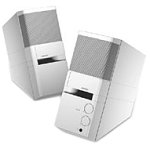
Image: The Bose MediaMate Computer Speakers in Gray. The image shows two compact speakers, one with visible volume and mix controls, and a headphone jack.
4. ترتیب کول
Follow these steps to set up your Bose MediaMate Computer Speakers:
- ځای په ځای کول: Place the speakers on a flat, stable surface on either side of your computer monitor. Ensure they are angled slightly upward towards your listening position for optimal sound.
- د آډیو کیبل سره وصل کړئ: Connect the 3.5mm audio cable from the back of the primary speaker (the one with controls) to the audio output jack on your computer.
- بریښنا وصل کړئ: Plug the power adapter into the power input on the primary speaker, then plug the adapter into a wall outlet.
- پاور آن: Turn on the speakers using the volume knob. The power indicator light should illuminate.
5. عملیاتي لارښوونې
Once set up, operating your MediaMate speakers is straightforward:
- د حجم کنټرول: Use the large knob labeled "VOLUME" on the front of the primary speaker to adjust the overall sound level.
- د مخلوط کنټرول: The "MIX" knob allows you to blend audio from two different sources if you have a second device connected to the auxiliary input.
- د سر غوږ جیک: For private listening, plug your headphones into the headphone jack located on the front of the primary speaker. This will mute the speakers.
- دوه ګونی داخلونه: The speakers feature dual inputs, allowing you to connect and mix two audio sources simultaneously. For example, you can connect your computer and a portable music player.
6. ساتنه
د خپلو سپیکرو د اوږد عمر او غوره فعالیت ډاډمن کولو لپاره:
- پاکول: Use a soft, dry cloth to clean the exterior surfaces of the speakers. Do not use liquid cleaners or aerosols.
- دوړې: Regularly dust the speaker grilles to prevent accumulation that could affect sound quality.
- ذخیره کول: که چیرې سپیکرې د اوږدې مودې لپاره ذخیره کوئ، نو له بریښنا څخه یې جلا کړئ او په یخ او وچ ځای کې یې وساتئ.
7. ستونزه حل کول
If you encounter issues with your Bose MediaMate speakers, refer to the following common problems and solutions:
| ستونزه | احتمالي لامل | د حل لاره |
|---|---|---|
| غږ نشته |
|
|
| تحریف شوی غږ |
|
|
| یوازې یو سپیکر کار کوي |
|
|
8. مشخصات
- نښه: بوس
- ماډل: MediaMate
- ارتباط: 3.5mm Audio Input, AC Power
- آډیو تولید: سټیریو
- د سپیکر ډول: ملټي میډیا
- مواد: فلزي
- د سپیکر اندازه: 6 Centimeters (Audio Driver)
- د توکي وزن: 3 پونډه
- رنګ: خړ
9. تضمین او ملاتړ
Bose MediaMate Computer Speakers come with a limited warranty. For specific warranty details and duration, please refer to the warranty card included with your product or visit the official Bose webسایټ
For technical support, product registration, or service inquiries, please contact Bose customer service:
- تلیفون: 800-444-2673
- Webسایټ: www.bose.com
Please have your product model number (MediaMate) and purchase date available when contacting support.