
1. پیژندنه
د پیرودلو لپاره مننهasing the GPX CDP6806DT Personal CD Player. This manual provides important safety instructions, operational guidelines, and maintenance procedures to ensure optimal performance and longevity of your device. Please read this manual thoroughly before using the product and retain it for future reference.
2. د خوندیتوب معلومات
د خوندیتوب مهمې لارښوونې
- واحد د اوبو یا رطوبت سره مخ مه کوئ.
- د تودوخې سرچینو لکه ریډیټرونو، د تودوخې راجسترونو، بخاریو، یا نورو وسایلو (په شمول د) ته نږدې د واحد له ځای پرځای کولو څخه ډډه وکړئ. ampلایفیر) چې تودوخه تولیدوي.
- د واحد د جلا کولو یا ترمیم کولو هڅه مه کوئ. ټول خدمتونه وړ خدماتو پرسونل ته راجع کړئ.
- Use only the specified batteries (2 x AA batteries). Ensure correct polarity when inserting batteries.
- بیټرۍ لرې کړئ که چیرې واحد د اوږدې مودې لپاره ونه کارول شي.
- د اورېدو د زیان د مخنیوي لپاره د اوږدې مودې لپاره په لوړ غږ اورېدلو څخه ډډه وکړئ.
- واحد یوازې د وچې جامې سره پاک کړئ.
3. د بسته محتويات
Carefully unpack your GPX CDP6806DT Personal CD Player and ensure all items are present:
- GPX CDP6806DT Personal CD Player
- د کارونکي لارښود (دا لاسوند)
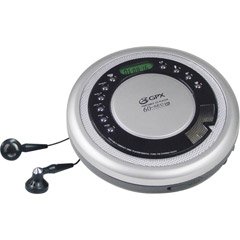
Figure 1: GPX CDP6806DT Personal CD Player. This image illustrates the compact design and general appearance of the device.
4. کنټرولونه او ځانګړتیاوې
Familiarize yourself with the controls and features of your GPX CDP6806DT for optimal use.
- د LCD نندارې: 6-digit display for track number, time, and FM frequency.
- لوبه وکړئ/وقفه وکړئ (►/−): Press to start or pause CD playback.
- ودروئ (■): Press to stop CD playback.
- پریږدئ/لټون (◀◀/▶▶): Press to skip tracks. Hold to search within a track.
- حجم (+/-): د آډیو تولید کچه تنظیموي.
- MODE/PROG: Selects playback mode (Repeat, Random) or programs CD tracks.
- FM TUNER (ON/OFF/BAND): Switches to FM radio mode, turns FM on/off, or changes FM band.
- PRESET (+/-): Navigates saved FM radio presets.
- د سي ډي کمپارټمنټ: Area for inserting audio CDs.
- د بیټرۍ کڅوړه: Located on the bottom, holds 2 AA batteries.
- د هیډفون جیک (3.5mm): د شخصي اوریدلو لپاره هیډفونونه وصل کوي.
Figure 2: GPX CDP6806DT Controls Layout. This image provides a visual reference for the location of various buttons and ports on the device.
5. ترتیب کول
5.1 د بیټرۍ نصب کول
The GPX CDP6806DT requires two (2) AA batteries (not included) for portable operation.
- د بیټرۍ کڅوړه د واحد په ښکته برخه کې ومومئ.
- د بیټرۍ کمپارټ پوښ خلاص کړئ.
- دوه AA بیټرۍ دننه کړئ، د سم قطبیت (+ او -) ډاډ ترلاسه کړئ لکه څنګه چې د خونې دننه ښودل شوي.
- د بیټرۍ کمپارټ پوښ په خوندي ډول وتړئ.
5.2 د هیډفون سره نښلول
For private listening, connect your 3.5mm stereo headphones (not included) to the headphone jack located on the side of the unit.
6. عملیاتي لارښوونې
6.1 CD پلے بیک
The unit supports CD and CD-R/RW disc formats.
- Open the CD compartment lid by gently pressing the OPEN button (if present, or lifting the lid).
- یوه سي ډي د لیبل اړخ پورته د مرکزي سپینډل په سر کې ځای په ځای کړئ.
- د سي ډي د کمپارټمنټ سر په کلکه وتړئ تر هغه چې کلیک وکړي.
- فشار ورکړئ لوبه وکړئ/وقفه وکړئ (►/−) button to begin playback. The track number and elapsed time will appear on the LCD display.
- د بیاځلې وقفې کولو لپاره ، فشار ورکړئ لوبه وکړئ/وقفه وکړئ (►/−). د بیا پیلولو لپاره بیا فشار ورکړئ.
- د بیاځلې ودریدو لپاره ودروئ (■) تڼۍ
- بل ټریک ته د تګ لپاره، فشار ورکړئ SKIP/SEARCH (▶▶).
- To go back to the beginning of the current track, press SKIP/SEARCH (◀◀) once. Press twice to go to the previous track.
- To search rapidly forward or backward within a track, hold down SKIP/SEARCH (▶▶) or (◀◀) په ترتیب سره.
- د. په کارولو حجم تنظیم کړئ حجم (+/-) کنټرولونه.
د ۶.۵ ایف ایم راډیو عملیات
The unit features a digital FM tuner with station presets.
- سلایډ کړئ د ایف ایم ټونر switch to the ON position or press the بانډ د FM حالت ته د ننوتلو لپاره تڼۍ.
- فشار ورکړئ SKIP/SEARCH (▶▶) or (◀◀) د مطلوب فریکونسۍ سره په لاسي ډول د ټون کولو لپاره تڼۍ.
- To auto-scan and save stations, hold down the لوبه وکړئ/وقفه وکړئ (►/−) button (or refer to specific instructions for auto-scan if available on the device).
- د خوندي شوي پریسیټونو د یادولو لپاره، وکاروئ PRESET (+/-) تڼۍ
6.3 CD Programming (24-Track)
تاسو کولی شئ په یو ځانګړي ترتیب کې د غږولو لپاره تر 24 ټریکونو پورې پروګرام وکړئ.
- With the CD stopped, press the MODE/PROG button. "PROG" will flash on the display.
- د کارولو SKIP/SEARCH (▶▶) or (◀◀) buttons to select the first track you wish to program.
- مطبوعاتي MODE/PROG again to confirm the selection. The display will show the program number and the next available program slot.
- Repeat steps 2 and 3 to add up to 24 tracks to your program.
- After programming all desired tracks, press لوبه وکړئ/وقفه وکړئ (►/−) د پروګرام شوي پلې بیک پیل کولو لپاره.
- To clear the program, press the ودروئ (■) تڼۍ دوه ځله.
۴.۲ د پریښودو ضد محافظت (ASP)
The GPX CDP6806DT features a 60-second Anti-Skip Protection system. This system buffers audio data to minimize interruptions caused by minor shocks or vibrations during CD playback. The ASP activates automatically when a CD is playing.
7. ساتنه
7.1 د واحد پاکول
- د واحد بهرنۍ برخه د نرم، وچ ټوکر سره پاک کړئ.
- د کثافاتو پاکوونکي، موم، یا محلول مه کاروئ.
- If the CD lens needs cleaning, use a specialized CD lens cleaner disc or a soft, lint-free cloth designed for optical lenses.
7.2 د بیټرۍ پاملرنه
- Remove batteries if the unit is not used for an extended period to prevent leakage.
- زاړه او نوي بیټرۍ، یا د بیټرۍ مختلف ډولونه مه ګډوئ.
- د ځایی مقرراتو سره سم په مسؤلیت سره کارول شوي بیټرۍ تصفیه کړئ.
8. ستونزه حل کول
If you experience issues with your GPX CDP6806DT, please consult the following table for common problems and solutions.
| ستونزه | احتمالي لامل / حل |
|---|---|
| واحد فعال نه دی. | Check if batteries are inserted correctly with proper polarity. Ensure batteries are fresh and not depleted. |
| د هیډفونونو څخه غږ نشته. | Ensure headphones are fully plugged into the headphone jack. Increase the volume level. Test with another pair of headphones. |
| سي ډي پریږدي یا پلې بیک مداخله کیږي. | Ensure the CD is clean and free of scratches or smudges. Clean the CD with a soft, lint-free cloth. Ensure the unit is on a stable surface or held steadily during use. |
| سي ډي نه غږېږي. | Ensure the CD is inserted correctly with the label side up. Close the CD compartment lid completely. Check if the CD is a supported format (CD, CD-R/RW). |
| د ایف ایم راډیو استقبال کمزوری دی. | Extend the headphone cable as it acts as the antenna. Try moving to a different location. |
9. مشخصات
- نښه: GPX
- ماډل: CDP6806DT
- ملاتړ شوي ډیسک فارمیټونه: CD ، CD-R / RW
- د پریښودو ضد محافظت: 60 ثانیې
- ښکاره کول: 6 عددي LCD
- راډیو: Digital FM Tuner with Presets
- CD Programming: 24-ټریک
- د بریښنا سرچینه: 2 x AA بیټرۍ (شامل ندي)
- ارتباط: ۳.۵ ملي میتره هیډفون جیک (مرستيال)
10. تضمین او ملاتړ
For detailed warranty information, please refer to the warranty card included with your original product packaging. For technical support, service inquiries, or to purchase replacement parts, please visit the official GPX webسایټ ته مراجعه وکړئ یا د دوی د پیرودونکو خدماتو څانګې سره اړیکه ونیسئ د هغه اړیکو معلوماتو په کارولو سره چې ستاسو د محصول اسنادو کې چمتو شوي.
مهرباني وکړئ د تضمین ادعاګانو لپاره د پیرود ثبوت وساتئ.