
پیژندنه
The Nokia Bluetooth Stereo Headset BH-905 is designed to provide a superior audio experience with active noise cancellation and wide compatibility. This manual provides instructions for setting up, operating, and maintaining your headset to ensure optimal performance.
The headset features 10 microphones: 8 dedicated to capturing ambient noise for cancellation and 2 for capturing speech in noisy environments. It offers versatile connectivity, supporting both wireless Bluetooth and wired connections with various devices.
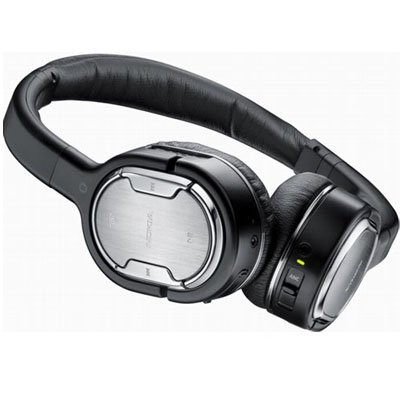
Image: The Nokia Bluetooth Stereo Headset BH-905, showcasing its sleek design and over-ear cups.
کلیدي ځانګړتیاوې
- د فعال شور لغوه کول (ANC): Significantly reduces ambient noise for an immersive listening experience.
- ۸ مایکروفونونه: Utilizes 8 microphones for noise capture and 2 for clear speech transmission in loud surroundings.
- پراخه مطابقت: Connects wirelessly via Bluetooth or wired to a variety of mobile phones, music players, and other audio devices.
- بې سیم کنټرول: Intuitive controls allow for easy switching between music and calls without needing to look at the device.
چمتو کول
د بلوتوث جوړې کول
- Ensure your headset is charged and powered off.
- په خپل ګرځنده وسیله کې بلوتوټ فعال کړئ.
- Press and hold the power button on the headset until the indicator light flashes blue rapidly, indicating pairing mode.
- On your device, search for Bluetooth devices and select "Nokia BH-905" from the list.
- If prompted, enter the passcode (usually "0000").
- یوځل چې جوړه شي، د شاخص رڼا به په کلکه نیلي شي یا ورو ورو فلش شي.
د بریښنا پيوستون
For devices without Bluetooth or when battery is low, use the provided audio cables. The headset includes plugs for standard audio jacks and airplane adapters for versatile use.
- Connect one end of the audio cable to the headset's audio input port.
- Connect the other end to your audio source (e.g., mobile phone, MP3 player, airplane entertainment system).
عملیاتي لارښوونې
پاور آن/بند
- د بریښنا د فعالولو لپاره، د بریښنا تڼۍ فشار ورکړئ او ونیسئ تر هغه چې د شاخص رڼا روښانه شي.
- د بریښنا بندولو لپاره، د بریښنا تڼۍ فشار ورکړئ او ونیسئ تر هغه چې د شاخص څراغ بند نشي.
د فعال شور منسوخ کول (ANC)
The BH-905 features advanced Active Noise Cancellation technology. With 8 dedicated microphones, it captures ambient low-frequency noise and generates an inverse sound wave, effectively canceling out unwanted sounds. This allows for a clearer audio experience, especially in noisy environments like airplanes or busy streets.
- To activate ANC, locate the ANC switch on the headset and slide it to the 'On' position. A green indicator light will confirm activation.
- To deactivate ANC, slide the switch to the 'Off' position.
د اړیکې مدیریت
The headset is equipped with 2 microphones specifically designed for speech. These microphones not only capture your voice clearly but also work to cancel out ambient noise, ensuring that the person you are speaking with hears you, not your surroundings.
- ځواب ویل / د زنګ وهلو کالونه: Use the dedicated call button on the headset.
- Switching between Music and Calls: The headset allows for seamless transitions between listening to music and taking calls. When a call comes in, your music will pause, and you can answer the call directly from the headset.
د غږ غږ
Control your music directly from the headset using the intuitive buttons. The design supports "blind usage," meaning you can operate the controls by feel without needing to look at them.
- پلی کول / ودرول: د پلې/پاز تڼۍ وکاروئ.
- لارښود پرېښودل: Use the forward/backward track buttons.
- د حجم کنټرول: د وقف شوي حجم تڼیو په کارولو سره حجم تنظیم کړئ.
Video: An official Nokia video demonstrating the features and technology behind the BH-905 headset, including its active noise cancellation and multi-microphone system for clear audio and calls.
ساتنه
- هیډسیټ په منظم ډول د نرم او وچ ټوکر سره پاک کړئ.
- د هیډسیټ د سختې تودوخې، رطوبت، یا مستقیم لمر وړانګو سره د مخ کیدو څخه ډډه وکړئ.
- Store the headset in its protective case when not in use to prevent damage.
- Do not attempt to disassemble or modify the headset, as this will void the warranty.
د ستونزو حل کول
- ځواک نشته: ډاډ ترلاسه کړئ چې هیډسیټ په بشپړ ډول چارج شوی.
- جوړه نشي کیدی: Make sure the headset is in pairing mode and within range of your device. Try restarting both devices.
- بې غږه/د غږ خراب کیفیت: Check volume levels on both the headset and your connected device. For wired connections, ensure cables are securely plugged in. For Bluetooth, ensure a stable connection.
- ANC په مؤثره توګه کار نه کوي: Ensure the ANC switch is in the 'On' position.
- زنګ وهونکي ما په واضح ډول نشي اوریدلی: Ensure the headset's microphones are not obstructed.
If issues persist, refer to the Nokia support webد نورو مرستو لپاره سایټ یا د پیرودونکو خدماتو سره اړیکه ونیسئ.
مشخصات
| فیچر | مشخصات |
|---|---|
| برانډ | نوکیا |
| د ماډل شمیره | 02716J5 |
| د فارم فکتور | Over-ear (two_ear) |
| د شور کنټرول | د فعال شور لغوه کول |
| د ارتباط ټیکنالوژي | بلوتوث، تار |
| د بې سیمه مخابراتو ټیکنالوژي | بلوتوث |
| اضافي ځانګړتیاوې | Microphone; Stereo |
| د کنټرول ډول | د میډیا کنټرول |
| د توکي وزن | 0.32 پونډه |
| UPC | 758478021477 |
| GTIN | 758478021477 |
تضمین او ملاتړ
The Nokia Bluetooth Stereo Headset BH-905 comes with a د 12 میاشتو تضمین د پیرود نیټې څخه. دا تضمین د عادي استعمال لاندې د تولید نیمګړتیاوې پوښي. مهرباني وکړئ د تضمین ادعاوو لپاره د پیرود ثبوت وساتئ.
For technical support, warranty service, or additional information, please visit the official Nokia support website or contact your local Nokia customer service center.