
1. پیژندنه
The BUFFALO Giga Switching Hub LSW3-GT-24NSR is a 24-port Gigabit Ethernet switch designed for high-speed network environments. It is ideal for small to medium-sized offices and workplaces requiring robust and reliable network connectivity. This device supports full Gigabit speeds across all ports, ensuring efficient data transfer.
Key features include a fanless design for silent operation and enhanced reliability, as well as a loop detection function to prevent network disruptions caused by accidental network loops.
2. د خوندیتوب معلومات
Please read and understand the following safety precautions before using the device to prevent injury or damage.
- د بریښنا رسول: یوازې چمتو شوی بریښنا اډاپټر وکاروئ. ډاډ ترلاسه کړئ چې د بریښنا آوټ لیټ ټاکل شوي حجم سره سمون لريtage اړتیاوې.
- وینټیلیشن: د هوا د بهېدو لارې مه بندوئ. د وسیلې شاوخوا کافي هوا جریان ډاډمن کړئ ترڅو د ډیر تودوخې مخه ونیول شي.
- چاپیریال: Avoid exposing the device to water, high humidity, extreme temperatures, or direct sunlight.
- سمبالول: Do not drop or subject the device to strong impacts. Do not attempt to open or repair the device yourself. Refer all servicing to qualified personnel.
- کیبلونه: Ensure all network cables are properly connected and secured.
3. د بسته محتويات
ډاډ ترلاسه کړئ چې ټول توکي په کڅوړه کې شتون لري:
- BUFFALO Giga Switching Hub LSW3-GT-24NSR Unit
- د بریښنا کیبل
- Rack Mount Brackets (if included with your model)
- د ربړ پښې (د ډیسټاپ ځای پرځای کولو لپاره)
4. ترتیب کول
4.1 فزیکي نصب کول
The LSW3-GT-24NSR can be installed on a desktop or mounted in a 19-inch equipment rack.
د ډیسټاپ ځای په ځای کول:
- Attach the included rubber feet to the bottom of the unit to prevent slipping and provide stability.
- Place the unit on a flat, stable surface with adequate ventilation.
د ریک نصبول:
- Attach the rack mount brackets to the sides of the unit using the provided screws.
- Secure the unit into a standard 19-inch equipment rack using appropriate rack screws (not included).
4.2 د شبکې کیبلونو سره نښلول
Connect your network devices (computers, servers, other switches) to any of the 24 RJ-45 ports on the front panel using standard Ethernet cables (Category 5e or higher recommended for Gigabit speeds).

شکل ۵.۱: مخکینۍ تختهview with 24 Ethernet Ports and Status LEDs.
4.3 د نښلولو بریښنا
- Connect the power cable to the AC IN port on the rear of the device.
- د بریښنا کیبل بل پای په مناسب بریښنا پلورنځي کې ولګوه.
- The device will power on automatically. The POWER LED on the front panel should illuminate.

شکل ۴: د شا پینل اوورview with AC IN Power Port.
5. عملیاتي لارښوونې
5.1 د LED شاخصونه
The front panel features several LED indicators to monitor the status of the switch and its ports.
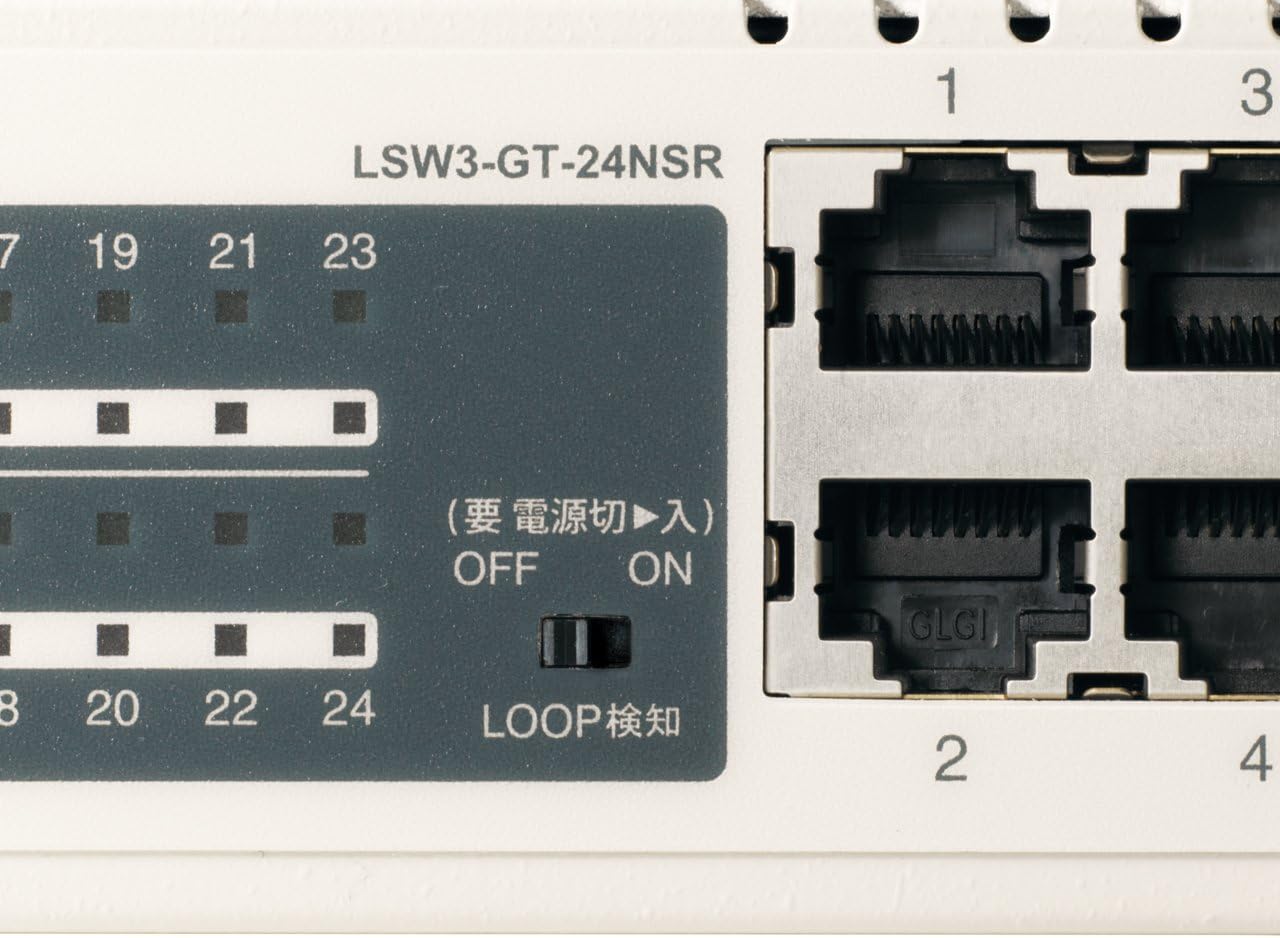
شکل 3: مفصل view of LED Indicators and Loop Detection Switch.
| د LED نوم | حالت | تفصیل |
|---|---|---|
| پاور | On | وسیله فعاله ده. |
| LINK / ACT (په هر بندر) | On | A network device is connected and a link is established. |
| فلش کول | معلومات د بندر له لارې لیږدول کیږي یا ترلاسه کیږي. | |
| 1000/100/10M (په هر بندر) | شین | Port is operating at 1000 Mbps (Gigabit Ethernet). |
| نارنجي | Port is operating at 100 Mbps (Fast Ethernet). | |
| بند | Port is operating at 10 Mbps (Ethernet). | |
| LOOP DETECT | On | A network loop has been detected. |
5.2 Loop Detection Function
The LSW3-GT-24NSR features a hardware switch for enabling or disabling the loop detection function. This function helps prevent network instability caused by accidental network loops.
Figure 4: Loop Detection Switch (ON/OFF).
- په: Loop detection is active. If a loop is detected, the corresponding port will be automatically shut down to prevent network broadcast storms, and the LOOP DETECT LED will illuminate.
- بند: Loop detection is disabled.
It is recommended to keep the loop detection function ON for network stability.
6. ساتنه
6.1 د وسیلې پاکول
To maintain optimal performance, periodically clean the exterior of the switch.
- د پاکولو دمخه د بریښنا کیبل قطع کړئ.
- د سطحې مسح کولو لپاره نرم، وچ ټوکر وکاروئ.
- Do not use liquid cleaners, aerosols, or solvents, as these may damage the casing یا داخلي برخې.
6.2 د چاپیریال په اړه نظرونه
Ensure the device is operated within its specified environmental conditions:
- دحرارت درجه: له 0°C څخه تر 40°C (32°F څخه تر 104°F)
- رطوبت: له 10٪ څخه تر 85٪ پورې (غیر کنډیشن)
7. ستونزه حل کول
If you encounter issues with your BUFFALO Giga Switching Hub, refer to the following common problems and solutions.
۱ برېښنا نشته
- نښې: د بریښنا LED بند دی.
- حل لاره: Check if the power cable is securely connected to both the device and the power outlet. Ensure the power outlet is functional.
7.2 No Link or Slow Speed on a Port
- نښې: The LINK/ACT LED for a connected port is off, or the 1000/100/10M LED indicates a lower speed than expected (e.g., 100M instead of 1000M).
- حل لاره:
- ډاډ ترلاسه کړئ چې د ایترنیټ کیبل په دواړو سرونو کې په خوندي ډول وصل دی.
- Try a different Ethernet cable. Ensure it is a Category 5e or higher cable for Gigabit speeds.
- وسیله په سویچ کې له بل پورټ سره وصل کړئ.
- Check the network adapter settings on the connected device (computer, server) to ensure it is configured for auto-negotiation or the correct speed.
7.3 Network Instability / LOOP DETECT LED is On
- نښې: The LOOP DETECT LED is illuminated, and network performance is degraded or unstable.
- حل لاره:
- A network loop has been detected. This typically occurs when two ports on the same switch (or different switches) are connected to each other, creating an infinite data path.
- Carefully inspect your network cabling to identify and remove any redundant connections that form a loop.
- If the loop detection switch is ON, the affected port will be automatically shut down. Once the loop is resolved, the port should resume normal operation.
8. مشخصات
| فیچر | تفصیل |
|---|---|
| برانډ | BUFFALO |
| د ماډل شمیره | LSW3-GT-24NSR |
| د پور شمیره | 24 x 10/100/1000BASE-T RJ-45 بندرونه |
| د بدلولو ظرفیت | 48 Gbps (Non-blocking) |
| د سپارلو کچه | 35.7 Mpps |
| د میک پتې جدول اندازه | 8K ننوتې |
| د جمبو چوکاټ ملاتړ | تر 9KB پورې |
| ځانګړتیاوې | Auto-MDI/MDIX, Auto-Negotiation, Loop Detection Function, Fanless Design |
| د بریښنا رسول | د داخلي AC بریښنا رسول |
| ابعاد (W x D x H) | (Specific dimensions not provided in source, typical for 1U rackmount) |
| وزن | (Specific weight not provided in source) |
| د عملیاتي حرارت درجه | له 0°C څخه تر 40°C پورې |
| عملیاتي رطوبت | له 10٪ څخه تر 85٪ پورې (غیر کنډیشن) |
9. تضمین او ملاتړ
This BUFFALO product is covered by a manufacturer's warranty. Please refer to the warranty card included with your product or visit the official BUFFALO webد تضمین د تفصيلي شرایطو او مقرراتو لپاره سایټ.
For technical support, product registration, or further assistance, please visit the official BUFFALO support webسایټ یا د دوی د پیرودونکو خدماتو څانګې سره اړیکه ونیسئ. د اړیکو معلومات معمولا د تولید کونکي په ویب پاڼه کې موندل کیدی شي webسایټ یا د محصول بسته بندي کې.