
پیژندنه
The GIGABYTE GM-M7600 is a wireless precision optical mouse designed for comfortable and reliable use. This manual provides instructions for setting up, operating, maintaining, and troubleshooting your device.
د بسته محتويات
مهرباني وکړئ د بسته بندۍ محتويات وګورئ ترڅو ډاډ ترلاسه کړئ چې ټول توکي شتون لري:
- GIGABYTE GM-M7600 Wireless Optical Mouse
- Portable Nano USB Receiver
- 2 x AAA بیټرۍ
چمتو کول
1. د بیټرۍ نصب کول
The GM-M7600 mouse requires two AAA batteries for operation. The batteries are included in the package.
- د موږک په لاندې برخه کې د بیټرۍ د برخې پوښ ومومئ.
- د خونې د خلاصولو لپاره پوښ په نرمۍ سره پورته کړئ یا یې وغورځوئ.
- دوه AAA بیټرۍ دننه کړئ، ډاډ ترلاسه کړئ چې مثبت (+) او منفي (-) ټرمینلونه د خونې دننه د نښانونو سره په سمه توګه سمون لري.
- د بیټرۍ کمپارټ پوښ په خوندي ډول وتړئ.
۲. د USB ریسیور سره نښلول
The mouse connects to your computer via a portable Nano USB receiver.
- Locate the Nano USB receiver. It may be stored inside the mouse's battery compartment or packaged separately.
- Plug the Nano USB receiver into an available USB port on your computer (Laptop or Personal Computer).
- Your operating system (e.g., Windows XP, Linux) should automatically detect and install the necessary drivers. This process may take a few moments.
- کله چې چلوونکي نصب شي، موږک د کارولو لپاره چمتو دی.
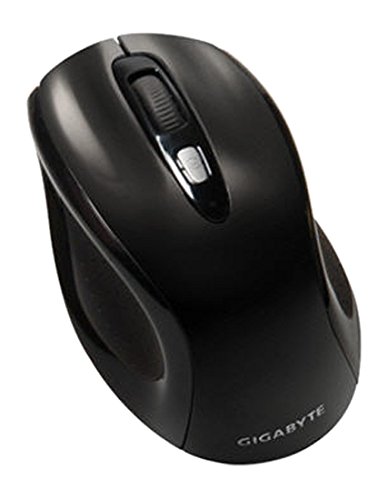
شکل 1: GIGABYTE GM-M7600 Wireless Optical Mouse. This image displays the ergonomic design of the mouse, highlighting its form factor and the location of its buttons. The Nano USB receiver is typically stored within the mouse or connected to a computer's USB port.
عملیاتي لارښوونې
1. بریښنا کول/بندول
The mouse typically has a power switch on its underside. Slide the switch to the 'ON' position to activate the mouse. Slide it to 'OFF' when not in use to conserve battery life.
۲. د DPI تنظیم کول (حساسیت)
The GM-M7600 features an adjustable DPI switch, allowing you to change the mouse sensitivity between 800 DPI and 1600 DPI. This switch is usually located near the scroll wheel. Press the DPI button to toggle between the two sensitivity settings.
۱. د موږک اساسي دندې
- کیڼ کلیک: د توکو د غوره کولو، پرانیستلو لپاره لومړنۍ تڼۍ files، او د سافټویر سره تعامل.
- ښي کلیک: د شرایطو مینو او اضافي انتخابونو ته د لاسرسي لپاره ثانوي تڼۍ.
- سکرول ویل: د اسنادو له لارې سکرول کولو لپاره کارول کیږي او web پاڼې. دا د منځني کلیک تڼۍ په توګه هم کار کولی شي.
ساتنه
1. پاکول
د غوره فعالیت او ظاهري ساتلو لپاره:
- Disconnect the mouse from your computer and turn off the power switch.
- د نرم، لینټ پاک ټوکر څخه لږ څه کار واخلئampد موږک سطحه د اوبو یا نرم پاکولو محلول سره پاک کړئ.
- د سختو کیمیاوي موادو، د کثافاتو پاکوونکو، یا په مستقیم ډول په موږک باندې د مایعاتو سپری کولو څخه ډډه وکړئ.
- Clean the optical sensor area on the underside of the mouse with a dry cotton swab to remove any dust or debris.
2. د بیټرۍ بدلول
When the mouse performance degrades or it stops responding, it may be time to replace the batteries.
- Turn off the mouse using the power switch.
- Open the battery compartment as described in the 'Installing Batteries' section.
- زړې AAA بیټرۍ لرې کړئ.
- Insert two new AAA batteries, observing the correct polarity (+/-).
- د بیټرۍ کڅوړه وتړئ او موږک بیرته چالان کړئ.
د ستونزو حل کول
If you encounter issues with your GIGABYTE GM-M7600 mouse, try the following solutions:
- موږک ځواب نه ورکوي:
- ډاډ ترلاسه کړئ چې موږک فعال دی.
- وګورئ چې بیټرۍ په سمه توګه نصب شوي او کافي چارج لري. که اړتیا وي نو بدل یې کړئ.
- ډاډ ترلاسه کړئ چې د نانو USB ریسیور ستاسو په کمپیوټر کې په یو فعال USB پورټ کې په خوندي ډول پلګ شوی دی. یو بل USB پورټ هڅه وکړئ.
- خپل کمپیوټر بیا پیل کړئ.
- د کرسر غیر منظم حرکت:
- د موږک په لاندې برخه کې نظري سینسر پاک کړئ.
- ډاډ ترلاسه کړئ چې تاسو موږک په مناسب سطحه کاروئ. د ډیر انعکاس کونکي یا شفاف سطحو څخه ډډه وکړئ.
- Check for any wireless interference. Move the mouse closer to the receiver or away from other wireless devices.
- DPI switch not working:
- ډاډ ترلاسه کړئ چې موږک فعال او وصل دی.
- د DPI تڼۍ په کلکه فشار ورکړئ.
مشخصات
| د ماډل نوم | د GM-M7600 لپاره تفتیش وسپارئ، موږ به په 24 ساعتونو کې له تاسو سره اړیکه ونیسو. |
| برانډ | ګیګابایټ |
| د ارتباط ټیکنالوژي | 2.4GHz Radio Frequency Wireless |
| د خوځښت کشف | نظري |
| د سمون وړ DPI | 800 / 1600 DPI |
| د تڼیو شمیر | ۳ (کیڼ، ښي، د سکرول څرخ/منځنی کلیک) |
| د بریښنا سرچینه | 2 x AAA بیټرۍ (شامل دي) |
| د ترلاسه کونکي ډول | Portable Nano USB Receiver |
| مطابقت لرونکې وسیلې | لپ ټاپ، شخصي کمپیوټر |
| د عملیاتي سیسټم ملاتړ | Linux, Windows XP |
| د تړلو موادو | Plastic with Rubberized Finish |
| رنګ | تور |
تضمین او ملاتړ
For warranty information and technical support, please refer to the warranty card included with your product or visit the official GIGABYTE webسایټ د تضمین ادعاګانو لپاره خپل د پیرود رسید وساتئ.