
1. پیژندنه
Thank you for choosing the LTC 3-Channel 60W Public Address Amplifier with USB/SD-MP3. This manual provides essential information for the safe and efficient operation of your new amplifier. Please read it thoroughly before use and keep it for future reference. This amplifier is designed for public address applications, offering versatile input options including microphones, auxiliary devices, and integrated USB/SD card playback.
2. د خوندیتوب لارښوونې
د خوندي عملیاتو ډاډ ترلاسه کولو او د زیان مخنیوي لپاره، مهرباني وکړئ لاندې خوندیتوب احتیاطي تدابیر په پام کې ونیسئ:
- د بریښنا سرچینه: سره وصل کړئ amplifier only to the specified power sources (12V DC or 220V AC) as indicated on the unit. Ensure the voltage ستاسو د محلي بریښنا رسولو سره سمون لري.
- وینټیلیشن: د هوا د تودېدو هیڅ لاره مه بندوئ. د یونټ شاوخوا کافي هوا جریان ډاډمن کړئ ترڅو د ډیر تودوخې مخه ونیول شي.
- رطوبت: افشا مه کوئ amplifier to rain, moisture, or excessive humidity. Keep it away from liquids.
- پاکول: د پاکولو دمخه بریښنا قطع کړئ. وچ، نرم ټوکر وکاروئ. مایع پاکوونکي یا ایروسول مه کاروئ.
- خدمت کول: د دې محصول د خدمت کولو هڅه مه کوئ. ټول خدمتونه وړ خدماتو پرسونل ته راجع کړئ. د واحد پرانیستل ممکن تاسو خطرناک حجم ته ورسوي.tages یا نور خطرونه.
- ځای په ځای کول: ځای په ځای کړئ amplifier on a stable, flat surface. Avoid placing it near heat sources or in direct sunlight.
- اوورلوډ: له اندازې زیات مه کوئ amplifier. Ensure connected speakers match the amplifier's impedance and power ratings.
3. محصول ختم شوview
The LTC 3-Channel 60W Public Address Amplifier is a versatile audio solution designed for various PA applications. It features multiple input options and an integrated MP3 player for convenience.
3.1 د فرنټ پینل کنټرولونه او ارتباطات
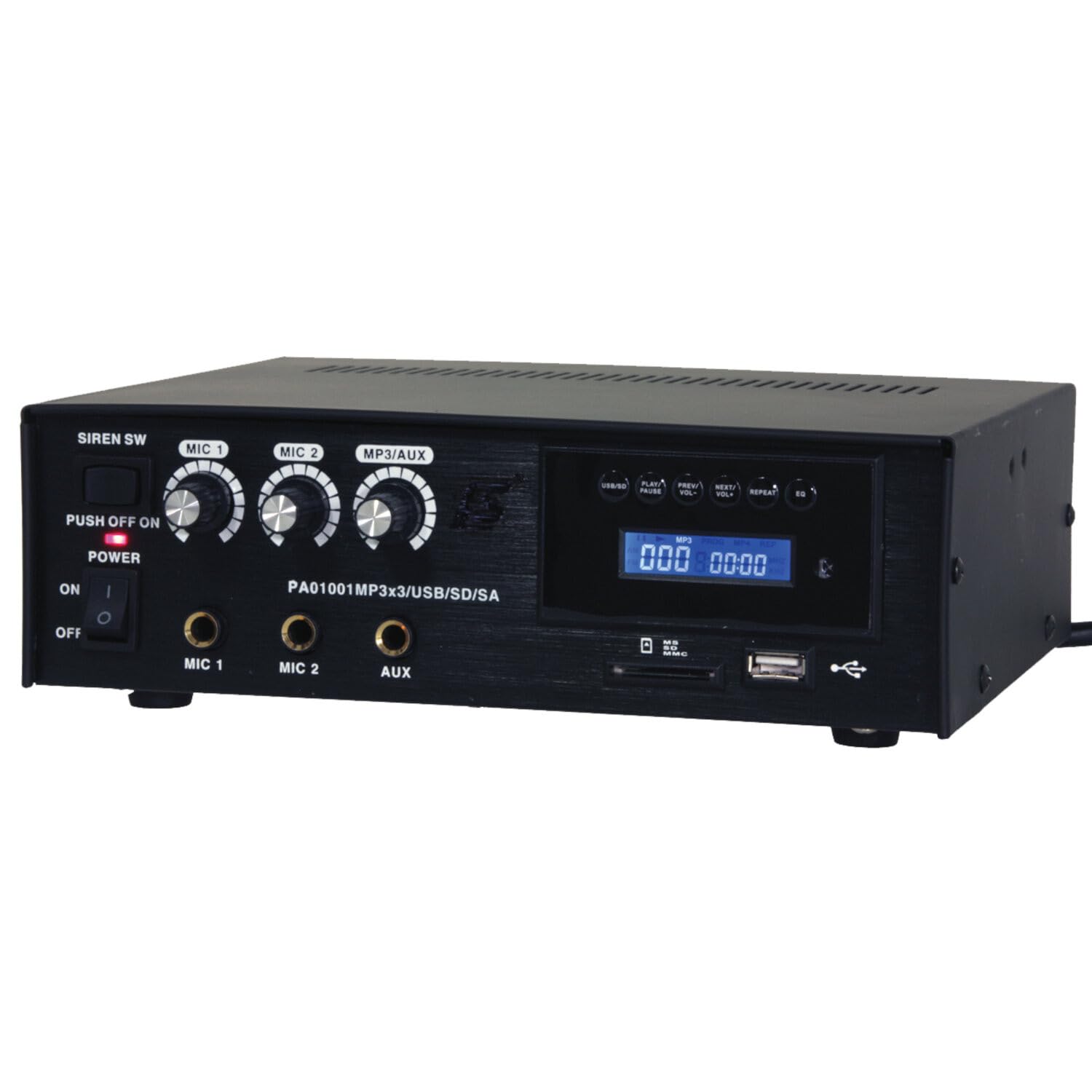
Image: Front panel of the LTC 3-Channel 60W Public Address Amplifier. Visible controls include volume knobs for MIC1, MIC2, and MP3/AUX, a Master volume knob, a Power switch, a Siren switch, and input jacks for MIC1, MIC2, and AUX. The MP3 player section features a display, USB port, and SD card slot.
- SIREN SW: Switch to activate the built-in siren sound.
- PUSH OFF / ON / OF Power Switch: د اصلي بریښنا سویچ لپاره ampلايف
- MIC 1 Volume: Rotary knob to adjust the volume level for Microphone Input 1.
- MIC 2 Volume: Rotary knob to adjust the volume level for Microphone Input 2.
- MP3/AUX Volume: Rotary knob to adjust the volume level for the MP3 player and Auxiliary input.
- د ماسټر ټوک: Rotary knob to control the overall output volume of the ampلايف
- د MIC 1 داخلول: 6.3mm jack for connecting Microphone 1.
- د MIC 2 داخلول: 6.3mm jack for connecting Microphone 2.
- AUX داخلول: 6.3mm jack for connecting external audio sources (e.g., CD player, smartphone).
- USB/SD MP3 Player: Integrated player with USB port and SD card slot for direct playback of audio files. Includes control buttons (Play/Pause, Prev/Vol-, Next/Vol+, Repeat, EQ) and an LCD display.
3.2 کلیدي ځانګړتیاوې
- Mobile or fixed amplifier with 12V battery (car, boat) or 220V mains power supply.
- Integrated MP3 player with USB and SD ports for music playback.
- Includes a siren for powerful sound and an MP3 control screen with a blue LCD display.
4. ترتیب کول
د خپل تنظیم کولو لپاره دا ګامونه تعقیب کړئ ampژوندی:
4.1 د بریښنا نښلول
- For 220V AC Operation: Connect the supplied power cord to the AC input on the rear panel of the amplifier and then to a standard 220V AC wall outlet.
- د 12V DC عملیاتو لپاره: Connect a 12V DC power source (e.g., car battery) to the 12V DC input terminals on the rear panel. Ensure correct polarity (+ to + and - to -).
- ډاډ ترلاسه کړئ ampد لایفیر د بریښنا سویچ د بریښنا سره وصل کیدو دمخه په 'بند' حالت کې دی.
د سپیکر اتصال
- Locate the speaker output terminals on the rear panel of the ampلايف
- Connect your speakers to these terminals, ensuring correct polarity (positive to positive, negative to negative).
- Verify that the total impedance of the connected speakers is compatible with the amplifier's output specifications to prevent damage.
۳.۳ د آډیو ان پټ اتصال
- مایکروفونونه: Insert your microphones into the MIC 1 and/or MIC 2 input jacks on the front panel.
- مرستندویه وسایل: Connect external audio sources (e.g., smartphone, laptop, CD player) to the AUX input jack on the front panel using an appropriate 6.3mm audio cable.
- USB/SD رسنۍ: Insert a USB flash drive into the USB port or an SD card into the SD card slot on the front panel for MP3 playback.
5. عملیاتي لارښوونې
یوځل د ampلایفیر تنظیم شوی، د کار کولو لپاره دا ګامونه تعقیب کړئ:
5.1 بریښنا کول / بندول
- ډاډ ترلاسه کړئ چې ټولې اړیکې خوندي دي.
- Turn the MASTER volume knob to its minimum position.
- Flip the POWER switch to the 'ON' position. The power indicator light will illuminate.
- To power off, turn the MASTER volume to minimum and then flip the POWER switch to 'OFF'.
۶.۴ د مایکروفون کارول
- Connect your microphone(s) to the MIC 1 and/or MIC 2 inputs.
- Slowly increase the MIC 1 and/or MIC 2 volume knob(s) to the desired level.
- Adjust the MASTER volume for overall output.
- Avoid pointing microphones directly at speakers to prevent feedback (howling).
۴.۴ د AUX ان پټ کارول
- Connect your external audio device to the AUX input.
- Ensure the volume on your external device is set to a moderate level.
- Slowly increase the MP3/AUX volume knob to the desired level.
- Adjust the MASTER volume for overall output.
5.4 MP3/USB/SD Playback
- Insert a USB flash drive into the USB port or an SD card into the SD card slot. The ampلایفیر به په اتوماتيک ډول رسنۍ کشف کړي او پلې بیک به پیل کړي.
- Use the 'PLAY/PAUSE' button to start or pause playback.
- Use the 'PREV/VOL-' button to go to the previous track or press and hold to decrease volume.
- Use the 'NEXT/VOL+' button to go to the next track or press and hold to increase volume.
- Use the 'REPEAT' button to cycle through repeat modes (e.g., repeat one, repeat all).
- Use the 'EQ' button to cycle through equalizer presets.
- Adjust the MP3/AUX volume knob and MASTER volume for desired output.
5.5 Siren Function
- To activate the siren, flip the SIREN SW to the 'ON' position.
- To deactivate, flip the SIREN SW back to the 'OFF' position.
- Use the MASTER volume to control the siren's output level.
6. ساتنه
Proper maintenance ensures the longevity of your ampژوندی:
- پاکول: په منظم ډول واحد د نرم، وچ ټوکر سره پاک کړئ. د کثافاتو پاکوونکو، مومونو، یا محلولونو څخه کار مه اخلئ.
- وینټیلیشن: Ensure that the ventilation grilles are free from dust and debris. Use a soft brush or vacuum cleaner to clear them if necessary.
- ذخیره کول: که ذخیره کول ampد اوږدې مودې لپاره د لایفیر سره، د بریښنا څخه یې جلا کړئ او په یخ او وچ ځای کې یې د مستقیم لمر وړانګو او سخت تودوخې څخه لرې وساتئ.
- اړیکې: په دوره یي ډول د کیبل ټولې اړیکې د ټینګښت او د اغوستلو نښو لپاره وګورئ.
7. ستونزه حل کول
که تاسو د خپلو ستونزو سره مخ شئ amplifier, refer to the table below for common problems and solutions:
| ستونزه | احتمالي لامل | د حل لاره |
|---|---|---|
| هیڅ ځواک نشته | Power cable not connected; Power outlet faulty; Power switch off; 12V DC battery depleted or incorrectly connected. | Check power cable connection; Try a different outlet; Ensure power switch is ON; Check 12V DC battery charge and polarity. |
| د غږ تولید نشته | Master volume too low; Input volume too low; Speakers not connected or faulty; Incorrect input selected (for MP3/AUX); Mute activated. | Increase Master and input volumes; Check speaker connections and functionality; Ensure correct input source is active; Check if any mute function is engaged. |
| تحریف شوی غږ | Volume too high (clipping); Speaker impedance mismatch; Faulty cables or connections. | Reduce volume; Verify speaker impedance compatibility; Check and replace faulty cables. |
| MP3/USB/SD not playing | غلط file format; USB drive/SD card faulty or not inserted correctly; MP3/AUX volume too low. | ډاډ ترلاسه کړئ files are MP3 format; Reinsert USB/SD card; Try a different USB/SD card; Increase MP3/AUX volume. |
| Feedback (howling) from microphones | Microphone too close to speakers; Microphone volume too high. | Reposition microphones away from speakers; Reduce microphone volume. |
که چیرې د دې حل لارو هڅه کولو وروسته هم ستونزه دوام ومومي، مهرباني وکړئ د پیرودونکو ملاتړ سره اړیکه ونیسئ.
8. مشخصات
Technical specifications for the LTC 3-Channel 60W Public Address Ampژوندی:
| فیچر | مشخصات |
|---|---|
| د ماډل شمیره | LTCAUDIO95-1000 |
| Output Power (12V) | RMS 35W, Max. 45W |
| Output Power (220V) | RMS 45W, Max. 60W |
| د چینلونو شمیر | 3 (MIC1, MIC2, AUX/MP3) |
| والیtage | ۱۲۰ ولټه (AC)، ۱۲ ولټه (DC) |
| اعظمي عرضه کول Voltage | 240 ولټه |
| لږترلږه عرضه کولtage | 220 وولټ (AC) |
| د محصول ابعاد (L x W x H) | 48 x 9 x 35 سانتي متره (18.9 x 3.5 x 13.8 انچه) |
| د محصول وزن | ۰.۰۹ کیلوګرامه (۰.۲ پونډه) |
| د نصب کولو ډول | د میز غره |
| یوځای شوي ځانګړتیاوې | USB/SD MP3 Player, Siren |
9. تضمین او ملاتړ
This product is manufactured by Ibiza and sold under the LTC brand. Spare parts availability is indicated for 2 years from the date of purchase. For technical support, troubleshooting assistance beyond what is provided in this manual, or warranty claims, please contact your retailer or the authorized service center. Keep your proof of purchase for warranty validation.