
1. پیژندنه
The HTC Radar is a smartphone designed for communication and multimedia. It features a unibody metal design and operates on Windows Phone OS 7.5. This manual provides essential information for setting up, operating, maintaining, and troubleshooting your device.
Key features include a 5-megapixel camera, a 3.8-inch touchscreen display, Wi-Fi, and GPS capabilities.
2. وسیله ختمه شوهview

شکل 2.1: مخ، شا او اړخ views of the HTC C110E Radar smartphone. This image illustrates the phone's overall design, including the display, camera, and various ports.

شکل 2.2: مخکی view of the HTC C110E Radar with the Windows Phone interface displayed. This shows the home screen layout with various application tiles.
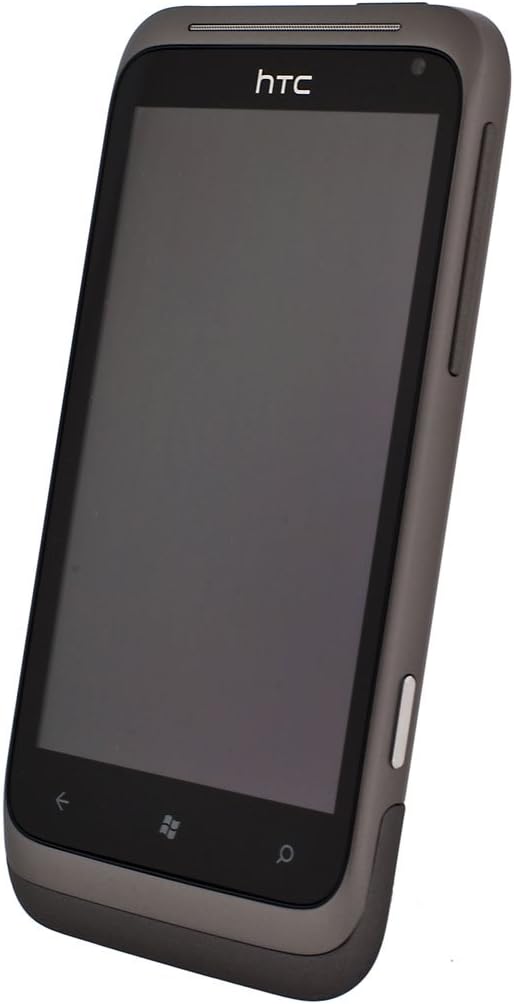
شکل 2.3: زاویه view of the HTC C110E Radar with the screen off, highlighting the device's form factor and button placement.
3. ترتیب کول
3.1. د سیم کارت داخلول
The HTC C110E Radar uses a single SIM card. Locate the SIM card slot, typically on the side or top edge of the device. Carefully insert your SIM card into the designated tray or slot until it clicks into place. Ensure the phone is powered off before inserting or removing the SIM card.
3.2. د بیټرۍ چارج کول
The device is powered by a 1520 mAh rechargeable Lithium-ion battery. To charge, connect the provided USB cable to the micro-USB 2.0 port on the phone and then to a compatible USB power adapter or computer. A full charge is recommended before first use.
Note: Some users have reported issues with non-standard or ill-fitting USB cables and European chargers. Ensure you are using a compatible USB cable and a North American power adapter if applicable.
3.3. بریښنا کول/بندول
To power on the device, press and hold the Power button (usually located on the side) until the screen illuminates. To power off, press and hold the Power button, then follow the on-screen prompts to shut down.
4. عملیاتي لارښوونې
4.1. Windows Phone OS 7.5 Interface
The HTC C110E Radar runs on Windows Phone OS 7.5. The home screen features Live Tiles that display real-time information and provide quick access to applications. Swipe left to access the application list.
4.2. بنسټیز نیویګیشن
- ټچ سکرین: Interact with the device using touch gestures such as tap, swipe, pinch-to-zoom. The display is a 3.8-inch touchscreen with 480 x 800 resolution.
- د شا تڼۍ: مخکینی سکرین ته راستنیږي.
- د پیل تڼۍ: د کور سکرین ته راستنیږي.
- د لټون تڼۍ: Opens the search function.
۷. د کیمرې دندې
The device features a 5-megapixel rear camera with an F2.2 lens, LED flash, and BSI sensor for improved low-light performance. It also includes a VGA front camera. The rear camera supports 720p HD video recording.
- عکسونه اخیستل: Open the Camera application, frame your shot, and tap the on-screen shutter button or use the dedicated camera button (if available).
- د ویډیو ثبت کول: Switch to video mode within the Camera application and tap the record button.
4.4. ارتباط
- وای فای: Connect to wireless networks for internet access. Go to Settings > Wi-Fi to enable and connect.
- بلوتوث: Pair with other Bluetooth-enabled devices such as headsets or car kits. Supports Bluetooth 2.1 with A2DP, PBAP, HFP, and HSP profiles. Go to Settings > Bluetooth to enable and pair.
- GPS: Utilize location services for navigation and location-based applications. The device has an internal GPS antenna.
- USB: Connect to a computer using the micro-USB 2.0 port for data transfer and charging.
- آډیو جیک: A 3.5 mm stereo audio jack is available for headphones or external audio devices.
5. ساتنه
۵.۱. د وسایلو پاملرنه
- وسیله وچه وساتئ. رطوبت کولی شي بریښنایی اجزاو ته زیان ورسوي.
- Avoid extreme temperatures. High or low temperatures can shorten the life of electronic devices and damage batteries.
- وسیله مه پریږدئ، ټک وکړئ، یا ټک وکړئ. سخته اداره کول کولی شي داخلي سرکټ بورډونه او ښه میخانیکونه مات کړي.
- Clean the screen and body with a soft, lint-free cloth. Avoid using harsh chemicals or abrasive cleaners.
5.2. د سافټویر تازه معلومات
Periodically check for software updates to ensure optimal performance and security. Updates can typically be found in the device's settings menu under "Phone update."
6. ستونزه حل کول
۶. عامې ستونزې او حل لارې
- وسیله نه چلیږي:
Ensure the battery is charged. Connect the device to a charger for at least 15 minutes before attempting to power on again. If the issue persists, try a different charging cable and adapter.
- د چارج کولو مسلې:
If the device is not charging, verify that the USB cable is securely connected to both the phone and the power source. Ensure the USB cable is compatible and not damaged. Some users have reported issues with the fit of certain USB cables.
- سیم کارت ونه موندل شو:
Power off the device, remove the SIM card, and reinsert it carefully to ensure proper seating. Verify that the SIM card is not damaged. If the issue persists, test with another known-good SIM card if available.
- Device unresponsive or frozen:
Perform a soft reset by pressing and holding the Power button for approximately 10-15 seconds until the device restarts.
- د شبکې کمزوری اتصال:
Check your location for network coverage. Restart the device. Ensure airplane mode is not enabled. Verify SIM card is properly inserted.
7. مشخصات
| فیچر | تفصیل |
|---|---|
| د ماډل شمیره | C110E |
| عملیاتي سیسټم | Windows Phone OS 7.5 |
| د CPU سرعت | 1 GHz |
| RAM | 512 MB |
| داخلي ذخیره | 8 GB (up to 6.54 GB available) |
| ښودل | 3.8-inch Touchscreen, 480 x 800 resolution |
| شاته کیمره | 5 MP with F2.2 lens, LED flash, BSI sensor, 720p HD video recording |
| مخکینۍ کیمره | VGA |
| شبکه | Quad-band GSM/GPRS/EDGE (850/900/1800/1900 MHz), HSPA/WCDMA (Europe/Asia: 900/2100 MHz) |
| ارتباط | Wi-Fi, Bluetooth 2.1 (A2DP, PBAP, HFP, HSP), GPS, micro-USB 2.0, 3.5 mm audio jack |
| بیټرۍ | 1520 mAh لیتیم آیون |
| د خبرو وخت | Up to 485 minutes (WCDMA), Up to 600 minutes (GSM) |
| ولاړ وخت | تر 535 ساعتونو پورې |
| ابعاد | 4.74 x 0.42 x 2.42 انچه |
| وزن | 4.8 اونس |
8. تضمین او ملاتړ
This product is sold without a manufacturer's warranty, as indicated in the product description. For technical support or further assistance, please refer to the official HTC support resources available online or contact your retailer.
جوړونکی: HTC