
پیژندنه
This manual provides essential information for the proper setup, operation, and maintenance of your Samson Auro D208 8-Inch Active Loudspeaker. Please read these instructions thoroughly before using the product to ensure optimal performance and safety.
د خوندیتوب معلومات
Always follow basic safety precautions when using this product to reduce the risk of fire, electric shock, or injury. Keep the loudspeaker away from water and moisture. Do not block ventilation openings. Refer all servicing to qualified personnel.
د بسته محتويات
ډاډ ترلاسه کړئ چې ستاسو کڅوړه لاندې توکي لري:
- Samson Auro D208 8-Inch Active Loudspeaker
- د بریښنا کیبل
- د کارن لارښود
چمتو کول
ځای پرځای کول
The Auro D208 is designed for versatile placement. It can be used as a main PA speaker, a floor monitor, or mounted on a standard 1 3/8-inch (35mm) pole. Ensure the speaker is placed on a stable, level surface or securely mounted to prevent tipping.
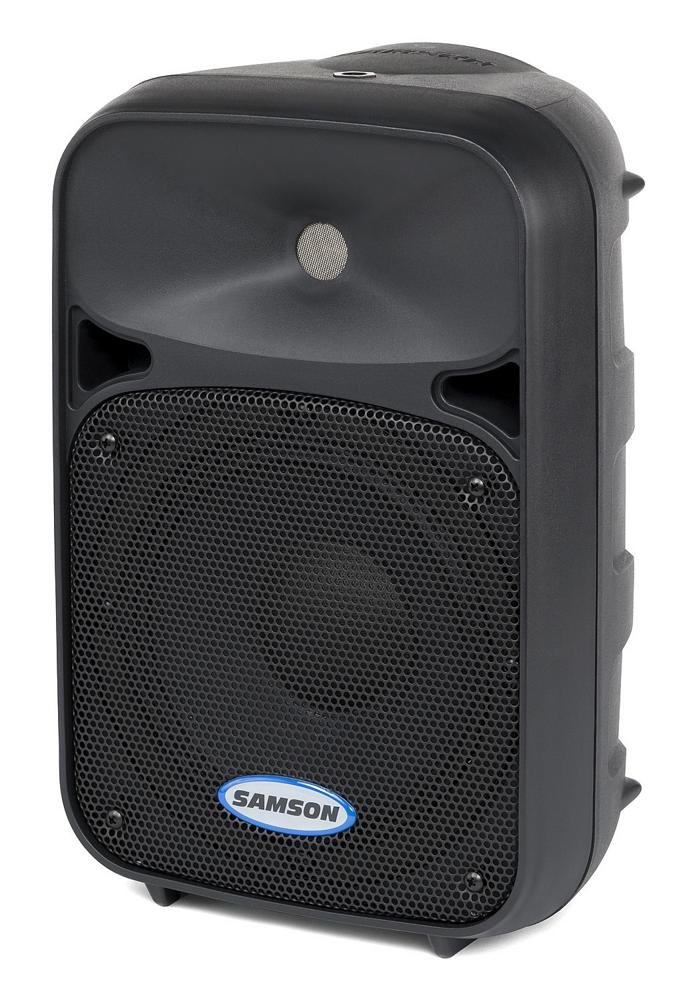
مخکی view of the Samson Auro D208 Active Loudspeaker, showcasinد هغې کمپیکټ ډیزاین او محافظتي ګریل.
ارتباطات
The Auro D208 features a Mic/Line input and an additional Line output for linking multiple speakers.
- د بریښنا پیوستون: ورکړل شوی بریښنا کیبل د شا پینل کې د AC انلیټ سره وصل کړئ او بیا د مناسب بریښنا آوټ لیټ سره وصل کړئ.
- د ننوتلو اړیکه: Use an XLR or 1/4-inch cable to connect your microphone or line-level audio source (e.g., mixer, instrument) to the Mic/Line input.
- Linking Speakers: To connect additional Auro D208 speakers, use an XLR cable from the Line output of the first speaker to the input of the next speaker.

Rear panel of the Samson Auro D208, illustrating the Mic/Line input, Line output, volume control, and Clip LED.
عملیاتي لارښوونې
بریښنا کول / بند کول
After all connections are made, turn on the power switch located on the rear panel. It is recommended to turn on the Auro D208 last in your audio chain and turn it off first.
د حجم کنټرول
Adjust the main Volume control knob on the rear panel to set the overall output level of the loudspeaker. Start with the volume at its minimum setting and gradually increase it to the desired level.
Clip LED Indicator
The Clip LED illuminates when the input signal is too strong, indicating potential distortion. If the Clip LED lights up frequently, reduce the input level from your source or the volume on the Auro D208 to prevent signal clipping.
ساتنه
پاکول
Clean the exterior of the loudspeaker with a soft, dry cloth. Do not use abrasive cleaners, solvents, or waxes. Ensure the speaker is unplugged before cleaning.
ذخیره کول
When not in use, store the loudspeaker in a dry, cool environment, away from direct sunlight and extreme temperatures. If storing for extended periods, consider covering it to protect against dust.
د ستونزو حل کول
| ستونزه | احتمالي لامل | د حل لاره |
|---|---|---|
| نه غږ | No power; input cable disconnected; volume too low. | Check power connection and switch; ensure input cables are secure; increase volume. |
| تحریف شوی غږ | Input signal too high (clipping); faulty cable. | Reduce input level from source or speaker volume; replace cable. |
| هوم یا بز | د ځمکې لوپ؛ ناقص کیبل؛ مداخله. | Ensure all equipment is on the same electrical circuit; try different cables; move away from power sources. |
مشخصات
| فیچر | تفصیل |
|---|---|
| برانډ | سمسون |
| د ماډل نوم | Auro D208 |
| د ماډل شمیره | SAROD208A |
| د سپیکر ډول | 2-Way Active Loudspeaker |
| د سپیکر اندازه | ۷۸۷ انچه |
| د ووفر قطر | ۷۸۷ انچه |
| د Tweeter قطر | ۷۸۷ انچه |
| د اعظمي تولید بریښنا | 200 واټ |
| د ارتباط ټیکنالوژي | USB (for control, not audio streaming) |
| د آډیو وتلې حالت | سټیریو |
| د نصب کولو ډول | Clip On, Floor Mount, 1 3/8-inch (35mm) Pole Mount Receptacle |
| اضافي ځانګړتیاوې | Mic/Line input with Volume control and Clip LED, Additional Line output for linking multiple speakers |
| د توکي ابعاد (D x W x H) | ۱۶"د x ۲۶"وچ x ۴۷"ح |
| د توکي وزن | 7.75 ګرامه |
| د بریښنا سرچینه | د بریښنا تار شوی |
تضمین او ملاتړ
د تضمین معلومات
This product is covered by a 1-year parts and labor limited warranty. Please retain your proof of purchase for warranty claims.
د پیرودونکي ملاتړ
For technical assistance, service, or warranty inquiries, please visit the official Samson webسایټ یا د دوی د پیرودونکو ملاتړ څانګې سره اړیکه ونیسئ. د اړیکو معلومات معمولا د تولید کونکي په ویب پاڼه کې موندل کیدی شي webسایټ یا د محصول بسته بندي کې.


