
محصول پای ته ورسیدview
The iSound Twist Portable Bluetooth Wireless Speaker offers a unique design combined with superior sound quality. Its compact form factor allows for portability, while its advanced features enable wireless music streaming and hands-free calling. The speaker features full stereo sound with 6 watts total output from two 40mm drivers and a passive radiator for enhanced bass.
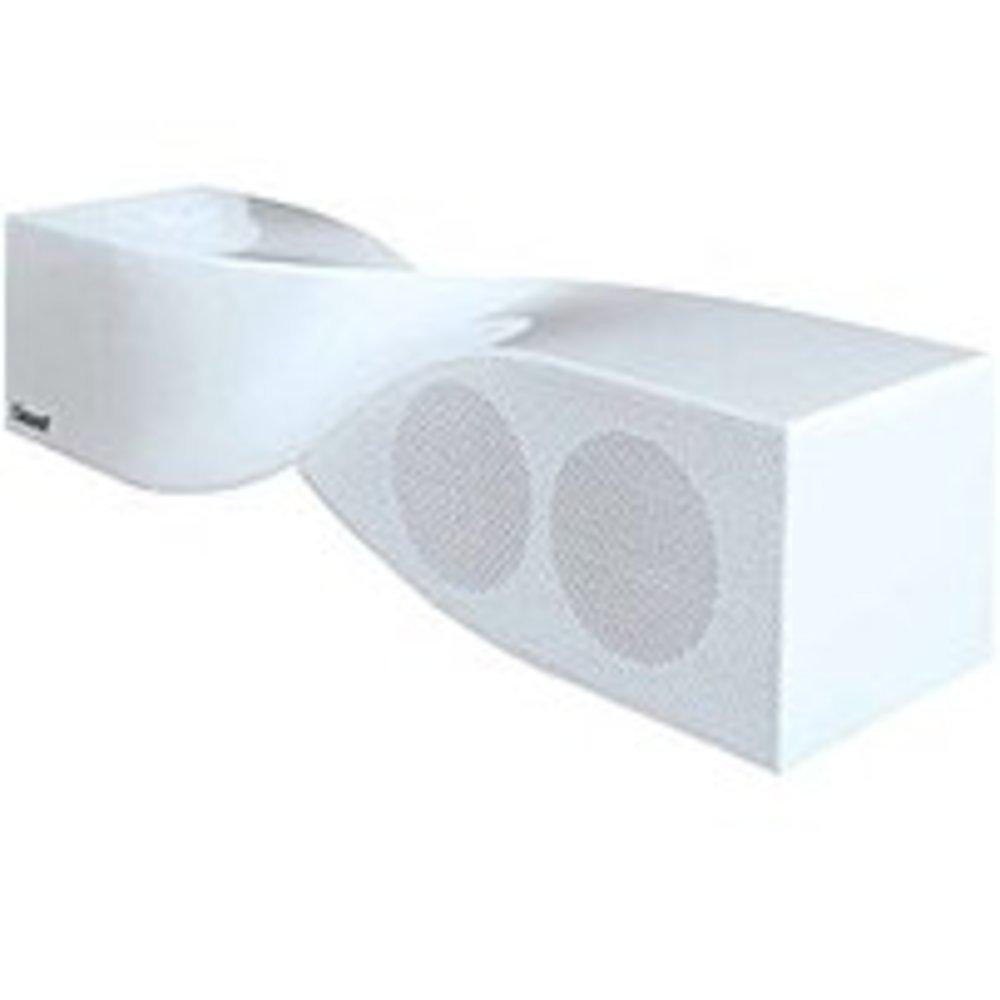
Image: The iSound Twist Portable Bluetooth Wireless Speaker in white, showcasing its unique twisted design.
د بسته محتويات
- iSound Twist Portable Bluetooth Wireless Speaker
- د USB چارج کیبل
- 3.5mm AUX Input Cable
- د کارونکي لارښود (دا لاسوند)
چمتو کول
1. د سپیکر چارج کول
Before initial use, fully charge the iSound Twist speaker. Connect the provided USB charging cable to the speaker's USB charging port and the other end to a powered USB source (e.g., computer, USB wall adapter). The charging indicator light will illuminate during charging and turn off when fully charged. A full charge provides up to 5 hours of continuous play.

Image: Rear panel of the speaker, highlighting the USB charging port, ON/OFF switch, and AUX IN port.
2. بریښنا کول/بندول
Locate the ON/OFF switch on the rear panel of the speaker. Slide the switch to the "ON" position to power on the device. Slide it to the "OFF" position to power off.
3. د بلوتوث جوړه کول
- Ensure the speaker is powered on and within close proximity to your Bluetooth-enabled device (e.g., smartphone, tablet, laptop).
- The speaker will automatically enter Bluetooth pairing mode. A blue indicator light will flash, indicating it is discoverable.
- On your device, navigate to the Bluetooth settings and enable Bluetooth.
- لټون available devices. The iSound Twist speaker should appear in the list, typically named "iSound Twist" or similar.
- Select the speaker from the list to initiate pairing. If prompted for a password, enter "0000".
- Once successfully paired, the blue indicator light on the speaker will stop flashing and remain solid. You will hear an audible confirmation.
- Your device is now connected, and you can stream audio wirelessly.
4. AUX Input Connection
For devices without Bluetooth capability, or if you prefer a wired connection, use the provided 3.5mm AUX cable.
- Connect one end of the 3.5mm AUX cable to the AUX IN port on the rear of the speaker.
- Connect the other end of the cable to the headphone jack or audio output port of your audio device.
- The speaker will automatically switch to AUX input mode.
عملیاتي لارښوونې
د کنټرول پینل دندې
The speaker features onboard controls located on its top surface for convenient operation.
- د بریښنا / حالت تtonۍ: د بریښنا د فعالولو/بندولو لپاره فشار ورکړئ او ونیسئ. د بلوتوث او AUX حالتونو ترمنځ د بدلولو لپاره لنډ فشار ورکړئ.
- د غږولو/بندولو/زنګ وهلو تڼۍ: Short press to play or pause music. During an incoming call, short press to answer or end the call. Press and hold to reject an incoming call.
- د غږ لوړولو/راتلونکي ټریک تڼۍ: د حجم زیاتولو لپاره لنډ فشار ورکړئ. بل ټریک ته د تګ لپاره فشار ورکړئ او ونیسئ.
- د غږ کمولو/مخکینی ټریک تڼۍ: Short press to decrease volume. Press and hold to go to the previous track.
د لاسونو څخه وړیا تلیفون کول
When connected via Bluetooth, the iSound Twist speaker's built-in microphone allows for hands-free phone calls.
- د زنګ په ځواب کې: When a call comes in, the music will pause. Press the Play/Pause/Call button once to answer.
- د زنګ وهلو پای: During a call, press the Play/Pause/Call button once to end the call.
- د زنګ رد کول: Press and hold the Play/Pause/Call button to reject an incoming call.
ساتنه
- سپیکر د اوبو، رطوبت او سختې تودوخې څخه لرې وساتئ.
- سپیکر په نرم او وچ ټوکر پاک کړئ. د کثافاتو پاکوونکي یا محلول مه کاروئ.
- د سپیکر قوي تاثیراتو ته د غورځولو یا تابع کولو څخه ډډه وکړئ.
- کله چې د اوږدې مودې لپاره نه کارول کیږي، سپیکر په یخ او وچ ځای کې وساتئ او د بیټرۍ روغتیا ساتلو لپاره یې په دوره یي ډول چارج کړئ.
د ستونزو حل کول
| ستونزه | د حل لاره |
|---|---|
| سپیکر نه چالانېږي. | ډاډ ترلاسه کړئ چې بیټرۍ چارج شوې ده. سپیکر د USB کیبل په کارولو سره د بریښنا سرچینې سره وصل کړئ او بیا هڅه وکړئ. |
| د بلوتوث له لارې جوړه نشي کیدی. |
|
| غږ نشته یا ټیټ غږ. |
|
| د زنګ وهلو کیفیت خراب دی. |
|
مشخصات
| فیچر | تفصیل |
|---|---|
| د ماډل نوم | ISOUND-1691 |
| برانډ | iSound |
| د سپیکر ډول | ټاور |
| ځانګړی ځانګړنه | په مایکروفون کې جوړ شوی |
| وړاندیز شوي استعمالونه | For Smartphones or Tablets, Music Players |
| مطابقت لرونکې وسیلې | ډیسکټاپ، لیپ ټاپ، MP3 پلیر، پروجیکټر، سمارټ فون، ټابلیټ، تلویزیون |
| شاوخوا د غږ چینل ترتیب کول | 2.0 |
| رنګ | سپین |
| د توکي وزن | 13.6 اونس |
| پنروک دی | غلط |
| د بې سیمه مخابراتو ټیکنالوژي | بلوتوث |
| د سپیکر اندازه | ۷۸۷ انچه |
| د بریښنا سرچینه | د بیټرۍ چلول |
| د بیټرۍ شمیر | 1 د لیتیم ایون بیټرۍ ته اړتیا ده. (شامل) |
| د آډیو ډرایور ډول | متحرک چلوونکی |
| د آډیو ډرایور اندازه | 40 ملی متره |
| د محصول ابعاد | 5 x 4 x 11.75 انچه |
| د سپیکر اعظمي تولید ځواک | 6 واټ |
| د ارتباط ټیکنالوژي | بېسیم |
| د آډیو وتلې حالت | سټیریو |
| د نصب کولو ډول | د میز ټاپ غر |
د محصول رسمي ویډیو
Video: Official product video for the iSound Twist Bluetooth Speaker, demonstrating its features and design. This video showcases the speaker's ability to stream audio from various devices and handle calls.
تضمین او ملاتړ
The iSound Twist Portable Bluetooth Wireless Speaker comes with a محدود تضمین. For specific warranty terms, conditions, and support inquiries, please refer to the warranty card included in your product packaging or visit the official iSound webسایټ
For further assistance, please contact iSound customer support.