
1. پیژندنه
The D-Link DGS-1500-28 SmartPro 24-Port Gigabit Switch is a high-performance Layer 3 managed switch designed for small to medium-sized businesses. It offers 24 Gigabit Ethernet ports and 4 SFP+ expansion slots, providing flexible connectivity and advanced management features. This manual provides essential information for the proper installation, configuration, operation, and maintenance of your DGS-1500-28 switch.
2. د بسته محتويات
Verify the following items are present in your DGS-1500-28 package. If any item is missing or damaged, please contact your local D-Link reseller for assistance.
- DGS-1500-28 SmartPro 24-Port Gigabit Switch
- د بریښنا تار
- Rack Mount Kit (two brackets and screws)
- د ربړ پښې (د ډیسټاپ نصبولو لپاره)
- Console Cable (RJ-45 to RS-232)
- د چټک نصبولو لارښود
- سي ډي روم (د محصول اسناد لري)
3. سپړنه
3.1 مخکښ پینل
The front panel of the DGS-1500-28 switch features the Gigabit Ethernet ports, SFP+ slots, and LED indicators for monitoring the switch's status and activity.
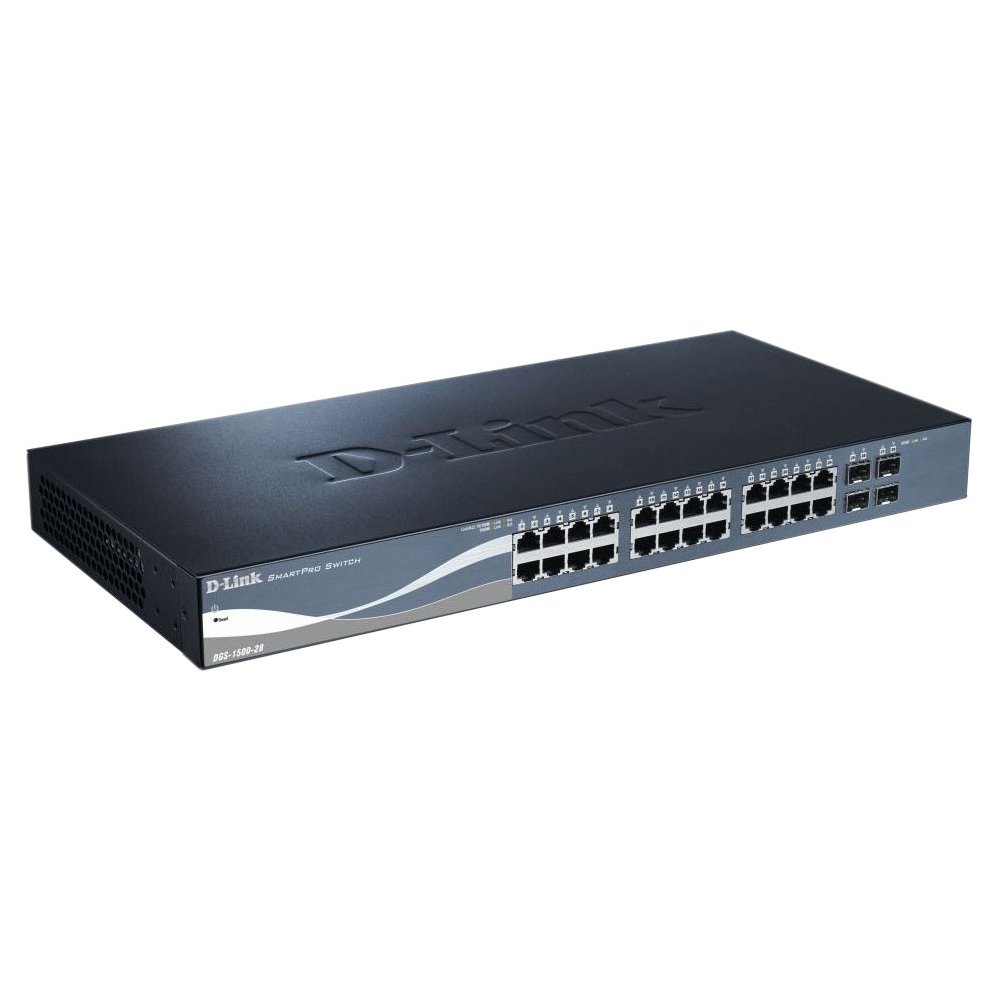
This image displays the front panel of the D-Link DGS-1500-28 switch, featuring 24 RJ-45 Gigabit Ethernet ports and LED indicators for status and activity.
- RJ-45 Ports (1-24): 10/100/1000 Mbps Gigabit Ethernet ports for connecting network devices.
- د SFP+ سلاټونه (۵-۶): 10 Gigabit Ethernet SFP+ ports for fiber optic connections or stacking.
- د LED شاخصونه:
- د بریښنا LED: د ځواک حالت په ګوته کوي.
- لینک/اکټ LED (په هر پورټ کې): Indicates network link and data activity.
- Speed LED (per port): Indicates connection speed (e.g., green for Gigabit, amber for 10/100 Mbps).
3.2 شاته پینل
The rear panel typically includes the power connector, grounding screw, and a console port for out-of-band management.
- د AC بریښنا استخراج: Connects to the provided AC power cord.
- ځمکنی پیچ: Provides an optional connection for grounding the switch.
- کنسول پورټ: RJ-45 port for connecting a console cable to a computer for command-line interface (CLI) management.
4. نصب کول
4.1 د ډیسټاپ نصب کول
- Attach the four rubber feet to the recessed areas on the bottom of the switch.
- Place the switch on a sturdy, level surface that can support its weight.
- Ensure adequate ventilation around the switch.
4.2 د ریک نصب کول
- Attach the two rack-mounting brackets to the sides of the switch using the provided screws.
- سویچ د مناسبو ریک سکرو په کارولو سره په معیاري 19 انچه تجهیزاتو ریک کې خوندي کړئ (شامل نه دي).
- Ensure proper airflow and avoid placing the switch near heat sources.
4.3 په سویچ کې ځواک ورکول
- Connect the AC power cord to the power receptacle on the rear panel of the switch.
- د برښنا تار بله پای په یو مناسب بریښنا سایټ کې ولګوه.
- په مخکینۍ پینل کې د بریښنا LED به روښانه شي، دا په ګوته کوي چې سویچ بریښنا ترلاسه کوي.
5. ابتدايي ترتیب
د DGS-1500-28 سویچ د a له لارې اداره کیدی شي webد کنسول پورټ له لارې د ګرافیکي کارونکي انٹرفیس (GUI) یا د کمانډ لاین انٹرفیس (CLI) پر بنسټ.
5.1 ته لاسرسی Web-د اساس مدیریت انٹرفیس
- Connect a computer to any of the switch's RJ-45 ports using an Ethernet cable.
- Configure your computer's IP address to be in the same subnet as the switch's default IP address (e.g., if the switch is 10.90.90.90, set your computer to 10.90.90.100).
- خلاص a web browser and enter the switch's default IP address (e.g., http://10.90.90.90) په ادرس بار کې.
- Enter the default username and password (refer to the Quick Installation Guide for default credentials).
- په بریالي ننوتلو سره، تاسو به سویچ ته لاسرسی ومومئ web مدیریت انٹرفیس.
یادونه: It is highly recommended to change the default password immediately after initial login for security purposes.
۵. د سویچ چلول
Once configured, the DGS-1500-28 operates as a network switch, forwarding data between connected devices. The LED indicators provide visual feedback on the operational status of the switch and its ports.
۴.۲ د پورټ فعالیت
- RJ-45 بندرونه: Automatically detect the speed and duplex mode of connected devices (10/100/1000 Mbps).
- SFP+ Slots: Support 10 Gigabit Ethernet transceivers for high-speed uplinks or stacking. Ensure compatible SFP+ modules are used.
6.2 پرمختللی ځانګړتیاوې
The DGS-1500-28 series integrates advanced features to enhance network performance and management:
- Virtual Stacking: Allows up to 32 DGS-1500 series devices to be managed as a single unit with one IP address, simplifying network administration and scalability.
- Layer 3 Static Routing: Enables the switch to forward IP packets between different IP subnets based on static routes configured by the administrator. This feature is crucial for inter-VLAN routing and basic network segmentation.
7. ساتنه
Regular maintenance ensures optimal performance and longevity of your DGS-1500-28 switch.
- د فرم ویئر تازه معلومات: په دوره یي ډول د ډي-لینک ملاتړ وګورئ webد فرم ویئر د وروستي نسخو لپاره سایټ. د فرم ویئر تازه کول کولی شي نوي ځانګړتیاوې، د فعالیت ښه والی، او امنیتي پیچونه چمتو کړي.
- د چاپیریال شرایط: ډاډ ترلاسه کړئ چې سویچ د سپارښت شوي تودوخې او رطوبت حدودو کې کار کوي. د هوا د تودوخی خلاصې د خنډونو څخه پاکې وساتئ.
- پاکول: د سویچ بهرنۍ برخه پاکولو لپاره نرم، وچ ټوکر وکاروئ. مایع یا ایروسول پاکوونکي مه کاروئ.
- د ترتیب بیک اپ: Regularly back up your switch configuration to an external device. This allows for quick restoration in case of a factory reset or device replacement.
8. ستونزه حل کول
This section provides solutions to common issues you might encounter with your DGS-1500-28 switch.
۷.۱ د بریښنا LED بند دی
- ډاډ ترلاسه کړئ چې د بریښنا تار په خوندي ډول د سویچ او کاري بریښنا سایټ دواړو سره وصل دی.
- د بل وسیلې په لګولو سره د بریښنا آوټ لیټ فعال دی تصدیق کړئ.
۷.۲ په پورټ کې هیڅ لینک/فعالیت نشته
- د ایترنیټ کیبل اتصال په دواړو سرونو کې وګورئ. یو بل کیبل هڅه وکړئ.
- ډاډ ترلاسه کړئ چې وصل شوی وسیله فعاله ده او په سمه توګه کار کوي.
- Verify the port status in the switch's web مدیریت انٹرفیس.
- د SFP+ پورټونو لپاره، ډاډ ترلاسه کړئ چې د SFP+ ماډل په سمه توګه داخل شوی او مطابقت لري.
۴.۲ لاسرسی نشم کولی Web سمبالښت برسیر
- ډاډ ترلاسه کړئ چې ستاسو د کمپیوټر IP پته د سویچ د IP پتې په څیر په ورته فرعي شبکه کې ده.
- Verify the switch's IP address. If unknown, you may need to reset the switch to factory defaults (refer to the Quick Installation Guide for reset procedures).
- Ensure there are no IP address conflicts on the network.
- د بل څخه انٹرفیس ته د لاسرسي هڅه وکړئ web browser or computer.
9. مشخصات
| فیچر | تفصیل |
|---|---|
| برانډ | د لینک |
| د ماډل شمیره | DGS150028 |
| بندرونه | 24 x 10/100/1000 Mbps RJ-45 Gigabit Ports, 4 x 10 Gigabit SFP+ Expansion Slots |
| د انٹرفیس ډول | RJ45، SFP+ |
| د بدلولو ظرفیت | Up to 128 Gbps (non-blocking) |
| Layer Support | Layer 3 (Static Routing) |
| مدیریت | Web-based GUI, CLI, SNMP |
| مطابقت لرونکې وسیلې | Desktop, Rack-mount devices |
| د توکي وزن | 0.01 Ounces (Note: This value may be a placeholder or incorrect. Refer to product packaging for accurate weight.) |
| UPC | 790069362927 |
| ASIN | B007TL1DHM |
10. تضمین او ملاتړ
D-Link products are backed by a limited warranty. The specific terms and conditions of the warranty may vary by region and product. Please refer to the warranty information included with your product or visit the official D-Link website for detailed warranty statements.
For technical support, product documentation, firmware updates, and FAQs, please visit the D-Link support webسایټ: www.dlink.com/support
You may also contact D-Link technical support directly through the contact information provided on their webستاسو د ځانګړې سیمې لپاره سایټ.