
1. پیژندنه
The D-Link GO-SW-5G is a 5-Port Unmanaged Gigabit Desktop Switch designed for home and small office environments. This device provides a simple and cost-effective solution to expand your network connectivity, offering high-speed Gigabit Ethernet ports for reliable data transfer. It incorporates D-Link's Green Technology for energy efficiency, reduced heat generation, and extended product lifespan.
This switch is a plug-and-play device, requiring no complex configuration or software installation, making it easy to integrate into an existing network.
2. د بسته محتويات
مهرباني وکړئ تصدیق کړئ چې لاندې ټول توکي ستاسو په کڅوړه کې شامل دي:
- D-Link GO-SW-5G 5-Port Gigabit Desktop Switch
- د بریښنا اډاپټر
- د چټک نصبولو لارښود
که کوم توکي ورک یا زیانمن شوي وي، مهرباني وکړئ د مرستې لپاره خپل پرچون پلورونکي سره اړیکه ونیسئ.
۴. د تنظیم لارښوونې
The D-Link GO-SW-5G switch is designed for easy plug-and-play installation. Follow these steps to set up your device:
۱۲. د بریښنا اډاپټر وصل کړئ
- Locate the power input port on the side of the D-Link GO-SW-5G switch.
- ورکړل شوی بریښنا اډاپټر دې پورټ سره وصل کړئ.
- د بریښنا اډاپټر بله پای په معیاري بریښنایی آوټ لیټ کې ولګوئ.
- The power LED on the front of the switch will illuminate, indicating that the device is receiving power.

شکل 1: اړخ view of the D-Link GO-SW-5G switch with the power input port.
3.2. له خپلې شبکې سره وصل شئ
- Using a standard Ethernet cable (RJ45), connect one end to an available LAN port on your router (not your modem).
- Connect the other end of this Ethernet cable to any of the five available ports on the back of the D-Link GO-SW-5G switch.
- The corresponding LED on the front of the switch will light up, indicating an active connection.
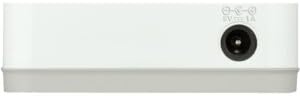
شکل 2: شاته view of the D-Link GO-SW-5G switch with five Ethernet ports.
3.3. Connect Network Devices
- Connect your network devices (e.g., computers, gaming consoles, network printers, smart TVs) to the remaining available Ethernet ports on the D-Link GO-SW-5G switch using Ethernet cables.
- Each connected device will have its corresponding LED on the front of the switch illuminate, confirming a successful connection.

شکل 3: مخکی view of the D-Link GO-SW-5G switch showing active port LEDs.
4. عملیاتي لارښوونې
The D-Link GO-SW-5G is an unmanaged switch, meaning it operates automatically without requiring user configuration. Once connected as described in the Setup section, it will begin forwarding network traffic between connected devices.
- اتوماتیک خبرې اترې: The switch automatically detects the network speed (10/100/1000 Mbps) and duplex mode (half/full) of connected devices and adjusts accordingly.
- اتومات MDI/MDIX: All ports support automatic MDI/MDIX crossover, eliminating the need for crossover cables when connecting to other switches or hubs.
- د LED شاخصونه: Each port has an LED indicator on the front panel. A lit LED indicates an active link, and blinking indicates network activity.
5. ساتنه
To ensure optimal performance and longevity of your D-Link GO-SW-5G switch, consider the following maintenance guidelines:
- ځای په ځای کول: سویچ په یوه سړه او وچ ځای کې د مستقیم لمر وړانګو، تودوخې سرچینو او ډیر رطوبت څخه لرې کیږدئ. د وسیلې شاوخوا مناسب هوا ورکول ډاډمن کړئ.
- پاکول: Use a soft, dry cloth to clean the exterior of the switch. Avoid using liquid or aerosol cleaners, as they may damage the device.
- د کیبل مدیریت: د ایترنیټ کیبلونه په منظم ډول تنظیم کړئ ترڅو د پیچلتیاو او ناڅاپي قطع کیدو مخه ونیسئ.
- د بریښنا دوره: If you experience network issues, a simple power cycle (unplugging the power adapter for 10 seconds and then plugging it back in) can often resolve minor problems.
6. ستونزه حل کول
If you encounter issues with your D-Link GO-SW-5G switch, refer to the following common troubleshooting steps:
- د بریښنا LED نشته:
- ډاډ ترلاسه کړئ چې د بریښنا اډاپټر په خوندي ډول د سویچ او کار کونکي بریښنایی آوټ لیټ دواړو سره وصل دی.
- د بل وسیلې په لګولو سره د بریښنایی آوټ لیټ فعال دی تصدیق کړئ.
- No Link/Activity LED for a Connected Device:
- وګورئ چې د ایترنیټ کیبل په خوندي ډول د سویچ پورټ او شبکې وسیلې دواړو سره وصل دی.
- د غلط کیبل د ردولو لپاره یو بل ایترنیټ کیبل هڅه وکړئ.
- ډاډ ترلاسه کړئ چې وصل شوی وسیله فعاله ده او د هغې د شبکې اډاپټر په سمه توګه کار کوي.
- هڅه وکړئ وسیله په سویچ کې مختلف بندر سره وصل کړئ.
- د شبکې ورو سرعت:
- Verify that all connected devices and cables support Gigabit Ethernet (1000 Mbps) for optimal performance. The switch will operate at the lowest common speed.
- Ensure your router and internet service provider (ISP) plan support the desired speeds.
- Perform a power cycle on the switch and your router.
- متقابل ارتباط:
- د خلاص کیبل اتصال لپاره چیک کړئ.
- Ensure the switch is not overheating; provide adequate ventilation.
- Test with different Ethernet cables.
7. مشخصات
| برانډ | د لینک |
| د ماډل شمیره | GO-SW-5G/B |
| د بندرونو شمیر | 5 |
| د سویچ ډول | بې نظمه |
| د معلوماتو د لیږد کچه | 1 Gigabits Per Second (10/100/1000 Mbps) |
| انٹرفیس | RJ45 |
| رنګ | سپین |
| د توکي وزن | 0.22 پونډه |
| والیtage | 100-240 وولټونه |
| مطابقت لرونکې وسیلې | PC, Mac, and other Ethernet-enabled devices |
| د پارچه بدلول | 10 Gbps |
| UPC | 790069365669 |
8. تضمین او ملاتړ
محدود تضمین: The D-Link GO-SW-5G switch comes with a 3-year limited warranty. For detailed terms and conditions, please refer to the warranty information included in your package or visit the official D-Link webسایټ
تخنیکي ملاتړ: For technical assistance, product registration, or to download the latest firmware and documentation, please visit the د لینک ملاتړ Webسایټ یا د D-Link پیرودونکي خدماتو سره اړیکه ونیسئ.