
AT&T TL88102
AT&T TL88102 DECT 6.0 2-Line Cordless Telephone System User Manual
ماډل: TL88102
1. پیژندنه
This manual provides comprehensive instructions for the AT&T TL88102 DECT 6.0 2-Line Cordless Telephone System, including the TL88102 base unit and TL88002 accessory handsets. This system is designed for clear, interference-free communication with extended range, featuring a 2-line answering system with caller ID/call waiting, and intercom capabilities.
The AT&T TL88102 system is ideal for busy households or home offices requiring dual line functionality and multiple cordless handsets for convenience.

Figure 1: The AT&T TL88102 base unit with one cordless handset, and three additional TL88002 accessory handsets.
2. ترتیب کول
2.1 د بسته محتويات
- AT&T TL88102 Base Unit with Cordless Handset
- د بیس واحد لپاره د AC بریښنا اډاپټر
- د ټیلیفون کرښه
- TL88002 Accessory Handsets (quantity may vary based on bundle)
- Chargers for Accessory Handsets
- Rechargeable Batteries for Handsets (AAA batteries required)
۲.۳ د اساس واحد سره نښلول
- Connect the small end of the AC power adapter to the POWER jack on the back of the TL88102 base unit.
- د AC بریښنا اډاپټر لویه پای په معیاري بریښنایی آوټ لیټ کې ولګوئ.
- Connect one end of the telephone line cord to the TEL LINE 1 or TEL LINE 2 jack on the back of the base unit. If using two lines, connect the second line cord to the other TEL LINE jack.
- Plug the other end(s) of the telephone line cord(s) into your telephone wall jack(s).
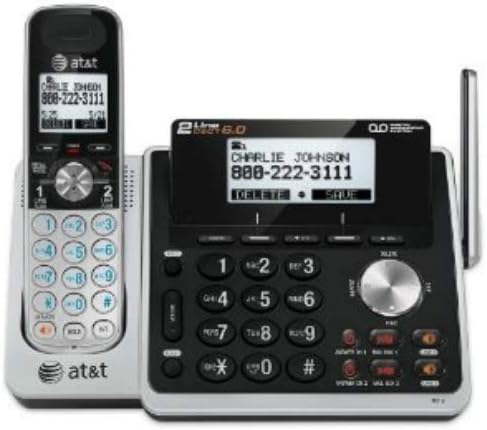
شکل 2: شاته view of the TL88102 base unit, illustrating the connection points for power and telephone lines.
2.3 Installing and Charging Handset Batteries
- د هر بې تاره هینډسیټ په شا کې د بیټرۍ کمپارټمینټ پوښ خلاص کړئ.
- Insert the supplied rechargeable AAA batteries, observing the correct polarity (+ and - markings).
- د بیټرۍ کمپارټ پوښ وتړئ.
- Place each handset in its respective charger (base unit or accessory charger). The CHARGE light on the handset will illuminate, indicating proper charging.
- د بیټرۍ غوره فعالیت ډاډمن کولو لپاره، هینډ سیټونه د لومړني کارونې دمخه لږترلږه 16 ساعته چارج ته پریږدئ.
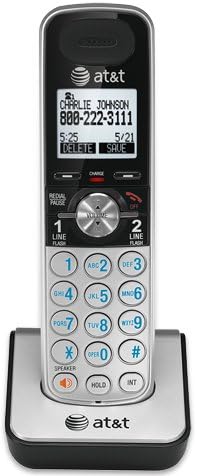
Figure 3: A cordless handset correctly seated in its charging cradle.
2.4 Registering Handsets
All accessory handsets (TL88002) must be registered to the TL88102 base unit before use. The handset included with the base unit is pre-registered.
- Place the handset you wish to register into the base unit's charger cradle.
- په بیس واحد کې، فشار ورکړئ او ونیسئ هینډسیټ ومومئ button for approximately 4 seconds until the IN USE light on the base unit begins to flash.
- په هینډسیټ کې، فشار ورکړئ # key. The handset will display "Registering..." and then "Handset Registered" upon successful registration.
- If registration fails, remove the handset from the charger and repeat the steps.
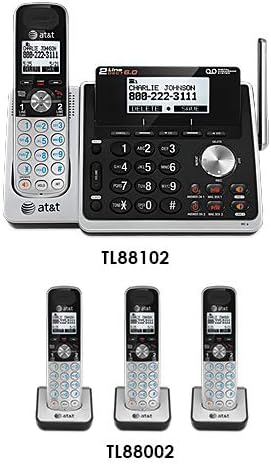
Figure 4: Illustration of the TL88102 base unit and TL88002 accessory handsets, indicating their relationship within the system.
3. عملیاتي لارښوونې
3.1 تلیفونونه کول او ترلاسه کول
- د تلیفون کولو لپاره: مطبوعاتي کرښه 1 or کرښه 2، بیا شمیره ډایل کړئ. په بدیل سره ، لومړی شمیره ډایل کړئ ، بیا فشار ورکړئ کرښه 1 or کرښه 2.
- د تلیفون ځواب لپاره: مطبوعاتي کرښه 1, کرښه 2، یا سپیکر.
- د تلیفون پای ته رسولو لپاره: مطبوعاتي بند یا هینډسیټ په چارجر کې ځای په ځای کړئ.

Figure 5: The TL88102 base unit and its cordless handset, highlighting the keypad and display for call management.
3.2 د ځواب ورکولو سیسټم
The TL88102 features a digital answering system for both lines, capable of storing up to 14 minutes of messages per line.
- آن/بندول: مطبوعاتي ANS ON/OFF 1 or ANS ON/OFF 2 on the base unit to activate or deactivate the answering system for each line.
- د پیغام غږول: مطبوعاتي پلی/درول on the base unit or access the answering system menu from any handset.
- لرې لاسرسی: You can retrieve messages remotely by calling your phone number and entering your remote access code.
3.3 Caller ID/Call Waiting
The system supports Caller ID and Call Waiting features. Ensure you subscribe to these services from your telephone service provider.
- Incoming call information (name and number) will display on the handset and base unit screens.
- During a call, if another call comes in, you will hear a tone. Press فلش د زنګونو تر مینځ بدلولو لپاره.
3.4 انټرکام
Use the intercom feature to communicate between the base unit and handsets, or between multiple handsets.
- To initiate intercom: مطبوعاتي INT on the handset, then select the desired handset or base unit to call.
4. ساتنه
۶.۱ د محصول پاکول
Clean the telephone system with a soft, damp ټوکر. د پاکولو سپرې یا سخت کیمیاوي توکي مه کاروئ، ځکه چې دوی ممکن پای یا بریښنایی برخو ته زیان ورسوي.
4.2 د بیټرۍ پاملرنه
- تل چمتو شوي چارج وړ AAA بیټرۍ وکاروئ.
- د غوره فعالیت لپاره، کله چې په کارولو کې نه وي، نو هینډ سیټونه په چارجرونو کې وساتئ.
- که چیرې هینډسیټ د اوږدې مودې لپاره ونه کارول شي، نو د لیکیدو مخنیوي لپاره بیټرۍ لرې کړئ.
- Replace batteries when the handset displays "Low Battery" or when talk time significantly decreases.
5. ستونزه حل کول
| ستونزه | د حل لاره |
|---|---|
| د ډایل ټون نشته. |
|
| Handset displays "Out of Range" or "No Power at Base". |
|
| د زنګ وهلو کیفیت خراب یا جامد. |
|
| د ځواب ورکولو سیسټم پیغامونه نه ثبتوي. |
|
6. مشخصات
- ټکنالوژي: DECT 6.0 ډیجیټل ټیکنالوژي
- کرښې: ۲-کرښه عملیات
- د ځواب ورکولو سیسټم: Digital, up to 14 minutes recording time per line
- د زنګ وهونکي ID/ کال انتظار کول: هو (ګډون اړین دی)
- لارښود: 50-number phonebook
- انټرکام: Handset to Handset, Handset to Base
- د بریښنا سرچینه: AC Power Adapter (Base Unit), Rechargeable AAA Batteries (Handsets)
- Product Dimensions (Base Unit): نږدې 12.1 x 10.2 x 8.6 انچه
- د توکي وزن: تقریبا 1.8 پونډه
- رنګ: سره زر
- مواد: پلاستیک
- مطابقت لرونکي وسایل: د اوریدلو مرستې سره مطابقت لري
7. تضمین او ملاتړ
For warranty information and technical support, please refer to the documentation included with your product or visit the official AT&T website. You may also contact AT&T customer service directly for assistance with product setup, operation, or troubleshooting.
د تضمین ادعاوو لپاره د پیرود ثبوت په توګه د پیرود رسید وساتئ.
Ask a question about this manual
Ask about setup, troubleshooting, compatibility, parts, safety, or missing instructions. Manuals+ will review the question and use this page’s manual context to help answer it.