
1. پیژندنه
Thank you for choosing the Linq HB-02 Mini Speaker. This portable speaker is designed to provide amplified audio from a variety of devices, including smartphones, MP3/MP4 players, notebooks, and more. Its compact design and rechargeable battery make it ideal for on-the-go use. Please read this manual carefully before using the product to ensure proper operation and longevity.
2. د خوندیتوب معلومات
- سپیکر د اوبو یا ډیر رطوبت سره مه مخ کوئ.
- د سخت تودوخې څخه ډډه وکړئ.
- د سپیکر جلا کول یا پخپله د ترمیم هڅه مه کوئ. دا به تضمین باطل کړي.
- د ماشومانو د لاسرسي څخه لرې وساتئ.
- د چارج کولو لپاره یوازې چمتو شوي USB کیبل وکاروئ.
- د بیټرۍ ضایع کول د ځایی مقرراتو سره سم په مسؤلیت سره ترسره کړئ.
3. د بسته محتويات
The Linq HB-02 Mini Speaker package typically includes:
- Linq HB-02 Mini Speaker
- د USB چارج کیبل
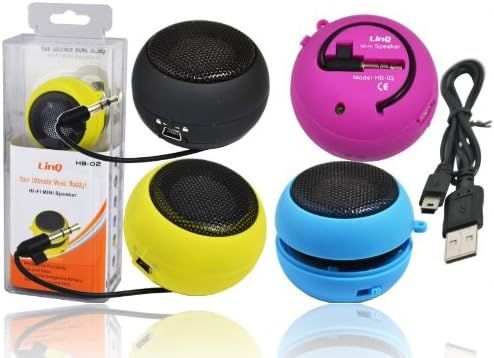
Image: Linq HB-02 Mini Speaker shown in its retail packaging, alongside other speakers and the included USB charging cable. This illustrates the typical contents and appearance of the product.
4. د محصول ب Featuresې
- Mini Pocket Speaker: د اسانه وړلو لپاره کمپیکټ او پورټ ایبل ډیزاین.
- نړیوال مطابقت: Connects via 3.5mm audio jack to devices like iPhones, iPods, MP3/MP4 players, smartphones, notebooks, PSP, CD players, and more.
- د چارج وړ بیټرۍ: Built-in lithium-ion battery for wireless use.
- Retractable Sound Resonator: Features a pneumatic suspension system that allows the acoustic membrane to be extended from one side, enhancing amplification and sound quality.
- د USB چارج کول: Conveniently recharges via the included USB cable.
- Ampلوړ غږ: Delivers excellent and pleasant acoustic performance despite its small size.

Image: Four Linq HB-02 Mini Speakers in pink, yellow, purple, and blue, shown with their retractable sound resonators extended, demonstrating the design and color variety.
5. ترتیب کول
5.1 ابتدايي چارج کول
- د لومړي ځل کارولو دمخه، سپیکر په بشپړه توګه چارج کړئ.
- Connect the small end of the included USB charging cable to the mini USB port on the speaker.
- د کیبل معیاري USB پای د USB بریښنا سرچینې سره وصل کړئ (د مثال په توګه، د کمپیوټر USB پورټ، د USB دیوال اډاپټر).
- د چارج کولو شاخص څراغ (که شتون ولري) به د چارج کولو پرمهال روښانه شي او کله چې په بشپړ ډول چارج شي نو بند شي یا رنګ بدل کړي.
۵.۱ د آډیو وسیلې سره نښلول
- Locate the integrated 3.5mm audio jack on the speaker. This jack is often stored neatly within the speaker's body.
- Plug the 3.5mm audio jack into the headphone port of your audio device (e.g., smartphone, MP3 player, notebook).
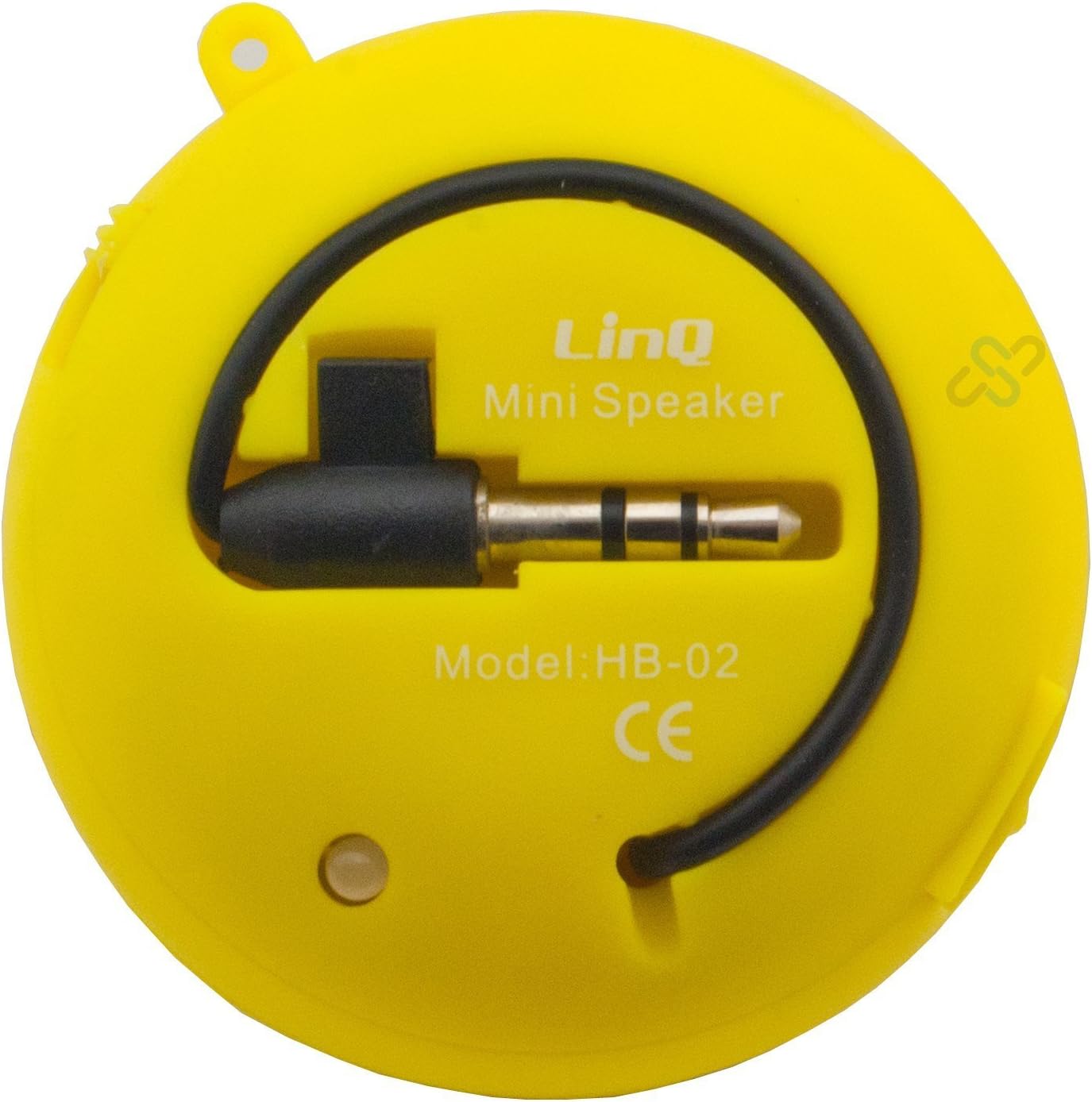
Image: A yellow Linq HB-02 Mini Speaker, viewed from the back, clearly showing the integrated 3.5mm audio jack coiled around the speaker and the model number 'HB-02'.
6. عملیاتي لارښوونې
6.1 بریښنا کول / بندول
Locate the power switch on the speaker. Slide it to the 'ON' position to turn on the speaker. Slide it to the 'OFF' position to turn it off.
6.2 آډیو غږول
- Ensure the speaker is connected to your audio device via the 3.5mm jack.
- سپیکر چالان کړئ.
- Start playing audio on your connected device. The sound will now be amplified through the Linq HB-02 speaker.
- Adjust the volume directly from your connected audio device. The speaker itself does not have volume controls.
6.3 Using the Retractable Sound Resonator
د ښه والي لپاره amplification and sound quality, gently pull and extend the acoustic membrane from one side of the speaker. This engages the 'Retractable Sound Resonator' system. To return to a more compact form, gently push the membrane back into the speaker body.
7. ساتنه
- پاکول: د سپیکر بهرنۍ برخه پاکولو لپاره نرم، وچ ټوکر وکاروئ. د مایع پاکوونکو یا ایروسولونو څخه کار مه اخلئ.
- ذخیره کول: کله چې په کارولو کې نه وي، سپیکر په یخ او وچ ځای کې وساتئ، د مستقیم لمر وړانګو او سختې تودوخې څخه لرې.
- د بیټرۍ پاملرنه: د بیټرۍ د ژوند اوږدولو لپاره، د سپیکر په مکرر ډول په بشپړ ډول چارج کولو څخه ډډه وکړئ. په منظم ډول یې چارج کړئ، حتی که د اوږدې مودې لپاره نه کارول کیږي.
8. ستونزه حل کول
8.1 غږ نشته
- Ensure the speaker is turned ON.
- Check if the 3.5mm audio jack is fully inserted into both the speaker and your audio device.
- Verify that your audio device's volume is turned up and not muted.
- Ensure the speaker's battery is charged.
۵.۲ د غږ خراب کیفیت
- د کیفیت ستونزو لپاره د آډیو سرچینه وګورئ.
- Ensure the 3.5mm audio jack connection is secure.
- Try extending the 'Retractable Sound Resonator' for improved sound.
- Ensure the speaker is fully charged. Low battery can affect sound quality.
8.3 Speaker Not Charging
- Verify that the USB cable is correctly connected to both the speaker and the power source.
- یو بل USB پورټ یا د بریښنا اډاپټر هڅه وکړئ.
- ډاډ ترلاسه کړئ چې د USB کیبل خراب شوی نه وي.
9. مشخصات
| برانډ | لینک |
| ماډل | HB-02 |
| د اعظمي تولید بریښنا | 2 واټ |
| د ارتباط ټیکنالوژي | AUX (3.5mm Jack), USB (for charging) |
| د نصب کولو ډول | ټابلیټ |
| د سپیکر ډول | وړوکی سپیکر |
| خنډ | 8 اوم |
| د بریښنا سرچینه | د بیټرۍ چلول (د چارج وړ) |
| وزن | Not specified, designed for portability. |
10. تضمین او ملاتړ
This product comes with a standard manufacturer's warranty. Please refer to the warranty card included with your purchase or contact your retailer for specific warranty terms and conditions. For technical support or further assistance, please contact the retailer or the manufacturer's customer service.