
قنبا Q1
Qanba Q1 PS3 & PC Joystick Instruction Manual
ماډل: Q1
1. محصول ختم شوview
The Qanba Q1 joystick is a high-performance arcade controller designed for use with PlayStation 3 and PC platforms. It features authentic Qanba arcade components, providing a responsive and durable gaming experience. This manual provides essential information for setting up, operating, and maintaining your Qanba Q1 joystick.
کلیدي ځانګړتیاوې:
- Compatible with PlayStation 3 and PC systems.
- Equipped with a Qanba joystick and 8 Qanba action buttons.
- Includes an adjustable and removable table clamp د خوندي نصبولو لپاره.
- Comes with square, circle, and hex joystick gates for customization.
- Features rubber pads on the base for non-slip use on tables or laps.

1.1 شکل: تړل view of the Qanba Q1 joystick and action buttons.
۴. د تنظیم لارښوونې
2.1 د وسیلې سره نښلول
- Locate the USB cable stored in the compartment on the side of the joystick.
- Connect the USB cable from the Qanba Q1 joystick to an available USB port on your PlayStation 3 console or PC.
- The system should automatically detect the joystick. For PC, driver installation may be required, which typically occurs automatically upon first connection.
2.2 Attaching the Table Clamp
The Qanba Q1 includes an adjustable table clamp for enhanced stability during use.
- cl سیده کړئamp arms with the designated slots on the sides of the joystick unit.
- cl سلایډ کړئamp arms into place until they are securely seated.
- Place the joystick on a flat surface, such as a table or desk.
- په cl باندې پیچونه ټینګ کړئamp until the joystick is firmly secured to the surface. Do not overtighten.

Figure 2.1: Qanba Q1 joystick with the table clamp نښلول شوی
2.3 Changing Joystick Gates
The Qanba Q1 comes with interchangeable joystick gates (square, circle, hex) to suit different playstyles.
- Carefully open the bottom panel of the joystick (if applicable, refer to specific model instructions for access).
- Locate the existing joystick gate.
- Gently unclip or unscrew the current gate and remove it.
- Insert the desired gate (circle or hex) into position, ensuring it clicks or screws into place securely.
- لاندې پینل بند کړئ.
3. عملیاتي لارښوونې
3.1 بنسټیز کنټرولونه
The Qanba Q1 features a standard arcade layout with a joystick and eight primary action buttons.
- جوسټک: Used for directional input.
- د عمل تڼۍ: Eight buttons for in-game actions (e.g., punches, kicks, special moves).
- د کور تڼۍ: Functions as the PlayStation button on PS3, or a system menu button on PC.
- د انتخاب تtonۍ: Functions as the Select button on PS3.
- د پیل تڼۍ: Functions as the Start button on PS3.
3.2 موډ سویچ
The joystick includes a mode switch to toggle between different input modes, typically for compatibility or specific game requirements. Refer to the labels near the switch for available modes (e.g., D-Pad, Left Analog Stick, Right Analog Stick).
۷.۹ ټربو فعالیت
The Turbo function allows for rapid, automatic pressing of a selected button. To activate:
- فشار ورکړئ او ونیسئ ټربو تڼۍ
- په داسې حال کې چې ساتل ټربو, press the desired action button you wish to apply the turbo function to.
- دواړه تڼۍ خوشې کړئ. غوره شوی د عمل تڼۍ به اوس په چټکۍ سره تکرار شي کله چې فشار ورکړل شي.
- To deactivate, repeat the process: hold ټربو and press the turbo-enabled action button again.
4. ساتنه
4.1 پاکول
- Wipe the surface of the joystick with a soft, dry cloth.
- د سختې خاورې لپاره، لږ څهampټوکر د اوبو سره ومینځئ. د سختو کیمیاوي موادو یا د کثافاتو پاکوونکو کارولو څخه ډډه وکړئ.
- Ensure no liquids enter the internal components of the joystick.
4.2 د کیبل مدیریت
The Qanba Q1 features a convenient storage compartment for its USB cable.
- When not in use, carefully coil the USB cable and store it within the designated compartment to prevent damage and tangling.
- Avoid sharp bends or excessive force on the cable.
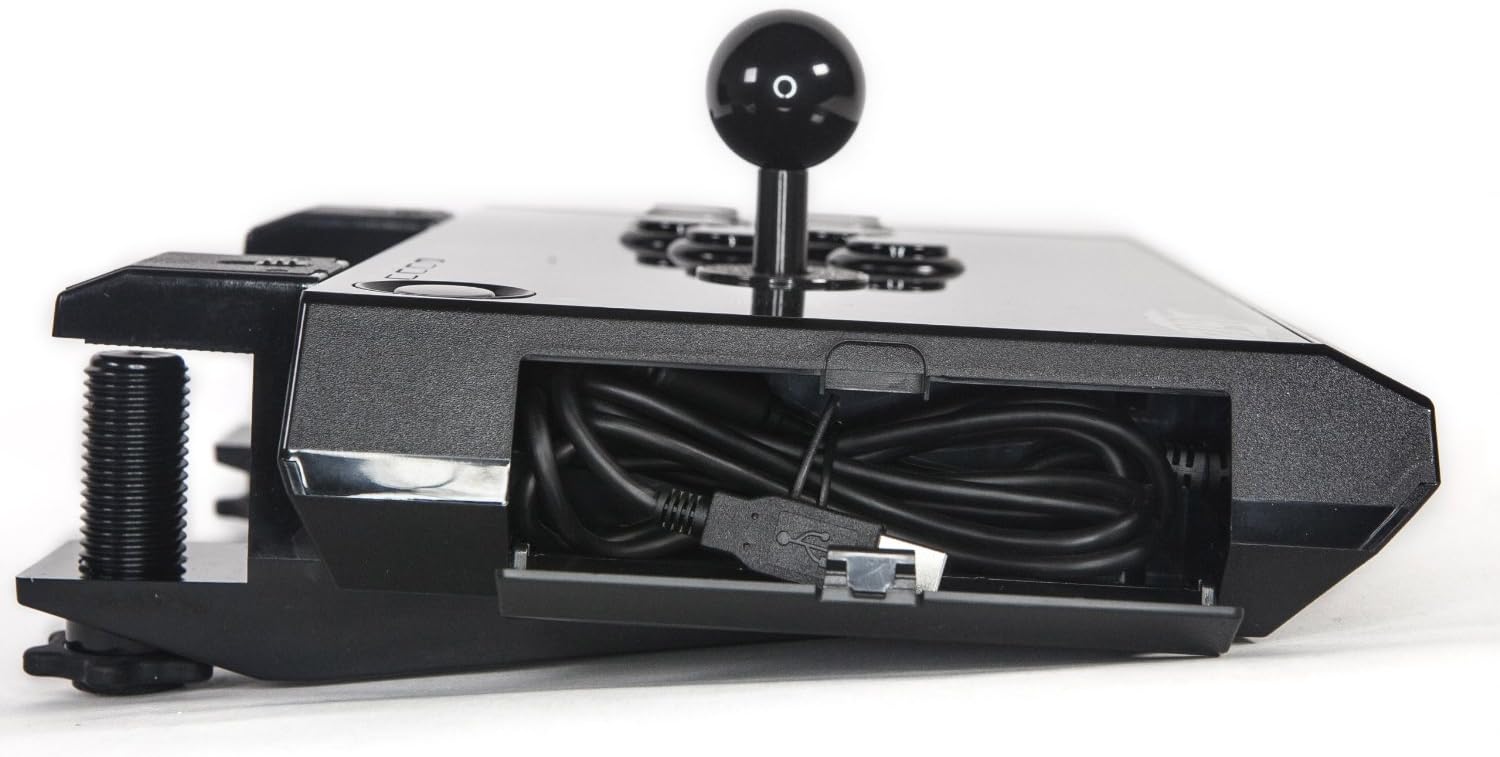
Figure 4.1: USB cable storage compartment.
5. ستونزه حل کول
5.1 Joystick Not Recognized
- د USB اتصال وګورئ: Ensure the USB cable is firmly connected to both the joystick and the console/PC. Try a different USB port.
- وسیله بیا پیل کړئ: Restart your PlayStation 3 or PC.
- PC Drivers: For PC, ensure that necessary drivers are installed. Windows typically installs these automatically, but manual installation may be required in some cases. Check Device Manager for any unrecognized devices.
- بل وسیله هڅه وکړئ: If possible, test the joystick on another compatible PS3 or PC to determine if the issue is with the joystick or the original device.
5.2 Buttons or Joystick Not Responding
- د حالت سویچ چیک کړئ: Ensure the mode switch is set to the correct input mode for your game or system.
- د لوبې ترتیبات: Verify that the game's controller settings are configured correctly for a joystick/arcade stick.
- د فرم ویئر تازه کول: Check the Qanba official website for any available firmware updates for your Q1 model.
6. مشخصات
| فیچر | تفصیل |
|---|---|
| برانډ | Qanba |
| د ماډل نوم | Q1 |
| مطابقت لرونکې وسیلې | کمپیوټر، پلې سټېشن ۳ |
| د کنټرولر ډول | جویسټک |
| د ارتباط ټیکنالوژي | USB |
| اضافي ځانګړتیاوې | ارګونومیک |
| د تڼۍ مقدار | 16 (including system buttons) |
| د هارډویر پلیټ فارم | کمپیوټر، PS3 |
| د ویډیو لوبې کنسول سره مطابقت لرونکي ماډلونه | د سوني پلی سټیشن 3 |
| د توکي وزن | ۰.۴۵ پونډه (تقریبا ۰.۴ کیلوګرامه) |
| د توکي ابعاد (L x W x H) | ۲.۶۴ x ۲.۳۲ x ۲.۷۶ انچه (تقریبا ۶.۷ x ۵.۹ x ۷ سانتي متره) |
7. تضمین او ملاتړ
For warranty information, please refer to the documentation included with your purchase or visit the official Qanba website. For technical support or further assistance, please contact Qanba customer service through their official channels.
Qanba Official Webسایټ: qanba.com
Ask a question about this manual
Ask about setup, troubleshooting, compatibility, parts, safety, or missing instructions. Manuals+ will review the question and use this page’s manual context to help answer it.