
پیژندنه
The Shure GLXD16 Rechargeable Wireless System offers guitarists and bassists unparalleled freedom and exceptional digital audio clarity. Designed for seamless operation, this system combines revolutionary LINKFREQ Automatic Frequency Management with reliable battery technology and robust Shure construction. This manual provides essential information for setting up, operating, and maintaining your GLXD16 system.
په بکس کې څه دي
Your Shure GLXD16 system includes the following components:
- GLXD6 Digital Guitar Pedal Receiver: The central unit for receiving wireless signals and managing system functions.
- GLXD1 Bodypack Transmitter: A compact transmitter designed to connect to your instrument.
- WA305 Instrument (Guitar) Cable: Connects your instrument to the GLXD1 transmitter.
- SB902A Lithium-Ion Rechargeable Battery: Provides power for the GLXD1 transmitter.
- PS24 Power Supply: For powering the GLXD6 receiver.
- Wall Battery Charger: For recharging the SB902A battery.
- د کارونکي لارښود: دا لارښود لارښود.

Image: The complete Shure GLXD16 Digital Wireless Guitar Pedal System, showcasing the GLXD6 receiver, GLXD1 transmitter, and associated cables and power supply.
د تنظیم کولو لارښوونې
1. Charge the Transmitter Battery
Before initial use, fully charge the SB902A Lithium-Ion rechargeable battery. Insert the battery into the GLXD1 bodypack transmitter and connect the wall battery charger to the transmitter's charging port. A 15-minute charge provides approximately 1.5 hours of use, while a full charge offers up to 11.5 hours (or up to 16 hours with an SB902 battery).

Image: The SB902A Lithium-Ion rechargeable battery, used to power the GLXD1 transmitter.
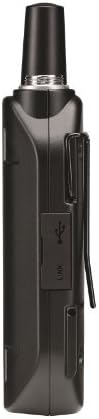
انځور: اړخ view of the GLXD1 Bodypack Transmitter, showing the micro-USB charging port.

Image: The PS24 power supply and a USB cable, used for charging the transmitter battery.
2. Connect the Transmitter to your Instrument
Connect one end of the WA305 instrument cable to your guitar or bass, and the other end to the input jack on the GLXD1 bodypack transmitter.
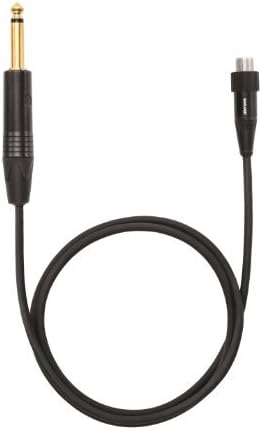
Image: The WA305 instrument cable, featuring a 1/4-inch jack on one end and a mini XLR connector on the other for the bodypack transmitter.
3. Connect the Receiver to your Ampلایفیر/پیډل بورډ
Place the GLXD6 Digital Guitar Pedal Receiver on your pedalboard or near your amplifier. Connect the PS24 power supply to the receiver and plug it into a power outlet. Use a standard 1/4-inch instrument cable to connect the receiver's output to your amplifier's input or the next pedal in your signal chain.

Image: The GLXD6 Digital Guitar Pedal Receiver with its illuminated display showing channel and signal information.
عملیاتي لارښوونې
1. Power On the System
Turn on the GLXD1 bodypack transmitter using its power switch. Then, turn on the GLXD6 receiver. The system will automatically scan for open frequencies and link the transmitter and receiver.
2. Automatic Frequency Management (LINKFREQ)
The GLX-D system utilizes LINKFREQ Automatic Frequency Management to continuously scan for open 2.4 GHz frequencies. If interference is detected, the system seamlessly switches to a clear backup frequency without interrupting your performance. This ensures a solid signal and exceptional digital audio clarity.
3. Integrated Tuner
The GLXD6 receiver features a built-in chromatic tuner. Engage the tuner mode to mute your signal and accurately tune your instrument. The display provides clear visual feedback for precise tuning.

Image: The GLXD6 Digital Guitar Pedal Receiver display showing the integrated chromatic tuner in action.
۴.۵. د بیټرۍ د ژوند څارنه
The GLXD6 receiver's display shows real-time battery life for the GLXD1 transmitter, indicated in minutes. This allows you to monitor your remaining playtime and plan recharges accordingly.
5. Multiple Transmitters (Advanced)
The system supports up to 4 compatible channels in typical settings. If using multiple GLXD1 transmitters (e.g., for different instruments), the GLXD6 receiver allows you to set and remember individual input signal levels for each transmitter, ensuring consistent sound when switching instruments.
ساتنه
To ensure the longevity and optimal performance of your Shure GLXD16 Wireless System, follow these maintenance guidelines:
- پاکول: Use a soft, dry cloth to clean the exterior of the receiver and transmitter. Avoid using harsh chemicals or abrasive materials.
- د بیټرۍ پاملرنه: Recharge the SB902A battery regularly. Store the battery in a cool, dry place when not in use. Avoid extreme temperatures.
- د کیبل معاینه: Periodically check the WA305 instrument cable for any signs of wear or damage. Replace if necessary to maintain signal integrity.
- ذخیره کول: When not in use for extended periods, store the system components in a protective case to prevent dust and physical damage.
د ستونزو حل کول
If you encounter issues with your GLXD16 system, consider the following:
- No Signal/Dropouts:
- ډاډ ترلاسه کړئ چې ټرانسمیټر او ریسیور دواړه فعال دي او په بشپړ ډول چارج شوي دي.
- Check for a clear line of sight between the transmitter and receiver. Obstacles can block the signal.
- Verify that the transmitter and receiver are linked and on the same channel. The system should automatically manage frequencies, but manual re-scan may help in crowded environments.
- Move away from other 2.4 GHz devices (Wi-Fi routers, Bluetooth devices) that might cause interference.
- د بیټرۍ چارج نه کول:
- Ensure the charging cable and power supply are securely connected.
- If the transmitter's charging indicator is blinking red or staying red without turning green, try turning the transmitter off, holding down the link button, and turning it back on while still holding the link button until the light goes out. This can reset the unit.
- ضعیف آډیو کیفیت:
- Check the input level settings on the receiver for your specific transmitter. Adjust as needed.
- Ensure all cables are securely connected and undamaged.
مشخصات
| فیچر | تفصیل |
|---|---|
| برانډ | شور |
| د ماډل نوم | GLXD16 |
| د ماډل شمیره | GLXD16-Z2 |
| سټایل | Guitar Pedal System |
| رنګ | تور |
| د توکي وزن | 3.8 پونډه |
| والیtage | 9 ولټه |
| Ampزمانه | 300 ملیونهamps |
| د کنټرول ډول | فوټ سویچ |
| د بریښنا سرچینه | Rechargeable, Battery Powered |
| هډوتري برسیر | USB |
| د سیګنال بڼه | ډیجیټل |
| د توکي ابعاد | 4.25 x 18.25 x 13 انچه |
| د نښلونکي ډول | USB |
| د فریکونسی بند | 2.4 GHz |
| د آډیو ځواب | 20 Hz – 20 kHz |
| متحرک سلسله | 120 dB |
| Battery Life (SB902A) | تر 11.5 ساعتونو پورې |
| Battery Life (SB902) | تر 16 ساعتونو پورې |
| چټک چارج | 15 min charge = 1.5 hours use |
| متوافق چینلونه | تر 4 پورې |
د محصول ویډیوګانې
ویډیو: یو اوورview of the Shure GLX-D wireless system, demonstrating its features and components. This video highlights the ease of use and digital clarity of the system.
تضمین او ملاتړ
The Shure GLXD16 Rechargeable Wireless System comes with a 2 کلن تضمین. For technical support, service, or warranty claims, please refer to the contact information provided in the original product packaging or visit the official Shure webسایټ