
پیژندنه
Thank you for choosing the Divoom Onbeat 200 Bluetooth Portable Speaker. This manual provides essential information for setting up, operating, and maintaining your speaker. Please read it thoroughly before use to ensure optimal performance and longevity of your device.
The Divoom Onbeat 200 is a compact and powerful portable speaker designed to deliver rich audio with the convenience of Bluetooth wireless connectivity. It features a built-in microphone for hands-free calling, making it versatile for both music playback and communication.
د بسته محتويات
مهرباني وکړئ د لاندې توکو لپاره په بسته کې وګورئ:
- Divoom Onbeat 200 Bluetooth Portable Speaker
- د USB چارج کیبل
- 3.5mm آډیو کیبل
- د کارن لارښود
که کوم توکي ورک یا زیانمن شوي وي، مهرباني وکړئ د مرستې لپاره خپل پرچون پلورونکي سره اړیکه ونیسئ.
محصول پای ته ورسیدview
The Divoom Onbeat 200 features a sleek design with intuitive controls. Familiarize yourself with the speaker's components before use.
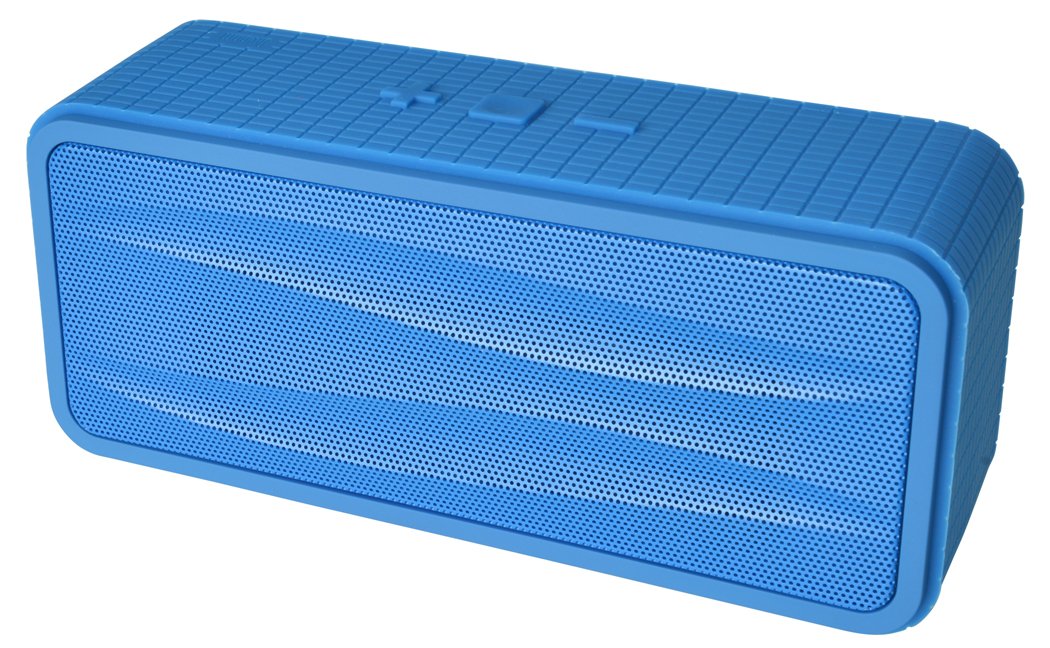
شکل 1: Divoom Onbeat 200 Bluetooth Portable Speaker shown with various compatible smartphones, highlighting its wireless connectivity. The speaker is blue and rectangular with a mesh grille.
The speaker is equipped with dual drivers for stereo sound and a passive radiator for enhanced bass. The control panel typically includes power, volume, and Bluetooth pairing buttons. A built-in microphone is integrated for hands-free communication.

شکل 2: Detailed dimensions of the Divoom Onbeat 200 speaker. The speaker measures approximately 16.5 cm in length, 7 cm in height, and 5.2 cm in depth.
چمتو کول
1. د سپیکر چارج کول
- د USB چارج کولو کیبل کوچنۍ پای د سپیکر د چارج کولو پورټ سره وصل کړئ.
- د USB چارج کولو کیبل لویه پای د USB بریښنا اډاپټر (شامل نه دی) یا د کمپیوټر USB پورټ سره وصل کړئ.
- د چارج کولو شاخص څراغ به د چارج کولو پرمهال روښانه شي، معمولا سور.
- Once fully charged, the indicator light will change color or turn off (refer to specific LED behavior in the full manual if available). A full charge usually takes 2-3 hours.
یادونه: For first-time use, ensure the speaker is fully charged.
2. د بلوتوث جوړه کول
- Ensure the speaker is charged and turned off.
- Press and hold the Power button (or dedicated Bluetooth button) for a few seconds until you hear an audible prompt or see the Bluetooth indicator light flashing rapidly, indicating it's in pairing mode.
- په خپل سمارټ فون، ټابلیټ، یا بل بلوتوث فعال شوي وسیله کې، د بلوتوث ترتیباتو ته لاړ شئ.
- بلوتوټ فعال کړئ او د شته وسایلو لټون وکړئ.
- Select "Onbeat 200" from the list of devices.
- Once paired, you will hear a confirmation tone, and the Bluetooth indicator light will typically glow solid blue.
لارښوونه: The speaker will automatically attempt to reconnect to the last paired device when powered on, if that device's Bluetooth is active and within range.
عملیاتي لارښوونې
پاور آن/بند
- د بریښنا د فعالولو لپاره: د بریښنا تڼۍ فشار ورکړئ او ونیسئ تر هغه چې د شاخص رڼا روښانه شي.
- د بریښنا بندولو لپاره: د بریښنا تڼۍ فشار ورکړئ او ونیسئ تر هغه چې د شاخص څراغ بند نشي.
د حجم کنټرول
- To increase volume: Press the Volume Up (+) button.
- To decrease volume: Press the Volume Down (-) button.
You can also adjust the volume directly from your connected device.
د غږ غږ
- Play/Pause: Press the Play/Pause button (often integrated with the Power or Bluetooth button).
- Next Track: Double-press the Volume Up (+) button (or a dedicated skip button).
- Previous Track: Double-press the Volume Down (-) button (or a dedicated skip button).
یادونه: Specific button functions may vary slightly. Refer to the physical markings on your speaker.
مرستندویه ان پټ (AUX)
د هغو وسیلو لپاره چې بلوتوث نلري، تاسو کولی شئ د 3.5 ملي میتر آډیو کیبل وکاروئ:
- د ۳.۵ ملي میتر آډیو کیبل یوه پای د سپیکر د AUX-in پورټ سره وصل کړئ.
- بل پای د خپل آډیو آلې هیډفون جیک سره وصل کړئ.
- The speaker will automatically switch to AUX mode, or you may need to press a mode button.
تلیفونونه کول او ترلاسه کول
The Divoom Onbeat 200 features a built-in microphone for hands-free calling when connected via Bluetooth to a smartphone.
- د زنګ په ځواب کې: When a call comes in, the music will pause. Press the Play/Pause button (or phone icon button) once to answer the call.
- د زنګ وهلو پای: During a call, press the Play/Pause button (or phone icon button) once to end the call.
- د زنګ رد کول: Press and hold the Play/Pause button (or phone icon button) for approximately 2 seconds to reject an incoming call.
- د وروستۍ شمېرې بیا ډایل کول: Double-press the Play/Pause button (or phone icon button) to redial the last number called.
Audio will be routed through the speaker, and your voice will be picked up by the built-in microphone.
ساتنه
- سپیکر د اوبو، رطوبت او سختې تودوخې څخه لرې وساتئ.
- سپیکر په نرم او وچ ټوکر پاک کړئ. د کثافاتو پاکوونکي یا محلول مه کاروئ.
- د سپیکر له غورځولو یا د قوي ټکانونو سره مخ کیدو څخه ډډه وکړئ.
- کله چې د اوږدې مودې لپاره نه کارول کیږي، سپیکر په یخ او وچ ځای کې وساتئ او د بیټرۍ روغتیا ساتلو لپاره یې په دوره یي ډول چارج کړئ.
د ستونزو حل کول
| ستونزه | احتمالي حل |
|---|---|
| سپیکر نه چالانېږي. | ډاډ ترلاسه کړئ چې سپیکر په بشپړ ډول چارج شوی دی. دا د بریښنا سرچینې سره وصل کړئ او بیا هڅه وکړئ. |
| د بلوتوث له لارې جوړه نشي کیدی. |
|
| غږ نشته یا ټیټ غږ. |
|
| د غږ تحریف. |
|
مشخصات
- د موډل نوم: Onbeat 200
- د توکي ماډل شمېره: Onbeat 200-Blue
- نښه: Divoom
- د سپیکر ډول: د کتابونو الماری
- ځانګړي ځانګړتیاوې: Built-in Microphone, Stereo
- وړاندیز شوي استعمالونه: موسیقي
- مطابقت لرونکي وسایل: سمارټ فون
- د شاوخوا غږ چینل ترتیب کول: 2.0
- رنګ: آبي
- د توکي وزن: ۲۴۰ ګرامه (۰.۵۳ پونډه)
- د اوبو ضد دی: نه
- د کنټرول طریقه: App (Note: While listed, primary control is via physical buttons and connected device)
- بې سیم مخابراتي ټیکنالوژي: بلوتوث
- د بریښنا سرچینه: د بیټرۍ چلول (1 لیتیم آیون بیټرۍ شامله ده)
- د محصول ابعاد: 16.51 x 5.08 x 7.11 سانتي متره
- د سپیکر اعظمي تولید ځواک: 4 واټ
- د ارتباط ټیکنالوژي: بلوتوث
- د نصب کولو ډول: ټابلیټ
- لومړی شتون لري: د می 17، 2013
تضمین او ملاتړ
The Divoom Onbeat 200 comes with a standard manufacturer's warranty. Please refer to the warranty card included in your package or visit the official Divoom webد تضمین د تفصيلي شرایطو او مقرراتو لپاره سایټ.
For technical support, troubleshooting assistance, or service inquiries, please contact Divoom customer support through their official channels. Keep your purchase receipt and product model information handy when contacting support.