
پیژندنه
This manual provides essential information for setting up, operating, and maintaining your Microsoft Xbox 360 E 250GB Console. Please read this guide thoroughly before using your console to ensure proper function and longevity.
د بسته محتويات
ډاډ ترلاسه کړئ چې ستاسو کڅوړه لاندې توکي لري:
- Xbox 360 E 250GB Console
- Xbox 360 Wireless Controller (Black)
- د بریښنا رسولو او بریښنا تار
- HDMI کیبل
- AA Batteries for Wireless Controller
کنسول اوورview
Familiarize yourself with the various ports and buttons on your Xbox 360 E console.

Image: Microsoft Xbox 360 E 250GB Console. This image displays the front and side view of the Xbox 360 E console, showing its compact design and disc drive slot.
مخکینۍ پینل
- د بریښنا تڼۍ: کنسول چالان یا بندوي.
- Disc Drive: Insert game discs or DVDs.
- USB پورټونه: Connect accessories like USB drives or wired controllers.
- Controller Connect Button: Used to wirelessly sync controllers.
شاته پینل
- د بریښنا بندر: د بریښنا رسولو سره وصل کړئ.
- د HDMI پورټ: Connect to a TV or monitor for high-definition video and audio.
- د AV پورټ: For older composite or component cables (not included with all models).
- ایترنیټ پورټ: د تار لرونکي شبکې سره وصل کړئ.
- USB پورټونه: Additional ports for accessories.
بېسیم کنټرولر اوورview
The Xbox 360 Wireless Controller allows for intuitive gameplay. Familiarize yourself with its buttons and functions.
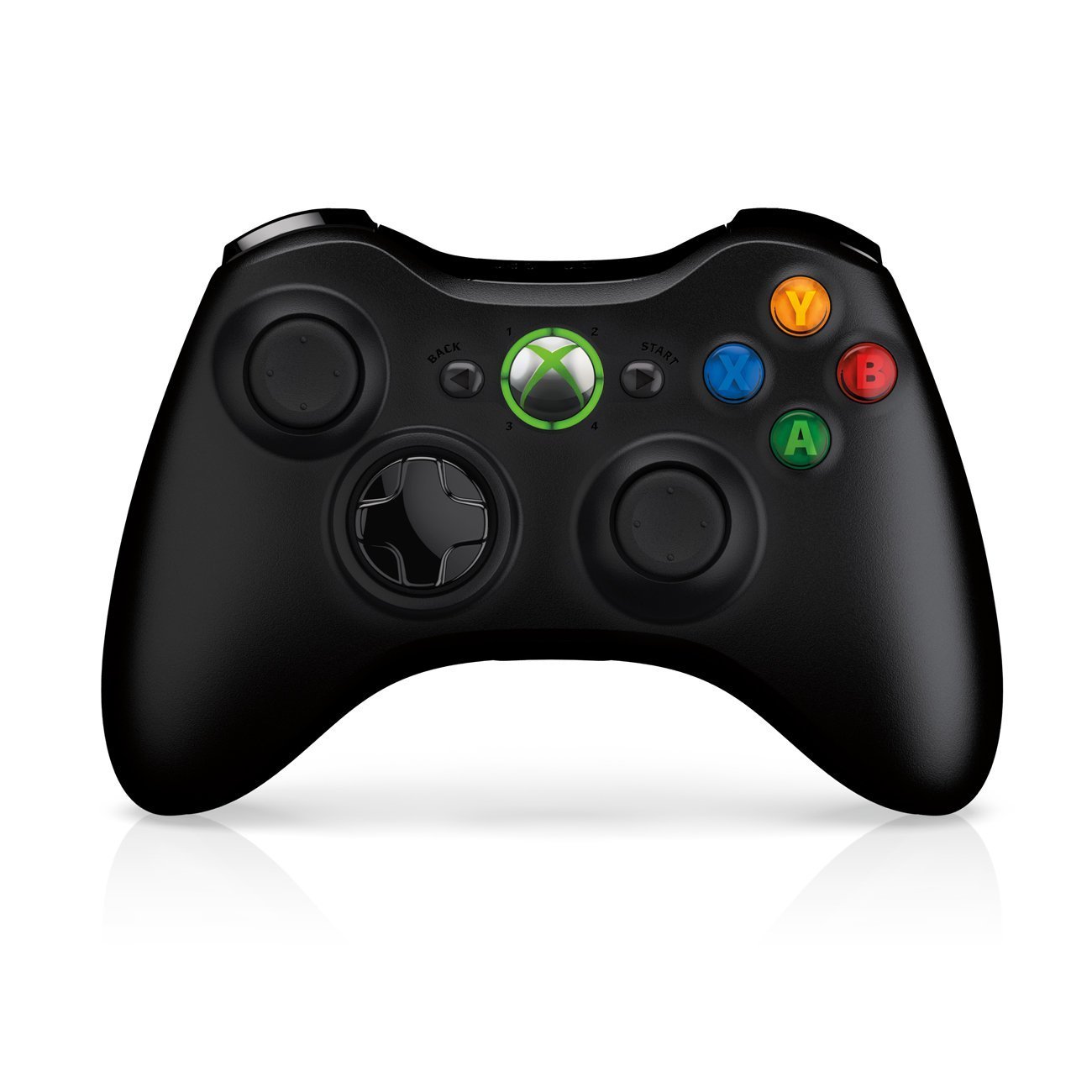
Image: Xbox 360 Wireless Controller. This image displays the front view of the black wireless controller, highlighting the D-pad, analog sticks, face buttons (A, B, X, Y), Guide button, Start button, and Back button.
د کنټرولر تڼۍ او دندې
- کیڼ/ښي انلاګ سټیکونه: د حرکت او کیمرې کنټرول لپاره.
- ډي-پډ (لارښودونکی پیډ): For menu navigation and specific game controls.
- د A، B، X، Y تڼۍ: Primary action buttons, color-coded (Green A, Red B, Blue X, Yellow Y).
- د پیل تڼۍ: Pauses games or opens in-game menus.
- د شا تڼۍ: Returns to previous screens or opens specific game functions.
- Guide Button (Xbox Logo): Powers on the console, accesses the Xbox Guide, or turns off the controller.
- کیڼ/ښي بمپرونه (LB، RB): د لوبې دننه د مختلفو کړنو لپاره د اوږو تڼۍ.
- کیڼ/ښي محرکونه (LT, RT): Analog triggers for precise control, often used for acceleration/braking or firing weapons.
د بیټرۍ نصب کول
The wireless controller requires two AA batteries. To install:
- Press the tab on the top of the battery pack and pull down to remove it.
- دوه AA بیټرۍ دننه کړئ، د سم قطبیت ډاډ ترلاسه کړئ (+/-).
- Slide the battery pack back into the controller until it clicks into place.
د تنظیم کولو لارښود
۱. د کنسول سره نښلول
- د بریښنا پیوستون: Connect the power cord to the power supply, then connect the power supply to the console's power port. Plug the power cord into a wall outlet.
- د ویډیو/آډیو اړیکه: Connect one end of the HDMI cable to the HDMI port on the back of your Xbox 360 E console. Connect the other end to an available HDMI input on your TV or monitor.
- د انټرنیټ اتصال (اختیاري): For wired internet, connect an Ethernet cable from your router/modem to the Ethernet port on the console. For wireless, the console has built-in Wi-Fi.
۲. د بېسیم کنټرولر سره نښلول
- Ensure batteries are installed in the controller.
- Turn on the console by pressing the Power button on the console or the Guide button on the controller.
- Press and release the Connect button on the console (small button near the USB ports on the front).
- Within 20 seconds, press and release the Connect button on the controller (small button on the top edge, between the bumpers).
- The lights around the Guide button on the controller and the console will flash and then glow steadily, indicating a successful connection.
3. Initial Power On and System Settings
After connecting, turn on your console. Follow the on-screen prompts to:
- خپله ژبه او سیمه وټاکئ.
- Adjust display settings (resolution, aspect ratio).
- Set up your internet connection (wired or wireless).
- Create or sign in to an Xbox Live profile.
Operating Your Console
لوبې کول او رسنۍ
- Turn on your console and TV.
- Open the disc tray by pressing the eject button on the console.
- Place a game disc or DVD/Blu-ray disc into the tray, label side up.
- Close the disc tray. The console should automatically start the game or media. If not, select it from the dashboard.
- Digital games can be launched directly from the Xbox Dashboard.
Connecting to Xbox Live
Xbox Live allows you to play online, download games and content, and access streaming services. Ensure your console is connected to the internet.
- From the Xbox Dashboard, navigate to the "Social" or "Settings" tab.
- Select "Join Xbox Live" or "Network Settings" to configure your connection and create/manage your profile.
- A 1-month Xbox LIVE Gold trial may be included with your console.
د سیسټم ترتیبات
Access system settings to customize your console experience:
- ښودنه او غږ: Adjust resolution, audio output, and screen format.
- ذخیره کول: Manage your 250GB hard drive, view free space, and delete content.
- د شبکې ترتیبات: Configure wired or wireless internet connections.
- Family Settings: Set parental controls for content and online access.
ساتنه
د خپل کنسول پاکول
- Always power off and unplug the console before cleaning.
- Use a soft, dry, lint-free cloth to wipe down the exterior of the console and controller.
- Do not use liquid cleaners, aerosols, or abrasive materials.
- Keep ventilation openings clear of dust and obstructions to ensure proper airflow.
Storage and Placement
- Place the console on a stable, flat surface.
- Ensure adequate ventilation around the console. Do not place it in an enclosed cabinet or on soft surfaces that can block vents.
- Avoid exposing the console to direct sunlight, excessive heat, or extreme cold.
د ستونزو حل کول
If you encounter issues with your Xbox 360 E console, refer to the following common solutions:
No Power / Console Not Turning On
- Ensure the power cord is securely connected to the console, power supply, and wall outlet.
- Check the power supply unit (PSU) indicator light. If it's off or red, try a different outlet or contact support.
- د بریښنا یو بل ځای هڅه وکړئ.
No Video or Audio Output
- Verify the HDMI cable is securely connected to both the console and your TV/monitor.
- ډاډ ترلاسه کړئ چې ستاسو تلویزیون/مانیټر د HDMI ان پټ سرچینې سره سم تنظیم شوی دی.
- په خپل تلویزیون کې یو بل HDMI کیبل یا یو بل HDMI پورټ هڅه وکړئ.
- Check your TV's volume and mute settings.
د ډیسک لوستلو تېروتنې
- ډاډ ترلاسه کړئ چې ډیسک پاک او له سکریچونو یا داغونو څخه پاک دی. په نرم ټوکر سره په نرمۍ سره له مرکز څخه بهر مسح کړئ.
- Try a different game or movie disc to determine if the issue is with the disc or the console.
- Ensure the console is placed on a stable, flat surface and not being moved during disc operation.
Wireless Controller Not Connecting
- ډاډ ترلاسه کړئ چې کنټرولر تازه بیټرۍ لري.
- Resync the controller by pressing the Connect buttons on both the console and controller as described in the "Setup Guide".
- Ensure there are no strong wireless interferences nearby.
For further assistance, please refer to the official Microsoft Xbox support webسایټ
مشخصات
| فیچر | تفصیل |
|---|---|
| د ماډل شمیره | M9V-00001 |
| ذخیره کول | 250 GB هارډ ډرایو |
| بې سیم ارتباط | جوړ شوی وائی فای |
| کنټرولر | ۱ تور بېسیم کنټرولر |
| د سیمې کوډ | NTSC |
| د محصول ابعاد | 12 x 6 x 24 انچه |
| د توکي وزن | ۲.۴۵ پونډه |
| بیټرۍ ته اړتیا ده | 2 AA batteries for controller |
| د خپریدو نیټه | د ۲۰۲۳ کال د جون ۱۹ |
د تضمین معلومات
For detailed warranty information regarding your Microsoft Xbox 360 E 250GB Console, please refer to the warranty card included with your product or visit the official Microsoft Xbox support webسایټ. د تضمین شرایط او مقررات ممکن د سیمې او پیرود نیټې سره سم توپیر ولري.
ملاتړ
If you require technical assistance, have questions about your console, or need to report an issue, please contact Microsoft Xbox Support:
- آنلاین ملاتړ: رسمي لیدنه وکړئ د ایکس بکس ملاتړ webسایټ د FAQs، د ستونزو حل کولو لارښوونو، او د اړیکو اختیارونو لپاره.
- د تلیفون ملاتړ: Refer to your product packaging or the Xbox Support webد سیمه ییزو تلیفون شمېرو لپاره سایټ.