
1. پیژندنه
This manual provides comprehensive instructions for the setup, operation, and maintenance of your A4tech Natural A Ergonomic Keyboard, model KRS-85. Designed with patented A-Shape keys and round-edged keycaps, this keyboard aims to promote a natural typing position, thereby helping to prevent Repetitive Strain Injury (RSI).
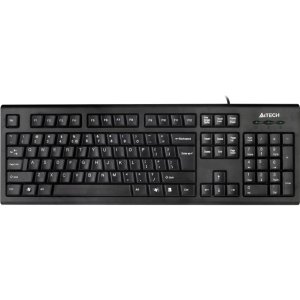
Figure 1: A4tech Natural A Ergonomic Keyboard (KRS-85). This image displays the full layout of the black wired keyboard, highlighting its ergonomic design with A-Shape keys and round keycaps.
2. ترتیب کول
2.1 د سیسټم اړتیاوې
- IBM or Compatible Systems
- Windows 2000 / XP (X64) / 2003 (X64) / Vista
۴.۲ د کیبورډ نښلول
- په خپل کمپیوټر کې موجود USB پورټ ومومئ.
- Insert the USB connector of the A4tech KRS-85 keyboard firmly into the USB port.
- ستاسو عملیاتي سیسټم باید په اتوماتيک ډول اړین چلوونکي کشف او نصب کړي. دا پروسه ممکن څو دقیقې وخت ونیسي.
- کله چې نصب بشپړ شي، کیبورډ د کارولو لپاره چمتو دی.
3. عملیاتي لارښوونې
The A4tech Natural A Keyboard is designed for comfortable and efficient typing. Its unique features are intended to enhance your typing experience and reduce strain.
3.1 کلیدي ځانګړتیاوې
- Patented A-Shape Keys: The layout of the keys is designed to align with the natural position of your hands and wrists, promoting a more relaxed posture.
- Round Edged Keycaps: These keycaps provide a smooth and comfortable typing surface.
- معیاري ترتیب: The keyboard features a full-size layout including a numeric keypad, function keys (F1-F12), and navigation keys.
3.2 بنسټیز کارول
Use the keyboard as you would any standard computer keyboard for typing, navigating, and executing commands. The ergonomic design is intended to provide comfort during extended use.
4. ساتنه
مناسب ساتنه ستاسو د کیبورډ اوږد عمر او غوره فعالیت تضمینوي.
4.1 پاکول
- د پاکولو دمخه کیبورډ له خپل کمپیوټر څخه جلا کړئ.
- د نرم، لینټ پاک ټوکر څخه لږ څه کار واخلئampد کیبورډ سطحه د اوبو یا نرم پاکولو محلول سره پاک کړئ.
- د سختو کیمیاوي موادو، خړوبونکو پاکوونکو، یا ډیر رطوبت کارولو څخه ډډه وکړئ.
- د کیلي ګانو ترمنځ د پاکولو لپاره، د دوړو او کثافاتو لرې کولو لپاره فشار شوي هوا وکاروئ.
5. ستونزه حل کول
If you encounter issues with your A4tech Natural A Keyboard, please refer to the following common solutions.
۵.۱ کیبورډ ځواب نه ورکوي
- ډاډ ترلاسه کړئ چې USB کیبل ستاسو په کمپیوټر کې د کار کونکي USB پورټ سره په خوندي ډول وصل دی. یو بل USB پورټ هڅه وکړئ.
- خپل کمپیوټر بیا پیل کړئ.
- Check your computer's Device Manager (Windows) to see if the keyboard is recognized and if there are any driver issues.
5.2 Specific Key Combinations Not Working (e.g., Ctrl-Alt-Del)
- Some users have reported that certain key combinations, such as Ctrl-Alt-Del, may not function as expected on this keyboard with Windows operating systems. This is a known compatibility limitation for some configurations.
- If this issue persists, consider using alternative methods for these functions within your operating system, or consult A4tech support for potential workarounds or driver updates if available.
6. مشخصات
| فیچر | تفصیل |
|---|---|
| د محصول نوم | Natural_A Rounded Edge Keyboard |
| د ماډل شمیره | د KRS-85 معرفي کول |
| د ارتباط ټیکنالوژي | کیبل (USB) |
| د کیبورډ توضیحات | ارګونومیک |
| د کلیدونو شمیر | 85 |
| د محصول ابعاد | 19.69 x 7.87 x 1.97 انچه |
| د توکي وزن | ۲.۴۵ پونډه |
| جوړونکی | ERGOGUYS (A4tech Co., Ltd) |
| نیټه لومړی شتون لري | د اکتوبر ۲۹، ۲۰۲۳ |
7. د تضمین معلومات
The A4tech Natural A Ergonomic Keyboard (KRS-85) comes with a 1 کلن محدود تضمین د جوړونکي څخه. دا تضمین د عادي استعمال لاندې موادو او کاري وړتیا کې نیمګړتیاوې پوښي.
Please retain your proof of purchase for warranty claims. For detailed terms and conditions, refer to the warranty documentation provided with your product or contact the manufacturer directly.
8. ملاتړ
For further assistance, technical support, or warranty inquiries, please contact the manufacturer or your point of purchase. Ensure you have your product model number (KRS-85) and proof of purchase ready when contacting support.