
پیژندنه
This manual provides instructions for the proper use, setup, and maintenance of your Beats by Dr. Dre In-Ear Headphones, Model OMEL-MR-PN-6694832. Please read this manual thoroughly before using the product to ensure optimal performance and longevity.
محصول پای ته ورسیدview
The Beats by Dr. Dre In-Ear Headphones are designed for high-quality audio delivery and convenience. Key features include:
- Solid Metal Housing: Constructed with durable metal for enhanced resilience.
- Grid-Iron Tough Build: Engineered for robustness and durability.
- جوړ شوی مایکروفون: Facilitates hands-free calls. Note that inline remote or microphone functionality may be limited with Apple devices.
- Tangle-Free Cables: Designed to prevent tangling for ease of use and storage.
- سپک او د پوښلو وړ ډیزاین: Offers portability and comfort during extended wear.
- د حجم کنټرول: Integrated controls for easy audio adjustments.
- Android Phone Control Support: Optimized for use with Android devices.
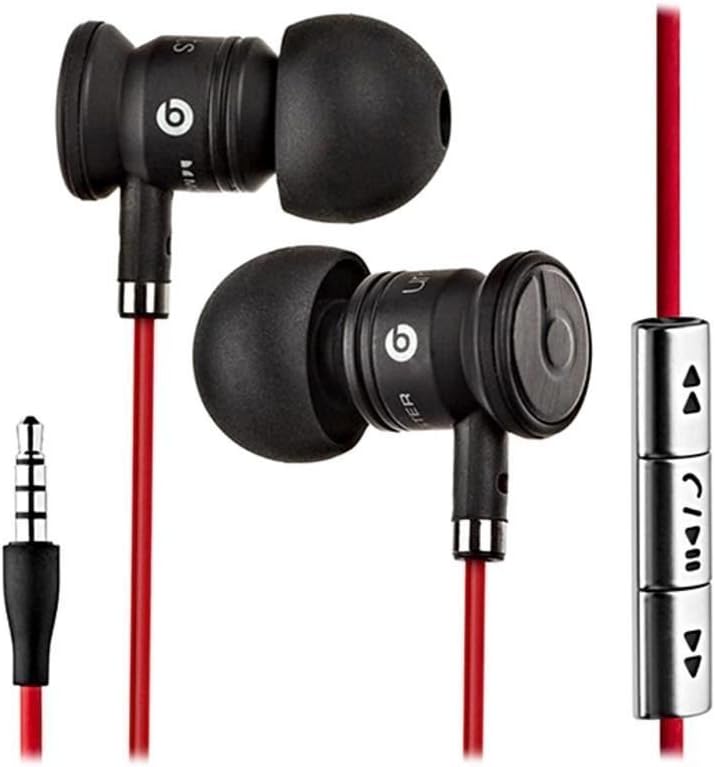
Image: The Beats by Dr. Dre In-Ear Headphones, featuring black earbuds, a red tangle-free cable, and an inline remote with control buttons.
چمتو کول
- د غوږونو لارښوونې غوره کړئ: Choose the ear tips that provide the most comfortable and secure fit for your ears. The headphones come with various sizes to ensure optimal sound isolation and comfort.

Image: The Beats by Dr. Dre In-Ear Headphones displayed with a selection of different sized ear tips and a branded carrying pouch.
- وسیله سره وصل کړئ: Insert the 3.5mm audio jack into the headphone port of your audio device (smartphone, tablet, MP3 player, etc.).
- د ایربډونو موقعیت: Gently insert the earbuds into your ears, ensuring a snug fit. The cable should hang comfortably.
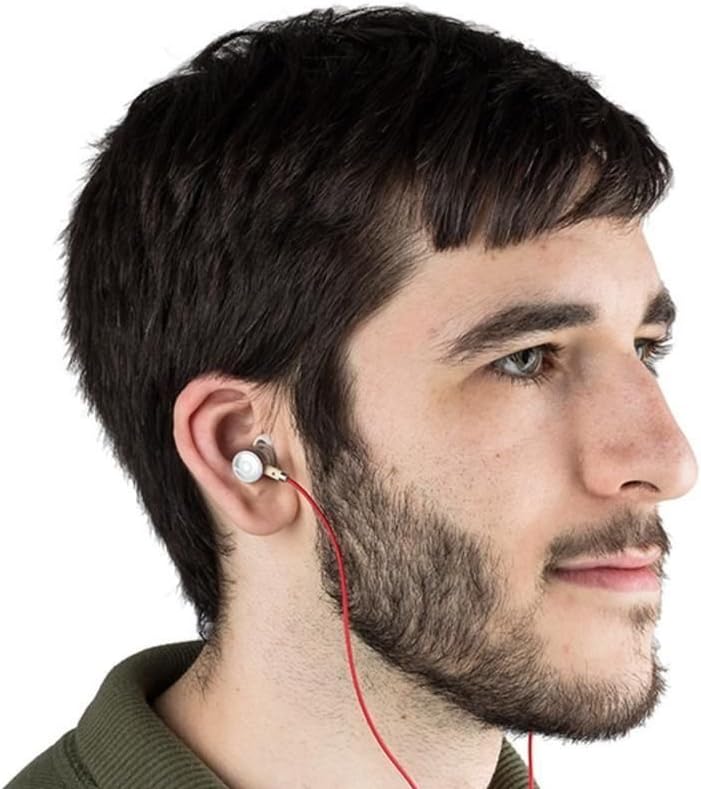
Image: A person wearing the Beats by Dr. Dre In-Ear Headphones, demonstrating proper earbud placement.
عملیاتي لارښوونې
آډیو پلې بیک
- پلی کول / ودرول: Press the center button on the inline remote once.
- بله لار: د مرکز ت buttonۍ په چټکۍ سره دوه ځله فشار ورکړئ.
- مخکینی لار د مرکز ت buttonۍ په چټکۍ سره درې ځله فشار ورکړئ.
- حجم پورته کول: Press the '+' button on the inline remote.
- کموالی: Press the '-' button on the inline remote.
د اړیکې مدیریت
- ځواب / پای کال: د راتلوونکي زنګ یا فعال زنګ په جریان کې یو ځل د مرکزي تڼۍ فشار ورکړئ.
- زنګ رد کړئ: د راتلوونکي زنګ په جریان کې د نږدې دوه ثانیو لپاره د مرکزي تڼۍ فشار ورکړئ او ونیسئ.
یادونه: Functionality of the inline remote and microphone may be limited or vary when used with Apple devices compared to Android devices.
ساتنه
- پاکول: Regularly wipe the earbuds and cable with a soft, dry, lint-free cloth. Do not use harsh chemicals or abrasive materials.
- د غوږ د څوکې پاملرنه: د غوږونو څوکې په دوره یي ډول لرې کړئ او په نرمو صابون او اوبو سره یې پاک کړئ. ډاډ ترلاسه کړئ چې د بیا نښلولو دمخه یې په بشپړه توګه وچ وي.
- ذخیره کول: When not in use, store your headphones in the provided carrying pouch to protect them from dust, dirt, and tangling.

Image: The black carrying pouch with the Beats by Dr. Dre logo, designed for headphone storage.
- د رطوبت څخه ډډه وکړئ: هیډفونونه د اوبو او ډیر رطوبت څخه لرې وساتئ.
د ستونزو حل کول
- غږ نشته:
- - Ensure the 3.5mm jack is fully inserted into your device.
- - Check the volume level on both your device and using the inline remote.
- - Test the headphones with another audio device to rule out device issues.
- مایکروفون کار نه کوي:
- - Verify that your device's microphone settings are correctly configured.
- - Remember that microphone functionality may be limited with Apple devices.
- - ډاډ ترلاسه کړئ چې مایکروفون بند شوی نه وي.
- د ریموټ کنټرول مسلې:
- - Confirm compatibility with your device. Full functionality is primarily supported on Android devices.
- - Ensure the connection is secure.
مشخصات
| فیچر | تفصیل |
|---|---|
| برانډ | وهل |
| د ماډل شمیره | OMEL-MR-PN-6694832 |
| د غوږ ځای پرځای کول | په غوږ کې |
| د فارم فکتور | په غوږ کې |
| د ارتباط ټیکنالوژي | تارونه |
| د توکي وزن | 0.3 اونس |
| د تړلو موادو | فلزي |
| د کیبل ځانګړتیاوې | تنګ مفت |
| اضافي ځانګړتیاوې | Foldable, Lightweight, Volume Control, Android Phone Control |
| د کنټرول ډول | لرې |
د محصول رسمي ویډیو
ویډیو: یو رسمي اوورview of the Beats by Dr. Dre In-Ear Headphones, demonstrating key features and design elements. Note: The video narration incorrectly refers to the product as wireless; these headphones are wired as shown in the video and product images.
تضمین او ملاتړ
For warranty information and customer support, please refer to the official Beats by Dr. Dre webسایټ یا خپل پرچون پلورونکي سره اړیکه ونیسئ. د تضمین ادعاوو لپاره د پیرود ثبوت وساتئ.
د نورو مرستو لپاره، تاسو کولی شئ لیدنه وکړئ په ایمیزون کې د بیټس پلورنځی.