
Linq IT-H408
Linq IT-H408 4-Port USB 2.0 Hub User Manual
Model: IT-H408
پیژندنه
This manual provides instructions for the proper setup, operation, and maintenance of your Linq IT-H408 4-Port USB 2.0 Hub. This device allows you to expand a single USB port into four, each with an independent on/off switch, facilitating efficient management of connected peripherals.
محصول پای ته ورسیدview
The Linq IT-H408 is a USB 2.0 hub designed to provide four additional USB ports. Each port features an individual power switch, allowing you to control power to connected devices independently. It supports data transfer speeds of up to 480 Mbps.
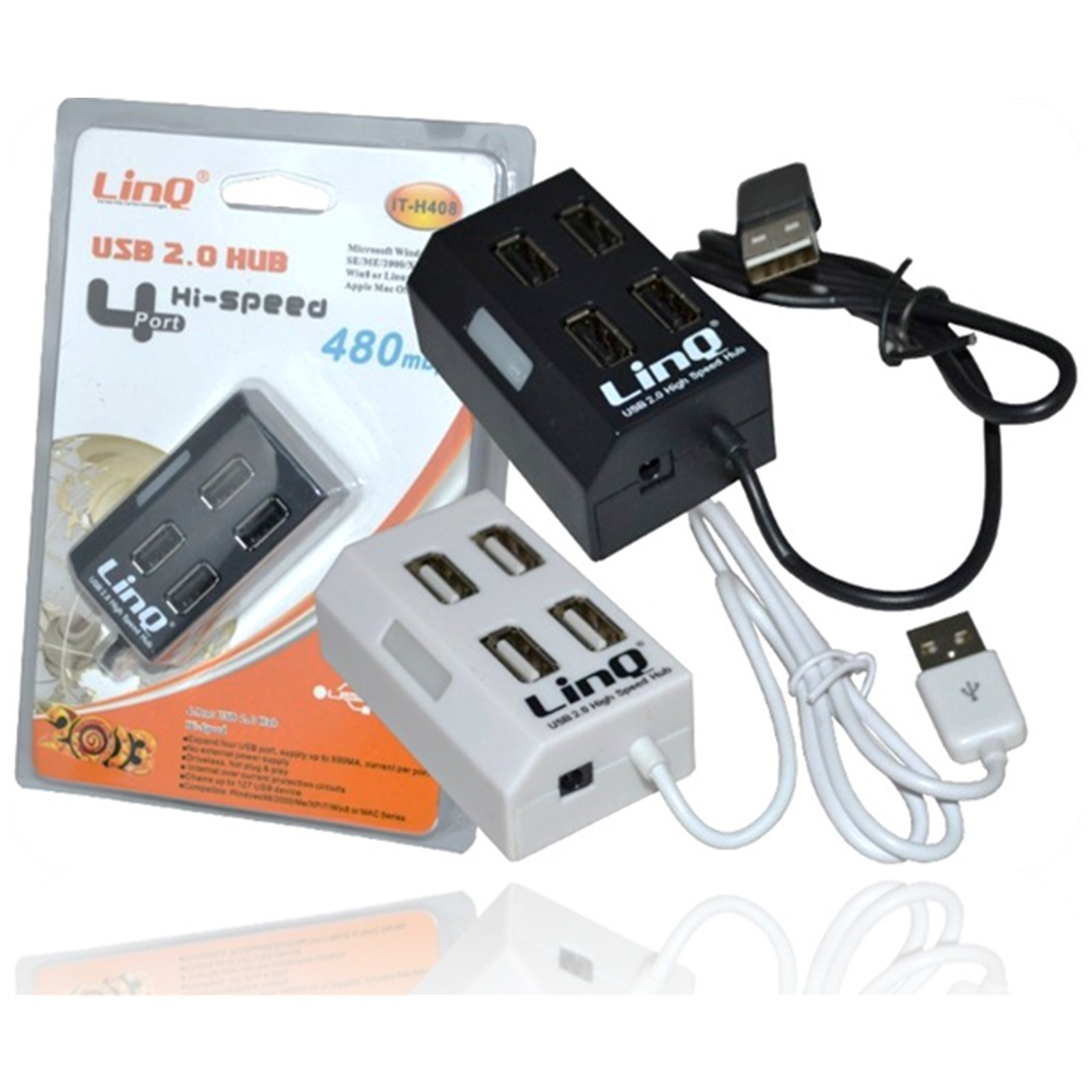
Figure 1: Linq IT-H408 4-Port USB 2.0 Hub. This image displays the hub's compact form factor, highlighting the four USB ports and their corresponding individual power switches, along with the integrated USB cable for connection to a host device.
د تنظیم کولو لارښوونې
- مرکز خلاص کړئ: Carefully remove the Linq IT-H408 USB Hub from its packaging.
- کمپیوټر سره وصل کړئ: Plug the integrated USB cable from the hub into an available USB 2.0 or USB 3.0 port on your computer.
- د ډرایور نصب کول: The hub is plug-and-play and typically does not require additional driver installation for compatible operating systems (Windows 98/2000/ME/XP/7/8, Mac OS series). Your operating system should automatically detect and configure the device.
- پرفیریلز وصل کړئ: Plug your USB devices (e.g., flash drives, keyboards, mice) into the available ports on the Linq IT-H408 hub.
د مرکز چلول
- Powering On/Off Ports: Each USB port on the Linq IT-H408 has an independent on/off switch. Press the switch corresponding to the desired port to toggle its power state. An indicator light (if present) will illuminate when the port is active.
- د نښلولو وسایل: Insert your USB device into an available port. Ensure the port is powered on using its individual switch.
- د معلوماتو لیږد: The hub supports USB 2.0 data transfer speeds up to 480 Mbps. Performance may vary based on the connected device and host system.
- د بریښنا مصرف: For high-power devices, ensure your computer's USB port can supply sufficient power. If multiple high-power devices are connected, an external power adapter (not included) might be required for optimal performance, if the hub supports it.
ساتنه
- پاکول: د مرکز بهرنۍ برخه د پاکولو لپاره د نرم، وچ ټوکر څخه کار واخلئ. د مایع پاکوونکو یا محلولونو کارولو څخه ډډه وکړئ.
- ذخیره کول: کله چې په کارولو کې نه وي، مرکز په یخ او وچ ځای کې د مستقیم لمر وړانګو او سختې تودوخې څخه لرې وساتئ.
- سمبالول: د مرکز له غورځولو یا د قوي ټکانونو سره مخ کیدو څخه ډډه وکړئ. د وسیلې د جلا کولو هڅه مه کوئ.
د ستونزو حل کول
وسیله ونه پیژندل شوه:
- Ensure the hub's USB cable is securely connected to your computer.
- Verify that the individual switch for the connected port is in the "on" position.
- هڅه وکړئ په خپل کمپیوټر کې یو بي بي USB بندر ته حب وصل کړئ.
- Test the connected device by plugging it directly into your computer's USB port to rule out device issues.
- خپل کمپیوټر بیا پیل کړئ.
د معلوماتو د لیږد ورو سرعت:
- Ensure both the hub and the connected device are USB 2.0 compatible for optimal USB 2.0 speeds.
- که چیرې د سرعت کموالی تجربه کوئ، نو په یو وخت کې د څو لوړ بینډ ویت وسیلو سره د نښلولو څخه ډډه وکړئ.
- Ensure the hub is connected to a USB 2.0 or higher port on your computer.
وقفې وقفې اړیکه:
- د کیبل ټولې اړیکې د نرموالي لپاره وګورئ.
- Ensure the hub is not placed near sources of strong electromagnetic interference.
- If using a desktop computer, try connecting the hub to a rear USB port directly on the motherboard.
مشخصات
| د ماډل شمیره | IT-H408 (Internal: 6950029010495) |
| برانډ | لینک |
| انٹرفیس | USB 2.0 |
| د بندرونو شمیر | 4 (with individual switches) |
| د معلوماتو د لیږد کچه | تر 480 Mbps پورې |
| مطابقت لرونکي عملیاتي سیسټمونه | Windows 98 / 2000 / ME / XP / 7 / 8, Mac OS series |
| رنګ | سپین، تور |
| ابعاد (تقریبا) | ۲۷.۵ x ۱۹.۲ x ۱۵.۵ سانتي متره (د بستې ابعاد) |
| وزن (نږدې) | 80 ګرامه |
| بیټرۍ ته اړتیا ده | نه |
تضمین او ملاتړ
Specific warranty information for the Linq IT-H408 USB Hub is typically provided at the point of purchase or within the product packaging. Please refer to your purchase documentation for details regarding warranty coverage and duration.
For technical support or further assistance, please contact your retailer or visit the official Linq webسایټ. د هر ډول تضمین ادعا لپاره د پیرود ثبوت په توګه د پیرود رسید وساتئ.
Ask a question about this manual
Ask about setup, troubleshooting, compatibility, parts, safety, or missing instructions. Manuals+ will review the question and use this page’s manual context to help answer it.