
پیژندنه
This manual provides comprehensive instructions for the setup, operation, maintenance, and troubleshooting of your Proscan CRK83X PSVR82 TV Remote Control. This remote is designed to work seamlessly with various Proscan TV and VCR models, offering a direct replacement or compatible control solution.
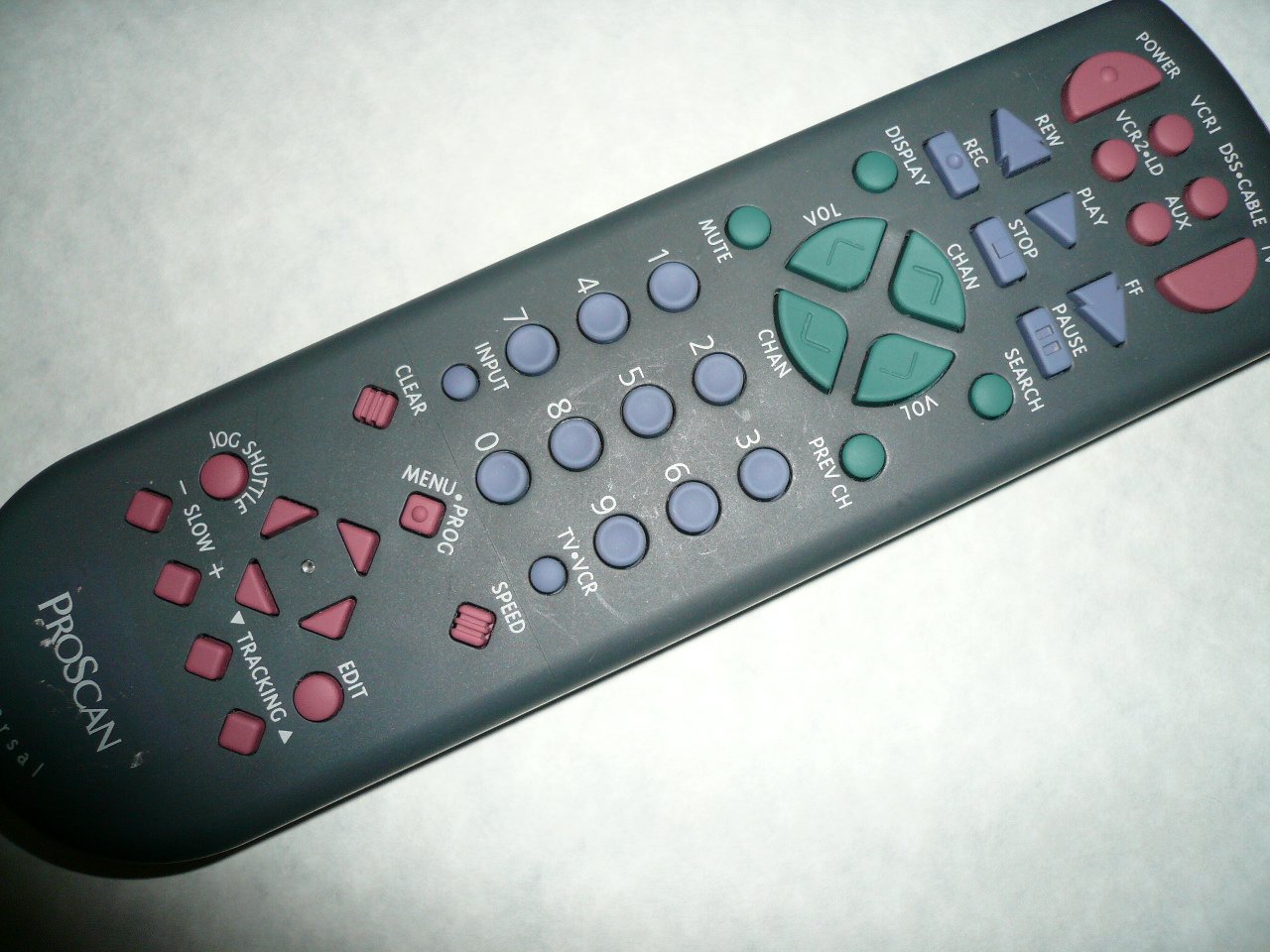
An image showing the Proscan CRK83X PSVR82 TV Remote Control, highlighting its ergonomic design and button layout. The remote is dark gray with purple and teal buttons, clearly labeled for various functions.
چمتو کول
1. د بیټرۍ نصب کول
- د ریموټ کنټرول شاته د بیټرۍ کمپارټ پوښ ومومئ.
- پوښ ښکته خوا ته وغورځوئ یا د خلاصولو لپاره یې قلف فشار ورکړئ.
- دوه (2) AAA بیټرۍ دننه کړئ (شامل نه دي)، ډاډ ترلاسه کړئ چې مثبت (+) او منفي (-) ټرمینلونه د کمپارټمنټ دننه د نښانونو سره په سمه توګه سمون لري.
- د بیټرۍ د برخې پوښ بیرته خپل ځای ته د سلایډ کولو سره بدل کړئ تر هغه چې په خوندي ډول کلیک وکړي.
2. ابتدايي استعمال
The Proscan CRK83X PSVR82 remote control is typically pre-programmed for compatible Proscan TV and VCR models. No complex programming steps are usually required for initial use with supported devices. Simply point the remote at your device and press the desired function button.
This remote is compatible with a wide range of models, including but not limited to: P5VR74, PAVR57, PCVR72, PRVR71, PSDR72, PSDR73, PSNKVSR72, PSNPSVR57, PSNPSVR65, PSNPSVR70, PSNPSVR71, PSNPSVR72, PSNPSVR73, PSNPSVR74, PSNPSVRR73, PSNR65, PSNVR74, PSRV65, PSRV71, PSRV72, PSRV74, PSRVR65, PSRVR71, PSUR70, PSUR72, PSV174, PSV65, PSV71, PSV72, PSVDR73, PSVER72, PSVH57, PSVP71, PSVR22, PSVR27, PSVR57, PSVR61, PSVR62, PSVR65, PSVR72L, PSVR72VCR, PSVR75, PSVR79, PSVR83, PSVT73, PSVV73, PSZR65, PSZR71, PSZR73, PVSR73, R65, RCU800, RSVR73, SPVR65, SSVR62, VR653HF, VR730, VR730HF.
عملیاتي لارښوونې
Familiarize yourself with the buttons and their functions for optimal control of your television and VCR.
| د تڼۍ نوم | فعالیت |
|---|---|
| پاور | Turns the connected device (TV/VCR) on or off. |
| VCR1, DSS/CABLE, VCR2/LD, AUX | Selects the input source for the television or VCR. |
| خاموش | د آډیو محصول خاموش یا غیر خاموش کوي. |
| VOL +/- | د حجم کچه پورته یا ښکته تنظیموي. |
| CHAN +/- | چینل پورته یا ښکته بدلوي. |
| PREV CH | Switches to the previously viewایډ چینل. |
| ښودل | Displays on-screen information such as channel number or time. |
| REC | Initiates recording on the VCR. |
| REW | Rewinds the tape during VCR playback. |
| لوبه وکړئ | Starts playback of a tape or disc. |
| FF | Fast forwards the tape during VCR playback. |
| ودروئ | پلې بیک یا ثبت کول بندوي. |
| وقفه | Pauses playback or recording. |
| لټون | Activates search function, typically for VCR content. |
| شمیره پیډ (0-9) | Directly enters channel numbers or menu selections. |
| INPUT | د شته معلوماتو سرچینو له لارې تیریږي. |
| روښانه | Clears entered numbers or menu selections. |
| MENU / PROG | Accesses the on-screen menu or programming functions. |
| تلویزیون-VCR | Toggles control between TV and VCR modes. |
| جوګ شټل | Provides frame-by-frame or variable speed control for VCR playback. |
| ورو +/- | Adjusts slow-motion speed during VCR playback. |
| سرعت | Adjusts playback speed, typically for VCR. |
| TRACKING ▲/▼ | Adjusts the VCR tracking for optimal picture quality. |
| ایډیټ | Activates editing functions, typically for VCR. |
ساتنه
د ریموټ پاکول
- ریموټ کنټرول د نرم، وچ ټوکر سره پاک کړئ.
- د سختې خاورې لپاره، لږ څهampټوکر د اوبو یا یو نرم، غیر خارښونکي کلینر سره ومینځئ. کلینر مستقیم په ریموټ کنټرول مه سپری کوئ.
- د سختو کیمیاوي موادو، محلولونو، یا د کثافاتو پاکولو پیډونو کارولو څخه ډډه وکړئ، ځکه چې دا کولی شي د ریموټ سطحې یا داخلي برخو ته زیان ورسوي.
د بیټرۍ بدلول
Replace batteries when the remote's response becomes sluggish or it stops functioning. Refer to the "Battery Installation" section under Setup for detailed instructions.
تل کارول شوي بیټرۍ د ځایی مقرراتو سره سم په مسؤلیت سره تصفیه کړئ.
د ستونزو حل کول
| ستونزه | احتمالي لامل / حل |
|---|---|
| ریموټ کار نه کوي. |
|
| ریموټ په وقفه يي ډول کار کوي. |
|
| ځینې تڼۍ ځواب نه ورکوي. |
|
مشخصات
- نښه: د
- ماډل: CRK83X PSVR82
- جوړونکی: پروسکان
- مطابقت لرونکي وسایل: Television (and various Proscan VCR models as listed in Setup section)
- د ارتباط ټیکنالوژي: انفراریډ
- د کنټرول ډول: د تڼۍ کنټرول
- ځانګړې ځانګړنه: ارګونومیک ډیزاین
- ASIN: B00P82T2LS
- د لومړي شتون نیټه: د ۲۰۲۳ کال د نومبر ۳۰مه
تضمین او ملاتړ
Specific warranty information for the Proscan CRK83X PSVR82 TV Remote Control is not provided in this manual. Please refer to the product packaging or contact your retailer for details regarding warranty coverage.
For further assistance or technical support, please contact the manufacturer or your point of purchase. No specific support contact details are available in this document.