
پیژندنه
د پیرودلو لپاره مننهasing the GPX 9-inch Portable DVD Player, Model PD901BDLP. This manual provides essential information for the safe and efficient operation of your device. Please read it thoroughly before use and retain it for future reference.
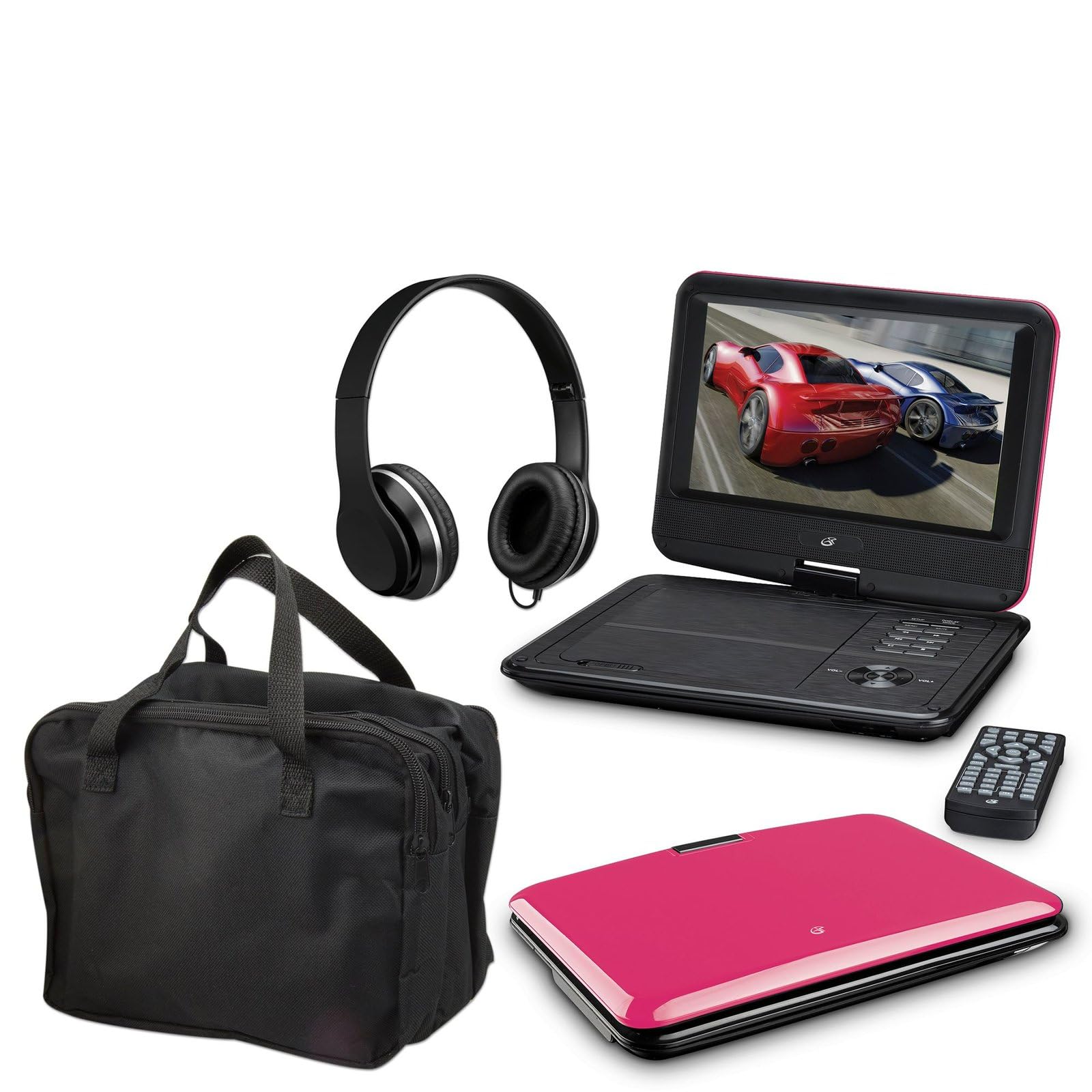
Image: The GPX 9-inch Portable DVD Player in its closed position, showcasing its vibrant pink top casing and sleek design.
د بسته محتويات
ډاډ ترلاسه کړئ چې لاندې ټول توکي ستاسو په بسته کې شامل دي:
- GPX 9-inch Portable DVD Player (Model PD901BDLP)
- ریموټ کنټرول (د 2 AAA بیټرۍ ته اړتیا لري، شامل دي)
- د AC/DC بریښنا اډاپټر
- د 12V موټر اډاپټر
- 3.5mm-to-RCA audio/video cable
- د لیږد قضیه
- هیډفونونه
- د لارښود لارښود (دا سند)
د محصول ځانګړتیاوې
- 9-inch 800x480 LCD screen
- Screen tilts and swivels for versatile viewزاویې
- Rechargeable lithium polymer battery with up to 2 hours of battery life
- جوړ شوي سټیریو سپیکرې
- د شخصي اوریدلو لپاره د هیډفون جیک
- RCA output for connection to external displays
- Supports DVD, DVD-R/RW, DVD+R/RW, CD, CD-R/RW, JPEG, MP3 formats
چمتو کول
1. د بیټرۍ چارج کول
Before first use, fully charge the internal lithium polymer battery. Connect the AC/DC power adapter to the DC IN port on the DVD player and plug the other end into a standard wall outlet. The charging indicator light will illuminate. Charging typically takes approximately 3-4 hours for a full charge, providing up to 2 hours of playback.
2. د ریموټ کنټرول بیټرۍ نصب کول
Open the battery compartment on the back of the remote control. Insert two (2) AAA batteries, ensuring correct polarity (+/-). Close the compartment securely.
3. Connecting to a Television (Optional)
ته view content on a larger screen, use the included 3.5mm-to-RCA audio/video cable. Connect the 3.5mm end to the AV OUT port on the DVD player. Connect the RCA (red, white, yellow) ends to the corresponding AV INPUT ports on your television. Select the correct AV input source on your TV.
4. Using the Car Adapter (Optional)
For in-car use, connect the 12V car adapter to the DC IN port on the DVD player and plug the other end into your vehicle's cigarette lighter socket.
عملیاتي لارښوونې
1. بریښنا کول/بندول
فشار ورکړئ او ونیسئ پاور button on the player or remote control to turn the device on or off.
2. Inserting a DVD
- Gently open the DVD player lid.
- Place a DVD disc onto the spindle with the label side facing up.
- د ډیسک په مرکز کې په نرمۍ سره فشار ورکړئ تر هغه چې دا په خپل ځای کې راشي.
- Close the lid. The player will automatically begin reading the disc.
۳. د سکرین تنظیم کول
The LCD screen can be tilted and swiveled to achieve the optimal viewing angle. Carefully adjust the screen to your preferred position.
۲. د پلې بیک اساسي کنټرولونه
- پلی/پاز: Press to start or pause playback.
- ودروئ: د پلې بیک بندولو لپاره فشار ورکړئ.
- SKIP (<< / >>): Press to skip to the previous or next chapter/track.
- FF / REW: Press and hold to fast forward or rewind.
- حجم (+/-): د غږ حجم تنظیم کړئ.
5. د هیډفون کارول
Plug the included headphones into the هیډفون jack for private listening. The built-in speakers will automatically mute when headphones are connected.
ساتنه
- د سکرین پاکول: Use a soft, lint-free cloth to gently wipe the LCD screen. Do not use liquid cleaners or abrasive materials.
- Cleaning the Disc Tray: Keep the disc tray free of dust and debris. Use a soft brush or compressed air if necessary.
- د بیټرۍ پاملرنه: To prolong battery life, avoid fully discharging the battery frequently. If storing the player for an extended period, charge it periodically.
- ذخیره کول: Store the DVD player in a cool, dry place away from direct sunlight and extreme temperatures. Use the included carrying case for protection during transport.
د ستونزو حل کول
| ستونزه | د حل لاره |
|---|---|
| لوبغاړی نه چالانېږي. | Ensure the battery is charged or the AC/DC adapter is securely connected to a working power outlet. Check the power switch. |
| هیڅ ډیسک ندی موندل شوی. | Verify the disc is inserted correctly with the label side up and seated properly on the spindle. Ensure the disc is clean and free of scratches. Try a different disc. |
| غږ نشته. | Check the volume level. Ensure headphones are not plugged in if you intend to use the built-in speakers. If connected to a TV, check the TV's volume and input settings. |
| ریموټ کنټرول کار نه کوي. | Check and replace the AAA batteries in the remote. Ensure there are no obstructions between the remote and the player's IR sensor. |
| انځور تحریف شوی یا تیاره دی. | Clean the disc. Adjust the screen angle. If connected to a TV, check the AV cable connections. |
مشخصات
- ماډل: PD901BDLP
- د سکرین اندازه: 9 انچه
- د ښودلو ډول: LCD
- اصلي پریکړه: 800 x 480
- د رسنیو ډول: DVD, DVD-R/RW, DVD+R/RW, CD, CD-R/RW, JPEG, MP3
- بیټرۍ: د چارج وړ لیتیم پولیمر
- د بیټرۍ ژوند: تر 2 ساعتونو پورې
- ارتباط: 3.5mm AV Out, Headphone Jack, DC In
- د بریښنا ننوتل: AC/DC Adapter, 12V Car Adapter
- وزن: تقریبا ۱۵ پونډه (۶.۸ کیلوګرامه)
- رنګ: ګلابي
- UPC: 047323179044
تضمین او ملاتړ
This GPX Portable DVD Player is covered by a د 90 ورځو محدود تولید کونکي تضمین د اصلي پیرود نیټې څخه. دا تضمین د عادي استعمال لاندې موادو او کاري وړتیا کې نیمګړتیاوې پوښي.
For warranty service or technical support, please refer to the contact information provided with your product packaging or visit the official GPX webسایټ. د پیرود ثبوت په توګه د پیرود رسید وساتئ.
د نورو معلوماتو لپاره، تاسو کولی شئ لیدنه وکړئ GPX Store on Amazon.