
1. پیژندنه
The PowerDrive PD3000 is a 3000 Watt power inverter designed to convert 12V DC power from your vehicle's battery into 115V AC household power. This unit provides 3000 Watts of continuous AC power and has a high surge capacity of up to 6000 Watts to accommodate devices with high starting power requirements. It features integrated Bluetooth wireless technology for remote monitoring and control via a mobile application, along with a removable control panel for flexible placement. This manual provides essential information for the safe and efficient operation of your PowerDrive PD3000 inverter.
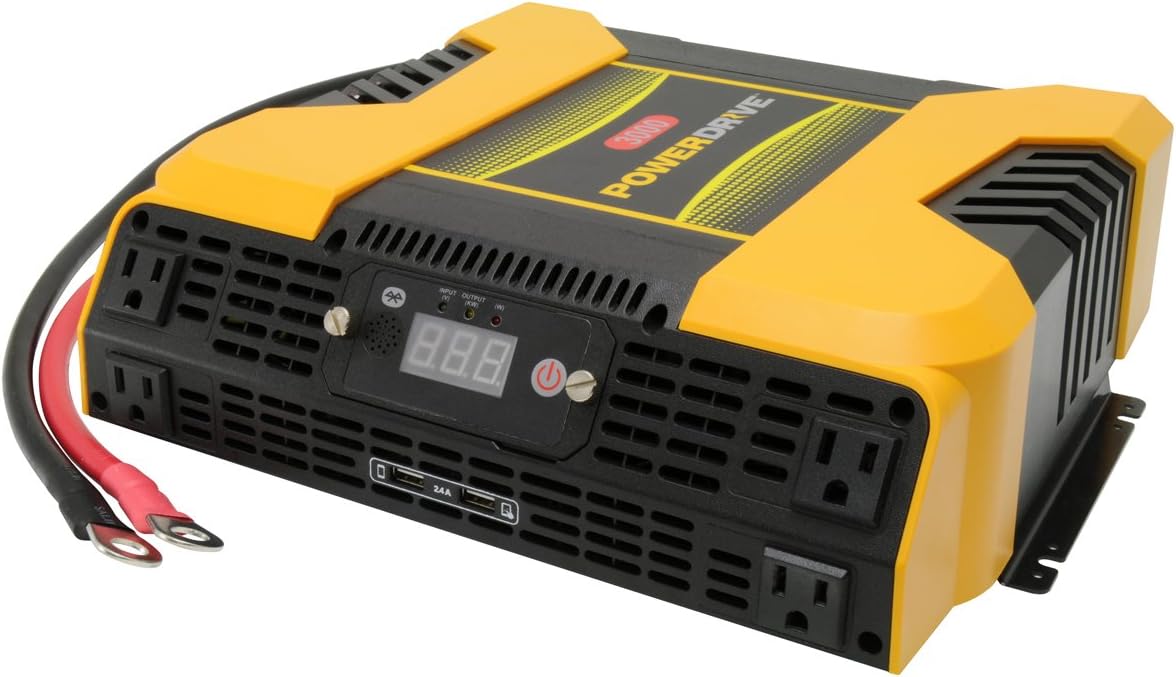
Figure 1.1: PowerDrive PD3000 3000 Watt Power Inverter, front view with outlets and display.
2. د خوندیتوب معلومات
Please read and understand all safety instructions before installing or operating the inverter. Failure to follow these instructions may result in electrical shock, fire, serious injury, or property damage.
- د بریښنایی شاک خطر: انورټر مه خلاصوئ casinج. دننه د کارونکي لپاره د خدمت وړ برخې نشته. ټولې خدمتونه وړ خدماتو پرسونل ته راجع کړئ.
- د اور خطر: Do not operate the inverter near flammable materials, gases, or vapors. Ensure adequate ventilation around the inverter.
- د بیټرۍ خوندیتوب: Connect the inverter only to a 12V DC battery system. Ensure battery terminals are clean and connections are secure. Wear eye protection and gloves when working with batteries.
- وینټیلیشن: ډاډ ترلاسه کړئ چې انورټر په ښه هوا لرونکي ځای کې نصب شوی دی. د هوا د جریان لارې مه بندوئ.
- د اوورلوډ محافظت: Do not exceed the inverter's continuous power rating of 3000 Watts. Overloading can damage the inverter and connected devices.
- رطوبت: انورټر باران، رطوبت، یا سپری ته مه ښکاره کوئ.
3. د بسته محتويات
د خلاصولو پر مهال ډاډ ترلاسه کړئ چې ټول توکي شتون لري:
- PowerDrive PD3000 Power Inverter Unit
- د لارښوونې لارښود
- د بیټرۍ کیبلونه (سور او تور)
- Removable Control Panel with Cable
4. د محصول ب Featuresې
The PowerDrive PD3000 inverter offers a range of features for versatile power conversion:
- د لوړ بریښنا تولید: Delivers 3000 Watts of continuous AC power with a 6000 Watt surge capacity.
- څو AC آوټ لیټونه: Equipped with four (4) 3-prong AC outlets to support various devices.
- د USB چارج کولو بندرونه: Includes two (2) USB power ports (shared 2400mA total output) for charging mobile devices.
- د بلوتوټ ارتباط: Allows remote access to features and settings via a free downloadable mobile application.
- د لرې کولو وړ کنټرول پینل: Detachable control panel enables remote monitoring and testing, offering installation flexibility.
- دوامدار ساختمان: Features a robust ABS PVC composite housing designed to protect internal electronic components.
- د خوندیتوب خوندیتوب: Incorporates audible alarms and automatic shut-off triggers for low battery, high battery, and overload conditions.

Figure 4.1: Front panel of the PowerDrive PD3000 showing AC outlets, USB ports, and digital display.
5. ترتیب او نصب کول
ستاسو د انورټر د خوندي او موثر فعالیت لپاره سم نصب کول خورا مهم دي.
5.1 د انورټر نصب کول
- د لمر د مستقیم وړانګو، تودوخې سرچینو او اور اخیستونکو موادو څخه لرې وچ، ښه هوا لرونکی ځای غوره کړئ.
- Ensure there is sufficient space around the inverter for air circulation, especially around the cooling fans.
- Mount the inverter securely using appropriate hardware (not included) to prevent movement during operation.
۳.۱ د ۱۲ ولټه ډي سي بریښنا سرچینې سره نښلول
مهم: Ensure the inverter is turned OFF before making any connections.
- سره وصل کړئ سور (مثبت) د بیټرۍ کیبل ته سور (مثبت) ټرمینل په انورټر کې. په خوندي ډول ټینګ کړئ.
- د بل پای سره وصل کړئ سور (مثبت) د بیټرۍ کیبل ته مثبت (+) terminal of your 12V DC battery. Tighten securely.
- سره وصل کړئ تور (منفي) د بیټرۍ کیبل ته تور (منفي) ټرمینل په انورټر کې. په خوندي ډول ټینګ کړئ.
- د بل پای سره وصل کړئ تور (منفي) د بیټرۍ کیبل ته منفي (-) terminal of your 12V DC battery. Tighten securely.
- Verify all connections are tight and free from corrosion. Loose connections can cause overheating and damage.

Figure 5.1: PowerDrive PD3000 Inverter showing battery cable connections.

شکل 5.2: شاته view of the PowerDrive PD3000 showing cooling fans and battery terminals.
5.3 Removable Control Panel Installation
The control panel can be used directly on the inverter or detached for remote operation.
- To use remotely, gently pull the control panel from the inverter.
- Connect the provided cable to the port on the back of the detached control panel and to the corresponding port on the inverter.
- Mount the control panel in a convenient location for monitoring and control.

Figure 5.3: PowerDrive PD3000 Inverter with its control panel detached for remote use.
6. عملیاتي لارښوونې
6.1 بریښنا کول / بندول
- After ensuring all battery connections are secure, press and hold the power button on the inverter or the remote control panel for approximately 1-2 seconds.
- The digital display will illuminate, and the inverter will begin providing AC power.
- To turn off, press and hold the power button again until the display turns off.
۶.۲ د AC وسایلو نښلول
- Plug your 115V AC devices into the 3-prong AC outlets on the front of the inverter.
- ټول واټ ډاډمن کړئtage of all connected devices does not exceed 3000 Watts.
- For devices with high starting loads (e.g., motors, compressors), ensure their surge wattage is within the inverter's 6000 Watt surge capacity.
۴.۱۰ د USB چارج کولو پورټونو کارول
- Connect your USB-powered devices (e.g., smartphones, tablets) to the USB ports.
- The two USB ports share a total output of 2400mA (2.4A).
6.4 Understanding the Digital Display and Indicators
The digital display shows real-time information such as input voltage or output wattage. Indicator lights provide status feedback:
- LED داخل کړئ: Indicates the status of the DC input power.
- د LED محصول: Indicates the status of the AC output power.
- د LED غلطی: Illuminates to indicate an error condition (e.g., overload, low/high voltagاو).
7. د بلوتوټ ارتباط
The PowerDrive PD3000 features Bluetooth wireless technology, allowing you to monitor and control the inverter using a compatible smartphone application.
7.1 Downloading the Mobile App
- لټون the official PowerDrive inverter app on your smartphone's app store (e.g., Apple App Store, Google Play Store).
- اپلیکیشن ډاونلوډ او نصب کړئ.
7.2 Pairing with Your Inverter
- ډاډ ترلاسه کړئ چې ستاسو په سمارټ فون کې بلوتوټ فعال دی.
- Turn on the PowerDrive PD3000 inverter.
- Open the PowerDrive mobile app. The app should automatically detect nearby PowerDrive inverters.
- Follow the on-screen prompts within the app to pair with your PD3000 inverter.
7.3 د اپلیکیشن ځانګړتیاوې
Once paired, the app allows you to:
- د څارنې ان پټ حجمtage او واټ تولیدويtage.
- View inverter status and fault codes.
- Remotely turn the inverter on or off.
- Adjust certain settings (refer to the app's help section for details).

Figure 7.1: Smartphone displaying the PowerDrive mobile application interface.
8. ساتنه
منظم ساتنه ستاسو د انورټر غوره فعالیت او اوږد عمر تضمینوي.
- پاکول: د انورټر بهرنۍ برخه په دوره یي ډول د وچ او نرم ټوکر سره پاکه کړئ. مایع پاکوونکي یا محلول مه کاروئ.
- وینټیلیشن: Ensure the cooling fans and ventilation openings are free from dust and debris. Use compressed air to clear blockages if necessary.
- اړیکې: Regularly check battery cable connections for tightness and corrosion. Clean terminals with a wire brush if corrosion is present.
- ذخیره کول: که چیرې انورټر د اوږدې مودې لپاره ذخیره کوئ، نو له بیټرۍ څخه یې جلا کړئ او په یخ او وچ ځای کې یې وساتئ.
9. ستونزه حل کول
This section addresses common issues you might encounter with your PowerDrive PD3000 inverter.
9.1 عام مسایل او حلونه
- انورټر نه چالانېږي:
- Check battery connections for tightness and proper polarity.
- د بیټرۍ حجم ډاډمن کړئtage is above 10.5V DC (Low Battery Shut Down Point).
- Verify the power button is pressed and held for the required duration.
- د AC محصول نشته:
- Check if the inverter is powered on and the Output LED is illuminated.
- Ensure the connected AC device is functioning correctly.
- Check for an overload condition (Fault LED illuminated). Reduce the load.
- Audible Alarm / Fault LED On:
- د ټیټ بیټرۍ الارم: Activates at 11 ± 0.3V DC. Recharge or replace the battery. The inverter will shut down at 10.5 ± 0.3V DC.
- High Battery Shut Down: Occurs at 15.5 ± 0.5V DC. Check the charging system of your vehicle.
- اوورلوډ: ټول واټtage of connected devices exceeds 3000 Watts. Disconnect some devices.
- دحرارت درجه: Inverter is overheating. Ensure proper ventilation and reduce load.
- د بلوتوټ اتصال مسلې:
- Ensure Bluetooth is enabled on your smartphone and the inverter is powered on.
- Restart the mobile app and try pairing again.
- Ensure your smartphone is within range of the inverter.
10. مشخصات
| مشخصات | ارزښت |
|---|---|
| ماډل | PD3000 |
| Continuous AC Power Output | 3000 واټ |
| د پوټ اضافه ځواک | 6000 واټ |
| د DC ننوت Voltage | 12.8V |
| د AC محصول Voltage | 115V |
| د AC محصول فریکونسی | 58Hz-62Hz |
| د USB محصول | 5V / 2 (Shared 2400mA) |
| موثریت ( اعظمي ) | >88% |
| موثریت (بشپړ بار) | >84% |
| Battery Drain (No AC Load) | <0.6A |
| Low Battery Alarm Trigger | 11 ± 0.3V DC |
| Low Battery Shut Down Point | 10.5 ± 0.3V DC |
| High Battery Shut Down Point | 15.5 ± 0.5V DC |
| Recovering Voltage after Under Voltage Turn-off | 12 ± 0.3V DC |
| د توکي وزن | ۲.۴۵ پونډه |
| د محصول ابعاد | 16.2 x 16.3 x 7.6 انچه |
11. تضمین او ملاتړ
For warranty information or technical support, please refer to the documentation included with your purchase or visit the official PowerDrive webسایټ. د هر ډول تضمین ادعا لپاره د پیرود ثبوت وساتئ.