
1. پیژندنه
The Microsoft Surface 3 is a versatile 10.8-inch tablet designed for productivity and portability. Running on Windows 10 and powered by an Intel Atom processor, it offers a full PC experience in a compact form factor. This manual provides essential information for setting up, operating, maintaining, and troubleshooting your device.

Image: Microsoft Surface 3 Tablet with an attached red Type Cover keyboard and a silver Surface Pen. The screen displays a colorful image with digital annotations, demonstrating its versatility.
۲. په بکس کې څه دي؟
Upon unboxing your Microsoft Surface 3, verify that all standard components are present:
- Microsoft Surface 3 Tablet
- Power Supply Unit (Charger)
- د چټک پیل لارښود (که شامل وي)
یادونه: The Surface Pen and Type Cover keyboard are optional accessories and are typically sold separately. Ensure you have these if your purchase included them.
3. وسیله ختمه شوهview
Familiarize yourself with the physical features and ports of your Surface 3 tablet.
۲.۲.۱ بندرونه او تڼۍ
- د USB 3.0 پورټ: For connecting USB devices such as external drives, mice, or keyboards.
- د مایکرو USB چارج کولو بندر: د وسیله چارج کولو لپاره کارول کیږي.
- مینی ډیسپلی پورټ: د بهرنیو ښودنې یا پروجیکټرونو سره د نښلولو لپاره.
- د سر غوږ جیک: د هیډفونونو یا بهرني سپیکرو ته د آډیو آوټ پټ لپاره.
- د مایکرو ایس ډی کارت سلاټ: For expanding storage with a microSDXC card.
- د حجم تڼۍ: د غږ کچې تنظیمولو لپاره.
- د بریښنا تڼۍ: د وسیله چالان/بندولو یا خوب حالت ته اچولو لپاره.
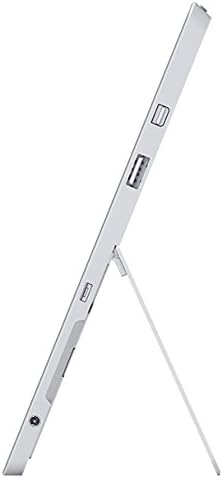
انځور: اړخ view of the Microsoft Surface 3, illustrating the various ports including USB, Mini DisplayPort, and the kickstand in an open position.

انځور: نږدې انځور view of the microSD card slot on the Microsoft Surface 3, with a microSD card partially inserted, demonstrating storage expansion capability.
3.2 کیمرې
- شاته کیمره: 8 MP for capturing photos and videos.
- مخکینۍ کیمره: 3.5 MP for video calls and selfies.
4. ترتیب کول
4.1 ابتدايي چارج
Before first use, connect the Surface 3 to the power supply using the Micro USB charging port and allow it to charge fully. The battery indicator on the screen will show charging status.
4.2 Powering On and Windows Setup
- فشار ورکړئ او ونیسئ د بریښنا تڼۍ until the Microsoft logo appears on the screen.
- Follow the on-screen prompts to complete the Windows 10 setup process. This includes selecting your language, connecting to a Wi-Fi network, and creating or signing in with a Microsoft account.
- Allow the system to download and install any pending updates for optimal performance and security.
4.3 Attaching Optional Accessories
- د پوښ ډول: Align the Type Cover with the magnetic connector at the bottom edge of the Surface 3 until it clicks into place.
- د سطحې قلم: The Surface Pen can be magnetically attached to the side of the Surface 3 for storage. For initial pairing, follow the instructions provided with the pen or in Windows settings.
5. چلول
5.1 نیویګیشن
- ټچ سکرین: د نیویګیشن لپاره د نل، سوائپ، پینچ-ټو-زوم په څیر اشارې وکاروئ.
- د سطحې قلم: Use the pen for precise input, drawing, writing, and annotating.
- Type Cover (Optional): Provides a traditional keyboard and trackpad experience.

Image: Microsoft Surface 3 in use with a Type Cover keyboard and Surface Pen, displaying a Windows 10 interface with various applications.
5.2 Windows 10 Features
- د پیل مینو: غوښتنلیکونو، ترتیباتو، او د بریښنا اختیارونو ته لاسرسی ومومئ.
- د عمل مرکز: Swipe from the right edge of the screen to access quick settings and notifications.
- دنده View: View open applications and virtual desktops.
- د ټابلیټ حالت: Switch to Tablet Mode for a touch-optimized interface.
5.3 د وای فای سره نښلول
- خلاص کړئ د عمل مرکز by swiping from the right edge of the screen or clicking the icon in the taskbar.
- ټایپ کړئ وای فای icon
- له لیست څخه خپل مطلوب شبکه غوره کړئ او که غوښتنه وشي نو پټنوم دننه کړئ.
6. ساتنه
6.1 پاکول
- د نرم، لینټ پاک ټوکر څخه کار واخلئampened with water or a screen cleaner specifically designed for electronics to clean the screen.
- د سختو کیمیاوي موادو، خړوبونکو موادو، یا ډیر رطوبت څخه ډډه وکړئ.
- Clean the device exterior with a soft, dry cloth.
6.2 د سافټویر تازه معلومات
Regularly check for and install Windows updates to ensure your device has the latest security patches and performance improvements. Go to ترتیبات> تازه معلومات او امنیت> وینډوز تازه معلومات.
6.3 د بیټرۍ پاملرنه
- د لوړې تودوخې څخه ډډه وکړئ، ځکه چې دوی کولی شي د بیټرۍ ژوند خراب کړي.
- For optimal battery longevity, avoid consistently draining the battery to 0% or keeping it at 100% for extended periods.
- The Surface 3 has an average battery life of up to 8 hours under typical usage conditions.
7. ستونزه حل کول
۶.۱ وسیله نه فعالېږي
- Ensure the device is charged. Connect the power supply and wait a few minutes before attempting to power on again.
- Perform a force restart by holding the د بریښنا تڼۍ for 10-15 seconds, then release and press it again briefly.
۴.۲ د وای فای اتصال مسلې
- Toggle Wi-Fi off and on in the Action Center.
- Restart your Surface 3 and your Wi-Fi router.
- Ensure you are within range of the Wi-Fi network and have the correct password.
۵.۳ ورو فعالیت
- هغه غیر ضروري غوښتنلیکونه بند کړئ چې په شاليد کې روان دي.
- د وینډوز کوم پاتې تازه معلومات وګورئ او نصب یې کړئ.
- ډاډ ترلاسه کړئ چې تاسو کافي وړیا ذخیره ځای لرئ.
8. مشخصات
| فیچر | تفصیل |
|---|---|
| د ماډل شمیره | 7G6-00014 |
| د ښودلو اندازه | ۷۸۷ انچه |
| د سکرین ریزولوشن | ۲۵۶۰x۱۶۰۰ پکسلز |
| پروسیسر | Intel Atom x7-Z8700 (2.4 GHz) |
| RAM | 4 جي بي |
| ذخیره کول | 128 GB SSD |
| عملیاتي سیسټم | وینډوز ۱۱ |
| د ګرافیک کاپروسیسر | Quad-core Intel Atom x7-Z8700 processor |
| بې سیم ډول | ۸۰۲.۱۱ac وای فای، بلوتوث ۵.۰ |
| USB بندرونه | 1x USB 2.0، 1x USB 3.0 |
| د اوسط بیټرۍ ژوند | 8 ساعته |
| د توکي وزن | ۲.۴۵ پونډه |
| د محصول ابعاد | 14.02 x 8.64 x 1.58 انچه |
| شاته Webد کیم ریزولوشن | 8 MP |
| مخکی Webد کیم ریزولوشن | 3.5 MP |
9. تضمین او ملاتړ
Your Microsoft Surface 3 Tablet is covered by a limited manufacturer's warranty. For detailed warranty information, including terms and conditions, please refer to the documentation provided with your purchase or visit the official Microsoft support webسایټ
For technical assistance, software updates, and additional resources, please visit the official Microsoft Support website or contact their customer service. Keep your device's serial number (located on the back of the tablet or in Windows settings) readily available when seeking support.