
1. پیژندنه
This manual provides instructions for the LaView LV-PB932F4 IP Bullet Camera. This camera is designed for surveillance applications, offering 1080P HD resolution for both indoor and outdoor use. It features day and night vision capabilities, with infrared (IR) night vision up to 100 feet. The camera is weatherproof with an IP66 rating and operates in temperatures from -13°F to 140°F (-25°C to 60°C).

Image 1.1: LaView LV-PB932F4 IP Bullet Camera features.
2. د بسته محتويات
ډاډ ترلاسه کړئ چې ټول توکي ستاسو په کڅوړه کې شتون لري:
- 1 x LaView LV-PB932F4 2MP 1080P IP Bullet Camera
- (Additional accessories such as mounting screws, anchors, and Ethernet cable may vary by package and are often sold separately.)
3. ترتیب او نصب کول
3.1 د نصبولو دمخه
Ensure your Network Video Recorder (NVR) system is compatible with IP 2MP cameras. Plan the camera's placement to maximize coverage and minimize obstructions.
3.2 فزیکي نصب کول
The camera is designed for wall mounting. Select a suitable location that provides the desired field of view and protection from direct impact.
د پورته کولو مرحلې:
- Mark drilling points using the camera's base as a template.
- Drill pilot holes appropriate for your mounting surface.
- Secure the camera to the mounting surface using appropriate screws and anchors (not included).
- د غوره پوښښ لپاره د کیمرې زاویه تنظیم کړئ.
3.3 پیوستون
This camera utilizes Power over Ethernet (PoE) for simplified installation. A single network cable provides both power and data connection.
- Connect one end of an Ethernet cable (Cat 5e or Cat 6 recommended) to the camera's Ethernet port.
- Connect the other end of the Ethernet cable to a PoE-enabled port on your NVR or a PoE switch.
- The camera should automatically power on and attempt to connect to your NVR system.
یادونه: For systems that do not automatically configure, refer to your NVR's manual for adding IP cameras and network configuration.
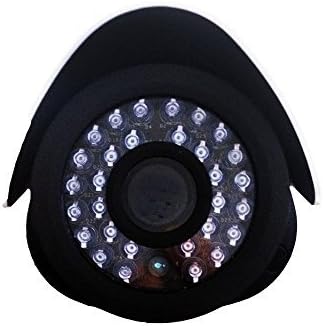
انځور 3.1: مخکی view of the camera lens and IR LEDs.
4. عملیات
4.1 Day/Night Vision
The camera automatically switches between day (color) and night (black and white, infrared) modes based on ambient light conditions. In night mode, the camera's infrared LEDs activate to provide visibility up to 100 feet in darkness.
4.2 د حرکت کشف
The camera supports motion detection. Configuration of motion detection zones and sensitivity settings is typically done through your connected NVR system's interface. Refer to your NVR's manual for detailed instructions on setting up motion alerts and recording triggers.
۵.۵ د ویډیو ثبت او پلې بیک
Video recording and playback functions are managed by your NVR system. Consult your NVR's user manual for instructions on accessing live view, configuring recording schedules, and reviewثبت شوی فوtage.
5. ساتنه
د خپلې کیمرې د غوره فعالیت او اوږد عمر ډاډمن کولو لپاره، د ساتنې دا لارښوونې تعقیب کړئ:
- پاکول: په دوره یي ډول د کیمرې لینز د نرم، ډ سره پاک کړئamp cloth. Avoid abrasive cleaners or solvents that could damage the lens coating.
- د کیبل معاینه: Regularly inspect all cables for damage, wear, or loose connections.
- د فرم ویئر تازه معلومات: Check the official LaView website for any available firmware updates for your camera model. Firmware updates can improve performance, enhance security, and add new features.
- د چاپیریال ساتنه: While the camera is IP66 weatherproof, extreme environmental conditions (e.g., direct lightning strikes, prolonged submersion, or corrosive environments) should be avoided.
6. ستونزه حل کول
6.1 No Image/Video Signal
- ځواک چیک کړئ: Ensure the camera is receiving power via the PoE connection. Verify the Ethernet cable is securely connected to both the camera and the PoE source (NVR/switch).
- د شبکې پیوستون چیک کړئ: Confirm the Ethernet cable is not damaged. Try a different port on your NVR/switch.
- د NVR مطابقت: Ensure your NVR system is compatible with 2MP IP cameras.
- د IP پتې شخړه: If manually configuring, check for IP address conflicts on your network.
۶.۳ د انځور ضعیف کیفیت
- د لینز پاکول: د کیمرې لینز د هر ډول خاورې، دوړو یا داغونو لپاره پاک کړئ.
- د رڼا شرایط: Ensure adequate lighting for optimal image quality. In low light, the camera will automatically switch to IR night vision.
- د حل ترتیبات: Verify the video resolution settings on your NVR are set to 1080P or higher, if supported by your NVR.
6.3 Night Vision Not Working
- د IR LEDs: In dark conditions, check if the infrared LEDs are illuminating. They may emit a faint red glow.
- خنډونه: Ensure there are no obstructions directly in front of the camera that could block the IR light.
۶.۳ د حرکت کشف مسلې
- د حساسیت ترتیبات: Adjust the motion detection sensitivity on your NVR. High sensitivity can lead to false alarms (e.g., from insects, moving branches).
- د کشف زونونه: Verify that the motion detection zones are correctly configured to cover the desired areas.
7. تخنیکي مشخصات
| فیچر | مشخصات |
|---|---|
| د ماډل شمیره | LV-PB932F4 |
| د ویډیو نیول حل | 1080p |
| د عکس سینسر حل | 2 MP |
| اغیزمن لاهم حل | 4 MP |
| د ارتباط ټیکنالوژي | تار لرونکی (PoE) |
| د کور دننه / بهر کارول | دننه، بهر |
| د پنروک درجه | IP66 |
| د شپې لید لړۍ | 100 پښه |
| ځانګړي ځانګړتیاوې | د حرکت سینسر، د شپې لید |
| د عملیاتي حرارت درجه | -13 °F څخه تر 140 °F (-25 ° C څخه تر 60 ° C) |
| د بریښنا سرچینه | د بریښنا تار (PoE) |
| د توکي ابعاد | 8.5 x 5 x 5 انچه |
| د توکي وزن | 1.35 پونډه |
| د فارم فکتور | ګولۍ |
| د غره ډول | دیوال غر |
8. تضمین او ملاتړ
8.1 د تضمین معلومات
This LaView product is covered by a 2-year manufacturer's warranty. Please retain your proof of purchase for warranty claims. The warranty covers defects in materials and workmanship under normal use.
8.2 تخنیکي ملاتړ
For technical assistance or support, please visit the official LaView website or contact their customer service. Lifetime technical support is provided to assist with setup, operation, and troubleshooting.
LaView رسمي Webسایټ: www.laviewsecurity.com