
نیکون ۲۱۸۵
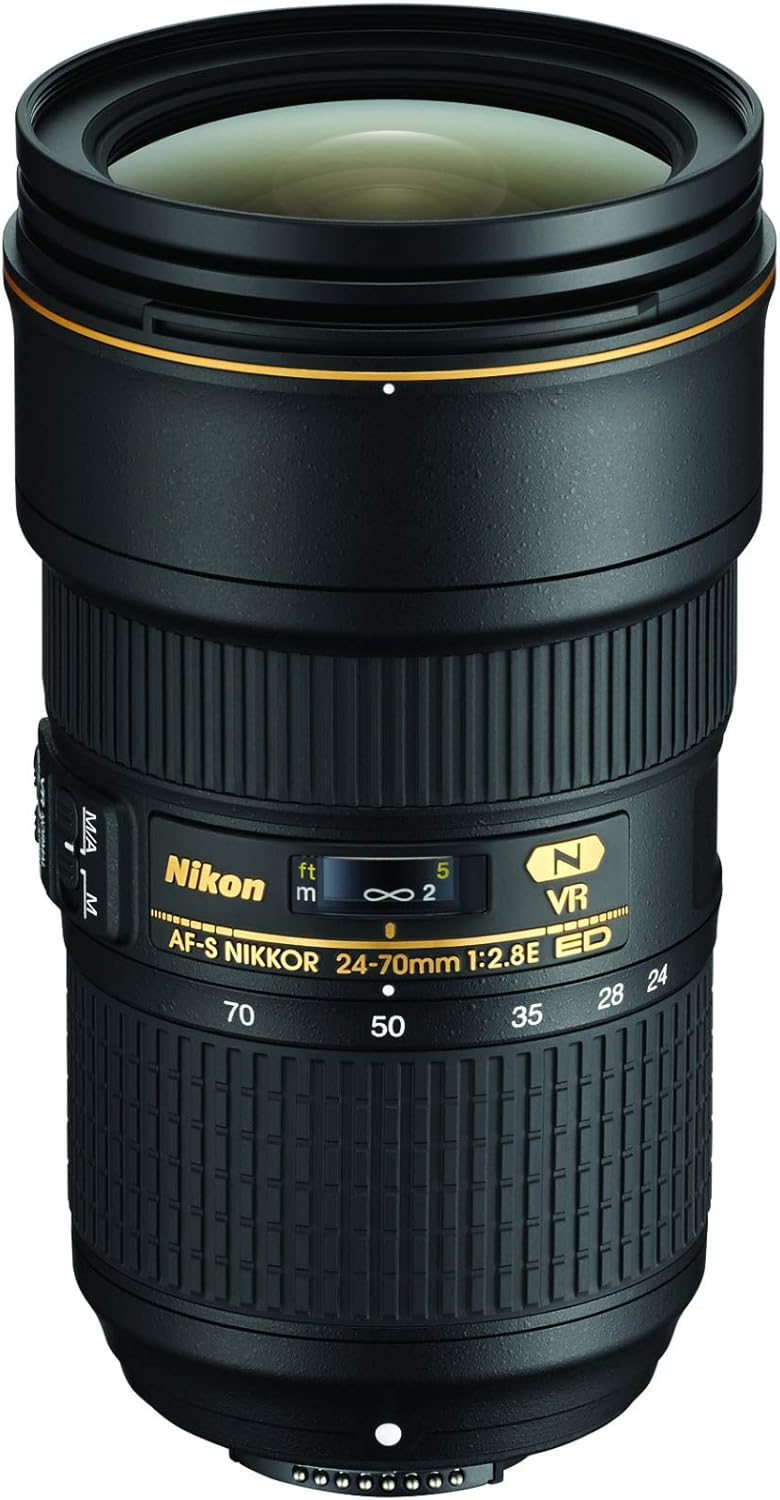
Nikon AF-S FX NIKKOR 24-70mm f/2.8E ED VR Zoom Lens User Manual
Brand: Nikon | Model: 20052
1. پهview
The Nikon AF-S FX NIKKOR 24-70mm f/2.8E ED VR is a high-performance, professional-grade zoom lens designed for Nikon DSLR cameras. It is engineered to deliver exceptional image quality, speed, and durability across its versatile 24-70mm focal range. Key features include a constant f/2.8 maximum aperture for excellent low-light performance and beautiful bokeh, an electromagnetic diaphragm for precise exposure control, and Nikon's advanced Vibration Reduction (VR) technology, which provides approximately 4.0 stops of image stabilization for sharper handheld shots and smoother video.
This lens incorporates a sophisticated optical design with specialized elements to effectively reduce various aberrations, ensuring outstanding sharpness and clarity from the center to the edges of the frame. Its robust construction is built to withstand the demands of professional use, making it a reliable choice for a wide array of photographic situations, from studio work to outdoor assignments.
۲. په بکس کې څه دي؟
ډاډ ترلاسه کړئ چې لاندې ټول توکي ستاسو په بسته کې شامل دي:
- AF-S FX NIKKOR 24-70mm f/2.8E ED Vibration Reduction Zoom Lens for Nikon DSLR Cameras
- LC-82 82mm سنیپ-آن فرنټ لینز کیپ
- LF-4 شا د لینز کیپ
- HB-74 بایونټ هود
- د CL-M3 لینس قضیه


3. ترتیب کول
۵.۱ د لینز نښلول
- ډاډ ترلاسه کړئ چې ستاسو کیمره بنده ده.
- د کیمرې څخه د بدن خولۍ او د لینز شاته خولۍ له لینز څخه لرې کړئ.
- په لینز کې د نصب کولو نښه د کیمرې په بدن کې د اړونده نښه سره سمون ورکړئ.
- لینز د ساعت په مقابل لوري وګرځوئ تر هغه چې دا په خپل ځای کې کلیک وکړي، دا په ګوته کوي چې دا په خوندي ډول تړل شوی دی.
- Attach the front lens cap when not in use to protect the front element.
۵.۲ د لینز هود نښلول
The HB-74 Bayonet Hood helps to block stray light from entering the lens, reducing flare and ghosting, and also provides physical protection to the front element. To attach, align the hood's mounting mark with the mark on the front of the lens, then rotate the hood until it clicks into place.
۵.۴ د محصول د ښودلو ویډیو
4. عملیاتي لارښوونې
۵.۱ اتومات فوکس او لاسي فوکس
The lens features an AF/M switch. Set the switch to 'AF' for autofocus operation, allowing the camera to automatically focus on your subject. For manual focus, set the switch to 'M' and rotate the focus ring on the lens to achieve desired sharpness. The lens's autofocus system is designed for fast and precise focusing.
4.2 زوم کول
To change the focal length, rotate the zoom ring on the lens. The 24-70mm range covers wide-angle to short telephoto perspectives, making it suitable for a variety of subjects.
4.3 Vibration Reduction (VR)
The Vibration Reduction (VR) system helps to minimize blur caused by camera shake, allowing for sharper images when shooting handheld, especially in low light or at slower shutter speeds. To activate VR, ensure the VR switch on the lens is set to 'ON'. When using VR, press the shutter-release button halfway and wait for the image in the viewfinder to stabilize before fully pressing the button to capture the shot. The VR system provides up to approximately 4.0 stops of compensation.
4.4 Constant f/2.8 Aperture
This lens maintains a constant maximum aperture of f/2.8 across its entire zoom range. This allows for consistent exposure settings when zooming, excellent performance in challenging low-light conditions, and the ability to create images with a shallow depth of field and pleasinد پس منظر تیاره کول (بوکه).
5. ساتنه
۴.۱ د لینز پاکول
The front and rear elements of the lens feature Nikon's Fluorine Coat, which repels dust, water droplets, grease, and dirt, making them easier to clean. To clean the lens surfaces, use a soft, clean microfiber cloth specifically designed for optical elements. Gently wipe the surface in a circular motion. For stubborn smudges, a small amount of lens cleaning fluid can be applied to the cloth (not directly to the lens).
5.2 ذخیره کول
When not in use, always attach both the front and rear lens caps to protect the optical elements. Store the lens in a cool, dry place, away from direct sunlight and extreme temperatures. If storing for extended periods, consider using a desiccant to prevent mold and mildew growth.
6. ستونزه حل کول
دا برخه هغه عامې ستونزې په ګوته کوي چې تاسو ممکن د خپلو لینزونو سره مخ شئ.
| ستونزه | احتمالي لامل | د حل لاره |
|---|---|---|
| Lens does not autofocus or focuses slowly. | AF/M switch set to 'M'; insufficient light; subject lacks contrast; camera settings. | Ensure AF/M switch is set to 'AF'. Increase ambient light or use a flash. Focus on an area with more contrast. Check camera's autofocus mode and settings. |
| Images are blurry or not sharp. | Vibration Reduction (VR) off; slow shutter speed; camera shake; dirty lens elements. | Ensure VR is 'ON' for handheld shooting. Use a faster shutter speed or tripod. Hold camera steady. Clean lens elements as per maintenance instructions. |
| د کیمرې لخوا لینز نه پیژندل کیږي. | په ناسم ډول نصب شوي لینزونه؛ ناپاکه بریښنایی اړیکې. | Re-attach the lens, ensuring it clicks securely into place. Clean the electrical contacts on both the lens and camera with a clean, dry cloth. |
7. مشخصات
| فیچر | تفصیل |
|---|---|
| د محصول ابعاد | 5.75 x 5.75 x 9.25 انچه |
| د توکي وزن | ۲.۴۵ پونډه |
| ASIN | B013D1BMFE |
| د توکي ماډل شمیره | 20052 |
| بیټرۍ ته اړتیا ده | 1 AA batteries (not included, for camera body) |
| جوړونکی | نیکون |
| د اصلي هیواد | جاپان |
| د فوکل اوږدوالی توضیحات | Standard (24-70mm) |
| د لینس ډول | معیاري زوم |
| متوافق mountings | نیکون ایف |
| د لینس عناصر | 20 |
8. تضمین او ملاتړ
8.1 د محصول تضمین
This product is covered by Nikon's standard warranty. Please refer to the warranty card included in your product packaging for specific terms and conditions, including coverage duration and claim procedures. Additional protection plans may be available for purchase to extend coverage beyond the standard warranty period.
۷.۳ د کارونکي لارښود او ملاتړ
For detailed information and further assistance, please consult the official User Guide PDF:
د کارونکي لارښود ډاونلوډ کړئ (PDF)
For technical support or service inquiries, please contact Nikon customer service through their official webسایټ یا ستاسو د محصول اسنادو کې چمتو شوي د اړیکو معلومات.