
1. پیژندنه
This manual provides essential information for the setup, operation, and maintenance of your Proscan PLDED3280A 32-Inch 720p LED TV. Please read this manual thoroughly before operating your television and retain it for future reference.
کلیدي ځانګړتیاوې:
- 32-Inch LED HD TV with Built-in ATSC Tuner
- Multiple Connectivity Options: HDMI, VGA, YPbPr, AV Audio/Video, PC Audio, Headphone, Coaxial Out, RF
- 60Hz Refresh Rate for smooth motion
- 16:9 Aspect Ratio for widescreen viewing
- Slim Bezel Design for a modern aesthetic
۲. په بکس کې څه دي؟
د کڅوړې د پرانیستلو پر مهال، ډاډ ترلاسه کړئ چې ټول توکي شتون لري:
- Proscan PLDED3280A 32-Inch 720p LED TV
- ریموټ کنټرول
- د تلویزیون سټینډ (۲ ټوټې)
- د کارونکي لارښود (دا لاسوند)

Figure 2.1: Proscan PLDED3280A 32-Inch 720p LED TV.
3. ترتیب کول
3.1 د سټینډ سره نښلول
- د تلویزیون سکرین په احتیاط سره په نرم او پاک سطح کې کیږدئ ترڅو د سکریچونو مخه ونیول شي.
- د سټینډ ټوټې د تلویزیون په ښکته برخه کې د نصب شوي سوري سره سم کړئ.
- د ورکړل شویو پیچونو په کارولو سره سټینډ خوندي کړئ. ډیر مه ټینګوئ.
3.2 د نښلولو بریښنا
Plug the power cord into the AC IN port on the back of the TV, then plug the other end into a standard electrical outlet (AC 120V, 60Hz).
۲.۳ د بهرنیو وسایلو نښلول
Your Proscan TV offers various input ports for connecting external devices such as cable boxes, DVD/Blu-ray players, gaming consoles, and computers.
- HDMI: For high-definition audio and video. Connect up to three HDMI devices.
- VGA: For connecting a PC.
- YPbPr (Component): For analog high-definition video.
- AV (مرکب): د معیاري تعریف ویډیو او سټیریو آډیو لپاره.
- آر ایف (انټینا/کیبل): د انتن یا کیبل تلویزیون فیډ سره وصل کولو لپاره.
- د کمپیوټر آډیو: For audio input from a PC.
- هیډفون: د هیډفونونو سره وصل کولو لپاره.
- کواکسیل بهر: د ډیجیټل آډیو آوټ پټ لپاره.
Ensure all cables are securely connected to the correct ports on both the TV and the external device.
۴. د تلویزیون چلول
۸ پاور آن/بند
فشار ورکړئ پاور button on the remote control or the power button on the side of the TV to turn the television on or off. A blue indicator light on the front of the TV signifies it is powered on.
۶.۲ د ننوتنې سرچینې انتخاب
To switch between connected devices, press the INPUT button on the remote control or the side of the TV. A menu will appear on screen, allowing you to select from available inputs such as TV, AV, Component, HDMI1, HDMI2, HDMI3, PC, or USB Media Player.
4.3 د حجم کنټرول
د کارولو VOL+ او VOL- buttons on the remote control or the side of the TV to adjust the volume level. A volume bar with a numerical indicator will appear on the screen.
4.4 د چینل انتخاب
If an antenna or cable is connected to the RF input, use the CH+ او CH- buttons on the remote control or the side of the TV to change channels.
4.5 د مینو نیویګیشن
فشار ورکړئ مینو button on the remote control or the side of the TV to access the on-screen display (OSD) menu. Use the arrow buttons to navigate through options and the OK or ننوتل د انتخابونو تایید لپاره تڼۍ.
5. ساتنه
Proper care ensures the longevity of your Proscan TV:
- د سکرین پاکول: په نرمۍ سره سکرین د نرم، لینټ نه پاک ټوکر سره پاک کړئ. د سختو نښو لپاره، یو څه لږampټوکر د اوبو یا ځانګړي سکرین کلینر سره ومینځئ. د سخت کیمیاوي موادو یا خړوبونکي موادو څخه ډډه وکړئ.
- د کابینې پاکول: د تلویزیون کابینې پاکولو لپاره نرم، وچ ټوکر وکاروئ.
- وینټیلیشن: د تلویزیون شاوخوا مناسب هوا ورکول ډاډمن کړئ. د هوا د بهیدو دروازې مه بندوئ.
- د بریښنا تار: د برېښنا تار په منظم ډول وګورئ چې کوم زیان لري. که زیانمن شوی وي، سمدلاسه یې بدل کړئ.
- ذخیره کول: If storing the TV for an extended period, disconnect it from power and store it in a cool, dry place.
6. ستونزه حل کول
د پیرودونکو ملاتړ سره د تماس نیولو دمخه، د عامو ستونزو لپاره لاندې حلونه هڅه وکړئ:
| ستونزه | احتمالي لامل / حل |
|---|---|
| هیڅ ځواک نشته | Ensure the power cord is securely plugged into both the TV and the outlet. Check if the outlet is working. |
| هیڅ انځور / هیڅ سیګنال نشته | Verify the correct input source is selected (e.g., HDMI1, AV). Check all cable connections between the TV and external devices. |
| نه غږ | د غږ کچه وګورئ او ډاډ ترلاسه کړئ چې تلویزیون خاموش نه دی. د آډیو کیبل اتصالونه تایید کړئ. |
| ریموټ کنټرول کار نه کوي | په ریموټ کنټرول کې بیټرۍ بدل کړئ. ډاډ ترلاسه کړئ چې د ریموټ او د تلویزیون د IR سینسر ترمنځ هیڅ خنډ شتون نلري. |
| د عکس ضعیف کیفیت | Adjust picture settings (brightness, contrast, color). Ensure the input source is providing a high-quality signal. |
7. مشخصات
| فیچر | تفصیل |
|---|---|
| برانډ | د |
| د ماډل شمیره | د PLDED3280A معرفي کول |
| د سکرین اندازه | ۷۸۷ انچه |
| ټیکنالوژي ښکاره کول | LED |
| قرارداد | 720p |
| د تازه کولو نرخ | 60Hz |
| د اړخ نسبت | 16:9 |
| د ارتباط ټیکنالوژي | HDMI, VGA, YPbPr, AV, PC Audio, Headphone, Coaxial Out, RF |
| د توکي وزن | 13.7 پونډه |
| د محصول ابعاد | ۱۶"د x ۲۶"وچ x ۴۷"ح |
| رنګ | تور |
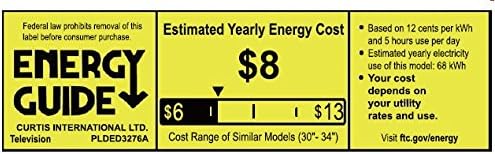
Figure 7.1: Estimated Yearly Energy Cost for similar models.
8. تضمین او ملاتړ
For detailed warranty information and customer support, please refer to the official Proscan website or the full User Manual PDF.
تاسو کولی شئ د کارونکي بشپړ لارښود (PDF) ډاونلوډ کړئ. دلته.
د نورو مرستو لپاره، لیدنه وکړئ PROSCAN Store on Amazon.