
1. پیژندنه
The Sony SBH54 is a versatile Stereo Bluetooth Headset designed for wireless communication and audio playback. It offers both handset and headset functionalities, allowing you to take and make calls, view messages, listen to music, and tune into FM radio directly from its display. Crafted from premium metal with a splash-proof design, it combines elegance with durability.
Key features include Bluetooth Wireless 3.0, NFC technology for easy pairing, an OLED display, and built-in noise cancellation for clear audio during calls. The headset supports A2DP profile and can connect to two devices simultaneously.
2. محصول ختم شوview
The SBH54 features a compact design that fits comfortably in your hand. It includes an OLED display for information at a glance and physical controls for media and call management.
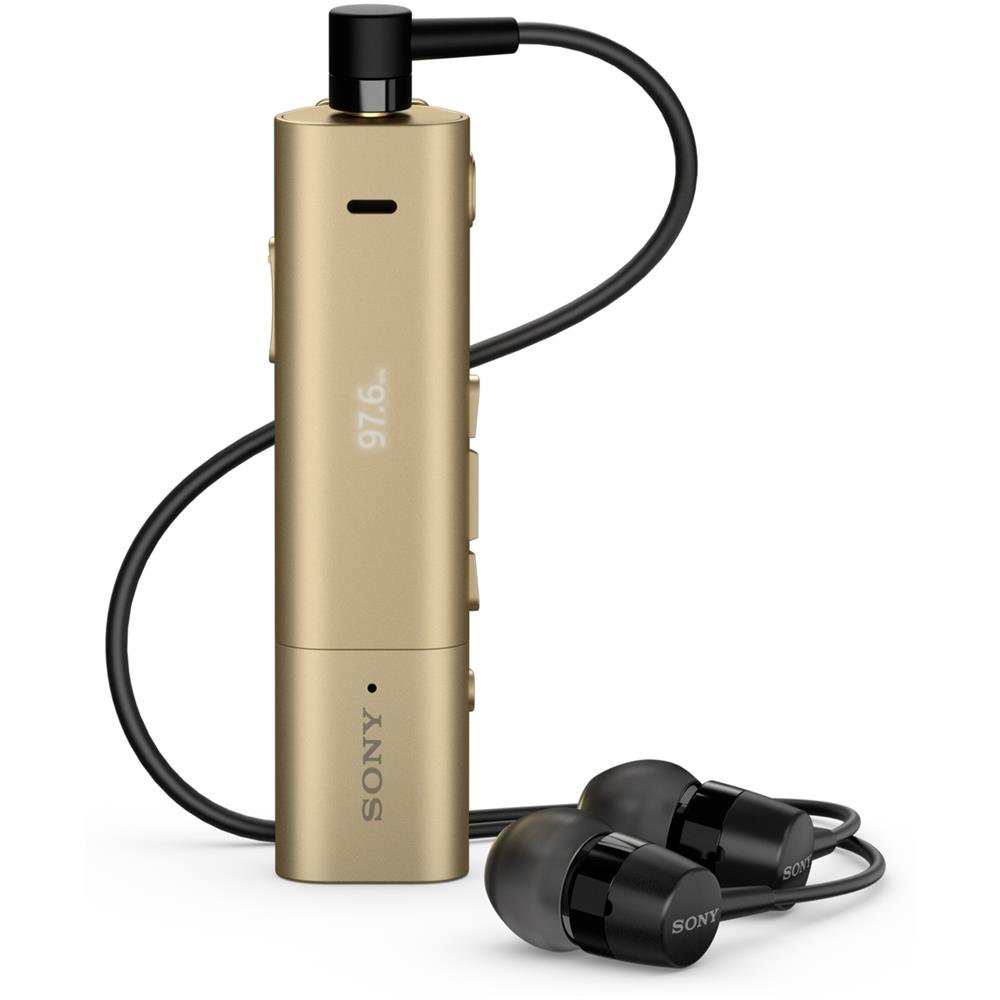
Image: Sony SBH54 Gold Stereo Bluetooth Headset. This image displays the compact, gold-colored headset with its integrated clip and display screen.
کنټرولونه او شاخصونه:
- OLED ښودنه: Shows caller ID, messages, music track information, and FM radio frequency.
- ملټي فنکشن بټن: For call answering/ending, play/pause music.
- د حجم تڼۍ: د غږ حجم تنظیم کړئ.
- د نیویګیشن تڼۍ: For menu navigation and track skipping.
- مایکروفون: Integrated for voice calls.
- د سر غوږ جیک: 3.5mm port for connecting the included premium headphones.
- د چارج کولو بندر: Micro USB port for charging the device.
3. ترتیب کول
۶.۲ د هیډسیټ چارج کول
- Connect the supplied USB cable to the headset's charging port and to a USB power adapter or a computer's USB port.
- په نندارتون کې د بیټرۍ شاخص به د چارج کولو حالت وښيي.
- د لومړي کارولو دمخه هیډسیټ په بشپړ ډول چارج کړئ.
3.2 Pairing with a Device (Bluetooth)
- ډاډ ترلاسه کړئ چې هیډسیټ چارج شوی او بند شوی دی.
- Press and hold the power button until the headset enters pairing mode (indicated by a specific light pattern or message on the display).
- په خپل سمارټ فون یا بل بلوتوث فعال شوي وسیله کې، بلوتوث فعال کړئ او د شته وسایلو لټون وکړئ.
- Select "SBH54" from the list of found devices.
- که غوښتنه وشي، نو پاس کوډ "0000" (څلور صفرونه) دننه کړئ.
- یوځل چې جوړه شي، هیډسیټ به د بریالي پیوستون نښه وي.
3.3 Pairing with a Device (NFC)
For devices with NFC (Near Field Communication):
- ډاډ ترلاسه کړئ چې ستاسو په سمارټ فون کې NFC فعال شوی او سکرین خلاص دی.
- Touch the NFC detection area of your smartphone to the NFC detection area on the SBH54 headset.
- د جوړه کولو پروسې بشپړولو لپاره هر ډول د پردې پرامپټس تعقیب کړئ.
۴. د هیډسیټ چلول
۸ پاور آن/بند
- د فعالولو لپاره: د بریښنا تڼۍ فشار ورکړئ او وساتئ تر هغه چې نندارتون روښانه شي.
- د بریښنا بندولو لپاره: د بریښنا تڼۍ فشار ورکړئ او ونیسئ تر هغه چې ښودنه بنده نشي.
4.2 تلیفونونه کول او ترلاسه کول
- د زنګ په ځواب کې: When a call comes in, press the multi-function button.
- د زنګ وهلو پای: During a call, press the multi-function button.
- د زنګ رد کول: Press and hold the multi-function button when a call comes in.
- تلیفون کول: Dial the number on your phone. The call will automatically route to the headset. You can also use voice commands if supported by your phone.
- د دستګاه فعالیت: The compact SBH54 can be used as an unobtrusive handset for calls.
- د شور لغوه کول: The headset features echo, wind, and noise cancellation for clear voice transmission.
- HD غږ: Enhances voice clarity for both parties during a call.
4.3 د میوزیک غږ
- پلی کول / ودرول: د څو فعالیت تڼۍ فشار ورکړئ.
- بله لار: Press the forward navigation button.
- مخکینی لار Press the backward navigation button.
- د حجم کنټرول: د حجم پورته/ښکته کولو تڼۍ وکاروئ.
4.4 ایف ایم راډیو
- د ایف ایم راډیو فعالول: Navigate through the headset menu to select the FM Radio function.
- د غږ سټیشنونه: Use the navigation buttons to scan or manually tune to FM frequencies.
- پری سیټونه خوندي کړئ: The headset may allow saving favorite stations (refer to on-screen prompts).
5. ساتنه
- پاکول: هیډسیټ په نرم او وچ ټوکر سره پاک کړئ. د سختو کیمیاوي موادو یا کثافاتو موادو کارولو څخه ډډه وکړئ.
- د اوبو مقاومت: The SBH54 has a splash-proof design. This means it can withstand light splashes of water but should not be submerged or exposed to heavy rain. Ensure the charging port cover is securely closed.
- ذخیره کول: هیډسیټ په یخ او وچ ځای کې د مستقیم لمر وړانګو او سختې تودوخې څخه لرې وساتئ.
- د بیټرۍ پاملرنه: د بیټرۍ د ژوند اوږدولو لپاره، د بیټرۍ په مکرر ډول په بشپړه توګه چارج کولو څخه ډډه وکړئ. په منظم ډول یې چارج کړئ.
6. ستونزه حل کول
عام مسایل او حل لارې:
- هیډسیټ نه فعالیږي: ډاډ ترلاسه کړئ چې بیټرۍ چارج شوې ده. د بریښنا سرچینې سره وصل شئ او بیا هڅه وکړئ.
- د وسیلې سره جوړه نشي کیدی:
- ډاډ ترلاسه کړئ چې هیډسیټ د جوړه کولو حالت کې دی.
- ډاډ ترلاسه کړئ چې ستاسو په وسیله بلوتوټ فعال شوی.
- هیډسیټ خپل وسیله ته نږدې کړئ.
- هیډسیټ او خپل وسیله دواړه بیا پیل کړئ.
- په خپل وسیله کې پخواني بلوتوث اړیکې پاکې کړئ او بیا جوړه کولو هڅه وکړئ.
- هیڅ غږ نشته یا د غږ کیفیت خراب دی:
- په هیډسیټ او ستاسو وصل شوي وسیله دواړو کې د حجم کچه وګورئ.
- Ensure the headset is within range of your device.
- د بلوتوټ اتصال منحل او بیا وصل کړئ.
- Ensure the headphones are properly plugged into the 3.5mm jack.
- ایف ایم راډیو کار نه کوي: Ensure you are in an area with good FM signal reception.
7. مشخصات
| فیچر | تفصیل |
|---|---|
| برانډ | سوني |
| د ماډل شمیره | SBH54GD |
| رنګ | سرو زرو |
| د غوږ ځای پرځای کول | په غوږ کې |
| د فارم فکتور | په غوږ کې |
| د شور کنټرول | د فعال شور لغوه کول |
| د توکي وزن | 0.1 کیلوګرامه |
| د آډیو ډرایور ډول | متحرک چلوونکی |
| د فریکونسی رینج | ۲۰ هرټز - ۲۰،۰۰۰ هرټز |
| د تړلو موادو | فلزي |
| مطابقت لرونکې وسیلې | Smartphones, Laptops, Tablets, Bluetooth-enabled Devices |
| د اوبو د مقاومت کچه | د اوبو مقاومت (د څاڅکو ضد) |
| د ارتباط ټیکنالوژي | بلوتوث، NFC |
| بې سیم ټیکنالوژي | بلوتوث، NFC |
| بلوتوث نسخه | 3.0 |
| د کنټرول ډول | د میډیا کنټرول |
| د کنټرول طریقه | لرې |
8. تضمین او ملاتړ
For warranty information and customer support, please refer to the documentation included with your purchase or visit the official Sony support webسایټ. د تضمین ځانګړي شرایط ممکن د سیمې او پرچون پلورونکي له مخې توپیر ولري.
آنلاین ملاتړ: www.sony.com/electronics/support