
PRORECK PARTY 15
PRORECK Party 15 Portable PA Speaker System
د کارن لارښود
Model: PARTY 15
پیژندنه
د پیرودلو لپاره مننهasing the PRORECK Party 15 Portable PA Speaker System. This system is designed to deliver powerful and clear audio for various applications, including parties, DJ events, home studios, and social gatherings. Featuring Bluetooth connectivity, USB/SD card playback, FM radio, and integrated LED lights, the Party 15 offers versatile audio solutions. Please read this manual thoroughly before operating the system to ensure proper use and to maximize its performance and longevity.
د خوندیتوب مهم معلومات
د دې محصول کارولو پرمهال تل د خوندیتوب لومړني احتیاطي تدابیر تعقیب کړئ ترڅو د اور، بریښنا شاک او ټپي کیدو خطر کم کړئ.
- دا تجهیزات باران یا رطوبت ته مه ښکاره کوئ.
- Do not open the speaker enclosure. There are no user-serviceable parts inside. Refer all servicing to qualified service personnel.
- د بریښنا رسولو حجم ډاډمن کړئtage د حجم سره سمون لريtage په واحد کې مشخص شوی.
- د بریښنا تار د چلولو یا پنچ کیدو څخه خوندي کړئ، په ځانګړې توګه په پلګونو، د اسانتیاو استخراج، او هغه ځای چې دوی د وسایلو څخه وځي.
- دا آله د بریښنا د طوفانونو په جریان کې یا کله چې د اوږدې مودې لپاره نه کارول کیږي خلاص کړئ.
- د هوا د بهېدو لارې مه بندوئ. د جوړونکي د لارښوونو سره سم نصب کړئ.
- یوازې د کارټ، سټینډ، ټریپوډ، بریکٹ یا میز سره چې د تولید کونکي لخوا مشخص شوي، یا د وسایلو سره پلورل کیږي.
په بکس کې څه دي
Carefully unpack your PRORECK Party 15 system and ensure all items listed below are present and in good condition. If any items are missing or damaged, please contact your retailer immediately.

Image: Complete PRORECK Party 15 system with all included accessories.
- ۱ x فعال سپیکر
- ۱ x غیر فعال سپیکر
- 2 x سپیکر ولاړ دی
- 1 x تار لرونکی مایکروفون
- 1 x Speakon Cable (for connecting active to passive speaker)
- 1 x د بریښنا کیبل
- 1 x ریموټ کنټرول

انځور: تفصیلي view of the wired microphone, remote control, and various cables.
چمتو کول
Follow these steps to set up your PRORECK Party 15 speaker system.
۱. د سپیکر سټینډ اسمبلۍ
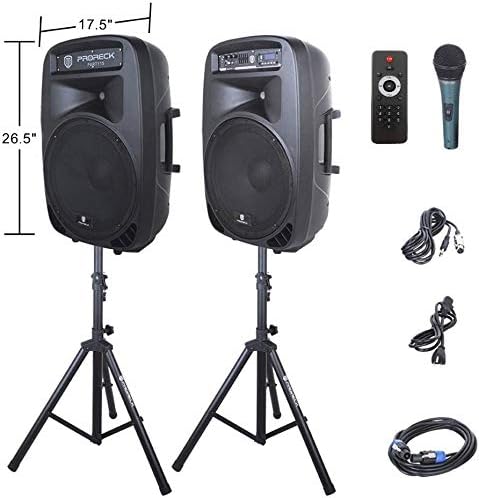
Image: The two included speaker stands.
- Unfold the tripod legs of each speaker stand until they are fully extended and stable.
- Loosen the height adjustment knob on the stand and extend the pole to your desired height. Ensure the safety pin is inserted through the appropriate hole to secure the height.
- د لوړوالی تنظیم کولو غوټۍ په کلکه ټینګ کړئ.
2. د سپیکر ځای پرځای کول
- Carefully lift each speaker and place it onto the top pole of a speaker stand. Ensure the speaker is securely seated.
- Position the active speaker (the one with the control panel) near a power outlet.
- Place the passive speaker within reach of the included Speakon cable from the active speaker.
Image: PRORECK Party 15 speakers set up on their stands.
۲. د سپیکرو نښلول
- Locate the Speakon output on the rear panel of the active speaker and the Speakon input on the rear panel of the passive speaker.
- Connect one end of the Speakon cable to the active speaker's Speakon output and the other end to the passive speaker's Speakon input. Ensure a secure connection.

Image: Rear panels of the active and passive speakers, highlighting the Speakon connection.
4. د بریښنا پیوستون
- Ensure the master volume knob on the active speaker is turned down to its minimum setting.
- Connect the power cable to the active speaker's power input and then plug it into a suitable electrical outlet.
عملیاتي لارښوونې
This section details how to operate your PRORECK Party 15 speaker system and utilize its various features.
د کنټرول پینل ختم شوview

انځور: تفصیلي view of the active speaker's control panel.
The active speaker features a comprehensive control panel with an LCD display, various input options, volume controls, and an equalizer.
1. بریښنا فعال/بند
- After connecting the power cable, locate the power switch on the rear panel of the active speaker.
- Flip the switch to the "ON" position to power on the system. The LCD display will illuminate.
- To power off, flip the switch to the "OFF" position.
2. حالت انتخاب
فشار ورکړئ موډ button on the control panel or remote control to cycle through available input modes: Bluetooth, USB, SD Card, FM Radio, and Line Input.
3. د بلوتوټ ارتباط
- Select "Bluetooth" mode using the موډ button. The LCD display will show "BLUE".
- په خپل بلوتوث فعال شوي وسیله (سمارټ فون، ټابلیټ، او نور) کې، د شته بلوتوث وسیلو لټون وکړئ.
- Select "PRORECK PARTY 15" from the list. Once paired, the speaker will emit a confirmation sound.
- تاسو اوس کولی شئ د سپیکرو له لارې له خپل وسیله څخه آډیو غږ کړئ.
۵. د USB/SD کارت پلے بیک
- Insert a USB drive or SD card containing MP3 audio files into the respective slot on the control panel.
- The system will automatically switch to USB or SD mode and begin playing the first compatible audio file. If not, press the موډ د سم ان پټ غوره کولو لپاره تڼۍ.
- د کارولو پلی/پاز, پخوانۍ، او بل buttons on the control panel or remote to manage playback.
5. ایف ایم راډیو
- Select "FM Radio" mode using the موډ تڼۍ
- فشار ورکړئ پلی/پاز button to initiate an automatic scan for available FM stations. The system will save detected stations.
- د کارولو پخوانۍ او بل د خوندي شوي سټیشنونو له لارې د تګ راتګ لپاره تڼۍ.
6. د مایکروفون کارول
- Connect the wired microphone to the 1/4'' MIC input on the control panel.
- Adjust the "MIC VOL" knob to control the microphone's volume level.
- Ensure the main volume is set appropriately to avoid feedback.
7. د ریموټ کنټرول افعالونه
Image: The included remote control.
The remote control allows for convenient operation from a distance (up to 20 feet). Functions include:
- لارښوونه: Switch between input modes.
- پلی/پاز: د آډیو غږول پلی کړئ یا یې ودروئ.
- مخکینی/راتلونکی: ټریکونه پریږدئ یا د ایف ایم سټیشنونو ته لاړ شئ.
- VOL+/VOL-: د ماسټر حجم تنظیم کړئ.
- EQ: Cycle through equalizer presets.
- Numeric buttons for direct track selection (in USB/SD mode).
۴.۶. د برابرونکي سمون
The control panel features a 5-band graphic equalizer. Adjust the sliders to fine-tune the audio output to your preference. Experiment with different settings to achieve the desired sound for various music genres or vocal performances.
9. د LED څراغونه

Image: PRORECK Party 15 speakers demonstrating various LED light colors.
The PRORECK Party 15 speakers are equipped with built-in LED lights that activate with sound. These lights enhance the party atmosphere. There is a dedicated switch on the rear of the active speaker to turn the LED lights on or off.
ساتنه
Proper maintenance ensures the longevity and optimal performance of your speaker system.
- پاکول: Use a soft, dry cloth to clean the exterior of the speakers. Do not use abrasive cleaners, waxes, or solvents.
- ذخیره کول: کله چې د اوږدې مودې لپاره نه کارول کیږي، سپیکرې په یخ او وچ ځای کې وساتئ، د مستقیم لمر وړانګو او سختې تودوخې څخه لرې.
- وینټیلیشن: ډاډ ترلاسه کړئ چې د هوا د تویېدو د مخنیوي لپاره د هوا د تویېدو دروازې له دوړو او کثافاتو څخه پاکې دي.
- کیبلونه: په منظم ډول ټول کیبلونه د خرابیدو یا خرابیدو نښو لپاره وګورئ. هر ډول زیانمن شوي کیبلونه سمدلاسه بدل کړئ.
د ستونزو حل کول
If you encounter issues with your PRORECK Party 15 system, refer to the following common problems and solutions.
| ستونزه | احتمالي لامل | د حل لاره |
|---|---|---|
| هیڅ ځواک نشته | د برېښنا کیبل نه دی وصل شوی؛ د برېښنا سویچ بند دی؛ د ساکټ خرابوالی. | Ensure power cable is securely connected and plugged into a working outlet. Check power switch on rear panel. |
| د سپیکرو څخه هیڅ غږ نشته | Volume too low; Incorrect input mode; Speakon cable loose/damaged; Audio source issue. | Increase master volume. Select correct input mode. Check Speakon cable connection between active and passive speakers. Verify audio source is playing. |
| بلوتوټ نه جوړیږي | سپیکر په بلوتوث حالت کې نه دی؛ وسیله ډیره لرې ده؛ وسیله لا دمخه د بل سپیکر سره جوړه شوې ده. | Ensure speaker is in Bluetooth mode ("BLUE" on display). Move device closer to speaker. Disconnect device from other Bluetooth connections. |
| مایکروفون کار نه کوي | Mic volume too low; Microphone not connected properly; Microphone faulty. | Increase "MIC VOL" knob. Ensure microphone is fully inserted into the 1/4'' input. Test with another microphone if available. |
| تحریف شوی غږ | Volume too high; Input signal too strong; Equalizer settings. | Reduce master volume or input source volume. Adjust equalizer settings. |
| د LED څراغونه کار نه کوي | LED switch off; Volume too low for activation. | Ensure the LED switch on the rear panel is in the "ON" position. Increase volume to activate sound-reactive lights. |
مشخصات
| د ماډل نوم | ګوند 15 |
| د سپیکر ډول | ووفر |
| د سپیکر اندازه | ۷۸۷ انچه |
| د سپیکر اعظمي تولید ځواک | 2000 Watts P.M.P.O (Peak Music Power Output) |
| د ارتباط ټیکنالوژي | تار لرونکی، بېسیم (بلوتوث) |
| د بې سیمه مخابراتو ټیکنالوژي | بلوتوث |
| د بلوتوټ رینج | ۱۰ متره (تقریبا ۳۳ فوټه) |
| ځانګړي ځانګړتیاوې | LED Light, FM Radio, USB Port, SD Card Reader, Digital LCD Display |
| داخلونه | 1/4'' Mic, RCA Line Inputs, USB, SD Card |
| محصولات | Speakon Output (for passive speaker), RCA Line Output |
| مواد | اکریلونایتریل بوټاډین سټیرین (ABS) |
| د محصول ابعاد (هر سپیکر) | 19"D x 30"W x 29"H (approximate, likely including handles/feet) |
| د توکي وزن (ټول) | 81.6 پونډه |
| د بریښنا سرچینه | د بریښنا تار شوی |
تضمین او ملاتړ
PRORECK products come with a limited warranty. For specific warranty terms and conditions, please refer to the warranty card included with your product or visit the official PRORECK website. For technical support, troubleshooting assistance, or parts inquiries, please contact PRORECK customer service through their official channels.
Manufacturer: PRORECK AUDIO
Ask a question about this manual
Ask about setup, troubleshooting, compatibility, parts, safety, or missing instructions. Manuals+ will review the question and use this page’s manual context to help answer it.