
MUSE M-1350 BTC
MUSE M-1350 BTC Portable Bluetooth Speaker
د کارن لارښود
پیژندنه
Thank you for choosing the MUSE M-1350 BTC Portable Bluetooth Speaker. This manual provides essential information for the safe and efficient operation of your device. Please read it thoroughly before use and retain it for future reference.
The MUSE M-1350 BTC is a versatile audio system featuring Bluetooth A2DP, MP3 CD player, FM PLL tuner, USB port with charging capability, and dual auxiliary inputs. It boasts a robust wooden casing and stands approximately 100cm tall, delivering 120W of power.

مخکی view of the MUSE M-1350 BTC Portable Bluetooth Speaker.
د خوندیتوب معلومات
- د اور یا بریښنا شاک څخه د مخنیوي لپاره واحد باران یا رطوبت ته مه ښکاره کوئ.
- د هوا مناسبه هوا ورکول ډاډمن کړئ. د هوا د بهېدو هیڅ لاره مه بندوئ.
- واحد په مستحکم، فلیټ سطح کې ځای په ځای کړئ.
- یوازې د جوړونکي لخوا مشخص شوي ضمیمې / لوازم وکاروئ.
- د برښنا د طوفان په وخت کې یا کله چې د اوږدې مودې لپاره نه کارول کیږي یونټ خلاص کړئ.
- ټول خدمتونه وړ خدمت پرسونل ته راجع کړئ.
د محصول ځانګړتیاوې او اجزا
The MUSE M-1350 BTC is designed with user convenience and high-quality audio in mind. Key features include:
- Bluetooth A2DP for wireless audio streaming.
- CD/MP3 player.
- PLL FM Tuner with 30 presets.
- USB port for MP3 playback and device charging.
- Two auxiliary input jacks.
- Integrated subwoofer for strong bass.
- Adjustable Bass & Treble, Loudness control.
- Alarm and Sleep functions.
- NFC for easy Bluetooth pairing.

Key features of the MUSE M-1350 BTC, highlighting Bluetooth connectivity, real wood casing, strong bass, and FM radio.

تفصيلي view of the top panel showing the integrated smartphone/tablet dock and CD player, alongside a note about the integrated subwoofer.
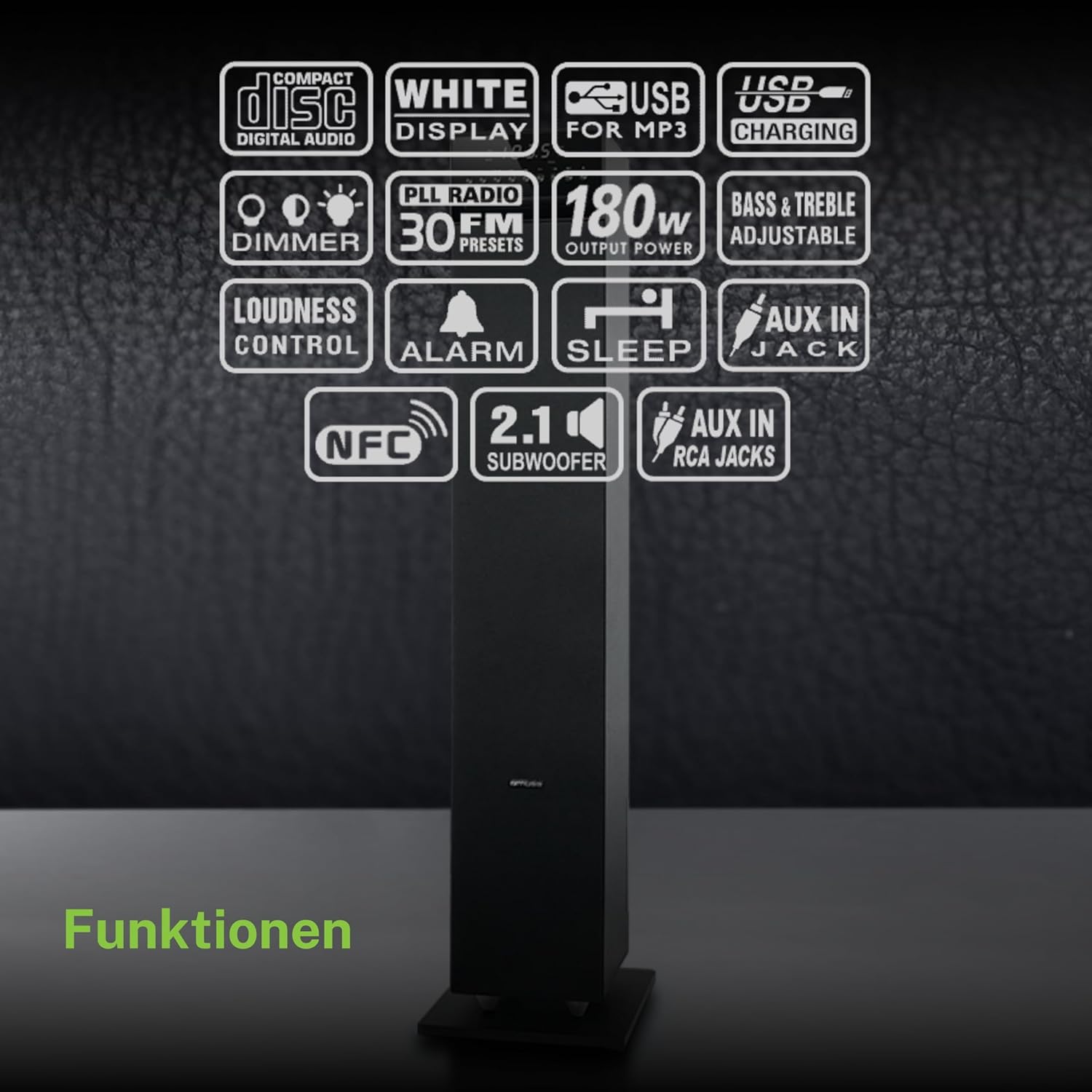
یو اوورview of the various functions and connectivity options available on the MUSE M-1350 BTC, including CD playback, USB, Bluetooth, FM radio, and audio adjustments.
چمتو کول
1. خلاصول
Carefully remove the speaker from its packaging. Check for any signs of damage during transit. Retain the packaging for future transport or storage.
2. ځای پرځای کول
Place the speaker on a firm, level surface. For optimal sound performance, position it in a location free from obstructions and away from direct heat sources or excessive moisture.

The MUSE M-1350 BTC speaker positioned in a living room environment, demonstrating its sleek design.
3. د بریښنا پیوستون
Connect the power cord to the AC inlet on the rear of the speaker, then plug the other end into a suitable wall outlet (AC 230V ~ 50Hz).
4. د بهرنیو وسایلو نښلول
- بلوتوث: Ensure Bluetooth is enabled on your device. The speaker will automatically enter pairing mode when Bluetooth is selected.
- AUX داخلول: Use a 3.5mm audio cable to connect external audio devices (e.g., MP3 players, smartphones) to the AUX IN jack.
- USB: د MP3 پلې بیک لپاره په USB پورټ کې د USB فلش ډرایو دننه کړئ.
عملیاتي لارښوونې
1. بریښنا فعال/بند
Press the POWER button on the top panel or remote control to turn the unit on or off.
2. حالت انتخاب
Press the MODE button repeatedly to cycle through available modes: CD, Bluetooth, FM Radio, USB, AUX.
3. د بلوتوث جوړه کول
- Select Bluetooth mode on the speaker. The display will show "BT" and flash, indicating pairing mode.
- On your Bluetooth device, search for "MUSE M-1350 BTC" in the Bluetooth settings.
- Select the speaker to pair. Once connected, the display will stop flashing.
4. CD پلے بیک
- د سي ډي حالت غوره کړئ.
- Insert a CD into the CD slot. The unit will automatically begin playback.
- Use the PLAY/PAUSE, SKIP, and STOP buttons for control.
۵. د ایف ایم راډیو ټونینګ
- د FM حالت غوره کړئ.
- Press and hold the SCAN button to automatically scan and store available stations.
- Use the PRESET buttons to navigate through stored stations.
6. USB پلی بیک
- یو USB فلش ډرایو داخل کړئ چې MP3 ولري fileد USB پورټ ته ننوځي.
- Select USB mode. Playback will begin automatically.
- Use the PLAY/PAUSE, SKIP, and STOP buttons for control.
7. د AUX داخل
Connect your external audio device to the AUX IN jack. Select AUX mode on the speaker. Audio will be played through the speaker.
8. د آډیو سمون
- حجم: Use the VOLUME knob or +/- buttons on the remote.
- باس / ټریبل: Adjust bass and treble levels using the dedicated controls on the remote or top panel.
- لوړ غږ: Activate the Loudness function for enhanced bass and treble at low volumes.
ساتنه
پاکول
Wipe the unit with a soft, dry cloth. Do not use abrasive cleaners, waxes, or solvents. For stubborn stains, a slightly damp ټوکر کارول کیدی شي، او وروسته وچ ټوکر.
ذخیره کول
که چیرې دا واحد د اوږدې مودې لپاره ونه کارول شي، نو د بریښنا له سایټ څخه یې خلاص کړئ او په یخ، وچ ځای کې یې وساتئ، د مستقیم لمر وړانګو او سختې تودوخې څخه لرې.
د ستونزو حل کول
| ستونزه | احتمالي لامل | د حل لاره |
|---|---|---|
| هیڅ ځواک نشته | د برېښنا تار نه دی وصل شوی؛ د برېښنا رسۍ خرابه ده | ډاډ ترلاسه کړئ چې د بریښنا تار په خوندي ډول ولګول شوی دی؛ یو بل ساکټ هڅه وکړئ |
| غږ نشته | Volume too low; Incorrect input mode selected; Device not connected properly | Increase volume; Select correct input mode (Bluetooth, CD, AUX, USB); Reconnect device |
| بلوتوث جوړه ناکامه ده | Speaker not in pairing mode; Device too far; Bluetooth not enabled on source device | Ensure speaker is in Bluetooth mode and flashing; Move device closer; Enable Bluetooth on your device |
| سي ډي نه غږېږي | CD inserted incorrectly; CD is scratched/dirty; Incorrect mode | Reinsert CD correctly; Clean or replace CD; Select CD mode |
| د FM ضعیف استقبال | انتن نه دی غځول شوی؛ د سیګنال کمزورې ساحه | Fully extend the FM antenna; Reposition the speaker for better reception |
مشخصات
| فیچر | تفصیل |
|---|---|
| د ماډل نوم | M-1350 BTC |
| برانډ | میوز |
| د سپیکر ډول | ټاور |
| د ارتباط ټیکنالوژي | بلوتوث، USB |
| د سپیکر اعظمي تولید ځواک | 120 واټ |
| د آډیو وتلې حالت | سټیریو |
| شاوخوا د غږ چینل ترتیب کول | 2.1 |
| مواد | لرګي |
| رنګ | تور |
| د محصول ابعاد (DxWxH) | 23.1 x 25.7 x 100.6 سانتي متره |
| د توکي وزن | 9.25 کیلوګرامه |
| ټول USB پورټونه | 1 |
| مطابقت لرونکې وسیلې | MP3 players, laptops, tablets, televisions, smartphones |
| وړاندیز شوي استعمالونه | د سمارټ فون یا ټابلیټ لپاره |

Technical drawing illustrating the precise dimensions of the MUSE M-1350 BTC speaker in millimeters.
تضمین او ملاتړ
دا محصول د پیرود نیټې څخه د جوړونکي لخوا د 1 کال تضمین سره راځي. مهرباني وکړئ د تضمین ادعاوو لپاره د پیرود ثبوت وساتئ.
For technical support or service inquiries, please contact your retailer or the official MUSE customer service. Contact information can typically be found on the manufacturer's webسایټ یا د محصول بسته بندي.
Ask a question about this manual
Ask about setup, troubleshooting, compatibility, parts, safety, or missing instructions. Manuals+ will review the question and use this page’s manual context to help answer it.