
پیژندنه
This manual provides comprehensive instructions for the setup, operation, and maintenance of your Zelotes T90 Professional 9200 DPI High Precision USB Wired Gaming Mouse. Please read this manual thoroughly before using the product to ensure optimal performance and longevity.

Figure 1: Zelotes T90 Professional Gaming Mouse, showcasing its ergonomic design and LED lighting.
د بسته محتويات
- 1 x Zelotes T90 Gaming Mouse
- ۱ x لارښود لارښود (دا سند)
چمتو کول
د سیسټم اړتیاوې
- Operating System: Windows 98/ 2000/ ME/ NT / XP/ win 7/ win 8/ win 10/ Mac OS and other OS
- انٹرفیس: USB پورټ
نصب کول
- موږک خلاص کړئ: Carefully remove the Zelotes T90 Gaming Mouse from its packaging.
- محافظتي فلم لرې کړئ: Before use, please remove the foot pad protective film located on the underside of the mouse.
- کمپیوټر سره وصل کړئ: Plug the USB connector of the mouse into an available USB port on your computer. The mouse is plug-and-play and does not require additional driver installation for basic functionality.
عملیاتي لارښوونې
د تڼۍ دندې
The Zelotes T90 mouse features 8 programmable buttons designed for enhanced gaming and productivity.
- بائیں کلیک تڼۍ
- ښي تڼۍ کلیک وکړئ
- Middle Button / Scroll Wheel
- د وړاندې کولو تڼۍ: Quick forward function when browsing the web or navigating folders.
- شاته تڼۍ: Quick backward function when browsing the web or navigating folders.
- د DPI تڼۍ: د موږک حساسیت (DPI) تنظیموي.
- د اور کلی: Configurable for rapid actions.
- د رڼا حالت بدلول: د LED رڼا اغیزې کنټرولوي.
د DPI تنظیم کول (حساسیت)
The mouse supports 6-speed DPI adjustment, allowing you to customize sensitivity for different tasks or games. Press the د DPI تڼۍ to cycle through the following settings:
- 1000 DPI: Indicated by red light flashing 3 times.
- 1600 DPI: Indicated by orange light.
- 2400 DPI: Indicated by green light.
- 3200 DPI: Indicated by light blue light.
- 5500 DPI: Indicated by blue light.
- 9200 DPI: Indicated by purple light.

Figure 2: Location of DPI and Fire Key buttons on the Zelotes T90 mouse.
Fire Key Function
- لنډ مطبوعات: Performs a double click.
- اوږد فشار (له 2 ثانیو څخه ډیر): Switches to triple click mode. The light will flash 3 times to confirm the successful switch.
د ر Lightا حالت بدلول
The Zelotes T90 features various LED lighting modes:
- لنډ مطبوعات: Cycles through 7-color breathing, 6 single-color breathing, and 6 single-color constant light modes (13 modes total).
- اوږد فشار (له 2 ثانیو څخه ډیر): Turns off the LED lights.

Figure 3: The Zelotes T90 mouse showcasing its 7-color cycle breathing and single-color lighting options.
د وزن مینځلو سیستم
The mouse includes 8 removable 2.5-gram weights, allowing you to customize the mouse's weight and balance for improved stability and control, especially during fast movements.
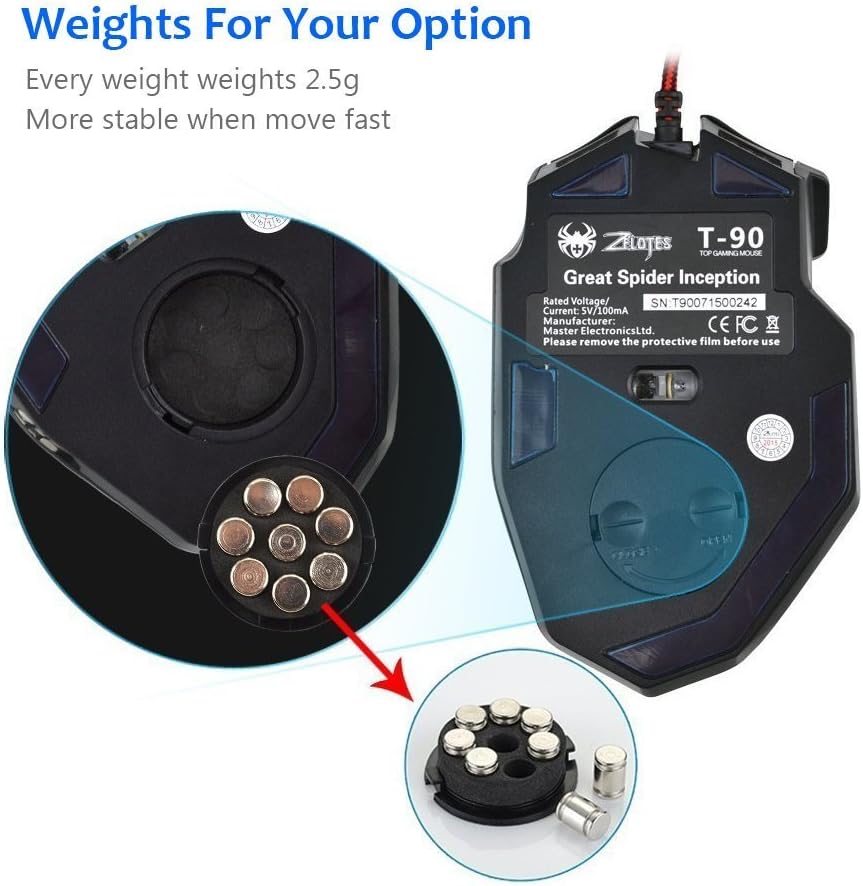
Figure 4: Location of the weight tuning system on the underside of the Zelotes T90 mouse.
ساتنه
پاکول
- د موږک سطح پاکولو لپاره نرم، وچ ټوکر وکاروئ.
- د سختې خاورې لپاره، لږ څهampټوکر د اوبو یا نرم پاکولو محلول سره ومینځئ. د سختو کیمیاوي موادو څخه ډډه وکړئ.
- موږک په اوبو یا کوم مایع کې مه ډوبوئ.
ذخیره کول
موږک په یخ او وچ ځای کې د مستقیم لمر وړانګو او سختې تودوخې څخه لرې وساتئ کله چې د اوږدې مودې لپاره نه کارول کیږي.
د ستونزو حل کول
| ستونزه | احتمالي لامل | د حل لاره |
|---|---|---|
| موږک ځواب نه ورکوي | د USB اتصال خراب دی، د USB پورټ نیمګړتیا، د سیسټم تېروتنه. | Ensure the USB cable is securely plugged into the computer. Try a different USB port. Restart your computer. |
| د LED څراغونه کار نه کوي | Lights turned off, software issue. | Short press the Light Mode Switch button to cycle through modes. Long press the Light Mode Switch button for more than 2 seconds to turn lights on if they were off. |
| د DPI ترتیب نه بدلیږي | د DPI تڼۍ په سمه توګه نه ده فشار شوې. | Ensure you are pressing the dedicated DPI button. Observe the light flashes to confirm DPI changes. |
| د موږک کرسر بې ثباته یا ګډوډ | ناپاک نظري سینسر، د موږک پیډ نامناسب سطح. | Clean the optical sensor on the underside of the mouse. Use a clean, uniform mouse pad surface. |
| Mouse settings reset | Accidental factory reset. | Press the left and right buttons simultaneously for more than 2 seconds to restore factory settings. If settings are reset, reconfigure them as desired. |
مشخصات
| ماډل | T90 |
| ابعاد (LxWxH) | 130mm x 81mm x 40mm (5.12 x 3.19 x 1.57 انچه) |
| وزن | 145g ± 5g (excluding cable) |
| د وزن ضد | 8 x 2.5 Gram tuning weights |
| د DPI تنظیمات | 1000/1600/2400/3200/5500/9200 DPI |
| FPS | 6666 |
| سرعت | 23G |
| د رای ورکولو کچه | 500Hz |
| ژوند بدل کړئ | 800 میلیونه ځله |
| تڼۍ | 8 |
| د USB کیبل اوږدوالی | 1.8M braided-fiber cable |
| انٹرفیس | USB |
| د آپټیکل ډول | Red wave |
| مطابقت | Windows 98/ 2000/ ME/ NT / XP/ win 7/ win 8/ win 10/ Mac OS and other OS |
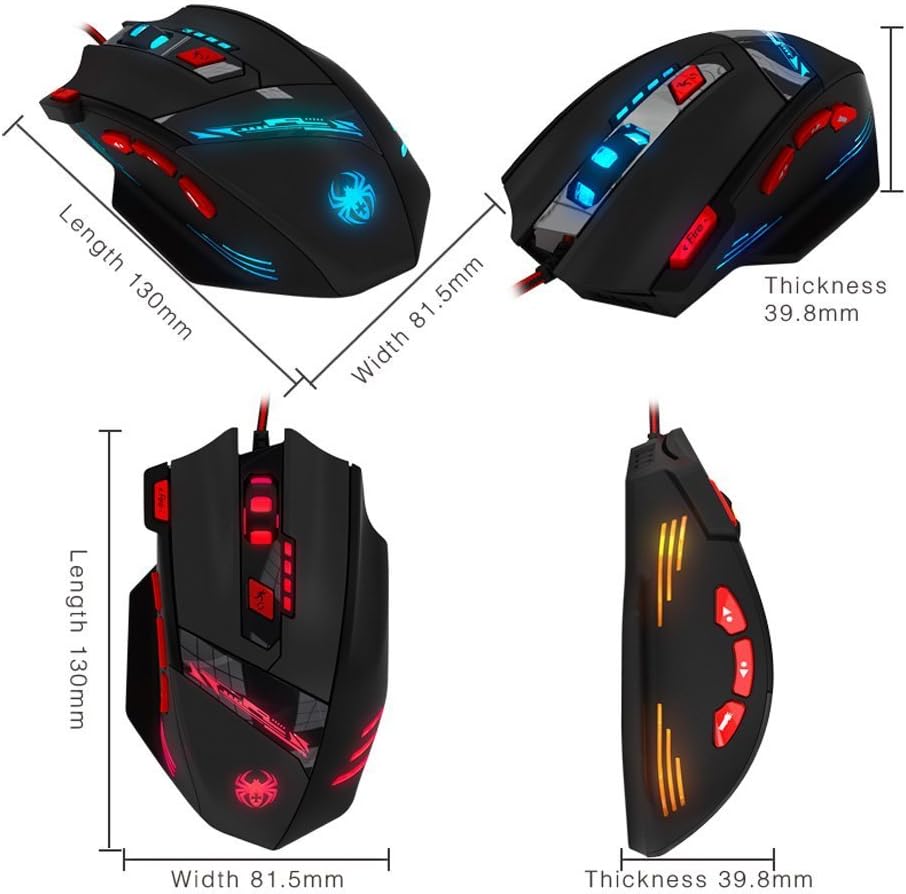
Figure 5: Detailed dimensions of the Zelotes T90 Professional Gaming Mouse.
ارګونومیک ډیزاین
The Zelotes T90 mouse is designed with ergonomics in mind, providing a comfortable fit for both fingertip and claw-style grips. This design aims to reduce fatigue during long periods of use.

Figure 6: Ergonomic design of the Zelotes T90 mouse, showing a comfortable hand grip.
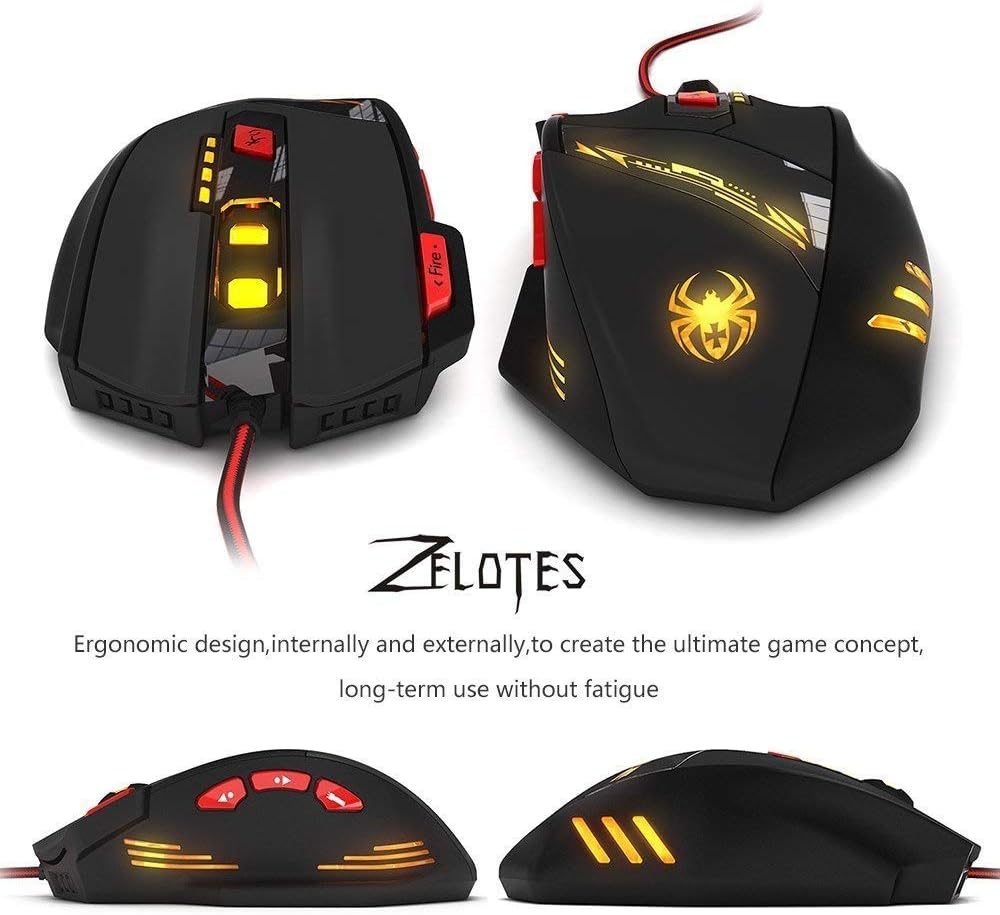
شکل 7: مختلف views highlighting the ergonomic contours of the Zelotes T90 mouse.
مهم یادښتونه
- Always remove the foot pad protective film before using the mouse.
- To restore the mouse to factory settings, press and hold the left and right mouse buttons simultaneously for more than 2 seconds.