
1. پیژندنه
This manual provides essential instructions for the installation, operation, maintenance, and troubleshooting of the APC Smart-UPS SRT3000RMXLT 3kVA 208V Rackmount Uninterruptible Power Supply (UPS). Please read this manual thoroughly before installing or operating the equipment to ensure proper usage and safety.
2. د خوندیتوب معلومات
په دې لارښود کې ټول اخطارونه او عملیاتي لارښوونې په پام کې ونیسئ. د دې کولو کې پاتې راتلل ممکن د ټپي کیدو یا تجهیزاتو زیان لامل شي.
- بریښنایی خوندیتوب: دا واحد د خطرناک حجم لريtages. Do not attempt to disassemble the UPS. Servicing should only be performed by qualified personnel.
- د بیټرۍ خوندیتوب: بیټرۍ کولی شي د بریښنا شاک او د لوړ شارټ سرکټ جریان خطر رامینځته کړي. د بیټرۍ سره د لاس وهلو دمخه ساعتونه، حلقې، یا نور فلزي شیان لرې کړئ. د موصل شوي لاستي سره وسایل وکاروئ.
- وزن: The UPS is heavy. Use proper lifting techniques and ensure adequate support during installation.
- چاپیریال: Install the UPS indoors in a controlled environment, free from excessive dust, moisture, and extreme temperatures.
3. د بسته محتويات
Carefully unpack the UPS and inspect for shipping damage. The package should contain the following items:
- APC Smart-UPS SRT3000RMXLT Unit
- Power Supply (Built-In)
- د ریک کښته کولو هارډویر
- د اسنادو CD
- USB کیبل
- سیریل کیبل
4. ترتیب کول
4.1 فزیکي نصب کول
The SRT3000RMXLT is designed for rack installation. Ensure the rack is stable and capable of supporting the UPS weight (approximately 69 pounds).
- Mount the UPS into a standard 19-inch rack using the provided rack-mounting hardware.
- د واحد شاوخوا د هوا مناسب جریان ډاډمن کړئ. د هوا د جریان لارې مه بندوئ.

شکل 4.1: مخکی view of the APC Smart-UPS SRT3000RMXLT. This image shows the front panel with the display and ventilation grille.
۳.۳ د UPS نښلول
Connect the UPS to the utility power and your equipment.
- Connect the UPS input power cord to a dedicated 208V AC outlet. The UPS uses a Type B - 3 pin (North American) power plug.
- Connect your equipment to the output receptacles on the rear of the UPS. The unit provides 12 IEC 320 C13/C14 outlets.
- For communication, connect the USB cable or serial cable from the UPS to your computer or network management card.
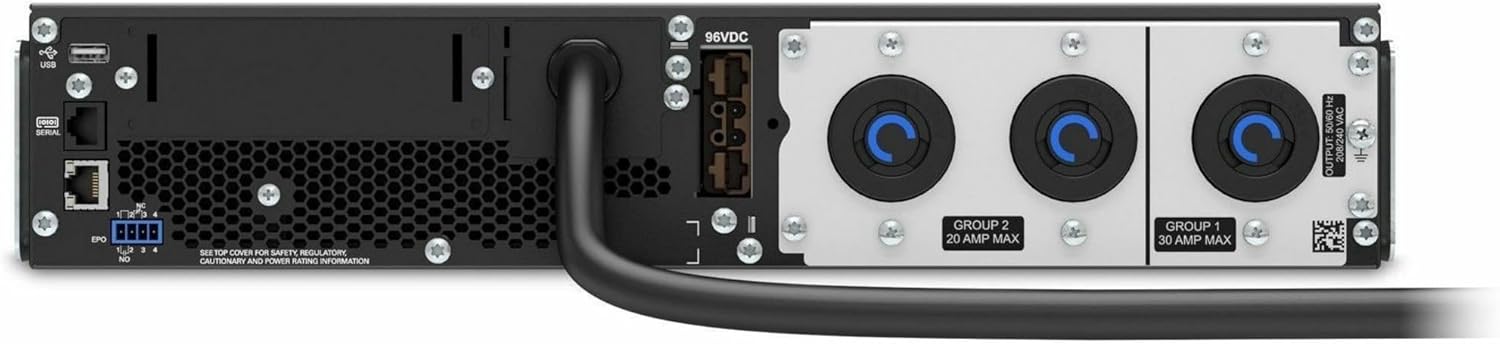
شکل 4.2: شاته view of the APC Smart-UPS SRT3000RMXLT. This image displays the various input and output ports, including USB, serial, EPO, and the 12 output receptacles, along with the main power input.
۵.۱ لومړنی پاور اپ
وروسته له دې چې ټولې اړیکې خوندي شي:
- د UPS د فعالولو لپاره په مخکینۍ پینل کې د بریښنا تڼۍ فشار ورکړئ.
- The UPS will perform a self-test and the display will show the current status.
- Allow the batteries to charge for at least 6 hours before relying on them for extended backup time.
5. د UPS چلول
۵.۱ د مخکینۍ پینل ښودنه او کنټرولونه
The front panel features an LCD display and control buttons for monitoring and configuring the UPS.
- د LCD نندارې: Shows real-time status, load, battery charge, input/output voltage, and event logs.
- د ESC تڼۍ: Exits the current menu or cancels an operation.
- د OK تtonۍ: یو انتخاب تاییدوي یا مینو ته ننوځي.
- پورته/ښکته تیرونه: Navigate through menu options or adjust settings.
5.2 بنسټیز عملیات
- چالان کول: د بریښنا تڼۍ فشار ورکړئ او ونیسئ تر هغه چې ښودنه روښانه شي.
- بندول: Press and hold the power button until the UPS powers down. Ensure all connected equipment is safely shut down first.
- د بیټرۍ حالت: د ځواک په حالت کې outage, the UPS will automatically switch to battery power. The display will indicate 'On Battery'.
- د ځان ازموینه: Initiate a manual self-test through the front panel menu to verify battery and UPS functionality.
6. ساتنه
6.1 د بیټرۍ بدلول
The UPS uses sealed lead-acid batteries. Battery life is typically 3-5 years, depending on environmental conditions and usage. Replace batteries when the UPS indicates a 'Battery Fault' or 'Replace Battery' warning.
- Contact APC support or a certified service technician for battery replacement.
- Always use genuine APC replacement battery cartridges (RBCs) to ensure compatibility and optimal performance.
- زړې بیټرۍ په مسؤلیت سره بیا وکاروئ.
6.2 پاکول
Keep the UPS free from dust and debris to ensure proper ventilation.
- Use a soft, dry cloth to clean the exterior of the UPS.
- مایع پاکوونکي یا محلول مه کاروئ.
- ډاډ ترلاسه کړئ چې د وینټیلیشن خلاصونه له خنډونو څخه پاک دي.
7. ستونزه حل کول
دا برخه د عامو ستونزو لپاره حلونه وړاندې کوي. د ډیرو پیچلو ستونزو لپاره، د تخنیکي ملاتړ سره اړیکه ونیسئ.
| ستونزه | احتمالي لامل | د حل لاره |
|---|---|---|
| UPS نه چالانېږي | No input power; Battery disconnected or discharged | Check power cord connection; Ensure utility power is present; Allow batteries to charge. |
| UPS په دوامداره توګه غږ کوي | د بیټرۍ په بریښنا کې؛ د ډیر بار حالت | Check utility power; Reduce connected load. |
| 'Replace Battery' indicator | بیټرۍ د ژوند پای ته نږدې کیږي | Order and replace the battery cartridge. |
| UPS not providing power to outlets | Output circuit breaker tripped; UPS in fault mode | Reset circuit breaker; Check display for fault codes and consult manual. |
8. مشخصات
Key technical specifications for the APC Smart-UPS SRT3000RMXLT.
| فیچر | مشخصات |
|---|---|
| د ماډل شمیره | SRT3000RMXLT |
| برانډ | APC |
| د تولید بریښنا ظرفیت | 3000 VA / 2700 واټ |
| د نامتو محصول Voltage | 208V AC |
| د نوم لیکنې حجمtage | 208V AC / 230V AC |
| د ننوتلو فریکونسی | 60 Hz |
| د محصول نښلول | 12 x IEC 320 C13/C14 |
| د بیټرۍ ډول | لیډ اسید |
| د عادي ریچارج وخت | 6 ساعته |
| Typical Backup Time (Full Load) | 4 دقيقو |
| د فارم فکتور | ریک |
| ابعاد (H x W x D) | 9 x 23 x 34 انچه |
| وزن | 69 پونډه |
| د عملیاتي حرارت درجه | ۵۰ - ۲۰۰ درجو سانتي ګراد (۱۲۲ - ۳۹۲ درجو فارنهایټ) |
9. تضمین او ملاتړ
9.1 د تضمین معلومات
APC provides a standard warranty for this product. Please refer to the warranty card included with your product or visit the official APC webستاسو د سیمې لپاره ځانګړي د تضمین تفصيلي شرایطو او شرایطو لپاره سایټ.
9.2 تخنیکي ملاتړ
For technical assistance, product information, or troubleshooting beyond the scope of this manual, please contact APC customer support. Have your model number (SRT3000RMXLT) and serial number ready when contacting support.
- رسمي APC ته مراجعه وکړئ webد ملاتړ سرچینو، FAQs، او د اړیکو معلوماتو لپاره سایټ.
- Online resources often include updated manuals, firmware, and diagnostic tools.