
پیژندنه
This manual provides detailed instructions for the setup, operation, and maintenance of your A4tech Bloody Light Strike B314 Gaming Keyboard. Please read this manual thoroughly before using the product to ensure optimal performance and longevity.
کلیدي ځانګړتیاوې
- Bloody 4 Light Strike Mechanical Switches: Experience ultra-fast response times of 0.2ms with infrared optic switches, providing a competitive edge in gaming.
- د دوامدارۍ وده: Designed for intensive use, featuring A,S,D,W silicon keys with a convex shape for improved control and longevity.
- Neon Glare System LED Backlighting: Customize your gaming environment with vibrant LED backlighting, making keys easy to locate in low-light conditions.
- ۷ د پروګرام وړ کیلي: Personalize your gaming experience by assigning custom functions to 9 individually programmable keys.
- Double Secure Water-Resistance: The keyboard is electronically sealed with a water drain hole, protecting it from accidental spills and extending its lifespan.
د بسته محتويات
ډاډ ترلاسه کړئ چې ټول توکي په کڅوړه کې شتون لري:
- Bloody Light Strike B314 Gaming Keyboard
- د کارونکي لارښود (دا لاسوند)

Image: The retail packaging for the Bloody Light Strike B314 Gaming Keyboard, showing the keyboard with LED backlighting and key features highlighted.
د تنظیم کولو لارښود
- کیبورډ وصل کړئ: د کیبورډ USB نښلونکی په خپل کمپیوټر کې موجود USB پورټ کې ولګوئ.
- د ډرایور نصب کول: The keyboard is typically plug-and-play. Your operating system should automatically detect and install the necessary drivers. If prompted, follow the on-screen instructions.
- د سافټویر نصب کول (اختیاري): For advanced customization, including programming keys and managing backlighting, download and install the official Bloody software from the A4tech webسایټ
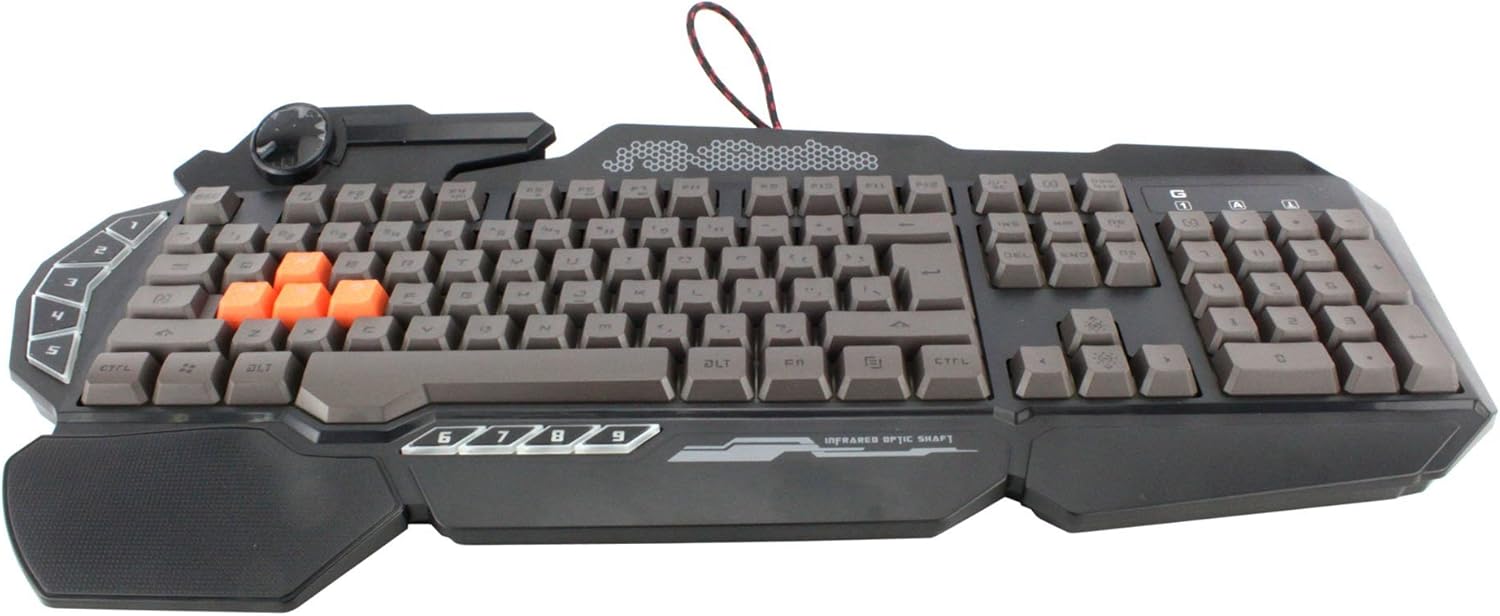
انځور: له پورته څخه ښکته view of the Bloody Light Strike B314 Gaming Keyboard, showcasing the full QWERTY layout with orange WASD keys and dedicated macro keys on the left.
عملیاتي لارښوونې
بنسټیز کارول
The Bloody B314 functions as a standard QWERTY keyboard for everyday typing and gaming. Its infrared mechanical switches provide a fast and responsive typing experience.
د پروګرام وړ کیلي
The keyboard features 9 programmable keys, typically located on the left side. To customize these keys:
- Install the official Bloody software from the A4tech webسایټ
- Launch the software and navigate to the key customization section.
- Select the desired programmable key (e.g., G1-G9 or similar).
- Assign macros, key functions, or multimedia controls as needed.
- خپل مسلکي خوندي کړئfile د بدلونونو پلي کولو لپاره.
LED Backlighting Control
The Neon Glare System LED backlighting can be adjusted using function key combinations:
- Fn+F12: Cycle through different backlighting modes (e.g., static, breathing, off).
- Fn + پورته/ښکته غشی: د بیک لائټ روښانتیا تنظیم کړئ.
- Fn + کیڼ/ښي غشی: Adjust backlight speed or direction (if applicable to the mode).
د لوبې حالت
Activate Game Mode to disable the Windows key and prevent accidental interruptions during gameplay.
- Fn+F8: د لوبې حالت فعال/بند کړئ.

انځور: یو زاویه لرونکی view of the Bloody Light Strike B314 Gaming Keyboard, highlighting the ergonomic wrist rest and the distinct orange WASD keys.
ساتنه
پاکول
- د پاکولو دمخه کیبورډ له خپل کمپیوټر څخه جلا کړئ.
- یو نرم استعمال کړئ، دamp cloth to wipe the surface of the keyboard. Avoid harsh chemicals or abrasive materials.
- د کیلي ګانو ترمنځ د دوړو او کثافاتو لپاره، فشار شوي هوا وکاروئ.
- The water-resistant design helps protect against spills, but it is still recommended to clean up liquids promptly.
ذخیره کول
کیبورډ په یخ او وچ ځای کې وساتئ، د مستقیم لمر وړانګو او سختو تودوخې څخه لرې وساتئ کله چې د اوږدې مودې لپاره نه کارول کیږي.
د ستونزو حل کول
کیبورډ ځواب نه ورکوي
- ډاډ ترلاسه کړئ چې USB کیبل په خوندي ډول په کیبورډ او کمپیوټر دواړو کې ولګول شوی دی.
- هڅه وکړئ چې کیبورډ په بل USB پورټ کې ولګوئ.
- خپل کمپیوټر بیا پیل کړئ.
- وګورئ چې کیبورډ ستاسو د کمپیوټر د وسیلې مدیر (وینډوز) یا د سیسټم معلوماتو (macOS) کې پیژندل شوی که نه.
د شا رڼا کار نه کوي
- Ensure the backlighting is not turned off using the Fn + F12 combination.
- Adjust brightness using Fn + Up Arrow.
- که چیرې دودیز پرو کاروئfiles, ensure the backlighting settings are correctly configured in the Bloody software.
Programmable Keys Not Working
- Verify that the Bloody software is installed and running.
- Ensure your custom profiles are loaded and active within the software.
- Check for any software updates for the Bloody keyboard utility.
مشخصات
| فیچر | تفصیل |
|---|---|
| برانډ | A4tech |
| د ماډل شمیره | A4TKLA45173 |
| د ارتباط ټیکنالوژي | انفراریډ |
| د کیبورډ توضیحات | میخانیکي |
| د سویچ ډول | Mechanical (Light Strike Optic) |
| ځانګړی ځانګړنه | Backlit, Programmable Keys, Water Resistant |
| رنګ | تور |
| د کیبورډ بیک لائیټینګ رنګ ملاتړ | RGB (Neon Glare System) |
| د کلیدونو شمیر | 104 |
| د پروګرام وړ تڼۍ | 9 |
| د اوبو د مقاومت کچه | د اوبو مقاومت |
| د توکي وزن | 2.9 پونډه |
تضمین او ملاتړ
For warranty information and technical support, please refer to the official A4tech webسایټ ته مراجعه وکړئ یا مستقیم د دوی د پیرودونکو خدماتو سره اړیکه ونیسئ. د تضمین ادعاوو لپاره د پیرود ثبوت په توګه د پیرود رسید وساتئ.
Official A4tech Webسایټ: www.a4tech.com