
پیژندنه
This manual provides detailed instructions for the setup, operation, maintenance, and troubleshooting of your EZCAP284 HD 1080P Capture HDMI YPbPr Recorder. Please read this manual thoroughly before using the device to ensure proper functionality and to prevent damage.
د خوندیتوب معلومات
- وسیله د لندبل، باران، یا ډیرې تودوخې سره مه مخ کوئ.
- د قوي تاثیراتو سره د وسیله له مینځه وړلو یا تابع کولو څخه ډډه وکړئ.
- یوازې ټاکل شوی بریښنا اډاپټر وکاروئ.
- د وسیلې د جلا کولو یا بدلولو هڅه مه کوئ. دا به تضمین باطل کړي.
- وسیله د ماشومانو څخه لرې وساتئ.
د بسته محتويات
ډاډ ترلاسه کړئ چې ټول توکي ستاسو په کڅوړه کې شتون لري:
- EZCAP284 HD 1080P Capture Device
- ریموټ کنټرول
- د بریښنا اډاپټر (په واضح ډول لیست شوی نه دی مګر د عملیاتو لپاره ضمني دی)
- د کارونکي لارښود (دا لاسوند)
محصول پای ته ورسیدview
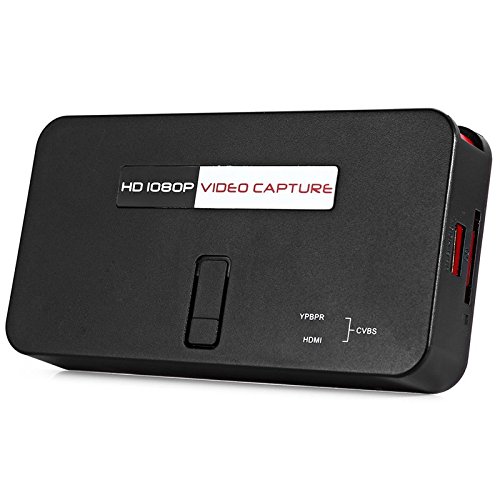
The EZCAP284 is a standalone HD video capture device designed for recording gameplay and other HDMI/YPbPr sources directly to a USB storage device without the need for a PC. It features HDMI pass-through for real-time viewing.

شکل 1: پورته view of the EZCAP284 device, featuring a prominent record button.

شکل 2: مفصل view of the input and output ports on the EZCAP284.
شکل 3: لاندې view of the EZCAP284 device, indicating model and certification information.
چمتو کول
- د ویډیو سرچینه وصل کړئ: Connect your game console (e.g., PS3) or other video source to the HDMI-IN or YPbPr IN port on the EZCAP284 using the appropriate cables.
- د نښلولو ښودنه: خپل تلویزیون یا مانیټر سره وصل کړئ HDMI بهر port on the EZCAP284. This allows you to view your gameplay in real-time while recording.
- د USB ذخیره وصل کړئ: Insert a USB flash drive or external hard drive (formatted as FAT32 or NTFS) into the USB 2.0 port on the EZCAP284. This is where your recordings will be saved.
- بریښنا وصل کړئ: Connect the power adapter to the DC IN port on the EZCAP284 and then plug it into a power outlet. The device will power on.
- Optional Audio Input: If you wish to record live commentary, connect a microphone to the د 3.5mm آډیو دننه بندر
عملیاتي لارښوونې
Recording Gameplay
- Ensure all connections are secure as described in the Setup section.
- Turn on your video source (e.g., game console) and your display.
- فشار ورکړئ REC button on the EZCAP284 device or the remote control to start recording. The indicator light will change to show recording is in progress.
- فشار ورکړئ REC د ثبت بندولو لپاره بیا تڼۍ. د شاخص رڼا به بیرته خپل سټینډ بای حالت ته راستانه شي.
- Your recorded video file will be saved to the connected USB storage device.
Adding Live Commentary
To record your voice along with the gameplay:
- یو مایکروفون سره وصل کړئ د 3.5mm آډیو دننه port before starting your recording.
- The device will automatically mix the microphone audio with the video source audio during recording.
پلې بیک
ته view your recorded videos, safely remove the USB storage device from the EZCAP284 and connect it to a computer or a media player that supports the recorded video format.
ساتنه
- پاکول: د وسیلې بهرنۍ برخه پاکولو لپاره نرم، وچ ټوکر وکاروئ. مایع پاکوونکي یا محلول مه کاروئ.
- ذخیره کول: وسیله په یخ او وچ ځای کې وساتئ، د مستقیم لمر وړانګو او سختې تودوخې څخه لرې وساتئ کله چې کارول نه وي.
- فرم ویئر: جوړونکي وګورئ website periodically for any firmware updates that may improve performance or add features.
د ستونزو حل کول
| ستونزه | احتمالي لامل | د حل لاره |
|---|---|---|
| په ښودنه کې د ویډیو محصول نشته. | Incorrect cable connection; input source not active; display input not selected. | Check HDMI/YPbPr connections. Ensure video source is on. Select correct input on your TV/monitor. |
| ثبت کول ناکامېږي یا په ناڅاپي ډول ودرېږي. | USB storage full; USB drive not compatible; power interruption. | Ensure USB drive has sufficient space. Try a different USB drive (FAT32/NTFS). Check power connection. |
| No audio in recording. | Audio cables not connected; source audio muted; microphone not connected or faulty. | Verify audio connections from source. Ensure source audio is not muted. Check microphone connection and functionality. |
| ریموټ کنټرول کار نه کوي. | Batteries low or inserted incorrectly; IR sensor blocked. | Replace batteries. Ensure line of sight to the device's IR sensor. |
مشخصات
| فیچر | تفصیل |
|---|---|
| ماډل | EZCAP284 |
| ډول | Adapter / Video Capture Device |
| مواد | مس (داخلي برخې) |
| انٹرفیسونه | 3.5mm Audio In, HDMI In, HDMI Out, YPbPr In, USB 2.0 |
| د ویډیو نیول حل | تر 1080p پورې |
| د پلیټ فارم مطابقت | PlayStation (and other HDMI/YPbPr sources) |
| شاملې برخې | ریموټ کنټرول |
| رنګ | تور |
| ابعاد (L x W x H) | ۱ x ۱ x ۱ سانتي متره (تقریبا) |
| وزن | 0.463 کیلوګرامه (تقریبا د بسته وزن) |
تضمین او ملاتړ
For warranty information and technical support, please refer to the documentation provided with your purchase or contact the seller/manufacturer directly. Keep your proof of purchase for warranty claims.