
د خوندیتوب مهمې لارښوونې
د کارولو دمخه ټول لارښوونې په دقت سره ولولئ.
- تل د پاکولو، خدمت کولو یا حرکت کولو دمخه د بریښنا له سایټ څخه فین خلاص کړئ.
- کله چې فین کار کوي، ګوتې یا کوم بل شی د جال له لارې مه دننه کوئ.
- د خراب شوي تار یا پلګ سره هیڅ فین مه چلوئ. فین پریږدئ یا د معاینې او/یا ترمیم لپاره مجاز خدماتو تاسیساتو ته ورشئ.
- د غالۍ لاندې تار مه چلوئ. تار د غالۍ، رنرز یا ورته پوښونو سره مه پوښئ. تار د ترافیکي ساحې څخه لرې تنظیم کړئ او چیرې چې دا به نه تیریږي.
- فین په لوند یا لوند کې مه کاروئamp ځایونه لکه تشنابونه یا د کالو مینځلو ځایونه.
- دا پکه یوازې د کور دننه کارونې لپاره ده. بهر مه کاروئ.
- Keep the fan away from curtains, drapes, or any objects that may get caught in the fan blades.
- کله چې فین کارول کیږي نو ماشومان څارنه وکړئ.
محصول پای ته ورسیدview
The Optimus 18-inch High Velocity Industrial Floor Fan is designed to provide powerful air circulation in various indoor environments. Its robust construction and high-velocity motor make it suitable for workshops, garages, and large rooms.
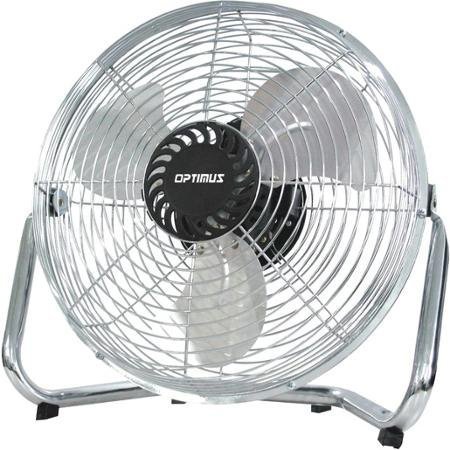
Image: Optimus 18-inch High Velocity Industrial Floor Fan. This image shows the fan with its silver metallic finish and sturdy floor stand.
کلیدي ځانګړتیاوې:
- 18-inch diameter for wide air distribution.
- Industrial-grade high velocity airflow.
- Durable metallic finish.
- Floor standing design for stable placement.
- Multiple power levels for adjustable airflow.
د تنظیم کولو لارښوونې
- فین خلاص کړئ: Carefully remove the fan and all components from the packaging. Retain packaging for future storage or transport.
- Assemble the Floor Stand:
- Attach the fan head to the floor stand using the provided screws and tools. Ensure all connections are secure.
- Verify the fan head can pivot smoothly on the stand.
- ځای په ځای کول: Place the fan on a firm, level surface. Ensure there is adequate space around the fan for proper air circulation and to prevent obstruction of the air intake/output. Keep the fan at least 3 feet away from walls or furniture.
- د بریښنا پیوستون: Ensure the fan is in the "OFF" position before plugging it into a standard 120V AC electrical outlet.
عملیاتي لارښوونې
This fan features push-button controls for easy operation. A remote control may also be included for convenience.
- پاور آن/بند: Locate the power button on the control panel. Press the button once to turn the fan ON. Press it again to turn the fan OFF.
- د فین سرعت تنظیمول: The fan has 4 power levels. After turning the fan ON, repeatedly press the speed control button to cycle through the available speed settings (Low, Medium, High, Max). The fan will operate at the selected speed.
- د هوا جریان تنظیم کول: The fan head can be tilted manually to direct airflow upwards or downwards. Gently tilt the fan head to the desired angle. Do not force the fan head beyond its intended range of motion.
ساتنه
منظم پاکول او ساتنه به غوره فعالیت ډاډمن کړي او ستاسو د فین ژوند به وغځوي.
- د فین پاکول:
- تل د پاکولو دمخه د بریښنا سرچینې څخه فین خلاص کړئ.
- یو نرم استعمال کړئ، دamp cloth to wipe the exterior surfaces of the fan. Do not use abrasive cleaners or harsh chemicals, as these may damage the finish.
- To clean the fan blades, carefully remove the front grille (if detachable, refer to assembly instructions for details). Wipe the blades with a soft cloth. Ensure the grille is securely reattached before operating the fan.
- ډاډ ترلاسه کړئ چې ټولې برخې په بشپړه توګه وچې دي مخکې له دې چې فین بیرته ولګوئ.
- ذخیره کول: کله چې د اوږدې مودې لپاره نه کارول کیږي، نو فین په یخ او وچ ځای کې وساتئ. سپارښتنه کیږي چې دا په خپل اصلي بسته بندۍ کې وساتئ ترڅو دا د دوړو او زیان څخه خوندي شي.
د ستونزو حل کول
| ستونزه | احتمالي لامل | د حل لاره |
|---|---|---|
| فین نه چالانېږي. | Not plugged in; power outlet not working; fan switch is off. | Ensure fan is securely plugged into a working outlet. Check household fuse/circuit breaker. Press the power button to turn the fan on. |
| کم هوا جریان. | Fan speed set too low; obstructed intake/output; dirty blades. | Increase fan speed. Clear any obstructions. Clean fan blades and grilles as per maintenance instructions. |
| غیر معمولي شور یا شور. | Loose parts; fan not on a level surface; foreign object in blades. | Unplug the fan and check for any loose screws or components. Place the fan on a stable, level surface. Carefully inspect for and remove any foreign objects. |
مشخصات
| فیچر | تفصیل |
|---|---|
| برانډ | Optimus |
| د ماډل نوم | لوړ سرعت |
| د توکي ماډل شمیره | 306c1b92-f36b-4ccc-ac62-2ad33d5c9efb |
| قطر | ۷۸۷ انچه |
| رنګ | سره زر |
| سټایل | صنعتي |
| د بریښنا سرچینه | د بریښنا تار شوی |
| د بریښنا د کچې شمیر | 4 |
| د کنټرول طریقه | د تڼۍ کنټرول |
| د کور دننه / بهر کارول | دننه |
| شاملې برخې | Floor Stand, Remote Control |
| د مشخصاتو ملاقات | OSHA |
تضمین او ملاتړ
Optimus products are manufactured to high-quality standards. This product is covered by a limited warranty against defects in materials and workmanship from the date of purchase. Please refer to the warranty card included with your product for specific terms and conditions.
For technical support, troubleshooting assistance, or warranty claims, please contact Optimus customer service. Contact information can typically be found on the product packaging or the official Optimus webسایټ
مهرباني وکړئ د تضمین موخو لپاره د پیرود ثبوت وساتئ.