
1. پیژندنه
Thank you for choosing the Baseus Encok S16 Neck Hung Bluetooth Wireless In-Ear Earphone. This manual provides detailed instructions for setup, operation, and maintenance to ensure optimal performance and longevity of your device. Please read this manual thoroughly before use.
2. د بسته محتويات
ډاډ ترلاسه کړئ چې ټول توکي په کڅوړه کې شتون لري:
- 1 x Baseus Encok S16 Wireless Earphone
- 1 x د چارج کولو کیبل
- 1 x د کارونکي لارښود
- 1 x تضمین کارت

Image: Contents of the Baseus Encok S16 earphone package, showing the earphones, charging cable, user manual, and warranty card.
3. محصول ختم شوview
The Baseus Encok S16 earphones feature a neck-hung design for comfortable and secure wear. Key features include:
- مقناطیسي فکسیشن: Earbuds can be magnetically joined when not in use, preventing tangling and loss.
- Adjustable Coils: The earphone line length can be adjusted by sliding for a customized fit.
- High Fidelity Sound: Equipped with a dynamic speaker unit, composite diaphragm, and independent tune trope structure for clear audio.
- موثر ځواک: Utilizes a British CSR chip and 120mAh battery for low power consumption and extended battery life.
- نړیوال مطابقت: Smartly matches with smartphones and tablet PCs, compatible with all Bluetooth 4.0 enabled devices.

Image: Close-up of the Baseus Encok S16 earbuds demonstrating their magnetic connection capability.
4. ترتیب کول
۳.۱ د غوږونو چارج کول
- Connect the provided charging cable to the charging port on the earphone's control unit.
- د چارج کولو کیبل بل پای د USB بریښنا سرچینې سره وصل کړئ (د مثال په توګه، د کمپیوټر USB پورټ، د USB دیوال اډاپټر).
- The indicator light will illuminate during charging and turn off or change color when fully charged.
- بشپړ چارج معمولا له ۲.۵ څخه تر ۳ ساعتونو پورې وخت نیسي.
4.2 د بلوتوټ جوړه کول
- ډاډ ترلاسه کړئ چې اییرفونونه په بشپړ ډول چارج شوي دي.
- Press and hold the Power button on the control unit until the indicator light flashes red and blue alternately, indicating pairing mode.
- په خپل سمارټ فون یا بلوتوث فعال شوي وسیله کې، د بلوتوث ترتیباتو ته لاړ شئ.
- لټون available devices and select "Baseus Encok S16" from the list.
- Once connected, the indicator light will flash blue slowly or turn solid blue.
- که چیرې د پټنوم غوښتنه وشي، "0000" ولیکئ.
5. عملیاتي لارښوونې
5.1 بنسټیز کنټرولونه
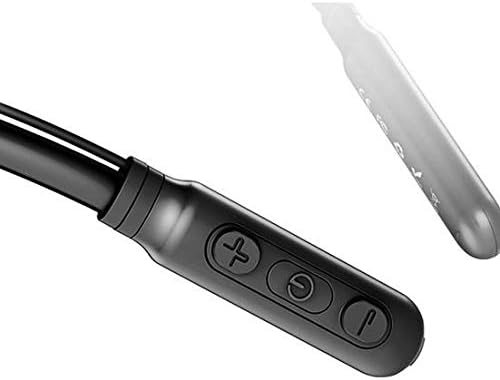
Image: Close-up of the Baseus Encok S16 earphone's inline control unit, showing the power/multi-function button, volume up, and volume down buttons.
| تڼۍ | فعالیت |
|---|---|
| Power Button (Center) |
|
| حجم پورته کول (+) |
|
| حجم کم (-) |
|
۴.۱ د غوږونو اغوستل
Place the neckband around your neck, ensuring the control unit is easily accessible. Insert the earbuds comfortably into your ears. Adjust the earphone line length using the sliding coils for a secure and comfortable fit.
6. ساتنه
- د غوږونو غوږوالۍ او کنټرول واحد په منظم ډول د نرم او وچ ټوکر سره پاک کړئ.
- Avoid exposing the earphones to extreme temperatures, humidity, or corrosive liquids.
- Store the earphones in a cool, dry place when not in use. The magnetic earbuds can help prevent tangling during storage.
- د غوږونو د جلا کولو یا ترمیم کولو هڅه مه کوئ، ځکه چې دا به تضمین باطل کړي.
7. ستونزه حل کول
| ستونزه | د حل لاره |
|---|---|
| بریښنا نشي چلولی | Ensure the earphones are fully charged. Press and hold the Power button for 3 seconds. |
| د وسیلې سره جوړه نشي کیدی |
|
| نه غږ یا ټیټ حجم |
|
| موقتي اړیکه |
|
8. مشخصات
| فیچر | تفصیل |
|---|---|
| برانډ | بیسوس |
| د ماډل شمیره | FWP-E-S16 |
| د ارتباط ټیکنالوژي | بلوتوث |
| بلوتوث نسخه | 4.0 (compatible with devices enabling Bluetooth 4.0) |
| د فارم فکتور | In Ear, Neck Hung |
| د کنټرول ډول | Voice Control, Touch (via buttons) |
| د بیټرۍ ظرفیت | 120mAh |
| وزن | 30 ګرامه |
| شاملې برخې | Wireless Earphone, Charging Cable, User Manual, Warranty Card |
9. تضمین او ملاتړ
This product comes with a Limited Warranty. Please refer to the included Warranty Card for detailed terms and conditions regarding coverage and duration.
For technical support or warranty claims, please contact your retailer or visit the official Baseus webد پیرودونکو خدماتو معلوماتو لپاره سایټ.
د نړیوال سوداګریز پیژندنې شمیره (GTIN): 06953156264489