
1. پیژندنه
د پیرودلو لپاره مننهasing the Syma X5HW RC Quadcopter Drone. This manual provides essential information for the safe operation, setup, and maintenance of your drone. Please read it thoroughly before first use to ensure proper function and to avoid damage.
The Syma X5HW is a 2.4G 4-channel RC quadcopter featuring a 0.3MP HD camera for FPV real-time transmission, high-hold mode, 360° 3D flips, headless mode, and a built-in 6-axis gyro for stable flight. It is designed for both beginners and experienced users.
2. د خوندیتوب احتیاطي تدابیر
- د الوتنې چاپیریال: Fly in open areas, away from people, animals, buildings, and power lines. Avoid flying in strong winds or adverse weather conditions.
- د عمر سپارښتنه: دا محصول د ۱۴ کلونو او پورته عمر لرونکو کاروونکو لپاره سپارښتنه کیږي. د ځوانو کاروونکو لپاره د لویانو څارنه سپارښتنه کیږي.
- د بیټرۍ خوندیتوب: Use only the provided charger and battery. Do not overcharge or short-circuit the battery. Disconnect the battery after use and during charging. Do not expose batteries to extreme temperatures or direct sunlight.
- د پروپیلر خوندیتوب: Keep hands, face, and loose clothing away from rotating propellers. Always ensure propellers are securely attached before flight.
- د اوبو ښکاره کول: ډرون د اوبو ضد نه دی. د اوبو یا رطوبت سره د تماس څخه ډډه وکړئ.
- د لید لید: د الوتنې پرمهال تل د ډرون سره د لید لید وساتئ.
- د محرمیت درناوی: When using the camera, respect the privacy of others.
3. د بسته محتويات
ډاډ ترلاسه کړئ چې ټول توکي په کڅوړه کې شتون لري:
- Syma X5HW RC Quadcopter Drone
- ریموټ کنټرولر
- د USB چارج کیبل
- Main Blades (Propellers)
- د پروپیلر ګارډز
- د لینډینګ ګیر
- HD Camera (0.3MP)
- سکرو ډرایور
- د کارونکي لارښود (دا لاسوند)
- 3.7V 600mAh LiPo Battery

Image: Syma X5HW package contents, showing the drone, remote, and various accessories.
4. د اجزاو پیژندنه
۲.۱ د ډرون اجزا

انځور: پورته view of the Syma X5HW drone.
- وړاندیز کونکي: Four main blades for lift and propulsion.
- پروپیلر ساتونکي: Protective frames around the propellers.
- موټرې: پروپیلرونه چل کړئ.
- LED څراغونه: Indicate drone orientation and status (front: red, rear: green).
- د بیټرۍ کڅوړه: Located on the underside of the drone.
- کمره: Attaches to the bottom for photo and video capture.
- د لینډینګ ګیر: Provides stable landing and protects the camera.
4.2 ریموټ کنټرولر اجزا
Image: Syma X5HW remote controller (part of the package contents image).
- کیڼ جویسټیک (تروټل/یاو): لوړوالی (پورته/ښکته) او گردش (کیڼ/ښي) کنټرولوي.
- ښي جویسټک (لارښودنه): د مخ/شاته او چپ/ښي حرکت کنټرولوي.
- د بریښنا سویچ: کنټرولر چالان/بندوي.
- د تڼۍ پرې کول: Adjust drone stability (forward/backward, left/right, yaw).
- Speed Mode Button: Toggles between low and high speed.
- 3D Flip Button: Initiates 360° flips.
- د سر پرته حالت تڼۍ: بې سرې حالت فعال/غیر فعالوي.
- د عکس / ویډیو بټن: عکسونه اخلي یا د ویډیو ثبت پیل/بندوي.
- د تلیفون لرونکی: For mounting a smartphone to view FPV feed.
5. ترتیب کول
۴.۱ د ډرون بیټرۍ چارج کول
- د ډرون بیټرۍ د USB چارج کولو کیبل سره وصل کړئ.
- د USB کیبل د USB بریښنا سرچینې سره وصل کړئ (د مثال په توګه، د کمپیوټر USB پورټ، د USB دیوال اډاپټر).
- The indicator light on the USB cable will illuminate during charging and turn off when fully charged.
- Charging time is approximately 90 minutes. Do not leave unattended during charging.
۵.۲.۲ د ریموټ کنټرولر بیټرۍ نصب کول
- د ریموټ کنټرولر شاته د بیټرۍ کڅوړه خلاص کړئ.
- Insert 4x AA batteries (not included) according to the polarity markings.
- د بیټرۍ کڅوړه په خوندي ډول وتړئ.
5.3 د پروپیلر نصب کول
Ensure propellers are installed correctly. Each propeller is marked with 'A' or 'B'. Match them to the corresponding motor shafts marked 'A' or 'B'.
- Attach propeller 'A' to motor shafts 'A'.
- Attach propeller 'B' to motor shafts 'B'.
- Press down firmly until they are seated.
5.4 پروپیلر ګارډ نصب کول
Attach the propeller guards to the drone's arms using the provided screws and screwdriver for added protection.
5.5 Landing Gear Installation
Slide the landing gear into the designated slots on the underside of the drone until they click into place.
د کیمرې لګول
- Connect the camera's cable to the port on the underside of the drone.
- Secure the camera module into its slot.
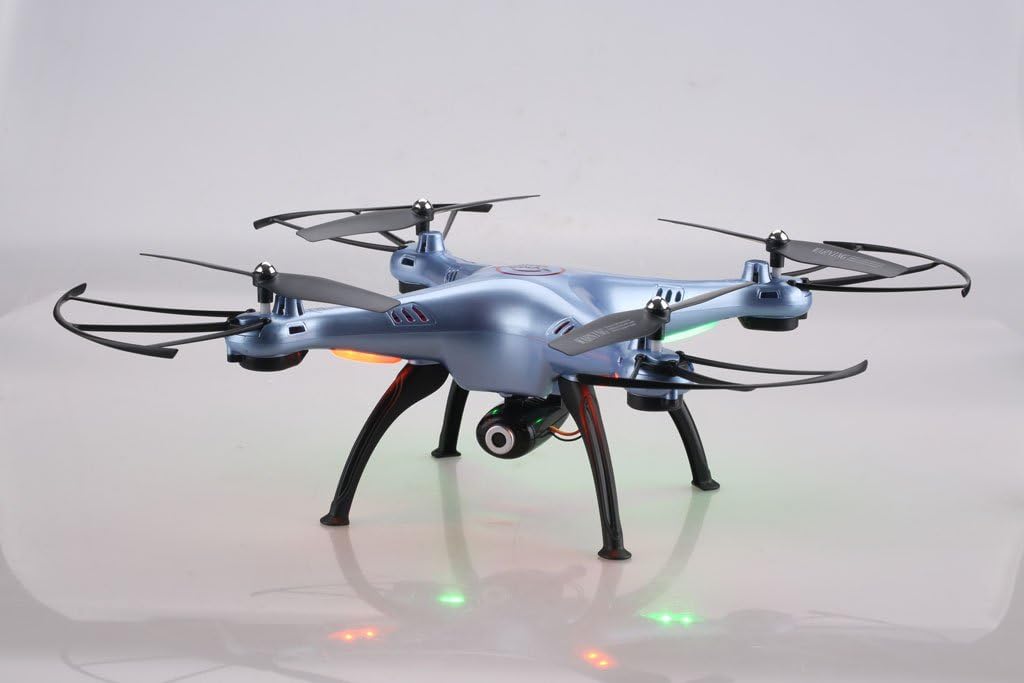
Image: Syma X5HW drone with camera and landing gear attached.
6. عملیاتي لارښوونې
6.1 Pairing the Drone and Remote Controller
- ډرون په فلیټ ، سطح سطح کې ځای په ځای کړئ.
- Insert the charged battery into the drone and connect it. The drone's LED lights will flash.
- Turn on the remote controller. The indicator light on the remote will flash.
- کیڼ جویسټیک (تروتل) ټوله پورته او بیا ټوله ښکته فشار ورکړئ.
- The drone's LED lights and the remote's indicator light will become solid, indicating successful pairing.
6.2 Calibration (Gyroscope Reset)
If the drone drifts during flight, perform a gyroscope calibration:
- After pairing, place the drone on a flat, level surface.
- Push both joysticks to the bottom-right corner simultaneously for 2-3 seconds.
- The drone's LED lights will flash rapidly and then become solid, indicating successful calibration.
۶.۵ د الوتنې اساسي کنټرولونه
- الوتنه: After pairing and calibration, gently push the left joystick (throttle) up. The propellers will start spinning, and the drone will ascend.
- لیندینګ: Gently pull the left joystick (throttle) down. The drone will descend and land.
- د لوړوالي کنټرول: Left joystick up/down.
- Rotation (Yaw): Left joystick left/right.
- مخکی / شاته: Right joystick up/down.
- Left/Right Sideways Flight: Right joystick left/right.
۶.۳ د الوتنې پرمختللي فعالیتونه
- د سرعت حالت: Press the Speed Mode button to switch between low and high speed. Low speed is recommended for beginners.
- بې سرې حالت: Press the Headless Mode button. The drone will orient itself relative to the pilot, regardless of its actual front direction. Press again to exit.
- High-Hold Mode (Altitude Hold): The drone automatically maintains its altitude using an integrated air pressure sensor. After taking off, release the left joystick, and the drone will hover at its current height. Adjust altitude by pushing the left joystick up or down.
- درې بعدي فلپونه: Fly the drone to a height of at least 3 meters. Press the 3D Flip button, then quickly push the right joystick in any direction (forward, backward, left, or right). The drone will perform a 360° flip in that direction.
6.5 FPV and Camera Operation
The Syma X5HW features a 0.3MP HD camera for real-time FPV transmission via Wi-Fi.
- اپلیکیشن ډاونلوډ کړئ: Download the free "SYMA FPV" app from the App Store (iOS) or Google Play Store (Android) to your smartphone.
- وائی فای سره وصل کړئ: Turn on the drone. On your smartphone, go to Wi-Fi settings and connect to the Wi-Fi network named "SYMA-X5HW" (or similar).
- اپلیکیشن پیل کړئ: Open the SYMA FPV app. You should see the live video feed from the drone's camera.
- انځورونه واخلئ: Press the Photo/Video button on the remote controller once to take a photo. Photos are saved to your smartphone.
- ویډیو ثبت کړئ: Press and hold the Photo/Video button on the remote controller to start video recording. Press and hold again to stop. Videos are saved to your smartphone.
7. ساتنه
- پاکول: Use a soft, dry cloth to clean the drone and remote controller. Do not use solvents or harsh chemicals.
- پروپیلر معاینه: په منظم ډول د پروپیلرونو د زیان لپاره وګورئ (درزونه، کږیدل). زیانمن شوي پروپیلرونه سمدلاسه بدل کړئ.
- د موټرو پاملرنه: Keep motors free from dust and debris.
- د بیټرۍ ذخیره کول: If storing the drone for an extended period, charge the battery to about 50% and remove it from the drone. Store in a cool, dry place.
- عمومي ذخیره: Store the drone and remote in a cool, dry environment, away from direct sunlight and extreme temperatures.
8. ستونزه حل کول
| ستونزه | احتمالي لامل | د حل لاره |
|---|---|---|
| ډرون ریموټ ته ځواب نه ورکوي. | جوړه نه ده؛ ټیټه بیټرۍ (ډرون یا ریموټ). | Ensure drone and remote are powered on and paired correctly. Charge drone battery. Replace remote batteries. |
| ډرون د الوتنې پر مهال ګرځي. | Gyroscope not calibrated; uneven surface during startup; wind interference. | Perform gyroscope calibration on a flat surface. Fly in calm conditions. Use trim buttons to fine-tune. |
| پروپیلرونه نه ګرځېږي. | Propellers jammed; motor issue; low battery. | Check for obstructions. Ensure battery is charged and connected. |
| د FPV ویډیو فیډ نشته. | Wi-Fi not connected; app not open; camera not connected. | Ensure smartphone is connected to drone's Wi-Fi. Open SYMA FPV app. Check camera connection to drone. |
| د الوتنې لنډ وخت. | بیټرۍ په بشپړه توګه چارج شوې نه ده؛ زوړ بیټرۍ؛ تیریدونکی الوتنه. | Ensure battery is fully charged. Consider replacing old batteries. Fly more gently. |
9. مشخصات
- ماډل: Syma X5HW
- فریکونسی: 2.4GHz
- چینلونه: ۶-چینل
- ګیرو: ۳-محور ګیروسکوپ
- کمره: 0.3MP HD Camera (720p video resolution)
- FPV: Wi-Fi Real-time Transmission
- د الوتنې طریقې: High-Hold Mode, Headless Mode, 3D Flips
- بیټرۍ: 3.7V 600mAh LiPo
- د چارج کولو وخت: نږدې 90 دقیقې
- د الوتنې وخت: نږدې 10 دقیقې
- د کنټرول لړۍ: تر 100 مترو پورې
- مواد: پلاستیک
- وړاندیز شوی عمر: ۴۲+
10. تضمین او ملاتړ
Syma products are manufactured to high quality standards. For warranty information or technical support, please refer to the contact details provided with your purchase documentation or visit the official Syma webسایټ. د تضمین ادعاوو لپاره د پیرود ثبوت وساتئ.