
1. پیژندنه
This manual provides detailed instructions for the installation, operation, and maintenance of the CP PLUS CP-UVR-1616K1-V3 16-Channel 1080P Digital Video Recorder (DVR). This device supports 16 channels of video input and 16 channels of audio input, offering comprehensive surveillance capabilities. It is designed for reliable performance in various security applications.
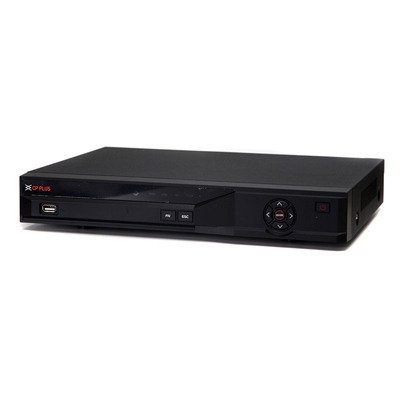
شکل 1: مخکی view of the CP PLUS CP-UVR-1616K1-V3 DVR unit.
2. د خوندیتوب احتیاطي تدابیر
- Ensure proper ventilation around the DVR to prevent overheating.
- وسیله د اوبو یا رطوبت سره مه ښکاره کوئ.
- یوازې د بریښنا اډاپټر وکاروئ چې د واحد سره چمتو شوي.
- د DVR د مستقیم لمر وړانګو یا د تودوخې سرچینو ته نږدې کېښودلو څخه ډډه وکړئ.
- وسیله په احتیاط سره اداره کړئ ترڅو د فزیکي زیان مخه ونیسي.
3. ترتیب او نصب کول
3.1 پیک کول
په احتیاط سره د بسته بندۍ څخه ټولې برخې لرې کړئ. ډاډ ترلاسه کړئ چې د بسته بندۍ په لیست کې لیست شوي ټول توکي شتون لري.
3.2 د هارډویر پیوستون
- کیمرې وصل کړئ: Connect your HDCVI, Analog, or IP cameras to the BNC video input ports (16 channels available) on the rear panel of the DVR.
- آډیو نښلول: Connect audio input devices to the 16 RCA audio input channels. Connect an audio output device to the 1 RCA audio output channel.
- د نښلولو ښودنه: Connect a monitor or television to the HDMI or VGA output port for video display.
- د نښلولو شبکه: Connect an Ethernet cable from the DVR's network port to your router or network switch for remote access and IP camera integration.
- د هارډ ډرایو نصب کول (اختیاري): If not pre-installed, open the DVR casing and connect a SATA HDD (up to 6TB) to the internal SATA port. Secure the HDD with screws.
- د USB وسیلو سره وصل کړئ: Connect a mouse or USB storage device to one of the two USB 2.0 ports.
- پاور آن: د بریښنا اډاپټر د DVR سره او بیا د بریښنا آوټ لیټ سره وصل کړئ. DVR به په اتوماتيک ډول فعال شي.
4. عملیاتي لارښوونې
۳.۴ د ابتدايي تنظیم وزرډ
Upon first power-on, the DVR will guide you through an initial setup wizard. Follow the on-screen prompts to configure basic settings such as language, date/time, network settings, and user accounts.
4.2 ژوندی View
د لومړني تنظیم وروسته، DVR به ژوندۍ ښکاره کړي view of connected cameras. You can switch between different display splits (1/4/8/9/16 channels) using the on-screen controls or mouse.
4.3 ثبتول
The DVR supports various recording modes including continuous, motion detection, and scheduled recording.
- Main Stream Recording: 1080P (1~15fps), 1080N/720P/960H/D1/HD1/BCIF/CIF/QCIF (1~25/30fps).
- Extra Stream Recording: CIF/QCIF (1~15fps).
Access the recording settings through the main menu to configure your preferred recording schedule and parameters.
4.4 پلې بیک
بیا بیاview ثبت شوی footage, navigate to the Playback menu. You can search for recordings by date, time, and event type.
4.5 Mobile Access
Download the official mobile applications (iCMOB, gCMOB, wCMOB) from your device's app store to access live view and playback remotely. Refer to the app's instructions for setup.
4.6 CMS Software
For centralized management of multiple DVRs, use the KVMS or KVMS Pro CMS software. Install the software on a compatible computer and follow the provided instructions for device addition and management.
5. ساتنه
- منظم پاکول: Keep the DVR free from dust. Use a soft, dry cloth for cleaning. Do not use liquid cleaners.
- د فرم ویئر تازه معلومات: Periodically check the CP PLUS official webد غوره فعالیت او امنیت ډاډمن کولو لپاره د فرم ویئر تازه معلوماتو لپاره سایټ.
- د هارډ ډرایو روغتیا: Monitor the health of the installed hard drive through the DVR's system settings. Replace the HDD if errors are detected.
- د بیک اپ ریکارډونه: Regularly back up important recordings to an external USB storage device or network storage.
6. ستونزه حل کول
| ستونزه | احتمالي لامل | د حل لاره |
|---|---|---|
| په مانیټر کې د ویډیو محصول نشته. | Loose HDMI/VGA cable, incorrect input selected on monitor, DVR not powered on. | د کیبل اتصالونه وګورئ، ډاډ ترلاسه کړئ چې مانیټر په سمه توګه داخل شوی دی، د DVR بریښنا تایید کړئ. |
| کیمرې نه ښودل کیږي. | Loose BNC cable, camera power issue, incorrect camera type selected. | Check camera connections and power, verify camera compatibility and settings in DVR menu. |
| هیڅ ریکارډ نشته. | HDD not installed or faulty, recording schedule not configured, insufficient storage. | Install/check HDD, configure recording schedule, check HDD space. |
| لرې لاسرسی کار نه کوي. | Network cable disconnected, incorrect network settings, firewall blocking. | Check network cable, verify IP address/gateway/DNS settings, configure port forwarding or P2P. |
7. مشخصات
| فیچر | تفصیل |
|---|---|
| ماډل | CP-UVR-1616K1-V3 |
| د ویډیو داخلول | 16 channel BNC (HDCVI/Analog/IP up to 5Mp) |
| آډیو ان پټ/آؤټ پټ | 16 channel RCA input, 1 channel RCA output |
| د ویډیو تولید | 1 HDMI, 1 VGA (Simultaneous) |
| د ویډیو حل | 1080P(1920×1080), 1080N(960×1080), 720P, 960H, D1, HD1, BCIF, CIF, QCIF |
| د ویډیو کمپریشن | H.264 |
| د آډیو کمپریشن | جی .711 |
| Recording Frame Rate (Main Stream) | 1080P (1~15fps), 1080N/720P/960H/D1/HD1/BCIF/CIF/QCIF (1~25/30fps) |
| د HDD ملاتړ | 1 SATA port, up to 6TB |
| د USB انٹرفیس | 2 x USB 2.0 |
| د موبایل سافټویر | iCMOB, gCMOB, wCMOB |
| د CMS سافټویر | KVMS, KVMS Pro |
| ابعاد | 325mm x 255mm x 55mm |
| وزن | 1.5Kg (without HDD) |
8. ملاتړ او تضمین
For technical assistance, product support, or warranty inquiries, please contact CP PLUS customer service. Refer to the official CP PLUS website for the most current contact information and warranty terms.
رسمي Webسایټ: www.cpplusworld.com
د تضمین ادعاوو لپاره د پیرود ثبوت په توګه د پیرود رسید وساتئ.