
پیژندنه
This manual provides comprehensive instructions for the setup, operation, and maintenance of your GPX Digital AM/FM Clock Radio, model C224B. Please read this manual thoroughly before using the device to ensure proper functionality and to maximize your user experience. Keep this manual for future reference.
محصول پای ته ورسیدview
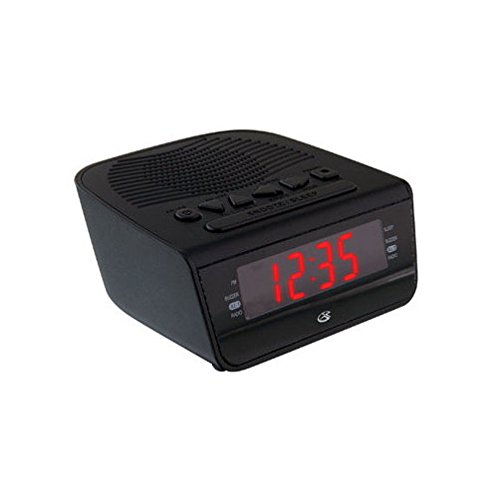
شکل 1: مخکی view of the GPX Digital AM/FM Clock Radio. This image shows the compact black unit with its digital display and control buttons.
The GPX Digital AM/FM Clock Radio (C224B) is designed for reliable timekeeping and audio entertainment. Key features include a clear multi-display clock, AM/FM radio tuner, dual alarm functionality, and a battery backup option to ensure continuous operation during power interruptions. Its compact and modern design makes it suitable for various indoor settings.
چمتو کول
1. خلاصول
Carefully remove the clock radio from its packaging. Ensure all components are present: the clock radio unit and the power adapter.
2. د بریښنا پیوستون
- Plug the power adapter into the DC input jack located on the back of the clock radio.
- Plug the other end of the power adapter into a standard wall outlet (AC 120V, 60Hz).
- The display will illuminate, indicating the unit is receiving power.
۲. د بیټرۍ بیک اپ نصب کول (اختیاري)
د ou په جریان کې د بیک اپ بریښنا لپارهtages, install batteries (not included).
- د بیټرۍ کڅوړه د واحد په ښکته برخه کې ومومئ.
- د بیټرۍ کمپارټ پوښ خلاص کړئ.
- Insert the required batteries (e.g., 2 x AAA, check unit for specific type) according to the polarity markings (+ and -).
- د بیټرۍ کمپارټ پوښ په خوندي ډول وتړئ.
یادونه: Batteries are for backup only and will not power the display or radio functions continuously. They preserve time and alarm settings during a power interruption.
عملیاتي لارښوونې
1. د وخت ټاکل
- فشار ورکړئ او ونیسئ د وخت وخت تڼۍ تر هغه وخته پورې فشار ورکړئ چې ښودنه روښانه شي.
- د کارولو ساعت او دقیقه د وخت تنظیم کولو لپاره تڼۍ.
- مطبوعاتي د وخت وخت بیا د تایید لپاره او د وخت تنظیم کولو حالت څخه وتلو لپاره.
۲. د الارمونو تنظیم کول (الارم ۱ او الارم ۲)
This unit features dual alarms, allowing you to set two independent wake-up times.
- فشار ورکړئ او ونیسئ الارم 1 SET (یا الارم 2 SET) button until the alarm time flashes.
- د کارولو ساعت او دقیقه buttons to adjust the desired alarm time.
- مطبوعاتي الارم 1 SET (یا الارم 2 SET) بیا د وخت تایید لپاره.
- Immediately after confirming the time, use the د الارم موډ button to select the alarm source: بوزر or راډیو.
- The alarm icon (e.g., AL1 or AL2) will appear on the display, indicating the alarm is active.
To turn off an alarm, press the corresponding الارم 1 آن/بند (یا الارم 2 آن/بند) button. The alarm icon will disappear.
۲. د AM/FM راډیو عملیات
- فشار ورکړئ رادیو آن/بند د راډیو د فعالولو لپاره تڼۍ.
- فشار ورکړئ بانډ د AM او FM بینډونو ترمنځ د بدلولو لپاره تڼۍ.
- د کارولو TUNE + or ټون - buttons to manually tune to a desired station.
- To automatically scan for the next available station, press and hold TUNE + or ټون - د څو ثانیو لپاره.
- د. په کارولو حجم تنظیم کړئ حجم + or حجم - تڼۍ
- د راډیو بندولو لپاره، فشار ورکړئ رادیو آن/بند بیا تڼۍ.
۴. د سنوز فعالیت
کله چې الارم غږیږي، فشار ورکړئ لنډول د الارم د لنډمهاله بندولو لپاره تڼۍ د نږدې 9 دقیقو لپاره. الارم به د سنوز دورې وروسته بیا غږ شي.
5. د خوب فعالیت
د خوب فعالیت راډیو ته اجازه ورکوي چې د یوې ټاکلې مودې لپاره غږ وکړي مخکې لدې چې په اتوماتيک ډول بند شي.
- پداسې حال کې چې راډیو غږیږي، فشار ورکړئ خوب د خوب د شته وختونو (د مثال په توګه، 90، 60، 30، 15 دقیقې، بند) له لارې د تګ لپاره په مکرر ډول تڼۍ فشار کړئ.
- راډیو به د ټاکل شوي وخت وروسته په اتوماتيک ډول بنده شي.
ساتنه
1. پاکول
To clean the unit, wipe the exterior with a soft, slightly damp cloth. Do not use abrasive cleaners or solvents, as these may damage the finish. Ensure the unit is unplugged before cleaning.
2. د بیټرۍ بدلول
If the battery backup function is not working, or if the unit loses time during a power outage, the backup batteries may need replacement. Follow the "Battery Backup Installation" steps in the Setup section to replace them.
د ستونزو حل کول
| ستونزه | احتمالي لامل | د حل لاره |
|---|---|---|
| واحد فعال نه دی. | د بریښنا اډاپټر وصل شوی نه دی یا خراب آوټ لیټ دی. | ډاډ ترلاسه کړئ چې د بریښنا اډاپټر په خوندي ډول د واحد او کاري دیوال آوټ لیټ سره وصل شوی دی. یو بل آوټ لیټ هڅه وکړئ. |
| الارم نه غږېږي. | الارم نه دی ټاکل شوی، د الارم غږ ډیر ټیټ دی، یا الارم بند شوی دی. | Verify alarm time and source (buzzer/radio) are set correctly. Ensure alarm is activated (icon visible). Increase radio volume if alarm source is radio. |
| د راډیو ضعیف استقبال. | کمزوری سیګنال یا مداخله. | Adjust the position of the unit or the antenna (if external). Move away from other electronic devices that may cause interference. |
| د بریښنا بندیدو وروسته وخت/ترتیبات له لاسه ورکړل شولtage. | د بیک اپ بیټرۍ مړه شوي یا نصب شوي ندي. | تازه بیک اپ بیټرۍ نصب کړئ یا موجوده بیټرۍ بدل کړئ. |
مشخصات
- ماډل: C224B
- د بریښنا سرچینه: AC 120V, 60Hz (main); Battery Powered (backup)
- د ښودلو ډول: د LED ډیجیټل نندارتون
- د راډیو بندونه: AM/FM
- ابعاد (تقریبا): ۱۴.۲۵" واټ x ۹.۳" واټ
- وزن (نږدې): 3 پونډه
- رنګ: تور
- مواد: پلاستیک
تضمین او ملاتړ
For warranty information or technical support, please refer to the warranty card included with your product or visit the official GPX website. Do not attempt to repair this unit yourself, as this may void your warranty.
GPX Official Webسایټ: www.gpx.com