
پیژندنه
This manual provides detailed instructions for the use and maintenance of your Strong SRT 7404 HD remote control. This remote is designed as an original replacement for the Strong SRT 7404 HD FRANSAT receiver, ensuring full compatibility and functionality.
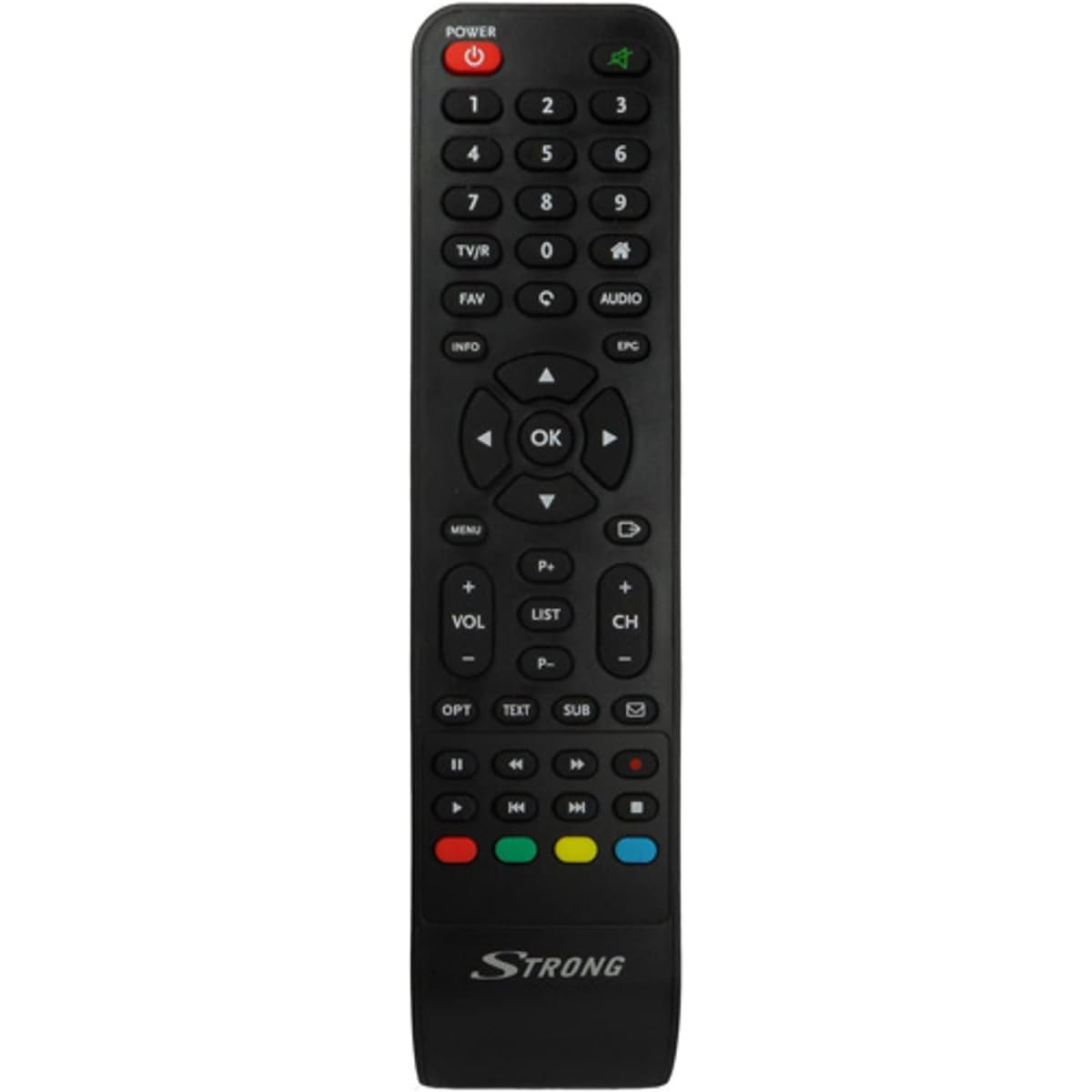
Image: The Strong SRT 7404 HD remote control, black in color, featuring various control buttons for television and receiver functions.
چمتو کول
1. د بیټرۍ نصب کول
- د ریموټ کنټرول شاته د بیټرۍ کڅوړه ومومئ.
- د بیټرۍ پوښ ښکته خوا ته یا په هغه لوري کې چې د تیر لخوا ښودل شوی وي د خلاصولو لپاره یې وغورځوئ.
- Insert two AAA alkaline batteries (not included), ensuring the positive (+) and negative (-) terminals align correctly with the markings inside the compartment.
- د بیټرۍ پوښ بیرته په خپل ځای کې سلایډ کړئ تر هغه چې په خوندي ډول کلیک وکړي.
Note: Always use new alkaline batteries for optimal performance. Do not mix old and new batteries, or different types of batteries.
2. ابتدايي استعمال
The Strong SRT 7404 HD remote control is an original replacement and is pre-programmed for the Strong SRT 7404 HD FRANSAT receiver. No additional setup or pairing is typically required. Simply install the batteries and point the remote control towards your receiver to begin operation.
عملیاتي لارښوونې
This section outlines the basic functions of the remote control buttons.
- د بریښنا تڼۍ: ریسیور فعال یا بندوي.
- چینل پورته / ښکته: Navigates through television channels.
- حجم پورته / ښکته: د آډیو حجم تنظیموي.
- تteۍ غږول: Silences or restores the audio.
- د شمېرې تڼۍ (0-9): Directly selects channels or enters numerical data.
- د مینو تڼۍ: Accesses the receiver's main menu.
- د نیویګیشن تڼۍ (پورته، ښکته، کیڼ، ښي، سمه): د مینو نیویګیټ کولو او انتخابونو تاییدولو لپاره کارول کیږي.
- د وتلو/شاته تڼۍ: پخوانۍ سکرین ته راستنیږي یا له مینو څخه وځي.
- د معلوماتو تtonۍ: د پروګرام معلومات ښکاره کوي.
- د رنګ تڼۍ (سور، شنه، ژیړ، نیلي): Functions vary depending on the on-screen menu or application.
Refer to your Strong SRT 7404 HD FRANSAT receiver's manual for specific functions related to its menu system and advanced features.
ساتنه
پاکول
د ریموټ کنټرول پاکولو لپاره، په نرمۍ سره د هغې سطحه د نرم، وچ ټوکر سره پاک کړئ. د سختې خاورې لپاره، یو څه کم کړئampen the cloth with water. Avoid using abrasive cleaners, solvents, or alcohol, as these can damage the remote's finish or internal components.
د بیټرۍ بدلول
Replace batteries when the remote control becomes unresponsive or its range decreases significantly. Follow the battery installation steps outlined in the "Setup" section. Dispose of used batteries according to local regulations.
ذخیره کول
کله چې د اوږدې مودې لپاره نه کارول کیږي، بیټرۍ لرې کړئ ترڅو د لیکیدو مخه ونیول شي، کوم چې کولی شي ریموټ کنټرول ته زیان ورسوي. ریموټ په یخ او وچ ځای کې د مستقیم لمر وړانګو او سخت تودوخې څخه لرې وساتئ.
د ستونزو حل کول
- ریموټ کنټرول ځواب نه ورکوي:
- وګورئ چې آیا بیټرۍ په سمه توګه د سم قطبي (+/-) سره داخل شوي دي.
- Replace old batteries with new alkaline batteries.
- Ensure there are no obstructions between the remote control and the receiver's infrared sensor.
- Make sure you are within the effective operating range (up to 10 meters).
- ریموټ مستقیم ریسیور ته وښایاست.
- ځانګړي تڼۍ کار نه کوي:
- د ریموټ کنټرول سطحه پاکه کړئ، په ځانګړې توګه د غیر ځواب ویونکي تڼیو شاوخوا، ترڅو هر ډول کثافات یا کثافات لرې کړئ چې ممکن د مناسب تماس مخه ونیسي.
- If cleaning and battery replacement do not resolve the issue, the button or remote may be faulty.
مشخصات
| فیچر | تفصیل |
|---|---|
| برانډ | قوي |
| د ماډل نوم | 7404 |
| ځانګړی ځانګړنه | د رڼا وزن |
| رنګ | تور |
| اعظمي ملاتړ شوي وسایل | 1 |
| مطابقت لرونکې وسیلې | TV Decoder (Strong SRT 7404 HD FRANSAT Receiver) |
| د ارتباط ټیکنالوژي | د راډیو فریکونسي |
| د تڼیو شمیر | 5 |
| د کنټرولر ډول | ریموټ کنټرول |
| اعظمي حد | 10 متره |
| د بیټرۍ ډول | القلي (AAA، شامل نه دی) |
| د اصلي هیواد | چین |
تضمین او ملاتړ
د تضمین معلومات
This Strong SRT 7404 HD remote control comes with a 2-year warranty from the date of purchase. This warranty covers manufacturing defects under normal use. Please retain your proof of purchase for warranty claims.
د پیرودونکي ملاتړ
For further assistance, technical support, or warranty inquiries, please contact Strong customer service. Contact details can typically be found on the official Strong webسایټ یا ستاسو د محصول پرچون پلورونکي له لارې.
You can visit the official Strong brand store for more information: قوي برانډ پلورنځی