
1. پیژندنه
د پیرودلو لپاره مننهasing the iHome IB90 Bluetooth Headphones. These headphones are designed to provide rich, detailed sound with an enhanced bass response, offering a comfortable listening experience with wireless freedom and extended battery life. This manual will guide you through the setup, operation, and maintenance of your new headphones.
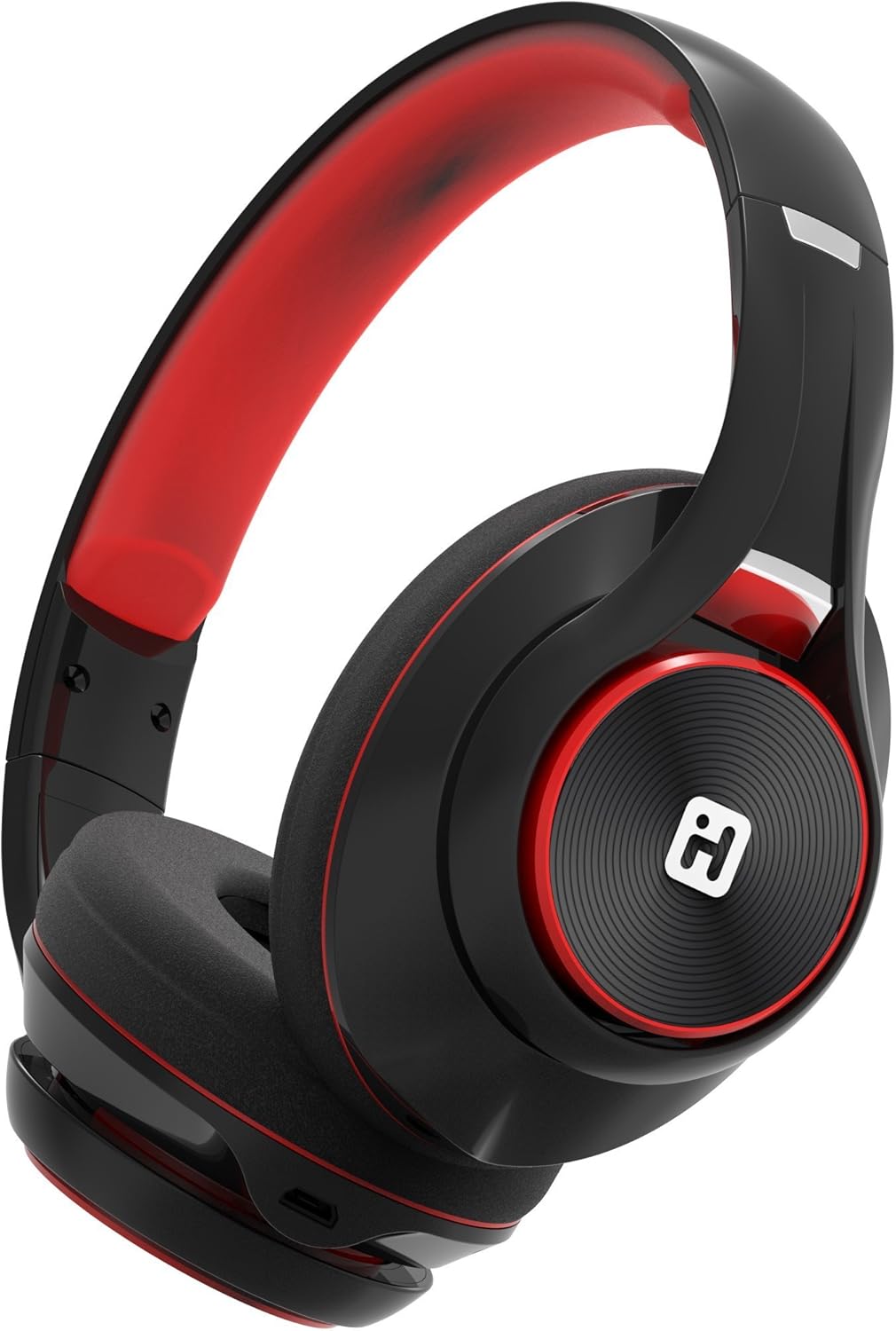
Image: iHome IB90 Bluetooth Headphones, featuring a comfortable over-ear design in black and red.
2. د بسته محتويات
- iHome IB90 Bluetooth Headphones
- د آډیو کیبل (د تار لرونکي حالت لپاره)
- USB Charging Cable (not explicitly listed but implied for rechargeable battery)
3. ترتیب کول
۳.۱ د هیډفونونو چارج کول
Before initial use, fully charge your headphones. The extra-long life rechargeable battery provides up to 46 hours of continuous use on a single charge. A 10-minute charge can provide 1 hour of play when the battery is low.
- ورکړل شوی USB چارجینګ کیبل د هیډفونونو چارج کولو پورټ سره وصل کړئ.
- د USB کیبل بل پای د بریښنا شوي USB پورټ سره وصل کړئ (د مثال په توګه، کمپیوټر، دیوال اډاپټر).
- د چارج کولو شاخص څراغ به د چارج کولو پرمهال روښانه شي او کله چې په بشپړ ډول چارج شي نو بند شي.
3.2 د بلوتوټ جوړه کول
Pair your iHome IB90 headphones with your Bluetooth-enabled device to enjoy wireless audio.
- ډاډ ترلاسه کړئ چې هیډفونونه چارج شوي او بند شوي دي.
- Press and hold the Power/Bluetooth button on the headphones until the indicator light flashes, indicating pairing mode. Voice prompts will confirm Bluetooth connection status.
- په خپل وسیله (سمارټ فون، ټابلیټ، کمپیوټر) کې، د بلوتوټ ترتیباتو ته لاړ شئ او بلوتوټ فعال کړئ.
- Select "iHome IB90" (or similar model name) from the list of available devices.
- Once connected, a voice prompt will confirm successful pairing, and the indicator light will change.
3.3 Melody Voice Assistant Setup
The iHome IB90 headphones are compatible with the free Melody voice-powered personal music assistant app, allowing you to control music from services like Spotify and iHeartRadio using voice commands. The voice control button on the earcup also works with Siri and Google Assistant.
Image: Melody Personal Music Assistant app logo.
- Download the Melody app from your device's app store (App Store for iOS, Google Play for Android).
- Open the Melody app and follow the on-screen instructions to set up your account and link your preferred music streaming services.
- Ensure your headphones are paired with your device.
- Use the voice control button on the earcup to activate Melody or your device's native voice assistant (Siri/Google Assistant) and issue commands.
Video: This video demonstrates the features and functionality of the Melody voice-powered personal music assistant, highlighting its integration with iHome products for hands-free music control and access to various streaming platforms.
۷. د هیډفونونو چلول
4.1 On-Ear Remote Control
The earcup features convenient controls for managing your audio and calls:
- پلی کول / ودرول: Press the designated button to play or pause audio.
- د انتخاب ټاکل: Use the track buttons to skip forward or backward.
- د حجم کنټرول: د حجم تڼۍ په کارولو سره حجم تنظیم کړئ.
- ځواب / پای زنګونه: The built-in echo-cancelling microphone allows for hands-free phone calls. Press the call button to answer or end a call.

Image: Close-up of the iHome IB90 headphone earcup, illustrating the location of control buttons.
4.2 د غږ کنټرول
Activate your personal voice assistant (Melody, Siri, or Google Assistant) by pressing the dedicated voice control button on the earcup. You can then use voice commands to:
- Play specific songs, artists, albums, or playlists.
- Check weather, set reminders, and make phone calls (via Siri/Google Assistant).
- Access music from various streaming platforms (via Melody app).
۴.۴ وایرډ موډ
The headphones can also be used in wired mode with the provided audio cable, ensuring you can continue listening even if the battery is depleted. Simply connect the audio cable to the headphone's audio input and your device's audio output.
5. ساتنه
5.1 پاکول
د خپلو هیډفونونو د حالت ساتلو لپاره:
- د غوږونو کپونه او سر بند د نرم او وچ ټوکر سره پاک کړئ.
- د کثافاتو پاکوونکو، محلولونو، یا سخت کیمیاوي موادو کارولو څخه ډډه وکړئ.
- Do not immerse the headphones in water, as they are not water-resistant.
5.2 ذخیره کول
When not in use, store your headphones in a cool, dry place away from direct sunlight and extreme temperatures. The foldable design allows for compact storage and portability.
6. ستونزه حل کول
If you encounter issues with your iHome IB90 headphones, refer to the following common solutions:
- ځواک نشته: ډاډ ترلاسه کړئ چې هیډفونونه په بشپړ ډول چارج شوي دي. د USB چارج کولو کیبل په کارولو سره یې د بریښنا سرچینې سره وصل کړئ.
- د بلوتوث له لارې جوړه نشي کیدی: Make sure the headphones are in pairing mode (flashing indicator light). Turn off and on your device's Bluetooth, then try re-pairing. Ensure the headphones are not already connected to another device.
- هیڅ غږ یا ټیټ حجم نشته: Check the volume levels on both the headphones and your connected device. Ensure the headphones are properly paired. If using wired mode, ensure the audio cable is securely connected.
- مایکروفون کار نه کوي: Verify that the headphones are properly connected via Bluetooth. Check your device's audio input settings to ensure the headphone microphone is selected.
- د غږ لیکېدل: The iHome IB90 headphones feature passive noise isolation, not active noise cancellation (ANC). While they provide an immersive sound environment, they may not completely block out all external noise, and some sound may be audible to others at higher volumes.
7. مشخصات
| فیچر | تفصیل |
|---|---|
| برانډ | iHome |
| د ماډل شمیره | IB90v2BRC |
| د غوږ ځای پرځای کول | په غوږ کې |
| د فارم فکتور | په غوږ کې |
| د شور کنټرول | None (Passive Noise Isolation) |
| د ارتباط ټیکنالوژي | بلوتوث |
| بې سیم ټیکنالوژي | بلوتوث |
| د کنټرول ډول | ریموټ کنټرول |
| جوړ شوی میډیا | هیډفونونه |
| د توکي وزن | 0.5 پونډه |
| د تړلو موادو | پلاستیک |
| د محصول لپاره ځانګړي کارول | سفر |
| د اوبو د مقاومت کچه | د اوبو مقاومت نلري |
8. تضمین او ملاتړ
For warranty information and customer support, please refer to the documentation included with your product or visit the official iHome website. This manual does not contain specific warranty details.