
1. پیژندنه
This manual provides essential information for setting up, operating, maintaining, and troubleshooting your Microsoft Surface Pro Model 1796. The Surface Pro is a versatile 2-in-1 device designed to function as both a high-performance laptop and a portable tablet. Please read these instructions carefully to ensure optimal use and longevity of your device.
2. محصول ختم شوview
The Microsoft Surface Pro Model 1796 features a 12.3-inch PixelSense multi-touch display, an Intel Core i5 processor, 4GB of RAM, and a 128GB SSD. It operates on Windows 10 Pro, offering a full desktop experience in a portable form factor. The device supports a detachable keyboard (Surface Pro Signature Type Cover) and a digital pen (Surface Pen), both sold separately, to enhance its functionality.

Figure 2.1: Microsoft Surface Pro in tablet mode, displaying the lock screen.
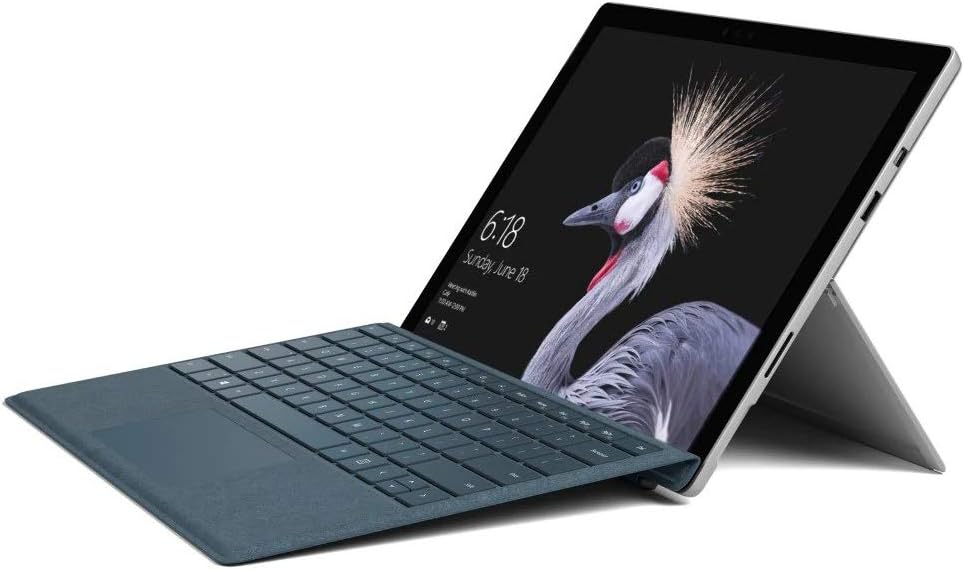
Figure 2.2: Microsoft Surface Pro with Signature Type Cover attached, configured as a laptop.

Figure 2.3: Microsoft Surface Pro tablet and detached Signature Type Cover.
3. ترتیب کول
3.1 ابتدايي پاور آن
- Connect the power supply to the Surface Pro and a power outlet.
- د وسیلې په پورتنۍ څنډه کې موقعیت لرونکي بریښنا تڼۍ فشار ورکړئ.
- د وینډوز ۱۱ پرو لومړني تنظیم بشپړولو لپاره په سکرین کې لارښوونې تعقیب کړئ، پشمول د ژبې انتخاب، د شبکې اتصال، او د کارونکي حساب جوړول.
۴.۳ د نښلولو لوازم
- Surface Pro Signature Type Cover: Align the Type Cover with the magnetic connector along the bottom edge of the Surface Pro until it clicks into place.
- د سطحې قلم: The Surface Pen connects via Bluetooth. Go to ترتیبات > وسایل > بلوتوث او نور وسایل to pair the pen.
3.3 د وسیلې چارج کول
Use the provided power adapter to charge your Surface Pro. The charging port is located on the right side of the device. A full charge provides approximately 13 hours of typical device usage.
4. عملیاتي لارښوونې
4.1 بنسټیز نیویګیشن
- لمس Use multi-touch gestures on the PixelSense display for navigation, zooming, and scrolling.
- د پوښ ډول: Utilize the keyboard and trackpad for traditional laptop input.
- د سطحې قلم: Write, draw, and annotate directly on the screen.
۳.۴ د وینډوز ۱۰ پرو ځانګړتیاوې
Your Surface Pro comes with Windows 10 Pro, offering features such as:
- وینډوز هیلو: For fast, secure, password-free sign-in using facial recognition.
- کورټانا: Your personal digital assistant.
- د مایکروسافټ ایج: ډیفالټ web براوزر
- د ټابلیټ حالت: Automatically or manually switch to a touch-optimized interface when the Type Cover is detached.
4.3 د ښودلو ترتیبات
The 12.3-inch PixelSense display has a resolution of 2736 x 1824 pixels. You can adjust display settings such as brightness, resolution, and scaling through ترتیبات> سیسټم> ښودنه.
5. ساتنه
5.1 د وسیلې پاکول
- د نرم، لینټ پاک ټوکر څخه کار واخلئampened with water or an approved screen cleaner to clean the display.
- For the device body, use a soft, dry cloth. Avoid harsh chemicals or abrasive materials.
5.2 د سافټویر تازه معلومات
Regularly check for and install Windows updates to ensure your device has the latest security patches and features. Go to ترتیبات> تازه معلومات او امنیت> وینډوز تازه معلومات.
5.3 د بیټرۍ پاملرنه
- د لوړې تودوخې څخه ډډه وکړئ، ځکه چې دوی کولی شي د بیټرۍ ژوند خراب کړي.
- د بیټرۍ د غوره روغتیا لپاره، د بیټرۍ په دوامداره توګه په بشپړه توګه خارجولو یا د اوږدې مودې لپاره په 100٪ چارج کې ساتلو څخه ډډه وکړئ.
6. ستونزه حل کول
6.1 عام مسایل
- وسیله نه چلیږي: Ensure the device is charged. Try holding the power button for 10-15 seconds to perform a force restart.
- سکرین ځواب نه ورکوي: Restart the device. If the issue persists, check for driver updates.
- د فعالیت مسلې: Close unnecessary applications, check for Windows updates, or run a disk cleanup.
6.2 د ملاتړ سره اړیکه ونیسئ
For more complex issues or technical assistance, please visit the official Microsoft Support website or contact their customer service. Have your device's model number (FJU-00001) and serial number ready.
7. مشخصات
| فیچر | مشخصات |
|---|---|
| د ماډل نوم | FJU-00001 |
| د ښودلو اندازه | ۷۸۷ انچه |
| د سکرین ریزولوشن | 2736 x 1824 پکسله |
| پروسیسر | انټل کور i5 (2.6 GHz) |
| RAM | 4 GB DDR3 |
| ذخیره کول | 128 GB SSD |
| د ګرافیک کاپروسیسر | Intel HD ګرافیک 620 |
| عملیاتي سیسټم | وینډوز 10 پرو |
| بې سیم ډول | 802.11b، 802.11g، 802.11n |
| د اوسط بیټرۍ ژوند | 13 ساعته |
| د توکي وزن | ۲.۴۵ پونډه |
| د محصول ابعاد | 11.5 x 0.33 x 7.93 انچه |
| شاته Webد کیم ریزولوشن | 5 MP |
8. تضمین او ملاتړ
Your Microsoft Surface Pro Model 1796 is covered by a limited hardware warranty provided by Microsoft. For detailed warranty terms and conditions, please refer to the documentation included with your purchase or visit the official Microsoft support webسایټ. د تضمین ادعاوو لپاره د پیرود ثبوت وساتئ.
For technical support, driver downloads, and service information, please visit ملاتړ. مایکروسافټ. com. You may need to provide your device's serial number and model information.