
1. پیژندنه
Thank you for choosing the HTC USB Type-C Hi-Res Earphones, Model 99H20317-00. These earphones are designed to provide a high-quality audio experience with their advanced features and ergonomic design. This manual provides essential information for the proper setup, operation, maintenance, and troubleshooting of your new earphones.
کلیدي ځانګړتیاوې عبارت دي له:
- Concert hall design for unparalleled sound.
- Larger 13mm speakers for a fuller sound profile.
- Enhanced port optimization for improved bass reproduction.
- Lighter and thinner aerospace polymer diaphragm to increase sound frequency response.
- Ergonomic design for maximum comfort during extended use.
2. د خوندیتوب معلومات
Please read and follow these safety guidelines to ensure safe and optimal use of your earphones:
- د اوریدلو محافظت: د اورېدو د زیان د مخنیوي لپاره د اوږدې مودې لپاره په لوړ غږ اورېدلو څخه ډډه وکړئ.
- د چاپیریال پوهاوی: Do not use earphones in situations where the inability to hear ambient sounds could be dangerous, such as while driving, cycling, or walking in traffic.
- پاکول: Clean the earphones regularly with a soft, dry cloth. Do not use liquid cleaners or solvents.
- د اوبو ښکاره کول: These earphones are not waterproof. Avoid exposure to water or excessive moisture.
- ماشومان: Keep out of reach of small children due to small parts that could pose a choking hazard.
3. د بسته محتويات
ډاډ ترلاسه کړئ چې ټول توکي ستاسو په کڅوړه کې شتون لري:
- HTC USB Type-C Hi-Res Earphones (Model: 99H20317-00)
- Additional ear tips (if included)
- د کارونکي لارښود (دا لاسوند)
4. ترتیب کول
These earphones are designed for simple plug-and-play operation.
- نښلول: Insert the USB Type-C connector of the earphones into the USB Type-C port of your compatible device (Smartphone, Laptop, Tablet).
- وسیله پیژندنه: Your device should automatically recognize the earphones. If prompted, select the earphones as the audio output device.
- حجم تنظیم کړئ: Begin playback at a low volume and gradually increase to a comfortable listening level.
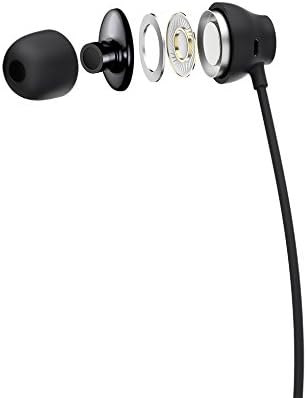
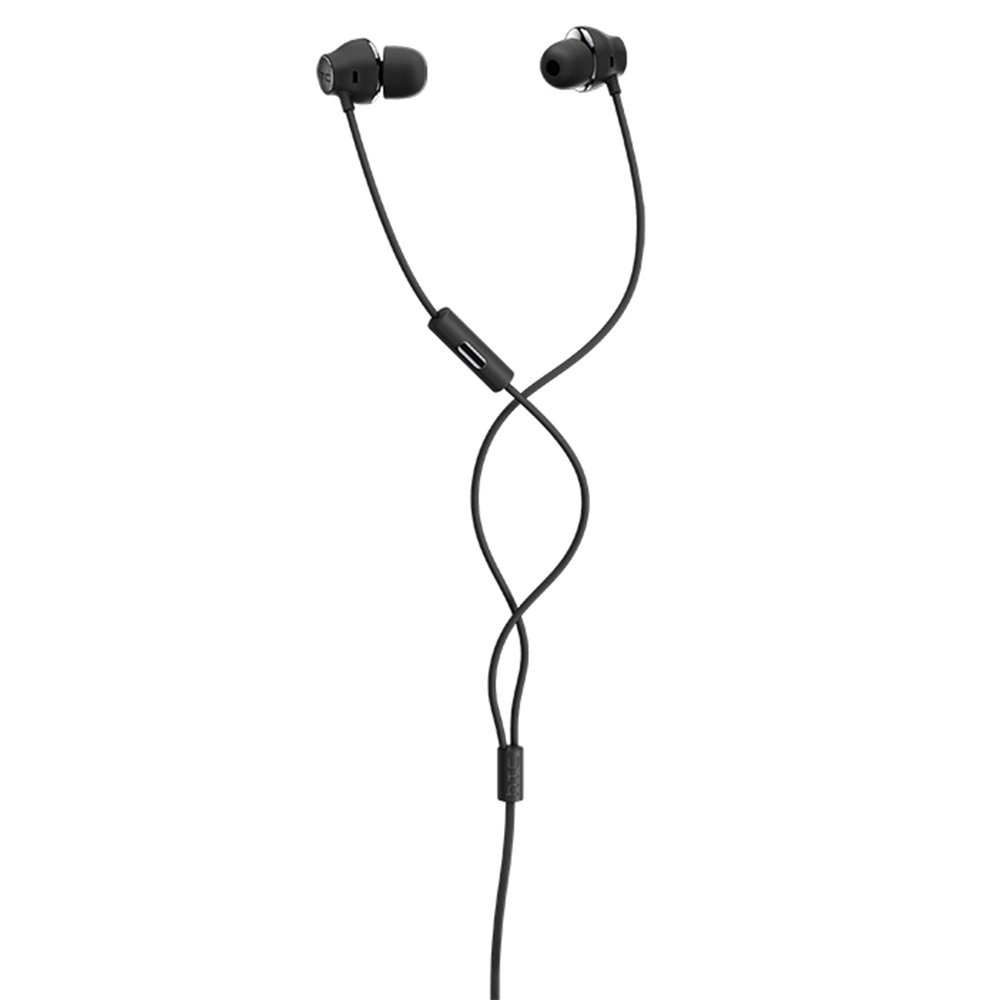
Figure 1: HTC USB Type-C Hi-Res Earphones connected to a device.
5. عملیاتي لارښوونې
Once connected, your earphones are ready for use.
- د آډیو پلې بیک: Play audio from your connected device. The sound will be routed through the earphones.
- د تلیفون مدیریت: For devices supporting call functions, you can typically answer/end calls using the device's interface.
- د اپلیکیشن کنټرول: This model supports control via an application. Refer to your device's app store for any official HTC audio control applications that may offer additional features or sound customization.
6. ساتنه او پالنه
Proper care extends the lifespan of your earphones:
- د غوږونو د پاکولو لارښوونې: Gently remove ear tips and clean them with a mild soap solution and water. Ensure they are completely dry before reattaching.
- د غوږۍ د بدن پاکول: Wipe the earphone body and cable with a soft, dry, lint-free cloth. Do not use abrasive materials or harsh chemicals.
- ذخیره کول: کله چې په کارولو کې نه وي، اییرفونونه په پاک او وچ ځای کې وساتئ، په غوره توګه په محافظتي کڅوړه کې ترڅو د ګډوډۍ او زیان مخه ونیول شي.
- د کیبل مدیریت: Avoid tightly winding the cable or subjecting it to sharp bends, which can damage internal wires.
2 شکل: چاودلی view of earphone components, highlighting the 13mm speaker and aerospace polymer diaphragm.
7. ستونزه حل کول
که تاسو له ستونزو سره مخ شئ، لاندې عامې ستونزې او حل لارې وګورئ:
| ستونزه | احتمالي لامل | د حل لاره |
|---|---|---|
| غږ نشته | Earphones not properly connected; device volume too low; incorrect audio output selected on device. | Ensure the USB Type-C connector is fully inserted. Increase device volume. Check device audio settings to confirm earphones are selected as output. |
| ضعیف غږ کیفیت | Dirty ear tips; damaged cable; low-quality audio source. | Clean ear tips. Inspect the cable for visible damage. Try a different audio source or file. |
| Earphones uncomfortable or fall out | د غوږ د څوکې ناسمه اندازه. | Try different sized ear tips (if provided) to find the best fit for your ears. |
8. مشخصات
| فیچر | تفصیل |
|---|---|
| برانډ | HTC |
| د ماډل شمیره | 99H20317-00 |
| د ارتباط ټیکنالوژي | وائرډ (USB ډول-C) |
| د سپیکر اندازه | 13 ملي متره |
| مواد | Synthetic leather (ear tips/housing accents) |
| وزن | 50 ګرامه |
| د محصول ابعاد | 0.1 x 0.1 x 0.1 cm (packaging/shipping dimensions, actual earphone size is compact) |
| د کنټرول طریقه | اپلیکیشن |
| د بلوتوټ ملاتړ | نه |
| بیټرۍ ته اړتیا ده | نه |
| مطابقت لرونکې وسیلې | Smartphone, Laptop, Tablet with USB Type-C audio output |
| رنګ | خړ خړ |
| د غوږ ځای پرځای کول | په غوږ کې |
9. تضمین او ملاتړ
For warranty information and technical support, please refer to the documentation provided with your purchase or visit the official HTC support webسایټ. د تضمین ادعاوو لپاره د پیرود ثبوت وساتئ.