
Unknown Yu- TLXgo-2201
Wireless Bluetooth Headset User Manual
Model: Yu- TLXgo-2201 | Brand: Unknown
پیژندنه
د پیرودلو لپاره مننهasing the Wireless Bluetooth Headset. This manual provides essential information for the proper use, setup, and maintenance of your new headset. Please read it thoroughly before use to ensure optimal performance and longevity of the product.
د بسته محتويات
مهرباني وکړئ تصدیق کړئ چې لاندې ټول توکي ستاسو په کڅوړه کې شامل دي:
- Wireless Bluetooth Headset (2 units)
- د USB چارج کولو کیبل (۲ واحدونه)
- د کارن لارښود

Image: Contents of the headset package, showing one black headset and a white USB charging cable.
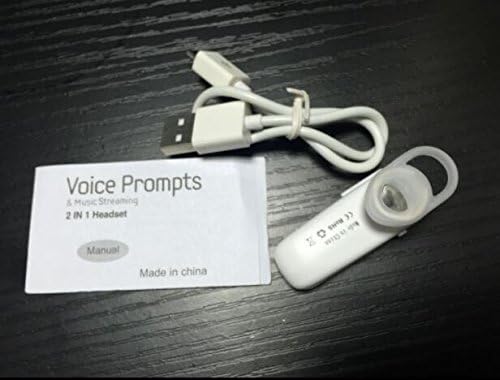
Image: Contents of the headset package, showing one white headset, a white USB charging cable, and the printed user manual.
محصول پای ته ورسیدview
The Wireless Bluetooth Headset is designed for convenience and portability, ideal for sports, driving, and daily use. It features a super mini design and supports voice prompts and music streaming.

انځور: مخکینۍ برخه view of the product packaging, displaying the black wireless Bluetooth headset inside its clear plastic casing.
مشخصات
| فیچر | تفصیل |
|---|---|
| بلوتوث نسخه | V3.0+EDR |
| ملاتړ پروfiles | Headset, Handsfree, A2DP |
| Talk Time/Playing Time | تر 5 ساعتونو پورې |
| ولاړ وخت | تر 80 ساعتونو پورې |
| د بریښنا سرچینه | د ریچارج وړ لی آیون بیټرۍ جوړه شوې |
| د ارتباط ټیکنالوژي | بېسیم |
| د فارم فکتور | په غوږ کې |
| د توکي وزن | ۱۰.۴ اونس (د ۱۰ واحدونو لپاره) |
| د کڅوړې ابعاد | 1.97 x 1.57 x 1.18 انچه |
| د ماډل شمیره | Yu- TLXgo-2201 |

Image: Back of the product packaging, displaying a list of product specifications including Bluetooth version, talk time, and power source.
چمتو کول
د هیډسیټ چارج کول
- د USB چارج کولو کیبل کوچنۍ پای د هیډسیټ چارج کولو پورټ سره وصل کړئ.
- د USB چارج کولو کیبل لویه پای د USB بریښنا سرچینې سره وصل کړئ (د مثال په توګه، د کمپیوټر USB پورټ، د USB دیوال اډاپټر).
- The indicator light on the headset will illuminate during charging. It will change color or turn off once fully charged.
- بشپړ چارج معمولا شاوخوا ۲-۳ ساعته وخت نیسي.
د بلوتوټ وسیله سره جوړه کول
- Ensure the headset is fully charged before initial pairing.
- With the headset turned off, press and hold the Multi-function Button (MFB) for approximately 5-7 seconds until the indicator light flashes red and blue alternately. This indicates the headset is in pairing mode.
- ستاسو په بلوتوث فعال شوي وسیله (سمارټ فون، ټابلیټ، او نور) کې، د بلوتوث ترتیباتو ته لاړ شئ او ډاډ ترلاسه کړئ چې بلوتوث فعال دی.
- لټون available devices. The headset should appear in the list, typically named "MBT2013" or similar.
- Select the headset from the list to connect. If prompted for a password, enter "0000" (four zeros).
- Once successfully paired, the indicator light will stop flashing and may show a steady blue light, and you may hear a voice prompt confirming the connection.
- The headset will automatically connect to the last paired device when turned on, if the device's Bluetooth is active and within range.
عملیاتي لارښوونې
پاور آن/بند
- پاور آن: Press and hold the Multi-function Button (MFB) for about 3 seconds until the blue indicator light flashes and you hear a voice prompt.
- بندول: Press and hold the MFB for about 3-4 seconds until the red indicator light flashes and you hear a voice prompt.
د اړیکې مدیریت
- زنګ ووهئ: یو ځل MFB فشار ورکړئ.
- ټلیفون پای: د زنګ وهلو پر مهال یو ځل MFB فشار ورکړئ.
- زنګ رد کړئ: Press and hold the MFB for about 2 seconds during an incoming call.
- وروستنۍ شمیره بیا ولیکئ: Double-press the MFB when not on a call.
د غږ غږ
- پلی کول / ودرول: Press the MFB once during music playback.
یادونه: د حجم کنټرول ممکن ستاسو د وصل شوي وسیلې څخه مستقیم اداره شي.
ساتنه
- پاکول: د هیډسیټ پاکولو لپاره نرم، وچ ټوکر وکاروئ. سخت کیمیاوي مواد یا د کثافاتو مواد مه کاروئ.
- ذخیره کول: هیډسیټ په یخ او وچ ځای کې د مستقیم لمر وړانګو او سختې تودوخې څخه لرې وساتئ.
- د بیټرۍ پاملرنه: To prolong battery life, charge the headset regularly, even if not in frequent use. Avoid fully discharging the battery for extended periods.
- د اوبو مقاومت: This headset is not waterproof. Avoid exposure to water or excessive moisture.
د ستونزو حل کول
- هیډسیټ نه فعالیږي:
- Ensure the headset is fully charged. Connect it to a power source and try again.
- د وسیلې سره جوړه نشي کیدی:
- Ensure the headset is in pairing mode (red and blue lights flashing alternately). Make sure Bluetooth is enabled on your device and it is within range (typically 10 meters). Try restarting both the headset and your device.
- غږ نشته یا د غږ خراب کیفیت:
- Check the volume levels on both the headset and your connected device. Ensure the headset is properly connected to your device. Move closer to your device to avoid interference.
- هیډسیټ په مکرر ډول قطع کیږي:
- Ensure the headset is within range of your device. Check for potential interference from other wireless devices. Try re-pairing the headset.
د خوندیتوب معلومات
- Do not disassemble, repair, or modify the headset. This may cause fire, electronic breakdown, or complete damage to the product.
- Keep the headset away from extreme temperatures, humidity, and corrosive substances.
- د هیډسیټ د غورځولو یا قوي اغیزو سره مخ کیدو څخه ډډه وکړئ.
- Do not expose the headset to open flames or dispose of it in fire.
- محصول او د هغې بیټرۍ د ځایی مقرراتو سره سم په مسؤلیت سره تصفیه کړئ.
تضمین او ملاتړ
د تضمین معلوماتو یا تخنیکي ملاتړ لپاره، مهرباني وکړئ د خپل پرچون پلورونکي یا د تولید کونکي چارواکي لخوا چمتو شوي د اړیکو توضیحاتو ته مراجعه وکړئ. webسایټ. مهرباني وکړئ د تضمین ادعاوو لپاره د پیرود ثبوت وساتئ.
Ask a question about this manual
Ask about setup, troubleshooting, compatibility, parts, safety, or missing instructions. Manuals+ will review the question and use this page’s manual context to help answer it.