
1. پیژندنه
د پیرودلو لپاره مننهasing the Riptunes Portable CD Player with AM/FM Radio, Model CDB204. This device is designed for portable audio playback, offering versatile options including CD playback, AM/FM radio reception, and auxiliary input for external audio sources. Please read this manual thoroughly before operating the unit to ensure proper use and to maximize your listening experience.

Image 1.1: Riptunes Portable CD Player (Model CDB204) with an external device connected.
2. د خوندیتوب معلومات
- د اور یا بریښنا شاک څخه د مخنیوي لپاره واحد باران یا رطوبت ته مه ښکاره کوئ.
- کابینه مه خلاصوئ. یوازې وړ پرسونل ته خدمت ته مراجعه وکړئ.
- د تودوخې سرچینو لکه ریډیټرونو، د تودوخې راجسترونو، بخاریو، یا نورو وسایلو ته نږدې چې تودوخه تولیدوي، د واحد له ځای پرځای کولو څخه ډډه وکړئ.
- یوازې د جوړونکي لخوا مشخص شوي ضمیمې / لوازم وکاروئ.
- دا واحد د بریښنایی طوفانونو په جریان کې یا کله چې د اوږدې مودې لپاره نه کارول کیږي خلاص کړئ.
- بیټرۍ په سمه توګه له منځه یوسئ، د ځایی مقرراتو په پام کې نیولو سره. بیټرۍ ډیرې تودوخې ته مه ښکاره کوئ.
3. د بسته محتويات
مهرباني وکړئ وګورئ چې لاندې توکي ستاسو په بسته کې شامل دي:
- Riptunes Portable CD Player (Model CDB204)
- د AC ځواک اډیپټر
- د لارښوونې لارښود
4. محصول ختم شوview
Familiarize yourself with the controls and features of your Riptunes Portable CD Player.
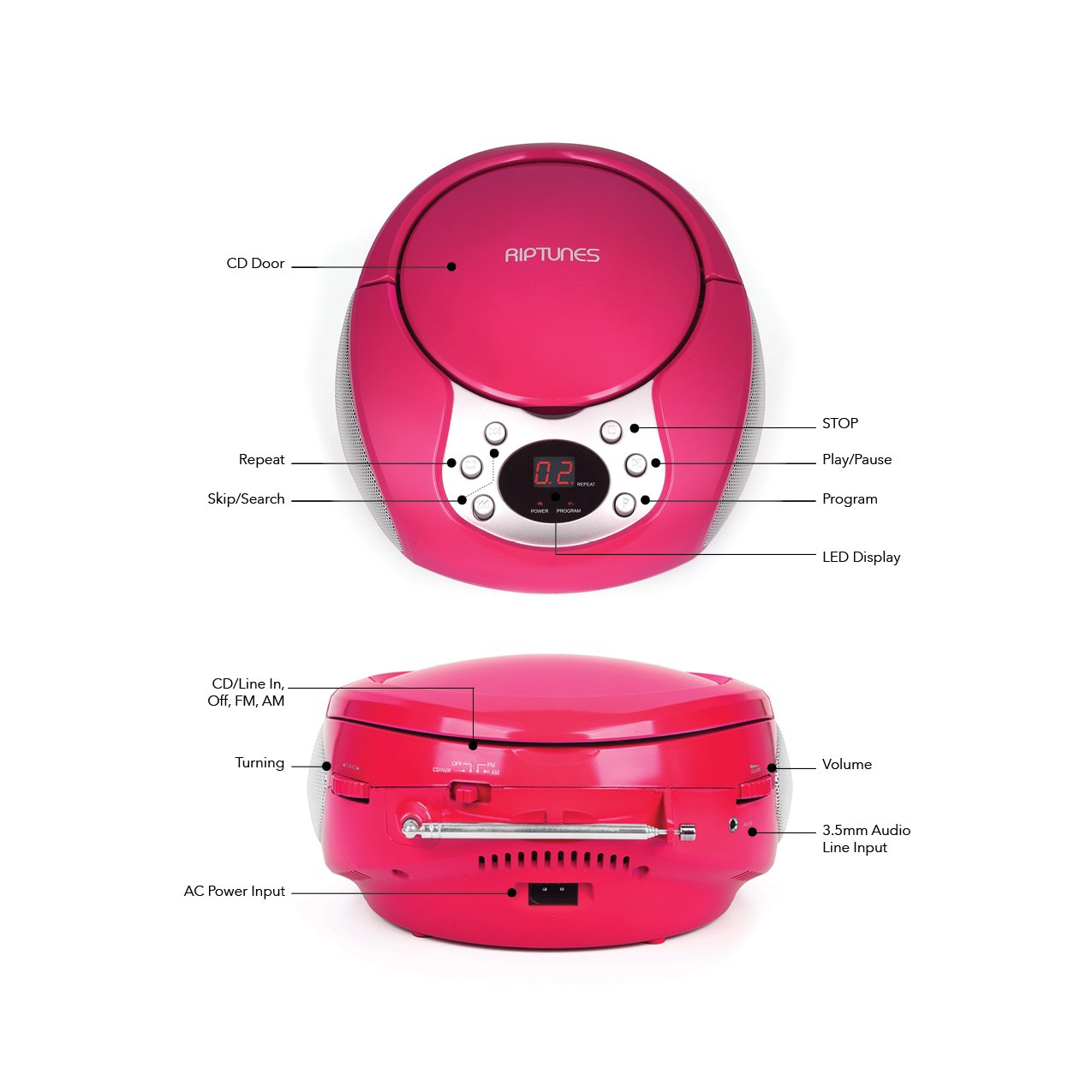
Image 4.1: Front and Side Panel Controls and Ports.
د مخکینۍ پینل کنټرولونه:
- د سي ډي دروازه: Open to insert or remove a CD.
- د LED ښودنه: Shows track number, radio frequency, or mode.
- POWER/PROGRAM Button: Press to turn the unit on/off. In CD mode, press to program tracks.
- د لوبې کولو/بندولو (►/--) تڼۍ: Press to start or pause CD playback.
- د بندولو (■) تڼۍ: Press to stop CD playback.
- پریږدئ/لټون (◀◀ / ►►) تڼۍ: Press to skip tracks on a CD. Hold to search within a track. In radio mode, press to tune.
- د تکرار تڼۍ: Press to repeat the current track or all tracks on a CD.
Side Panel Controls/Ports:
- FUNCTION Switch (CD/Line In-Off, FM, AM): Selects the operating mode (CD/Aux, FM Radio, AM Radio) and turns the unit off.
- د حجم ډایل: د آډیو تولید کچه تنظیموي.
- TUNING Dial: Adjusts the radio frequency in AM/FM mode.
- AUX په جیک کې: Connects external audio devices using a 3.5mm audio cable.
- AC POWER INPUT Jack: Connects the supplied AC power adapter.
- FM انتن: Extend for optimal FM radio reception.
5. ترتیب کول
۲.۱ د واحد ځواک ورکول
The Riptunes Portable CD Player can be powered by either the included AC adapter or by batteries.
د AC بریښنا عملیات:
- Ensure the FUNCTION switch is in the 'OFF' position.
- Insert the small end of the AC adapter into the AC POWER INPUT jack on the side of the unit.
- Plug the other end of the AC adapter into a standard AC wall outlet (120V ~ 60Hz).
د بیټرۍ عملیات:
د پورټ ایبل کارونې لپاره، دا واحد د 6 x 'C' اندازې بیټرۍ ته اړتیا لري (شامل نه دي).
- Ensure the FUNCTION switch is in the 'OFF' position.
- د بیټرۍ کڅوړه د واحد په ښکته برخه کې ومومئ.
- Open the battery compartment cover by sliding it off.
- د ۶ 'C' اندازې بیټرۍ دننه کړئ، د سم قطبیت (+/-) څارنه وکړئ لکه څنګه چې په کمپارټمنټ کې ښودل شوي.
- د بیټرۍ کمپارټ پوښ په خوندي ډول بدل کړئ.

Image 5.1: Battery Compartment on the underside of the unit.
۵.۲ د انتن تنظیم کول
For optimal FM radio reception, fully extend the telescopic FM antenna located on the side of the unit. For AM reception, the unit has a built-in antenna, so no external adjustment is needed, but you may need to reposition the unit for better signal.

Image 5.2: Unit with FM antenna extended.
6. عملیاتي لارښوونې
6.1 CD پلے بیک
- Slide the FUNCTION switch to the 'CD/Line In-Off' position.
- Press the 'OPEN' button on the CD door to open it.
- Place a CD into the compartment with the label side facing up.
- Close the CD door firmly. The LED display will show '00' or the total number of tracks.
- Press the PLAY/PAUSE (►/−−) button to start playback. The track number will appear on the display.
- Adjust the VOLUME dial to your desired listening level.
- To pause playback, press the PLAY/PAUSE (►/−−) button. Press again to resume.
- To stop playback, press the STOP (■) button.
- To skip to the next track, press the SKIP/SEARCH (►►) button.
- To go back to the beginning of the current track, press the SKIP/SEARCH (◀◀) button once. Press twice to go to the previous track.
- To search rapidly forward or backward within a track, hold down the respective SKIP/SEARCH button.
- تکراري فعالیت: Press the REPEAT button once to repeat the current track. Press again to repeat all tracks. Press a third time to cancel repeat mode.
- د پروګرام دنده: While the CD is stopped, press the PROGRAM button. The display will flash. Use the SKIP/SEARCH buttons to select your desired track, then press PROGRAM again to confirm. Repeat for up to 20 tracks. Press PLAY/PAUSE to start programmed playback.
د سهار ۶.۶ بجې/اېف اېم راډیو عملیات
- Slide the FUNCTION switch to either 'FM' or 'AM' position.
- For FM reception, extend the telescopic antenna fully.
- Rotate the TUNING dial on the side of the unit to select your desired radio station. The frequency will be displayed on the LED screen.
- Adjust the VOLUME dial to your desired listening level.
- For optimal AM reception, you may need to rotate the entire unit to find the best signal.
۴.۴ مرستندویه ان پټ (AUX IN)
- Slide the FUNCTION switch to the 'CD/Line In-Off' position.
- Connect one end of a 3.5mm audio cable (not included) to the AUX IN jack on the side of the unit.
- Connect the other end of the audio cable to the headphone jack or line-out jack of your external audio device (e.g., smartphone, MP3 player).
- Turn on your external audio device and start playback.
- Adjust the VOLUME dial on the Riptunes unit and the volume on your external device to achieve the desired sound level.
7. ساتنه
- پاکول: واحد د نرم او وچ ټوکر سره پاک کړئ. د کثافاتو پاکوونکو یا محلولونو څخه کار مه اخلئ.
- د سي ډي پاملرنه: سي ډي ګانې د هغوی له څنډو سره ونیسئ. پاکې او له خراشونو څخه پاکې وساتئ. د سي ډي ګانو د مرکز څخه بهر ته د پاکولو لپاره له نرم، لینټ نه پاک ټوکر څخه کار واخلئ.
- ذخیره کول: When not in use for extended periods, remove batteries and store the unit in a cool, dry place away from direct sunlight and extreme temperatures.
8. ستونزه حل کول
| ستونزه | احتمالي لامل | د حل لاره |
|---|---|---|
| هیڅ ځواک نشته | AC adapter not connected; Batteries depleted or incorrectly inserted; FUNCTION switch in 'OFF' position. | Ensure AC adapter is securely plugged in; Replace batteries or check polarity; Slide FUNCTION switch to 'CD/Line In-Off', 'FM', or 'AM'. |
| سي ډي نه غږېږي | CD inserted incorrectly; CD is dirty or scratched; CD door not closed; FUNCTION switch not in 'CD/Line In-Off' mode. | Insert CD with label side up; Clean or replace CD; Close CD door firmly; Set FUNCTION switch to 'CD/Line In-Off'. |
| د راډیو ضعیف استقبال | FM antenna not extended; Unit position. | Fully extend FM antenna; Reposition the unit for better signal. |
| د AUX IN څخه هیڅ غږ نشته | Audio cable not connected properly; External device volume too low; FUNCTION switch not in 'CD/Line In-Off' mode. | Check audio cable connections; Increase volume on external device; Set FUNCTION switch to 'CD/Line In-Off'. |
9. مشخصات
- ماډل: CDB204
- د بریښنا سرچینه: د AC ۱۲۰V ~ ۶۰Hz یا ۸ x 'C' اندازه بیټرۍ (DC ۱۲V)
- د سي ډي مطابقت: CD ، CD-R / RW
- د راډیو فریکونسۍ: ایف ایم، ام
- ارتباط: 3.5mm AUX IN
- ابعاد (تقریبا): 12.48 x 11.46 x 7.09 انچه (31.7 x 29.1 x 18 سانتي متره)
- وزن (نږدې): ۶ پونډه (۳ کیلو ګرامه)
10. تضمین او ملاتړ
Riptunes products are designed for reliability and performance. For warranty information, technical support, or customer service inquiries, please refer to the contact information provided with your purchase documentation or visit the official Riptunes webسایټ. مهرباني وکړئ د تضمین ادعاوو لپاره د پیرود ثبوت وساتئ.