
پیژندنه
Thank you for choosing the Lepro LED Desk Lamp. دا ایلamp is designed to provide versatile and comfortable lighting for various tasks, featuring adjustable brightness, multiple color temperatures, a flexible design, and convenient additional functions.

The Lepro LED Desk Lamp provides versatile illumination for your workspace.
- د تنظیم وړ رڼا: Choose from 3 color temperatures (3000K Warm White, 4700K Natural White, 6000K Cool White) and stepless dimming from 5% to 100% brightness.
- انعطاف وړ ډیزاین: دamp features a multi-angle adjustable arm and head, allowing for precise light positioning. The base rotates 90 degrees, and the lamp head adjusts 180 degrees.
- مربوط USB پورټ: A 5V/1A USB output port is located on the back of the base for convenient charging of your electronic devices.
- سمارټ دندې: Includes a memory function to recall your last lighting setting and a 30-second timer for automatic shut-off.
- دوامدار ساختمان: Made with a brushed aluminum alloy stand and shade, ensuring excellent heat dissipation and longevity, with ABS plastic articulations for flexibility.
د تنظیم کولو لارښوونې
- د محتوياتو خلاصول: په احتیاط سره لیرې کړئamp, power adapter, and cleaning cloth from the packaging.
- د L ځای ونیسئamp: L ځای پر ځای کړئamp on a stable, flat surface such as a desk or table.
- بریښنا وصل کړئ: Insert the power adapter's DC plug into the power input port on the back of the lamp base. Then, plug the power adapter into a standard electrical outlet.
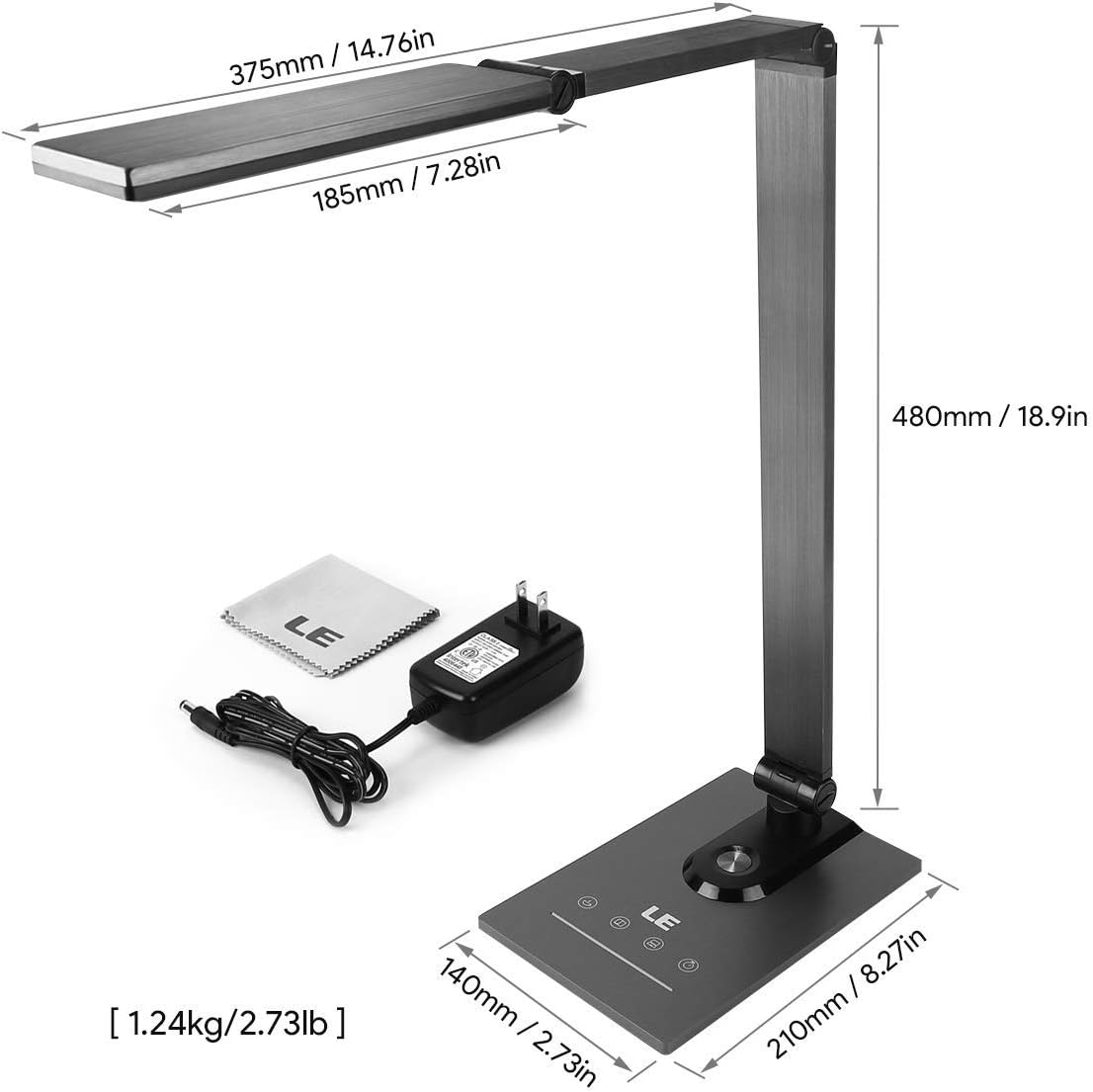
Ensure all components, including the power adapter and cleaning cloth, are present.
عملیاتي لارښوونې
1. بریښنا فعال/بند
Gently touch the power symbol (O) په lamp د l د بدلولو لپاره اساسamp آن یا بند.
2. د روښانتیا تنظیم کول
Slide your finger along the touch panel (indicated by a horizontal line with sun icons) on the lamp base to adjust the brightness level from 5% to 100%. The lamp offers stepless dimming for precise control.
3. Changing Color Temperature
Touch the mode symbol (icons resembling a coffee cup, book, and computer) on the lamp base to cycle through the three available color temperature modes:
- ۳۰۰۰K (ګرم سپین): Ideal for relaxation or a cozy atmosphere.
- 4700K (Natural White): Suitable for general reading and daily tasks.
- ۴۰۰۰K (سپینه رنګ): Best for focused work and concentration.

Easily switch between three color temperatures and adjust brightness with the touch controls.
4. د USB چارج کولو بندر
Connect your smartphone, tablet, or other USB-powered devices to the 5V/1A USB output port located on the rear of the lamp د اسانه چارج کولو لپاره اساس.

Charge your devices efficiently using the integrated 5V/1A USB port.
5. د حافظې دنده
دamp automatically remembers your last used brightness and color temperature settings. When you turn the lamp on again, it will resume with these previous settings.
6. 30-Second Timer
Touch the clock symbol (ساعت) په lamp base to activate the 30-second timer. The lamp will dim to a low light level and automatically turn off after 30 seconds, providing a convenient delay for leaving a room or falling asleep.

Utilize the timer and memory functions for enhanced convenience.
7. Adjusting Lamp موقف
دamp's design allows for extensive adjustment to direct light precisely where needed:
- د اساس گردش: دamp base can be rotated up to 90 degrees horizontally.
- د بازو تنظیم: The main arm of the lamp can be adjusted to various angles.
- د سر سمون: دamp head can be tilted and rotated up to 180 degrees vertically.

l تنظیم کړئamp's arm and head to achieve optimal lighting angles.

The flexible design allows for precise light direction, suitable for various scenarios.
ساتنه
- پاکول: Use the provided cleaning cloth or a soft, dry cloth to wipe the lamp. د کثافاتو پاکوونکي، محلولونه، یا سخت کیمیاوي توکي مه کاروئ، ځکه چې دا ممکن پای یا بریښنایی اجزاو ته زیان ورسوي.
- ذخیره کول: که چیرې د l ذخیره کولamp د اوږدې مودې لپاره، ډاډ ترلاسه کړئ چې دا پاک او وچ وي. دا په یخ او وچ ځای کې د مستقیم لمر وړانګو او سخت تودوخې څخه لرې وساتئ.
- LEDs: The LED light source is integrated and not user-replaceable. Do not attempt to disassemble the lamp سر
د ستونزو حل کول
| ستونزه | احتمالي لامل | د حل لاره |
|---|---|---|
| Lamp نه چلیږي. | نه د بریښنا رسولو او یا هم د تړلو تړل. | ډاډ ترلاسه کړئ چې د بریښنا اډاپټر په خوندي ډول په دواړو l کې نښلول شویamp او د کار کولو بریښنایی وسیله. |
| د رڼا ځلېدل یا روښانتیا متضاده ده. | Unstable power supply or dirty touch panel. | Check the power source. Clean the touch control panel with a dry cloth. |
| د USB چارج کولو پورټ کار نه کوي. | د وسیلې نه مطابقت یا غلط کیبل. | Ensure your device is compatible with 5V/1A USB charging. Try a different USB cable. |
| Lamp does not hold its adjusted position. | Joints may be loose or over-extended. | Gently readjust the lamp to a stable position. Avoid forcing joints beyond their intended range of motion. |
مشخصات
| فیچر | تفصیل |
|---|---|
| د ماډل شمیره | 3100030-EU |
| ابعاد (L x W x H) | 14P x 21l x 48H cm (5.5 x 8.3 x 18.9 inches) |
| وزن | ۶۰۰ ګرامه (۱.۳۲ پونډه) |
| LED بریښنا | 9 واټ |
| د USB محصول | 5V/1A (10 Watts) |
| ننوتۍ جلدtage | 240 ولټه |
| د رنګ تودوخې | 3000K، 4700K، 6000K |
| د روښانتیا تنظیم کول | Stepless Dimming (5%-100%) |
| د کنټرول طریقه | ټچ کنټرول |
| مواد | Brushed Metal (Base, Shade), ABS Plastic (Articulations) |
| شاملې برخې | ډیسک ایلamp, Power Adapter, Cleaning Cloth |
تضمین او ملاتړ
This product comes with a 1-year availability of spare parts, indicating a commitment to product support.
For any questions, technical assistance, or warranty claims, please contact the retailer where you purchased the product or visit the official Lepro webد پیرودونکو ملاتړ معلوماتو لپاره سایټ.
مهرباني وکړئ د تضمین موخو لپاره د پیرود ثبوت وساتئ.