
پیژندنه
Thank you for choosing the PRORECK UK-2000 UHF 2 Channel Wireless Microphone System. This system is designed to provide clear, distortion-free audio for various applications, including parties, weddings, church events, conferences, and speeches. It features a stable UHF signal transmission and offers 560 selectable frequencies for optimal performance. This manual provides detailed instructions for setting up, operating, and maintaining your wireless microphone system.
د بسته محتويات
مهرباني وکړئ تصدیق کړئ چې لاندې ټول توکي ستاسو په کڅوړه کې شامل دي:
- 1 x د ترلاسه کونکي واحد
- ۲ x لاسي مایکروفونونه
- 1 x 6.35mm TS Cable
- ۱ x د بریښنا چارجر
- ۱ x د کارونکي لارښود (دا سند)
محصول پای ته ورسیدview
Receiver Unit (Rear Panel)
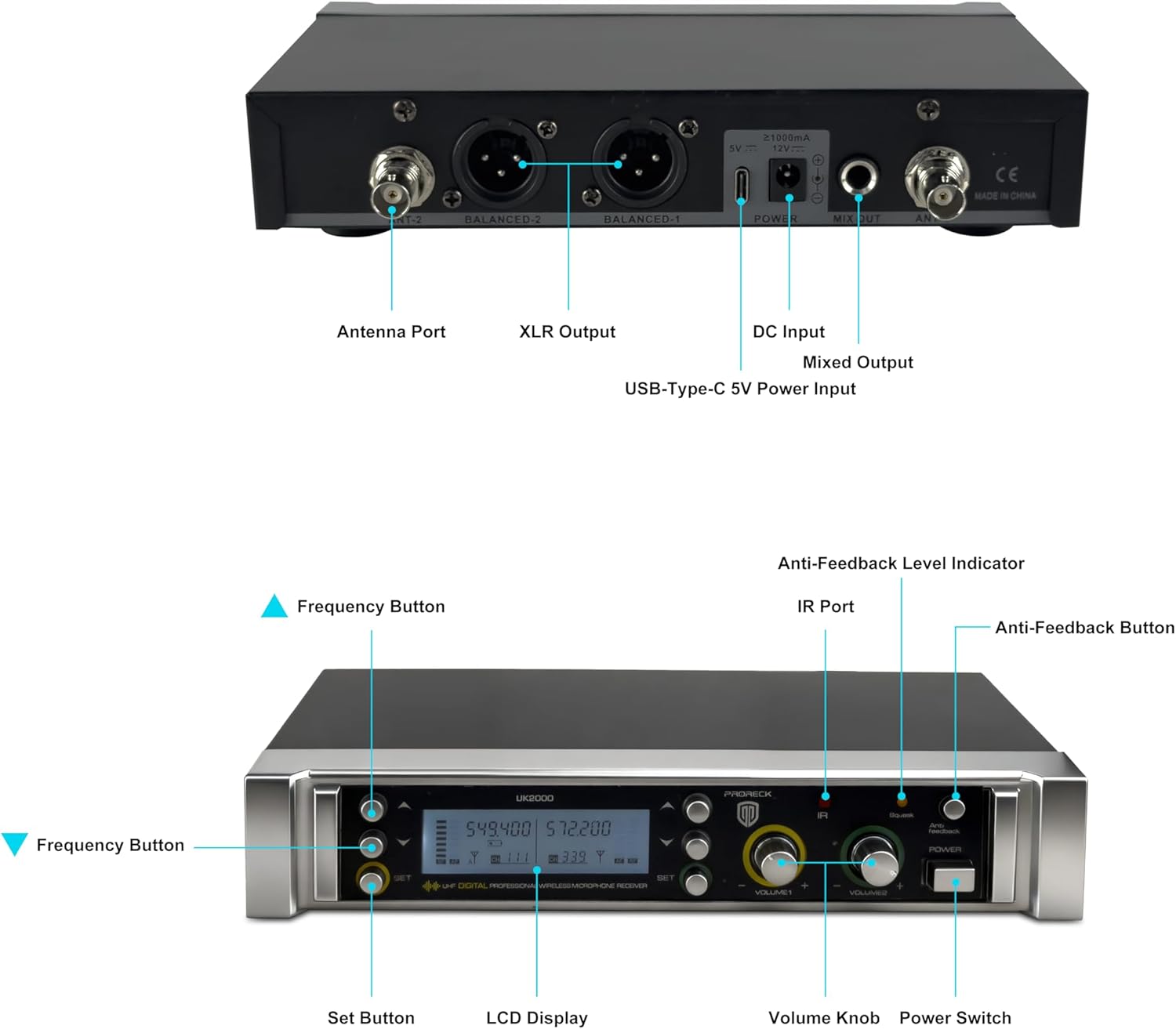
Image: Rear panel of the PRORECK UK-2000 receiver. This view highlights the Antenna Ports, Balanced XLR Outputs (1 and 2), DC Input for power, Mixed Output (6.35mm), and USB-Type-C 5V Power Input.
- د انتن بندر: Connect the included antennas for signal reception.
- XLR Output (BALANCED 1/2): Balanced audio outputs for connecting to a mixer or ampلايف
- د DC انپټ: Connect the provided power charger.
- Mixed Output (MIX OUT): Unbalanced 6.35mm (1/4") audio output for connecting to various audio devices.
- USB-Type-C 5V Power Input: Alternative power input, useful with a portable power bank.
Receiver Unit (Front Panel)

Image: Front panel of the PRORECK UK-2000 receiver. This view shows the Frequency Buttons, Set Button, LCD Display, IR Port, Volume Knobs, Power Switch, Anti-Feedback Level Indicator, and Anti-Feedback Button.
- Frequency Buttons: Used to adjust the operating frequency.
- تڼۍ تنظیم کړئ: Confirms frequency selection and other settings.
- د LCD نندارې: Shows channel, frequency, signal strength, and battery status.
- د IR پورټ: Infrared sensor for syncing frequencies with microphones.
- د حجم نوب: Adjusts the output volume for each microphone channel.
- د بریښنا سویچ: د ترلاسه کونکي واحد فعال یا بندوي.
- Anti-Feedback Level Indicator: Displays the level of anti-feedback processing.
- د غبرګون ضد تڼۍ: Activates or deactivates the anti-feedback function.
لاسي مایکروفون

انځور: چاودنه وشوه view of the handheld microphone. This shows the Mic Grill, LCD Display, Metal Construction, Battery Compartment, and Battery Cover.
- Mic Grill: د مایکروفون کیپسول ساتنه کوي.
- د LCD نندارې: Shows frequency and battery status.
- فلزي ساختمان: Durable housing for the microphone.
- د بیټرۍ کڅوړه: دوه AA بیټرۍ لري.
- د بیټرۍ پوښ: Secures the batteries in place.
- IR Sync Sensor: Located on the microphone body, used for automatic frequency synchronization with the receiver.
د تنظیم کولو لارښوونې
1. Install Batteries in Microphones
- Unscrew the battery cover at the bottom of each handheld microphone.
- Insert two AA batteries into the battery compartment, ensuring correct polarity (+/-).
- Screw the battery cover back on securely.
یادونه: Each microphone requires 2xAA batteries (not included).
۱. رسیور سره وصل کړئ
- Attach the antennas to the Antenna Ports on the rear panel of the receiver. Position them vertically for optimal signal reception.
- Connect the power charger to the DC Input on the receiver and plug it into a power outlet. Alternatively, you can use a portable power bank with the USB-Type-C 5V Power Input.
- ریسیور خپل آډیو سیسټم سره وصل کړئ (مکسر، amplifier, powered speaker) using either the Balanced XLR Outputs or the Mixed Output (6.35mm TS cable).
3. Power On and Sync
- Turn on the receiver unit using the Power Switch on the front panel. The LCD display will illuminate.
- Turn on each handheld microphone.
- To synchronize the microphone with the receiver, press the SET button on the receiver. The display will show "IR---".
- Align the IR Sync Sensor on the microphone with the IR Port on the receiver (within a few inches). The frequency will automatically sync. Repeat for the second microphone.

Image: Connectivity diagram illustrating how the PRORECK UK-2000 system can connect to a mixer, TV, amplifier, PA system, computer, powered speaker, or pad/phone.
عملیاتي لارښوونې
د فريکوينسي ټاکنه
The PRORECK UK-2000 system offers 560 selectable UHF frequencies (280 per channel) to avoid interference.
- If you experience interference, press the د فریکونسۍ تڼۍ on the receiver to cycle through available frequencies.
- Once a clear frequency is selected on the receiver, perform the IR sync process again with the corresponding microphone to match its frequency.

Image: Microphone display showing frequency selection. The system offers 560 selectable frequencies, with each channel having 280 options, ranging from 539.000 MHz to 599.000 MHz.
د حجم کنټرول
Adjust the output volume of each microphone independently using the dedicated د حجم نوبونه on the receiver's front panel. Start with a low volume and gradually increase it to prevent feedback.
د عملیاتي لړۍ
The system has an operating range of up to 328 feet (100 meters) within the line of sight. Obstacles, walls, and other wireless devices may reduce this range.
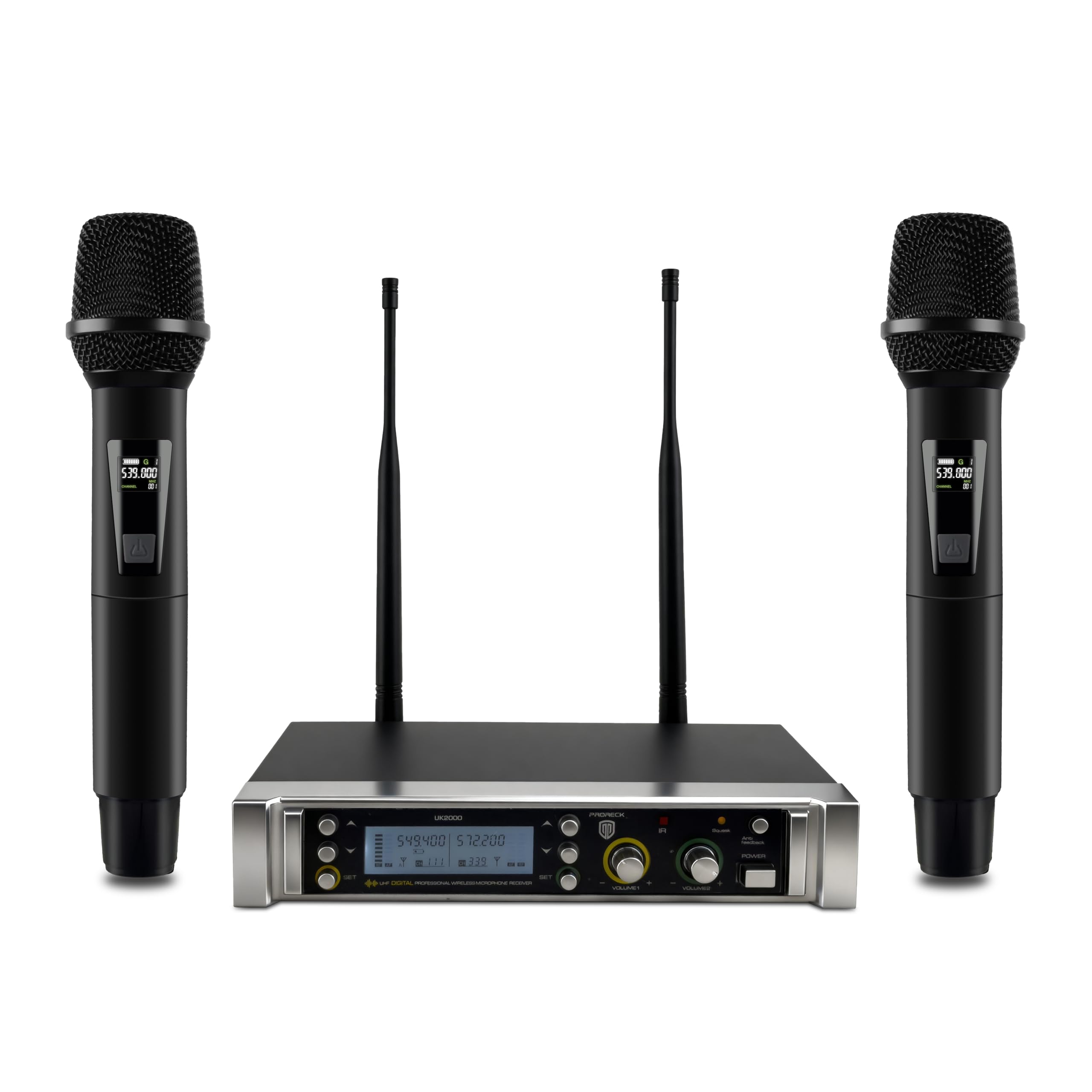
Image: Operating range diagram. A microphone wirelessly transmits to the receiver, indicating an effective operating range of up to 328 feet.
Anti-Feedback Function
The receiver includes an anti-feedback function to minimize unwanted audio feedback. Press the Anti-Feedback Button to activate or deactivate this feature. The Anti-Feedback Level Indicator will show its status.
ساتنه
- ریسیور او مایکروفونونه د نرم او وچ ټوکر سره پاک وساتئ.
- د سیسټم ډیر تودوخې، رطوبت، یا مستقیم لمر ته د افشا کولو څخه ډډه وکړئ.
- که مایکروفونونه د اوږدې مودې لپاره نه کارول کیږي نو د لیکیدو مخنیوي لپاره یې بیټرۍ لرې کړئ.
- Store the system in a dry, dust-free environment.
د ستونزو حل کول
| ستونزه | احتمالي لامل | د حل لاره |
|---|---|---|
| د غږ تولید نشته |
|
|
| مداخله یا جامد |
|
|
| ضعیف یا تحریف شوی غږ |
|
|
| غبرګون (د چیغې غږ) |
|
|
مشخصات
| د ماډل نوم | UK-2000 |
| برانډ | پروریک |
| د چینلونو شمیر | 2 |
| د فریکونسی رینج | 538.3MHz to 599MHz (560 selectable frequencies) |
| د عملیاتي لړۍ | تر 328 فوټو پورې (د لید کرښه) |
| د ارتباط ټیکنالوژي | UHF Wireless, XLR |
| د نښلونکي ډول | XLR, 6.35mm (1/4") |
| د مایکروفون د بریښنا سرچینه | 2 x AA batteries (per microphone) |
| مواد | Metal (microphones) |
| قطبي بڼه | یو طرفه |
| د توکي وزن | ۷.۲۸ پونډه (سیسټم) |
| د کڅوړې ابعاد | 11 x 8 x 4 انچه |
تضمین او ملاتړ
PRORECK products are designed for reliability and performance. For any questions, technical support, or warranty inquiries, please refer to the contact information provided with your purchase or visit the official PRORECK webسایټ. مهرباني وکړئ د تضمین خدماتو لپاره د پیرود ثبوت وساتئ.