
پیژندنه
Thank you for choosing the MeeTion K9310 Gaming Keyboard. This manual provides detailed instructions for setting up, operating, and maintaining your new keyboard. The K9310 is designed for an enhanced gaming experience with features such as multicolor backlighting, anti-ghosting, and dedicated shortcut keys.
د بسته محتويات
- MeeTion K9310 Gaming Keyboard
- د کارونکي لارښود (دا لاسوند)
چمتو کول
Follow these steps to connect your MeeTion K9310 Gaming Keyboard to your computer:
- کیبورډ د هغې له بسته بندۍ څخه خلاص کړئ.
- په خپل کمپیوټر کې موجود USB پورټ ومومئ.
- د کیبورډ USB نښلونکی په USB پورټ کې ولګوئ.
- Your operating system (Windows XP/Vista/7/8/10) will automatically detect and install the necessary drivers. No additional software installation is typically required.
- The keyboard is ready for use once the drivers are installed.

انځور: پورته view of the MeeTion K9310 Gaming Keyboard with its USB cable, ready for connection.
عملیاتي لارښوونې
کلیدي ځانګړتیاوې
- Multicolor Key Backlit: The keyboard features vibrant multicolor backlighting for enhanced visibility and aesthetic appeal, especially in low-light conditions.
- Comfortable and Soft Keys: Designed with membrane keys offering tactile feedback, providing a comfortable typing and gaming experience.
- ۱۰۴ کیلي د غوسټینګ ضد: This feature ensures that up to 19 keys can be pressed simultaneously without any input loss, crucial for complex gaming commands.
- Win Lock Function with LED Indication: Prevents accidental presses of the Windows key during gameplay, which can interrupt your game. An LED indicator shows when this function is active.
- 12 FN Shortcut Buttons: Access various multimedia and system functions quickly using the Function (FN) key in combination with the F1-F12 keys.
د شاتنۍ رڼا کنټرول
The K9310 keyboard features a multicolor backlight. Specific key combinations may be used to adjust brightness or switch lighting modes. Refer to the keyboard's markings for dedicated backlight control keys, often indicated by a sun or light bulb icon, or through FN key combinations.
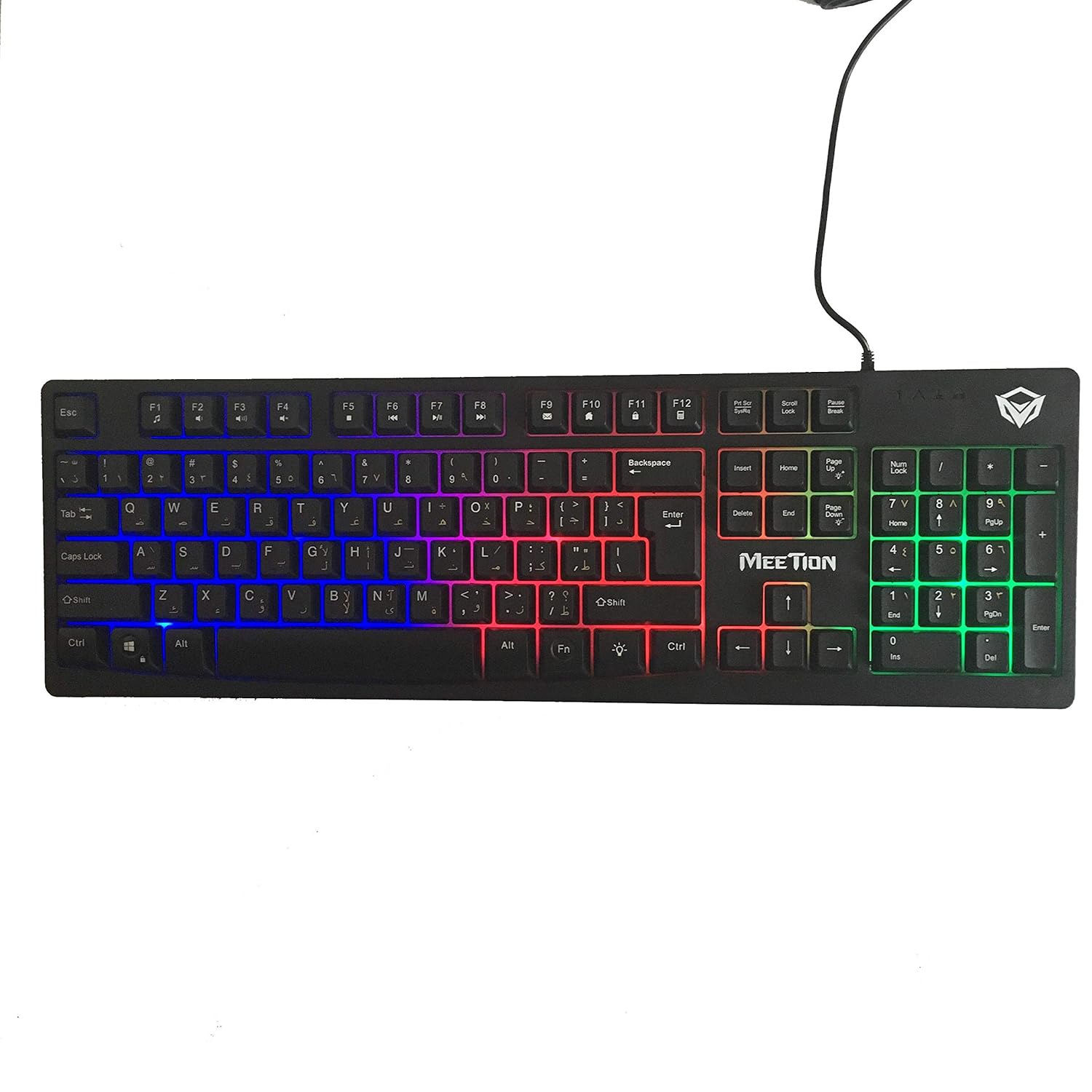
انځور: پورته view of the MeeTion K9310 Gaming Keyboard with its multicolor backlighting illuminated.
FN Shortcut Functions
The keyboard includes 12 FN (Function) shortcut buttons. To activate these functions, press and hold the FN key, then press the desired F-key (F1-F12).
| کلیدي ترکیب | فعالیت |
|---|---|
| FN + F1 | د رسنیو پلیر |
| FN + F2 | حجم ښکته |
| FN + F3 | حجم پورته |
| FN + F4 | خاموش |
| FN + F5 | ودریږئ |
| FN + F6 | مخکینی ټریک |
| FN + F7 | پلی/ودرول |
| FN + F8 | بله لار |
| FN + F9 | ایمیل |
| FN + F10 | Web براوزر |
| FN + F11 | زما کمپیوټر |
| FN + F12 | محاسبه کوونکی |
Win Lock Function
To activate or deactivate the Windows key lock function, press FN + وین کیلي. When active, the Windows key will be disabled, preventing accidental presses during gaming. An LED indicator on the keyboard will typically illuminate to show the Win Lock status.
ساتنه
مناسب ساتنه ستاسو د کیبورډ اوږد عمر او غوره فعالیت تضمینوي.
- پاکول: Use a soft, dry cloth to wipe the surface of the keyboard. For deeper cleaning, a slightly damp د نرم صابون سره ټوکر کارول کیدی شي، ډاډ ترلاسه شي چې مایع د کیلي سویچونو یا داخلي برخو ته ننوځي.
- د دوړو لرې کول: د کیلي ګانو ترمنځ د دوړو او کثافاتو د لرې کولو لپاره د فشار شوي هوا څخه کار واخلئ.
- د مایعاتو څخه ډډه وکړئ: Do not spill liquids on the keyboard. If a spill occurs, immediately disconnect the keyboard from the computer and allow it to dry completely before reconnecting.
- ذخیره کول: کیبورډ په یخ او وچ ځای کې وساتئ، د مستقیم لمر وړانګو او سختو تودوخې څخه لرې وساتئ کله چې د اوږدې مودې لپاره نه کارول کیږي.

انځور: ښکته view of the MeeTion K9310 Gaming Keyboard, showing the product label and rubber feet.
د ستونزو حل کول
If you encounter issues with your MeeTion K9310 Gaming Keyboard, refer to the following troubleshooting steps:
- کیبورډ ځواب نه ورکوي:
- ډاډ ترلاسه کړئ چې USB کیبل ستاسو په کمپیوټر کې په یوه فعال USB پورټ کې په خوندي ډول ولګول شوی دی.
- هڅه وکړئ چې کیبورډ په بل USB پورټ کې ولګوئ.
- خپل کمپیوټر بیا پیل کړئ.
- په بل کمپیوټر کې کیبورډ ازموینه وکړئ ترڅو معلومه کړئ چې ستونزه په کیبورډ کې ده یا په کمپیوټر کې.
- Keys Not Working (e.g., 'W' key):
- Check for any debris or foreign objects lodged under the affected key. Use compressed air to clear it.
- If only specific keys are not responding, and the keyboard is otherwise functional, it might indicate a hardware issue.
- د شا څراغ کار نه کوي یا ځلیږي:
- ډاډ ترلاسه کړئ چې کیبورډ په سمه توګه وصل دی.
- Check if the backlight brightness is set to minimum or turned off via FN key combinations.
- If the issue persists, it may indicate a hardware malfunction.
- Win Lock Function Not Working:
- Ensure you are using the correct key combination (FN + Win Key) to toggle the function.
- Check the LED indicator for Win Lock status.
مشخصات
| فیچر | تفصیل |
|---|---|
| برانډ | غونډه |
| ماډل | K9310 |
| د کیبورډ ډول | د لوبو کیبورډ |
| کلیدي اړیکه | Membrane with tactile feedback |
| ترتیب | Cyrillic alphabet layout (Windows Keys) |
| د غشی ضد | 19 کیلي |
| شاته څراغ | څو رنګه کیلي بیک لایټ |
| Win Lock Function | هو، د LED نښې سره |
| FN Shortcut Buttons | 12 |
| Error-Free Running Time | More than 10 million strokes |
| د OS مطابقت | Windows XP/Vista/7/8/10 |
| ابعاد | 17.5 × 5.5 x 1.5 inches (approximate) |
| وزن | ۶.۵ پونډه (تقریبا) |
| مطابقت لرونکې وسیلې | لیپ ټاپ (او ډیسټاپ کمپیوټرونه) |
تضمین او ملاتړ
For warranty information or technical support, please refer to the documentation provided at the time of purchase or visit the official MEETION webسایټ. د هر ډول تضمین ادعا لپاره د پیرود ثبوت وساتئ.