
1. پیژندنه
This manual provides essential information for the safe and efficient operation of your Digi International WR21-L52A-DE1-TB Cellular Wireless Router. Please read this manual thoroughly before installation and use, and retain it for future reference. This device is designed to provide reliable cellular connectivity for various applications.
2. د خوندیتوب معلومات
- د بریښنا رسول: Use only the power adapter supplied with the device. Using an incorrect adapter may damage the device and void the warranty.
- وینټیلیشن: Ensure adequate ventilation around the router. Do not block ventilation openings.
- چاپیریال: Avoid exposing the device to extreme temperatures, humidity, direct sunlight, or corrosive environments.
- خدمت کول: د وسیلې د خلاصولو یا ترمیم کولو هڅه مه کوئ. ټولې خدمتونه وړ پرسونل ته راجع کړئ.
- انتن: Ensure antennas are securely connected before powering on the device.
3. د بسته محتويات
ډاډ ترلاسه کړئ چې ټول توکي په کڅوړه کې شتون لري:
- Digi International WR21-L52A-DE1-TB Cellular Wireless Router
- د بریښنا اډاپټر
- Antennas (quantity may vary)
- ایترنیټ کیبل
- د چټک پیل لارښود (که شامل وي)
که کوم توکي ورک یا زیانمن شوي وي، سمدلاسه خپل پلورونکي سره اړیکه ونیسئ.
4. محصول ختم شوview
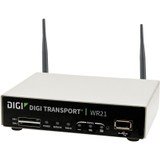
انځور: مخکینۍ برخه view of the Digi International WR21-L52A-DE1-TB Cellular Wireless Router. This image displays the compact form factor of the device, likely showing ports for antennas, power, and network connections.
The Digi International WR21-L52A-DE1-TB is a robust cellular wireless router designed for reliable and secure connectivity. It features multiple connectivity options and is suitable for various industrial and enterprise applications requiring remote access and data transfer over cellular networks.
5. ترتیب کول
5.1. د سیم کارت نصب کول
- ډاډ ترلاسه کړئ چې روټر بند شوی او د بریښنا سرچینې څخه منحل شوی.
- Locate the SIM card slot(s) on the device. Refer to the device's physical markings for exact location.
- Insert the activated cellular SIM card into the slot with the gold contacts facing down and the notched corner oriented correctly. Push until it clicks into place.
- If applicable, secure the SIM card tray or cover.
5.2. د انتن پیوستون
- Identify the cellular antenna ports (typically labeled 'MAIN' and 'DIV' or similar).
- Screw the provided cellular antennas onto the corresponding ports until finger-tight. Do not overtighten.
- د غوره سیګنال استقبال لپاره انتنونه ځای په ځای کړئ.
5.3. د بریښنا پیوستون
- د بریښنا اډاپټر د روټر د بریښنا ان پټ پورټ سره وصل کړئ.
- د بریښنا اډاپټر په مناسب بریښنایی پلورنځي کې ولګوئ.
- The router will power on automatically or may require pressing a power button. Observe the LED indicators for power status.
۳. د شبکې اتصال (اختیاري)
- To connect a device via Ethernet, plug one end of an Ethernet cable into an available LAN port on the router.
- Plug the other end of the Ethernet cable into the network port of your computer or other network device.
6. عملیاتي لارښوونې
6.1. بریښنا کول/بندول
- پاور آن: Connect the power adapter. The device will typically power on automatically. Observe the power LED.
- بندول: Disconnect the power adapter from the electrical outlet. For controlled shutdown, refer to the device's web interface or specific documentation for a software shutdown procedure if available.
6.2. ته لاسرسی Web انٹرفیس
- Ensure your computer is connected to the router via Ethernet or Wi-Fi (if enabled).
- خلاص a web براوزر (د مثال په توګه، کروم، فایرفاکس، ایج).
- د روټر ډیفالټ IP پته دننه کړئ (د مثال په توګه، 192.168.1.1 or 192.168.0.1) into the address bar and press Enter. Refer to the Quick Start Guide or device label for the exact default IP address.
- Enter the default username and password when prompted. These are typically found on a label on the device or in the Quick Start Guide.
- Upon successful login, you will access the router's configuration interface.
6.3. بنسټیز ترتیب
په دننه کې web د انٹرفیس په کارولو سره، تاسو کولی شئ مختلف ترتیبات تنظیم کړئ:
- Cellular Settings: Verify APN settings, signal strength, and connection status.
- د شبکې ترتیبات: Configure LAN IP address, DHCP server, and port forwarding.
- امنیت: Change default login credentials, configure firewall rules, and VPN settings.
- د فرم ویئر تازه کول: Check for and apply firmware updates to ensure optimal performance and security.
7. ساتنه
- پاکول: د روټر بهرنۍ برخه د پاکولو لپاره نرم، وچ ټوکر وکاروئ. د مایع پاکوونکو یا ایروسولونو څخه کار مه اخلئ.
- د فرم ویئر تازه معلومات: په منظم ډول د تولید کونکي وګورئ webد فرم ویئر تازه معلوماتو لپاره سایټ. د فرم ویئر تازه ساتل وروستي ځانګړتیاوې، امنیتي پیچونه، او د فعالیت ښه والی ډاډمن کوي.
- د چاپیریال شرایط: Ensure the router is operating within its specified temperature and humidity ranges to prevent overheating or damage.
8. ستونزه حل کول
8.1. No Cellular Connection
- Verify the SIM card is correctly inserted and activated with your cellular provider.
- Check antenna connections and ensure they are positioned for optimal signal.
- ته ننوتل web interface to check cellular signal strength and connection status.
- روټر بیا پیل کړئ.
۵.۳. لاسرسی نه شي کېدای Web انٹرفیس
- Ensure your computer is directly connected to the router via Ethernet.
- Verify your computer's IP address is in the same subnet as the router (e.g., if router is 192.168.1.1, computer should be 192.168.1.x).
- د خپل براوزر کیش پاکولو یا بل براوزر کارولو هڅه وکړئ.
- If you forgot the password, a factory reset might be necessary (refer to specific device documentation for this procedure, as it will erase all configurations).
۶.۳. د اړیکې ورو سرعت
- Check cellular signal strength in the web interface. Weak signal can lead to slow speeds.
- Ensure antennas are properly positioned and unobstructed.
- Verify your cellular data plan has not reached its data cap or is being throttled.
- Restart the router and connected devices.
9. مشخصات
| فیچر | تفصیل |
|---|---|
| ماډل | WR21-L52A-DE1-TB |
| برانډ | Digi نړیوال |
| د ارتباط پروتوکول | سیلولر |
| د ارتباط ټیکنالوژي | USB |
| د کنټرول طریقه | لرې |
| ځانګړی ځانګړنه | WPS |
| مطابقت لرونکې وسیلې | شخصي کمپیوټر |
| وړاندیز شوي استعمالونه | کور |
| UPC | 747356312219 |
10. تضمین او ملاتړ
د تضمین په اړه د تفصيلي معلوماتو لپاره، مهرباني وکړئ د تضمین کارت ته مراجعه وکړئ چې ستاسو د محصول سره شامل دی یا رسمي ډیجي انټرنیشنل ته مراجعه وکړئ. website. Technical support is available through the manufacturer's support channels. Please have your product model number (WR21-L52A-DE1-TB) and serial number ready when contacting support.