
Bytech BCAUBS134BK
Bytech Massive Bluetooth Long Bar Speaker-BK User Manual
Model: BCAUBS134BK
1. پیژندنه
د پیرودلو لپاره مننهasing the Bytech Massive Bluetooth Long Bar Speaker-BK. This manual provides essential information for the proper setup, operation, and maintenance of your new speaker. Please read this manual thoroughly before using the product to ensure optimal performance and longevity.
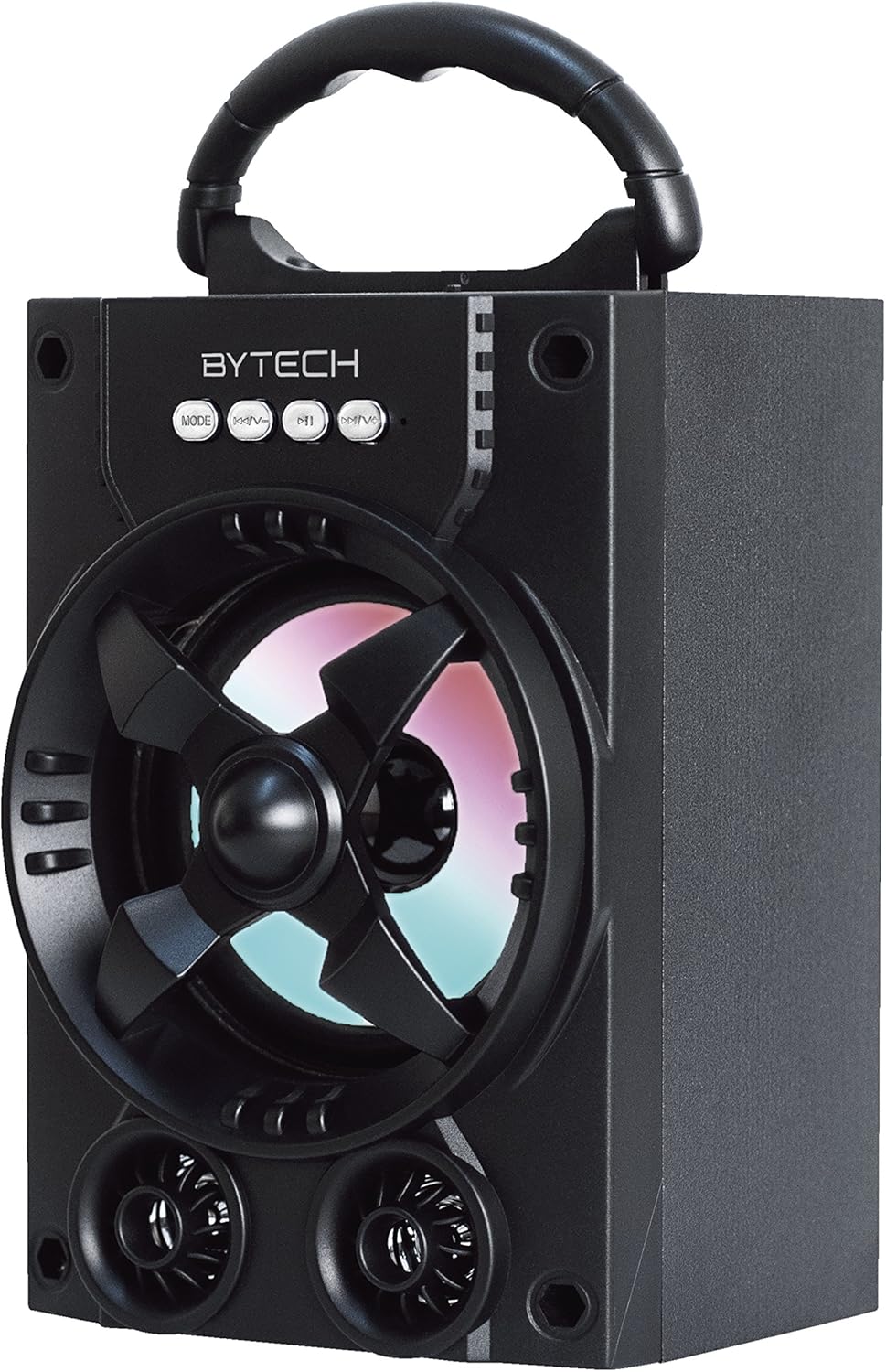
شکل 1.1: مخکی view of the Bytech Massive Bluetooth Long Bar Speaker-BK, showcasing its design, handle, and speaker grille with LED lights.
2. د بسته محتويات
مهرباني وکړئ د لاندې توکو لپاره په بسته کې وګورئ:
- Bytech Massive Bluetooth Long Bar Speaker-BK
- د USB چارج کیبل
- د کارونکي لارښود (دا لاسوند)
که کوم توکي ورک یا زیانمن شوي وي، مهرباني وکړئ د پیرودونکي ملاتړ سره اړیکه ونیسئ.
3. د محصول ب Featuresې
- LED Performance Lights: Dynamic LED lights that synchronize with your music for an enhanced audio-visual experience.
- Convenient Carrying Handle: Integrated handle for easy portability, allowing you to take your music anywhere.
- Universal Bluetooth Connectivity: Seamlessly connect wirelessly to your smartphone, tablet, or other Bluetooth-enabled devices.
- شاوخوا غږ: Designed to deliver a high-quality surround sound experience.
- وړ وړ ډیزاین: Ideal for various settings, including parties, outdoor gatherings, and personal use.

Figure 1.2: The speaker shown with its retail packaging, illustrating its key features such as multi-color LED lights, Bluetooth connectivity, and surround sound capability.
4. کنټرولونه او شاخصونه
The speaker features intuitive controls and indicators for easy operation:
- د موډ تڼۍ: Press to switch between available input modes (e.g., Bluetooth).
- V- تڼۍ: Press to decrease volume. Long press to skip to the previous track.
- V+ تڼۍ: د حجم زیاتولو لپاره فشار ورکړئ. د راتلونکي ټریک ته د تګ لپاره اوږد فشار ورکړئ.
- M تڼۍ: (Function not explicitly detailed, typically for mode or mute)
- LED څراغونه: Indicate power status, charging status, and provide dynamic light effects during audio playback.
5. د تنظیم کولو لارښود
۳.۱ د سپیکر چارج کول
- د USB چارج کولو کیبل کوچنۍ پای د سپیکر د چارج کولو پورټ سره وصل کړئ.
- د USB چارج کولو کیبل لویه پای د USB بریښنا اډاپټر (شامل نه دی) یا د کمپیوټر USB پورټ سره وصل کړئ.
- د LED شاخص به د چارج کولو حالت وښيي (د مثال په توګه، د چارج کولو لپاره سور، کله چې په بشپړ ډول چارج شي بند وي).
- د لومړي استعمال څخه دمخه د بشپړ چارج لپاره شاوخوا 3-4 ساعته وخت ورکړئ.
5.2 بریښنا کول / بندول
- To power on, press and hold the Power button (location not specified, typically near charging port or on control panel) for a few seconds until you hear an audible prompt or see the LED lights activate.
- د بریښنا بندولو لپاره، د بریښنا تڼۍ بیا فشار ورکړئ او ونیسئ تر هغه چې سپیکر بند نشي.
5.3 د بلوتوټ جوړه کول
- Ensure the speaker is powered on and in Bluetooth pairing mode (indicated by a flashing LED light or audible prompt).
- په خپل سمارټ فون یا ټابلیټ کې، د بلوتوټ ترتیباتو ته لاړ شئ.
- لټون available devices. The speaker will appear as "BYTECH" or a similar name.
- د جوړې پیل کولو لپاره له لیست څخه سپیکر غوره کړئ.
- Once successfully paired, the LED indicator will typically become solid, and you may hear a confirmation tone.
6. عملیاتي لارښوونې
6.1 د بلوتوت له لارې آډیو غږول
- After successful Bluetooth pairing, open your preferred music application on your connected device.
- Select and play your desired audio. The sound will be streamed wirelessly to the speaker.
- Use the V+ and V- buttons on the speaker or your connected device to adjust the volume.
- Long press V+ or V- to skip tracks.
6.2 LED Performance Lights
The speaker features integrated LED lights that enhance your listening experience. These lights typically activate automatically when the speaker is powered on and playing audio. Specific controls for light modes are not detailed, but they are designed to provide dynamic visual effects.
6.3 د حالت بدلول
فشار ورکړئ موډ button to cycle through available input modes. While Bluetooth is the primary connectivity, other modes (if available, such as FM radio or AUX input) can be accessed via this button.
7. ساتنه او پالنه
- پاکول: د سپیکر بهرنۍ برخه پاکولو لپاره نرم، وچ ټوکر وکاروئ. د کثافاتو پاکوونکو، مومونو یا محلولونو څخه کار مه اخلئ.
- ذخیره کول: کله چې د اوږدې مودې لپاره نه کارول کیږي، سپیکر په یخ او وچ ځای کې د مستقیم لمر وړانګو او سختې تودوخې څخه لرې وساتئ.
- د بیټرۍ پاملرنه: To prolong battery life, avoid fully discharging the battery frequently. Recharge the speaker regularly, even if not in use, to maintain battery health.
- د اوبو مقاومت: دا محصول دی نه waterproof. Avoid exposure to water, rain, or excessive moisture to prevent damage.
8. ستونزه حل کول
که تاسو د خپل سپیکر سره ستونزې سره مخ شئ، لاندې عامې ستونزې او حل لارې وګورئ:
| ستونزه | احتمالي لامل | د حل لاره |
|---|---|---|
| سپیکر نه چالانېږي. | ټیټ بیټرۍ. | سپیکر په بشپړه توګه چارج کړئ. |
| له سپیکر څخه غږ نه راځي. | Volume too low; Not paired; Incorrect mode. | Increase volume on speaker and device; Ensure successful Bluetooth pairing; Press MODE button to select correct input. |
| د بلوتوث اتصال بې ثباته یا ناکام دی. | وسیله ډېره لرې ده؛ مداخله؛ د جوړې کولو ستونزه. | Move device closer to speaker (within 33 ft/10m); Avoid obstacles; Forget device on your phone and re-pair. |
| د LED څراغونه کار نه کوي. | Speaker not powered on or playing audio. | Ensure speaker is on and audio is playing. |
9. مشخصات
| فیچر | تفصیل |
|---|---|
| برانډ | Bytech |
| د ماډل نوم | BYTECH |
| د توکي ماډل شمیره | BCAUBS134BK |
| د سپیکر ډول | شاوخوا غږ |
| د ارتباط ټیکنالوژي | بلوتوث |
| د بې سیمه مخابراتو ټیکنالوژي | بلوتوث |
| مطابقت لرونکې وسیلې | سمارټ فون |
| د سپیکر اعظمي تولید ځواک | 20 واټ |
| د تعدد ځواب | 20 KHz |
| خنډ | 1 اوم |
| د سپیکر اندازه | ۷۸۷ انچه |
| د بریښنا سرچینه | د بریښنا تار (د چارج کولو لپاره) |
| د بیټرۍ ډول | 1 لیتیم آیون بیټرۍ ته اړتیا ده |
| رنګ | تور |
| د محصول ابعاد | 4.75 x 5.5 x 8.5 انچه |
| د توکي وزن | ۲.۴۵ پونډه |
| پنروک دی | نه |
| د اصلي هیواد | چین |
| UPC | 805112038121 |
10. د تضمین معلومات
Bytech products are manufactured to the highest quality standards. For specific warranty terms and conditions, please refer to the warranty card included with your purchase or visit the official Bytech webسایټ. د تضمین ادعاوو لپاره د پیرود ثبوت وساتئ.
11. د پیرودونکي ملاتړ
For technical assistance, troubleshooting, or general inquiries, please contact Bytech customer support. Contact information can typically be found on the product packaging, the official Bytech webسایټ، یا ستاسو د پیرود رسید.
یادونه: د چمتو شوي معلوماتو پراساس د پلورونکي لخوا د محصول رسمي ویډیوګانې د ځای پرځای کولو لپاره شتون نلري.
Ask a question about this manual
Ask about setup, troubleshooting, compatibility, parts, safety, or missing instructions. Manuals+ will review the question and use this page’s manual context to help answer it.